Chapter 11. Client Identification and Cookies
(해석 또는 이해가 잘못된 부분이 있다면 댓글로 편하게 알려주세요.)
✏️ 원문 번역
Cookies and Session Tracking
Cookies can be used to track users as they make multiple transactions to a web site. E-commerce web sites use session cookies to keep track of users’ shopping carts as they browse. Let’s take the example of the popular shopping site Amazon.com.
-
쿠키는 웹 사이트에 다중의 트랜잭션을 생성하는 사용자를 추적하는 데 사용될 수 있습니다.
-
사용자가 탐색을 진행하는 동안 이커머스 웹 사이트는 세션 쿠키를 사용하여 장바구니를 추적합니다.
-
유명한 쇼핑 사이트인 Amazon.com의 예시를 함께 살펴봅시다.
When you type http://www.amazon.com into your browser, you start a chain of transactions where the web server attaches identification information through a series of redirects, URL rewrites, and cookie setting.
- 여러분이 브라우저에 http://www.amazon.com을 입력하면 웹 서버는 일련의 리디렉션과 URL 재작성, 쿠키 설정 절차를 거쳐 식별 정보를 덧붙이는 트랜잭션 체인을 시작합니다.
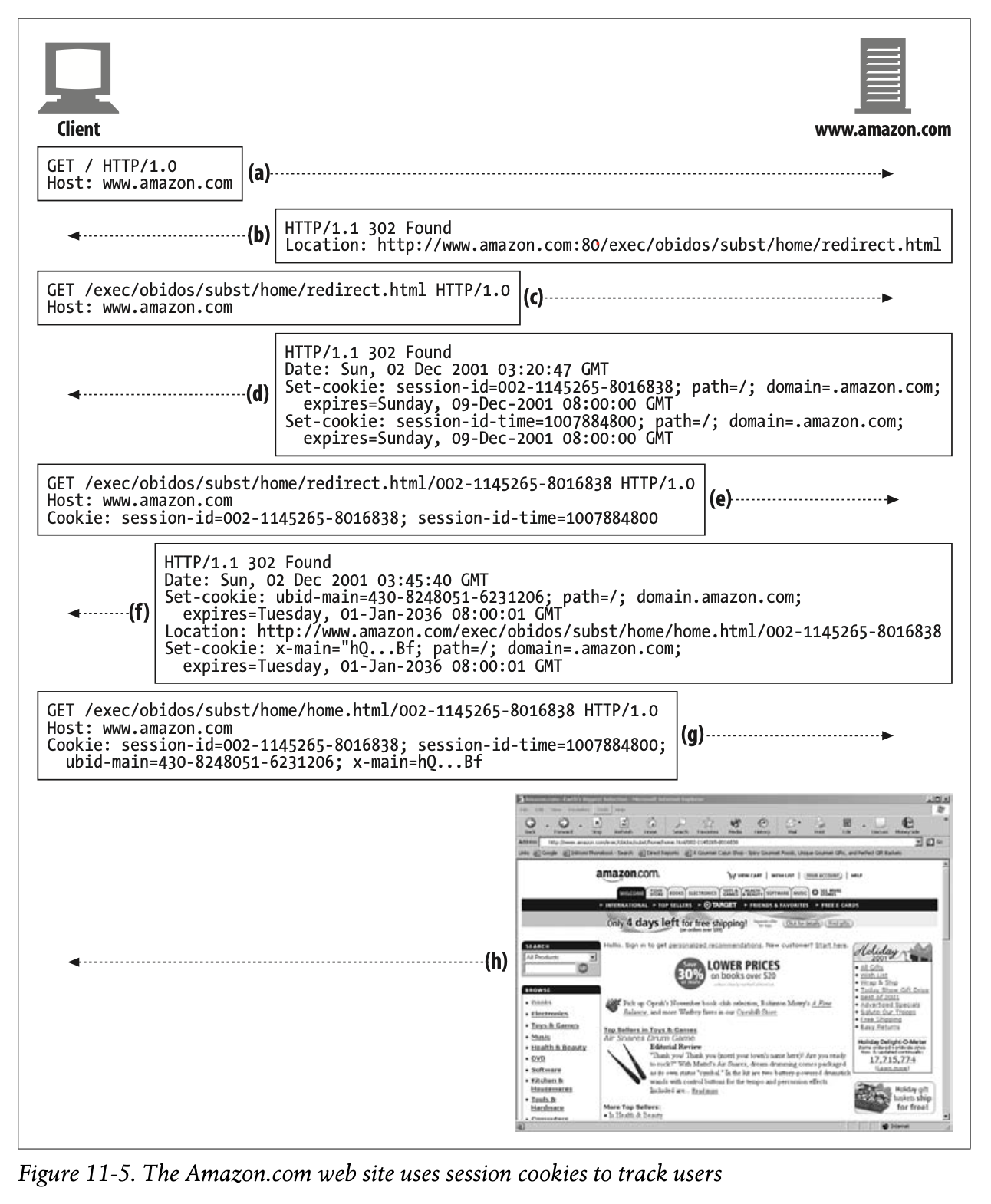
Figure11-5 shows a transaction sequence captured from an Amazon.com visit:
• Figure11-5a—Browser requests Amazon.com root page for the first time.
• Figure11-5b—Server redirects the client to a URL for the e-commerce software.
• Figure11-5c—Client makes a request to the redirected URL.
• Figure11-5d—Servers laps two session cookies on the response and redirects the user to another URL, so the client will request again with these cookies attached. This new URL is a fat URL, meaning that some state is embedded into the URL. If the client has cookies disabled, some basic identification can still be done as long as the user follows the Amazon.com-generated fat URL links and doesn’t leave the site.
• Figure11-5e—Client requests the new URL, but now passes the two attached cookies.
• Figure11-5f—Server redirects to the home.html page and attaches two more cookies.
• Figure11-5g—Client fetches the home.html page and passes all four cookies.
• Figure11-5h—Server serves back the content.
-
Figure 11-5는 Amazon.com 방문 시 발생하는 트랜잭션을 나타낸 자료입니다.
-
Figure 11-5a에서 브라우저는 Amazon.com 루트 페이지에 최초로 요청을 전송합니다.
-
Figure 11-5b에서 서버는 클라이언트를 이커머스 소프트웨어의 URL로 리디렉션합니다.
-
Figure 11-5c에서 클라이언트가 리디렉션 URL로 요청을 전송합니다.
-
Figure 11-5d에서 서버는 응답에 두 개의 세션 쿠키를 추가하여 다른 URL로 사용자를 리디렉션합니다. 클라이언트는 추가된 쿠키와 함께 요청을 다시 한 번 전송합니다. 새로운 URL은 일부 상태 정보가 URL에 임베딩 된 Fat URL입니다. 클라이언트가 쿠키를 비활성화 하더라도 사용자가 Amazon.com이 생성한 Fat URL 링크를 따르고 사이트를 떠나지 않는 한 여전히 몇 가지 기본적인 식별 작업을 수행할 수 있습니다.
-
Figure 11-5e에서 클라이언트는 두 개의 쿠키를 덧붙여 새로운 URL로 요청을 전송합니다.
-
Figure 11-5f에서 서버는 home.html 페이지로 리디렉션하며 두 개의 쿠키를 추가로 덧붙입니다.
-
Figure 11-5g에서 클라이언트는 home.html 페이지를 불러와 총 4개의 쿠키를 전달합니다.
-
Figure 11-5h에서 서버는 콘텐츠를 반환합니다.
Cookies and Caching
You have to be careful when caching documents that are involved with cookie transactions. You don’t want to assign one user some past user’s cookie or, worse, show one user the contents of someone else’s personalized document.
-
쿠키 트랜잭션을 포함하는 문서를 캐싱할 때는 주의를 기울여야 합니다.
-
사용자에게 과거 사용자의 쿠키를 부여하거나 다른 사용자의 개인화된 문서 콘텐츠를 보여주는 것을 바라지는 않을 것입니다.
The rules for cookies and caching are not well established. Here are some guiding principles for dealing with caches:
-
쿠키와 캐싱에 대한 규칙은 명확히 정립되지 않았습니다.
-
다음은 캐시 처리에 대한 몇 가지 기본 원리입니다.
Mark documents uncacheable if they are
The document owner knows best if a document is uncacheable. Explicitly mark documents uncacheable if they are—specifically, use Cache-Control: no-cache=“Set-Cookie” if the document is cacheable except for the Set-Cookie header. The other, more general practice of using Cache-Control: public for documents that are cacheable promotes bandwidth savings in the Web.
캐싱 불가능한 문서는 반드시 표기하라
-
문서가 캐싱 가능한지 가장 잘 알고 있는 사람은 문서의 소유자입니다.
-
캐싱할 수 없는 문서는 명시적으로 표기하는 것이 좋습니다.
-
특히 Set-Cookie 헤더를 제외한 문서는 캐싱 가능한 경우
Cache-Control: no-cache="Set-Cookie"를 사용할 수 있습니다. -
혹은 캐싱할 수 있는 문서에 대해
Cache-Control: public을 사용하여 웹상에서 대역폭을 절약할 수 있습니다.
Be cautious about caching Set-Cookie headers
If a response has a Set-Cookie header, you can cache the body (unless told otherwise), but you should be extra cautious about caching the Set-Cookie header. If you send the same Set-Cookie header to multiple users, you may be defeating user targeting.
Set-Cookie 헤더를 캐싱하는 것을 주의하라
-
응답이 Set-Cookie 헤더를 포함하고 있다면, 본문을 저장할 수 있더라도 Set-Cookie 헤더를 캐싱하는 것에 대해서는 각별히 주의를 기울여야 합니다.
-
동일한 Set-Cookie 헤더를 여러 사용자에게 전송하는 것은 사용자 타겟팅을 무력화할 수 있습니다.
Some caches delete the Set-Cookie header before storing a response in the cache, but that also can cause problems, because clients served from the cache will no longer get cookies slapped on them that they normally would without the cache. This situation can be improved by forcing the cache to revalidate every request with the origin server and merging any returned Set-Cookie headers with the client response. The origin server can dictate such revalidations by adding this header to the cached copy:
Cache-Control: must-revalidate, max-age=0
-
일부 캐시는 캐시에 응답을 저장하기 전 Set-Cookie 헤더를 삭제합니다.
-
하지만 캐시로부터 응답을 받은 클라이언트가 캐시가 없을 때는 정상적으로 받아지던 쿠키를 더 이상 얻지 못할 수 있으므로 또한 문제가 됩니다.
-
이 문제는 캐시가 모든 요청을 원본 서버에 재검증하도록 강제한 후 반환되는 Set-Cookie 헤더를 클라이언트 응답에 결합함으로써 개선될 수 있습니다.
-
캐싱된 사본에 다음과 같은 헤더를 추가하면 원본 서버가 재검증을 수행할 수 있습니다.
Cache-Control: must-revalidate, max-age=0
More conservative caches may refuse to cache any response that has a Set-Cookie header, even though the content may actually be cacheable. Some caches allow modes when Set-Cookied images are cached, but not text.
-
더 보수적인 캐시는 실제로 캐싱 가능한 콘텐츠더라도 Set-Cookie 헤더가 포함된 모든 응답을 캐싱하지 않습니다.
-
일부 캐시는 쿠키 이미지가 캐싱되지만 텍스트는 캐싱되지 않는 모드를 지원하기도 합니다.
Be cautious about requests with Cookie headers
When a request arrives with a Cookie header, it provides a hint that the resulting content might be personalized. Personalized content must be flagged uncacheable, but some servers may erroneously not mark this content as uncacheable.
Cookie 헤더가 포함된 요청을 주의해서 다루어라
-
Cookie 헤더가 포함된 요청이 도착하면 결과 콘텐츠가 개인화되었을 것이라는 의미를 내포합니다.
-
개인화된 콘텐츠는 반드시 캐싱이 불가함을 명시해야 하지만 일부 서버에서 이를 제대로 표기하지 않았을 수 있습니다.
Conservative caches may choose not to cache any document that comes in response to a request with a Cookie header. And again, some caches allow modes when Cookied images are cached, but not text. The more accepted policy is to cache images with Cookie headers, with the expiration time set to zero, thus forcing a revalidate every time.
-
보수적인 캐시는 Cookie 헤더가 포함된 요청에 대한 응답으로 얻은 모든 문서들을 캐싱하지 않으려 할 것입니다.
-
또한 앞서 이야기한 것처럼 일부 캐시는 쿠키 이미지만을 캐싱하고 텍스트는 캐싱하지 않는 모드를 지원합니다.
-
더 수용적인 정책으로는 만료일시를 0으로 설정하여 매번 재검증을 수행할 수 있도록 Cookie 헤더의 이미지를 캐싱하는 것이 있습니다.
Cookies, Security, and Privacy
Cookies themselves are not believed to be a tremendous security risk, because they can be disabled and because much of the tracking can be done through log analysis or other means. In fact, by providing a standardized, scrutinized method for retaining personal information in remote databases and using anonymous cookies as keys, the frequency of communication of sensitive data from client to server can be reduced.
-
사람들은 쿠키가 그 자체로 거대한 보안 위험을 야기할 것이라고 생각하지 않습니다.
-
쿠키는 비활성화 할 수 있으며 로그 분석이나 다른 수단을 통해 대부분의 추적을 수행할 수 있기 때문입니다.
-
실제로 원격 데이터베이스에 저장된 개인정보를 보관하고 익명의 쿠키를 키로 사용하기 위하여 표준화되고 면밀한 방식을 제공함으로써 클라이언트에서 서버로 민감한 데이터가 자주 전송되는 것을 줄일 수 있습니다.
Still, it is good to be cautious when dealing with privacy and user tracking, because there is always potential for abuse. The biggest misuse comes from third-party web sites using persistent cookies to track users. This practice, combined with IP addresses and information from the Referer header, has enabled these marketing companies to build fairly accurate user profiles and browsing patterns.
-
그럼에도 여전히 개인정보를 다루거나 사용자를 추적할 때는 주의를 기울이는 것이 좋습니다.
-
항상 잠재적인 악용 가능성이 존재하기 때문입니다.
-
가장 치명적인 악용 사례는 사용자를 추적하기 위해 영속 쿠키를 사용하는 3rd-party 웹 사이트에서 비롯됩니다.
-
Referer 헤더를 통해 IP 주소와 정보를 결합하는 방식은 마케팅 회사가 적절한 유저 프로필과 탐색 패턴을 구축하도록 돕습니다.
In spite of all the negative publicity, the conventional wisdom is that the session handling and transactional convenience of cookies outweighs most risks, if you use caution about who you provide personal information to and review sites’ privacy policies.
- 부정적인 여론에도 불구하고, 개인정보를 제공하는 대상에 주의를 기울이고 사이트의 개인정보 보호 정책을 검토한다면 세션 처리와 쿠키를 통한 트랜잭션의 편의성이 대부분의 위험보다 크다는 것이 일반적인 통념입니다.
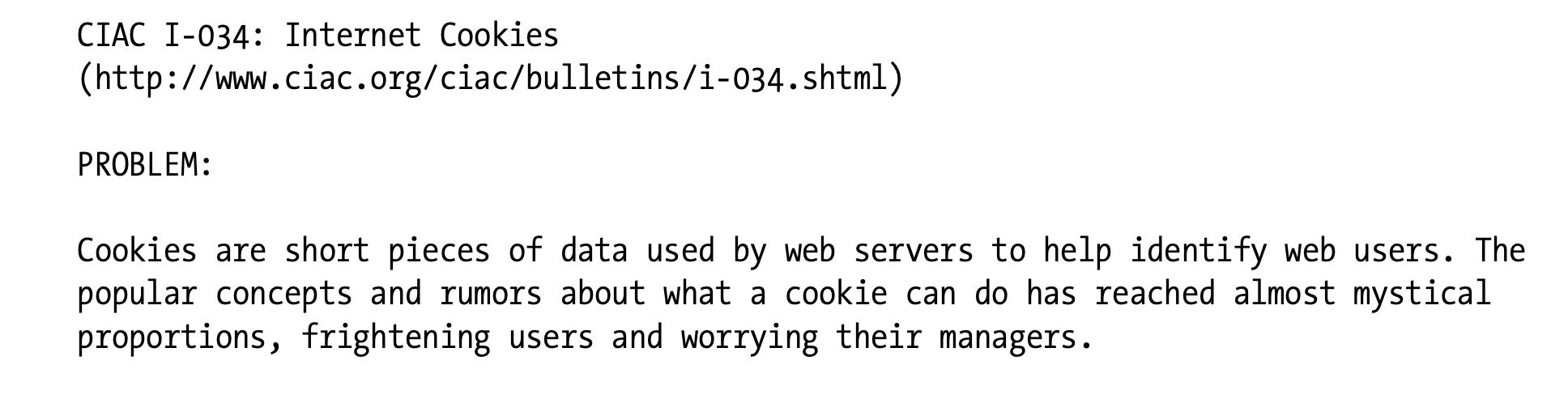
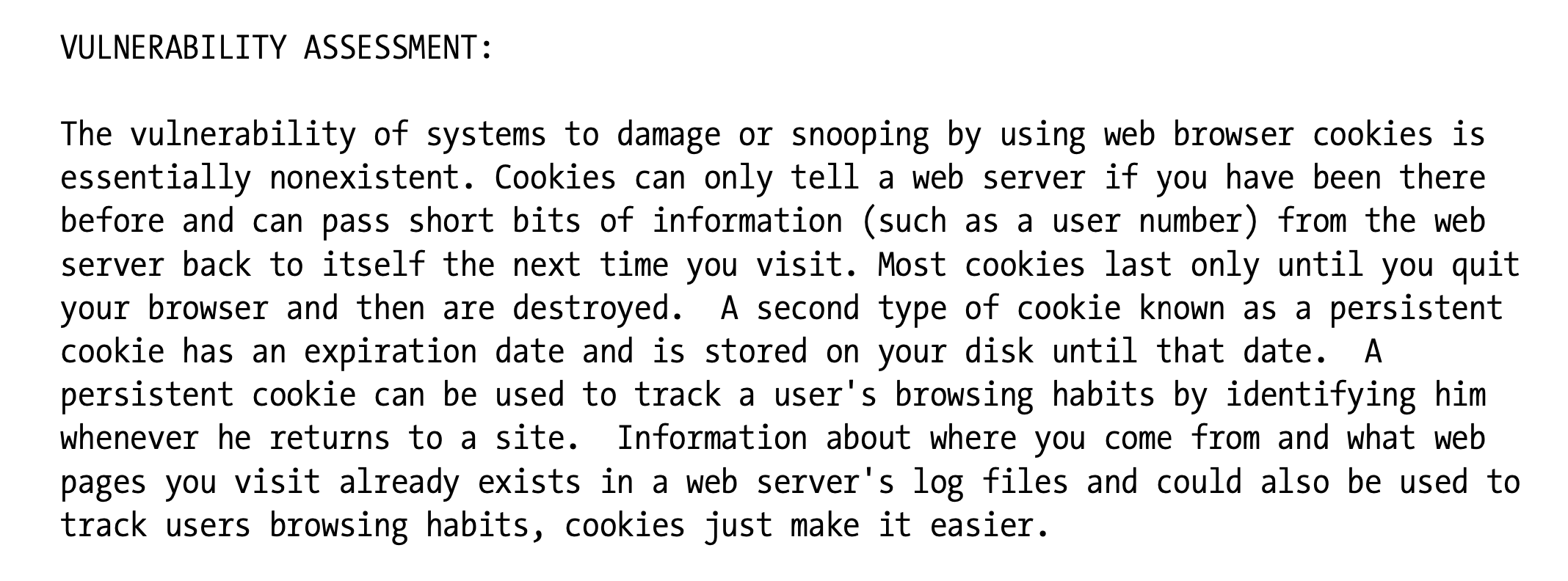
The Computer Incident Advisory Capability (part of the U.S. Department of Energy) wrote an assessment of the overrepresented dangers of cookies in 1998. Here’s an excerpt from that report:
-
1998년 Computer Incident Advisory Capability는 쿠키의 위험성이 과장되게 표현된 것에 대한 비평을 작성하였습니다.
-
아래 내용은 해당 보고서에서 발췌한 내용입니다.
✏️ 요약
Cookies and Caching
[1] 캐싱 불가능한 문서는 반드시 표기하라
- 헤더를 통해 쿠키의 캐싱 가능 여부를 표시해야 한다
- Set-Cookie 헤더를 제외하여 캐싱 가능
Cache-Control: no-cache="Set-Cookie"- 쿠키 캐싱 가능
Cache-Control: public
[2] Set-Cookie 헤더를 캐싱하는 것을 주의하라
- Set-Cookie 헤더를 여러 사용자에게 전송하는 것은 사용자 타겟팅을 무력화할 수 있다
- 서버의 문서가 프록시를 통해 전달되는 경우 Cookie가 필요할 수 있다 -> 이때는 캐시가 모든 요청을 재검증하도록 강제하여 Set-Cookie 헤더를 클라이언트 응답에 결합하도록 해야 한다
Cache-Control: must-revalidate, max-age=0
[3] Cookie 헤더가 포함된 요청을 조심해서 다루어라
- Cookie 헤더가 포함된 요청은 개인화된 콘텐츠일 가능성이 높다
- 만료일시를 0으로 설정하여 재검증을 수행할 수 있도록 하는 것이 좋다
✏️ 감상
쿠키를 똑똑하게 쓰면 돈을 잘 벌 수 있겠다
아마존의 쿠키 활용 사례를 보면서 쿠키를 영리하게 이용하면 좋은 효과를 볼 수 있겠다는 생각이 들었다. 순수하게 웹 사이트 운영을 통해 수익을 창출한다고 한다면, 적재적소에 광고를 노출하는 것이 중요하다. 사용자의 식별 정보를 토대로 해당 사용자에게 적절한 광고를 쿠키에 실어서 전송한다면 더 높은 이익을 남길 수 있을 것이다. 노출이 얼마나 많이 되느냐에 따라 수익을 얻는 경우도 있지만, 요즘 광고 중에는 클릭이나 실질적인 구매로 이어졌을 때 더 높은 광고비를 지급하는 것도 있다.
그리고 대부분의 사용자들은 쿠키에 대해 잘 모르거나 알아도 모른 척 한다. 사이트에 들어가면 직접 쿠키 설정 권한을 조절할 수 있지만, 귀찮으니까 대충 허용해버리는 경우가 많다. 나도 그런 사람들 중 한 명이다. 사람들은 쿠키를 아주 열린 마음으로 받아들이고 있으니 마음이 열려있을 때 마음껏 이용해먹도록 하자(?)
놀라운 업적
Chapter 10에 이어 Chapter 11도 매일매일 TIL을 작성하는 데 성공했다. 물론 Chapter 10과 11의 볼륨이 크지 않아서 가능했던 것도 사실이지만! 몇 번은 감상문도 제대로 안 적어 올리기도 했지만! 학기가 시작되고 바쁜 와중에도 잊지 않고 velog에 들어온 나 자신을 칭찬해주고 싶다 😉