
Chapter 12. Basic Authentication
(해석 또는 이해가 잘못된 부분이 있다면 댓글로 편하게 알려주세요.)
✏️ 원문 번역
Preface
Millions of people use the Web to perform private transactions and access private data. The Web makes it very easy to access this information, but easy isn’t good enough. We need assurances about who can look at our sensitive data and who can perform our privileged transactions. Not all information is intended for the general public.
-
수백만의 사람들이 웹을 통해 개인적인 트랜잭션을 수행하며 개인적인 데이터에 접근합니다.
-
웹은 이러한 정보에 매우 쉽게 접근할 수 있게 하지만, 쉬운 것만으로는 충분하지 않습니다.
-
누가 민감한 데이터를 관찰할 수 있으며 누가 권한을 가지고 트랜잭션을 수행할 수 있는지 확신이 필요합니다.
-
모든 정보가 일반 대중을 대상으로 하는 것은 아닙니다.
We need to feel comfortable that unauthorized users can’t view our online travel profiles or publish documents onto our web sites without our consent. We need to make sure our most sensitive corporate-planning documents aren’t available to unauthorized and potentially unscrupulous members of our organization. And we need to feel at ease that our personal web communications with our children, our spouses, and our secret loves all occur with a modicum of privacy.
-
인증되지 않은 사용자가 우리의 온라인 프로필을 보거나 웹 사이트에 문서를 게시할 수 없으리라고 안심할 수 있어야 합니다.
-
인증되지 않은 사용자나 잠재적으로 부도덕한 조직 구성원이 가장 민감한 기업의 기밀문서를 접근할 수 없어야 합니다.
-
또한 아이들과 배우자, 애인과의 웹 커뮤니케이션이 프라이버시가 보장되는 가운데 이루어지고 있다고 느낄 수 있어야 합니다.
Servers need a way to know who a user is. Once a server knows who the user is, it can decide which transactions and resources the user can access. Authentication means proving who you are; usually, you authenticate by providing a username and a secret password. HTTP provides a native facility for HTTP authentication. While it’s certainly possible to “roll your own” authentication facility on top of HTTP forms and cookies, for many situations, HTTP’s native authentication fits the bill nicely.
-
서버는 사용자가 누구인지를 확인하기 위한 방법이 필요합니다.
-
서버가 사용자를 식별하고 나면 어떤 트랜잭션을 사용할 것인지, 사용자가 접근할 수 있는 리소스가 무엇인지를 결정할 수 있습니다.
-
인증(Authentication)은 당신이 누구인지를 증명하는 과정입니다.
-
일반적으로 username과 password를 통해 이루어집니다.
-
HTTP 양식과 쿠키 위에서 자체적인 인증 특성을 사용하는 것도 가능하지만, 대부분의 상황에서는 HTTP가 제공하는 인증 방식을 사용하는 것이 가장 적절합니다.
This chapter explains HTTP authentication and delves into the most common form of HTTP authentication, basic authentication. The next chapter explains a more powerful technique called digest authentication.
-
이번 챕터에서는 HTTP 인증에 대해 설명하고 HTTP 인증의 가장 일반적인 형태인 Basic Authentication을 자세히 살펴봅니다.
-
다음 챕터에서는 Digest Authentication이라고 불리는 더 강력한 기법에 대해 소개합니다.
Authentication
Authentication means showing some proof of your identity. When you show a photo ID, like a passport or a driver’s license, you are showing some proof that you are who you claim to be. When you type a PIN number into an automatic teller machine, or type a secret password into a computer’s dialog box, you also are proving that you are who you claim to be.
-
인증이란 여러분의 신원을 증명할 수 있는 자료를 제시하는 것을 의미합니다.
-
여러분은 여권이나 운전면허증과 같이 사진으로 된 신분증을 제시하여 자기 자신임을 증명합니다.
-
ATM에 PIN 번호를 입력하거나 컴퓨터의 다이얼로그 박스에 비밀번호를 입력하는 것 또한 자기 자신임을 증명하는 과정입니다.
Now, none of these schemes are foolproof. Passwords can be guessed or overheard, and ID cards can be stolen or forged. But each piece of supporting evidence helps to build a reasonable trust that you are who you say you are.
-
이 중 어떠한 기법도 완벽하지는 않습니다.
-
비밀번호는 유추하거나 유출할 수 있으며, 신분증은 도난당하거나 위조될 수 있습니다.
-
하지만 각각의 증빙 자료는 사용자가 자신이 누구인지를 설명할 때 합당한 신뢰를 구축하는 데 도움을 줍니다.
HTTP's Challenge/Response Authentication Framework
HTTP provides a native challenge/response framework to make it easy to authenticate users. HTTP’s authentication model is sketched in Figure 12-1.
-
HTTP는 기본적인 challenge/response 프레임워크를 제공하여 사용자가 쉽게 인증을 진행할 수 있게 합니다.
-
HTTP의 인증 모델은 Figure 12-1에 묘사한 것과 같습니다.
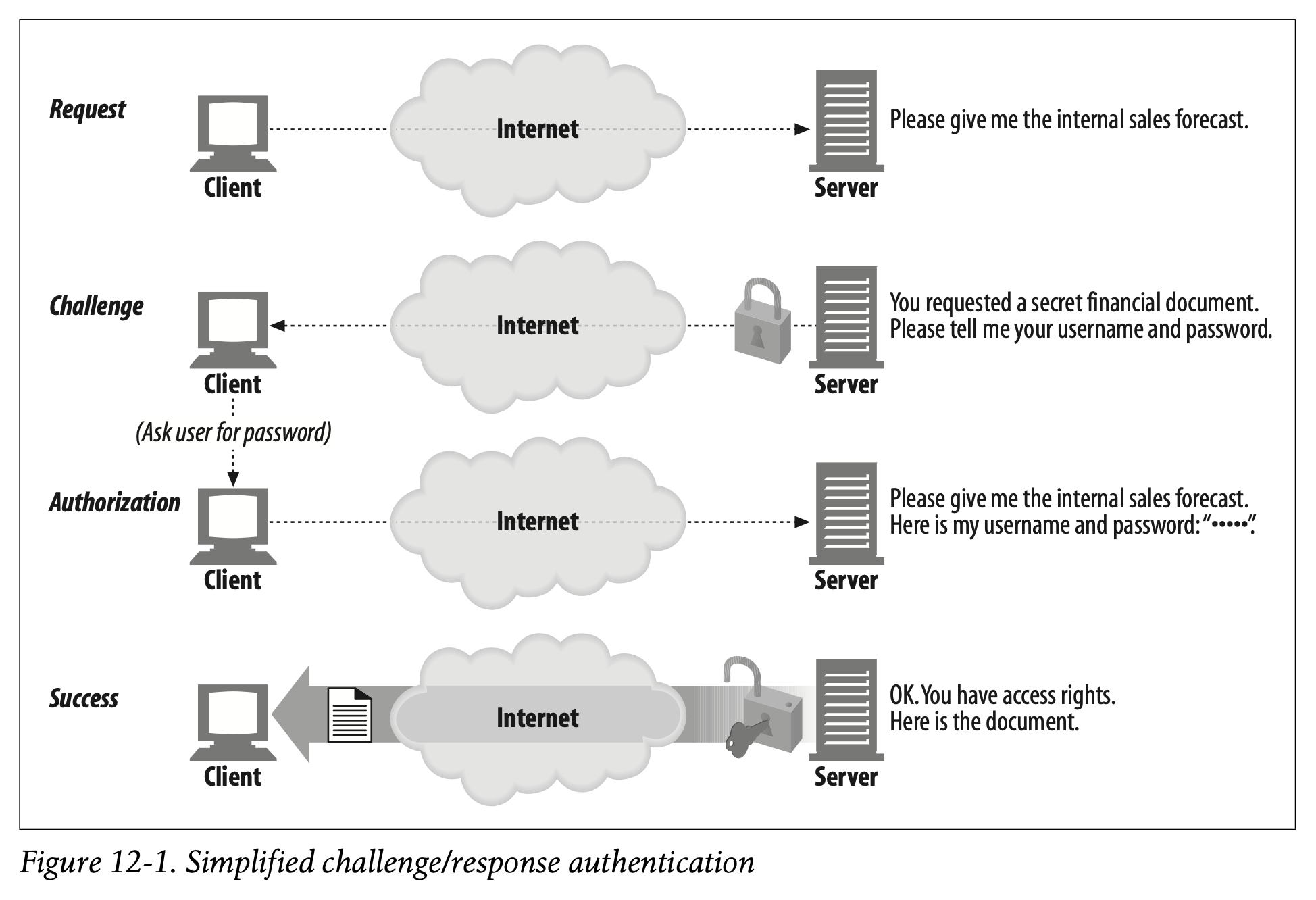
Whenever a web application receives an HTTP request message, instead of acting on the request, the server can respond with an “authentication challenge,” challenging the user to demonstrate who she is by providing some secret information.
-
웹 응용 프로그램이 HTTP 요청 메시지를 받을 때, 서버는 요청을 수행하는 대신 "authentication challenge"와 함께 응답할 수 있습니다.
-
이는 사용자가 개인정보의 일부분을 제공하여 신원을 증명하도록 요구하는 것입니다.
The user needs to attach the secret credentials (username and password) when she repeats the request. If the credentials don’t match, the server can challenge the client again or generate an error. If the credentials do match, the request completes normally.
-
사용자는 요청을 재전송할 때 개인적인 신원 확인 수단을 덧붙여 전송해야 합니다.
-
신원이 일치하지 않는 경우 서버는 클라이언트에게 재증명을 요청하거나 에러를 발생시킬 수 있습니다.
-
신원이 일치하는 경우 요청이 정상적으로 완료됩니다.
✏️ 요약
Authentication (인증)
: 신원을 증명할 수 있는 자료를 제시하는 것
- 여권/운전면허증 : 사진으로 된 신분증을 통한 본인인증
- PIN/비밀번호 : 신원을 증명하기 위한 정수 번호를 통한 본인인증
- 모든 인증 방식은 완벽하지 않지만 신뢰를 구축하는 데 도움을 줌
Challenge/Response Authentication
: 서버가 HTTP 요청을 처리하는 대신 클라이언트에게 신원을 증명하도록 요구하는 것
- 서버에게 Authentication Challenge를 받은 클라이언트는 요청 재전송 시 인증 수단을 포함해야 함
- 신원이 일치하는 경우 요청 정상 처리
- 신원이 일치하지 않는 경우 재증명 요청 혹은 에러 처리
✏️ 감상
Authentication vs Authorization
단어가 너무 비슷하게 생겨서 가끔씩 두 가지 용어의 의미가 헷갈릴 때가 있다. 심지어 한국말로도 인증(Authentication), 인가(Authorization)다. 그럼에도 두 용어가 나타내는 바는 엄연히 다르기에 구분이 필요하다.
책에서도 언급되었듯 Authentiation은 자신의 신원을 증명하는 것이다. 이때 아이디와 패스워드, 신분증, 인증서, PIN번호 등을 통해서 확인할 수 있는 정보는 오로지 "내가 본인이다"라는 정보뿐이다. 하지만 Authorization은 결이 조금 다르다. 기본적으로 Authorization은 Authentication이 정상적으로 이루어졌음을 전제한다. 자신의 Authentication을 바탕으로 그 사람에게 적절한 역할을 부여하는 과정이 바로 Authorization인 것이다.
우리에게 친숙한 AWS를 생각해보자. IAM에 사용자를 추가하고 나서 아이디와 패스워드, MFA를 통해서 로그인을 한다. 즉 내가 등록된 사용자임을 Authentication 하는 것이다. 하지만 어떤 사용자인가에 따라 IAM에서 부여하는 권한이 다르다. 예를 들어 "Admin" 역할을 가진 사용자는 모든 AWS 서비스에 정상적으로 접근할 수 있지만, 해당 권한이 없는 사람은 서비스의 이용이 제한된다. 특정 정책을 통해 S3의 사용이 허용된 사용자는 S3에 한해서 정상적으로 서비스를 이용할 수 있지만, 다른 영역은 함부로 접근할 수 없다. 이처럼 사용자에 따라 적절히 권한을 부여하는 것을 Authorization이라고 한다.
접근 제어는 중요한 데이터를 보호하고 시스템을 안정적으로 운용하는 데 반드시 필요한 기술이다. 보안을 강화하고 싶다면 접근을 모두 막아놓는 것을 디폴트로 하되 필요한 경우에만 권한을 부여하도록 사용하는 것이 좋다. 그것이 사용자가 됐든 포트가 됐든 말이다.