Chapter 14. Secure HTTP
(해석 또는 이해가 잘못된 부분이 있다면 댓글로 편하게 알려주세요.)
✏️ 원문 번역
HTTPS : The Details
HTTPS is the most popular secure version of HTTP. It is widely implemented and available in all major commercial browsers and servers. HTTPS combines the HTTP protocol with a powerful set of symmetric, asymmetric, and certificate-based cryptographic techniques, making HTTPS very secure but also very flexible and easy to administer across the anarchy of the decentralized, global Internet.
-
HTTPS는 가장 흔히 사용되는 보안 HTTP입니다.
-
거의 모든 상업용 브라우저와 서버에서 널리 구현되어 있습니다.
-
HTTPS는 HTTP 프로토콜을 Symmetric, Asymmetric 암호화와 인증서 기반의 암호학 기술을 결합하여 만들어졌습니다.
-
이러한 기술들은 무정부 상태의 분산된 글로벌 인터넷에서 안전하면서도 쉽고 유연하게 동작할 수 있는 HTTPS를 제공합니다.
HTTPS has accelerated the growth of Internet applications and has been a major force in the rapid growth of web-based electronic commerce. HTTPS also has been critical in the wide-area, secure administration of distributed web applications.
-
HTTPS는 인터넷 응용 프로그램의 성장과 함께 가속화되어 웹 기반의 전자 상거래가 급속도로 성장하는 데 영향을 주었습니다.
-
HTTPS는 분산된 웹 응용 프로그램을 안전하게 관리함에 있어 중요하게 사용됩니다.
HTTPS Overview
HTTPS is just HTTP sent over a secure transport layer. Instead of sending HTTP messages unencrypted to TCP and across the world-wide Internet (Figure 14-13a), HTTPS sends the HTTP messages first to a security layer that encrypts them before sending them to TCP (Figure 14-13b).
-
HTTPS는 단순히 보안 전송 레이어 위에서 HTTP 요청을 전송하는 방식입니다.
-
HTTPS는 HTTP 메시지를 암호화되지 않은 TCP 연결을 통해 전세계의 인터넷으로 전송하는 것이 아니라(Figure 14-13a), HTTP 메시지가 보안 레이어를 거쳐 암호화를 수행한 후 TCP 레이어로 전송하도록 합니다.
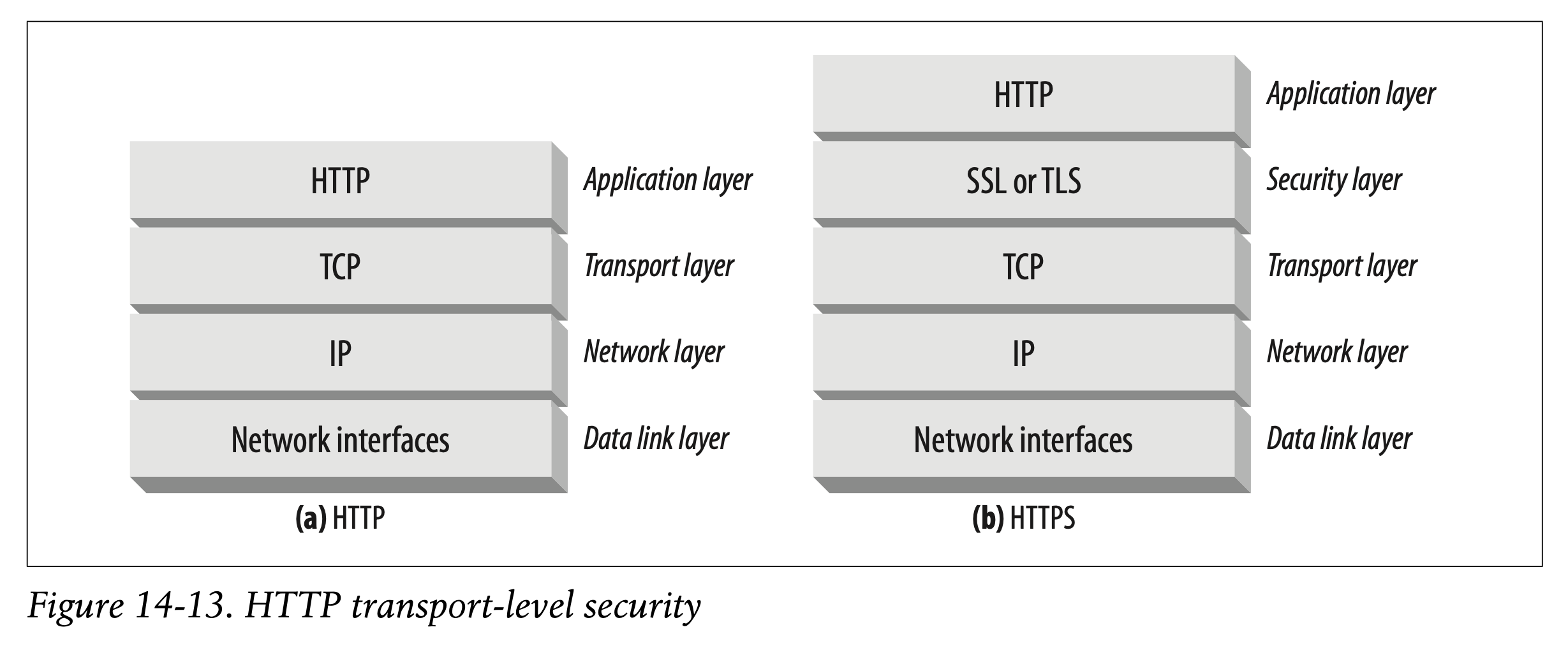
Today, the HTTP security layer is implemented by SSL and its modern replacement, TLS. We follow the common practice of using the term “SSL” to mean either SSL or
TLS.
-
오늘날 HTTP 보안 레이어는 SSL에 구현되며, 더 현대적인 방식으로는 SSL 대신 TLS를 사용합니다.
-
책에서는 SSL 혹은 TLS를 설명하기 위해 보다 일반적인 용어인 "SSL"을 사용합니다.
HTTPS Schemes
Today, secure HTTP is optional. Thus, when making a request to a web server, we need a way to tell the web server to perform the secure protocol version of HTTP.
This is done in the scheme of the URL.In normal, nonsecure HTTP, the scheme prefix of the URL is http, as in:
http://www.joes-hardware.com/index.htmlIn the secure HTTPS protocol, the scheme prefix of the URL is https, as in:
https://cajun-shop.securesites.com/Merchant2/merchant.mv?Store_Code=AGCGS
-
오늘날의 보안 HTTP는 선택적으로 구현합니다.
-
그러므로 웹 서버에 대한 요청을 생성할 때 웹 서버에게 HTTP의 보안 프로토콜을 수행하도록 요구할 방법이 필요합니다.
-
이 과정은 URL의 scheme을 통해 이루어질 수 있습니다.
-
일반적으로 안전하지 않은 HTTP에서는 URL의 접두사로 http를 사용합니다.
-
하지만 안전한 HTTPS 프로토콜을 사용하는 경우 URL의 접두사가 https입니다.
When a client (such as a web browser) is asked to perform a transaction on a web resource, it examines the scheme of the URL:
• If the URL has an http scheme, the client opens a connection to the server on port 80 (by default) and sends it plain-old HTTP commands (Figure 14-14a).
• If the URL has an https scheme, the client opens a connection to the server on port 443 (by default) and then “handshakes” with the server, exchanging some SSL security parameters with the server in a binary format, followed by the encrypted HTTP commands (Figure 14-14b).
-
웹 브라우저와 같은 클라이언트가 웹 리소스에 대한 트랜잭션을 수행하고자 할 때 URL의 scheme을 검사합니다.
-
만약 URL이 http scheme을 가지고 있다면 클라이언트는 80번 포트(default)에 서버와의 연결을 설정한 후 일반적인 형태의 HTTP 명령을 전송합니다. (Figure 14-14a)
-
반면 URL이 https scheme을 가지고 있다면 클라이언트는 443번 포트(default)에 서버와의 연결을 설정한 후 서버와의 "handshake" 절차를 거칩니다. handshake 과정에서 바이너리 형태로 SSL 보안 파라미터를 교환하고 나서 암호화된 HTTP 명령을 보낼 수 있습니다. (Figure 14-14b)
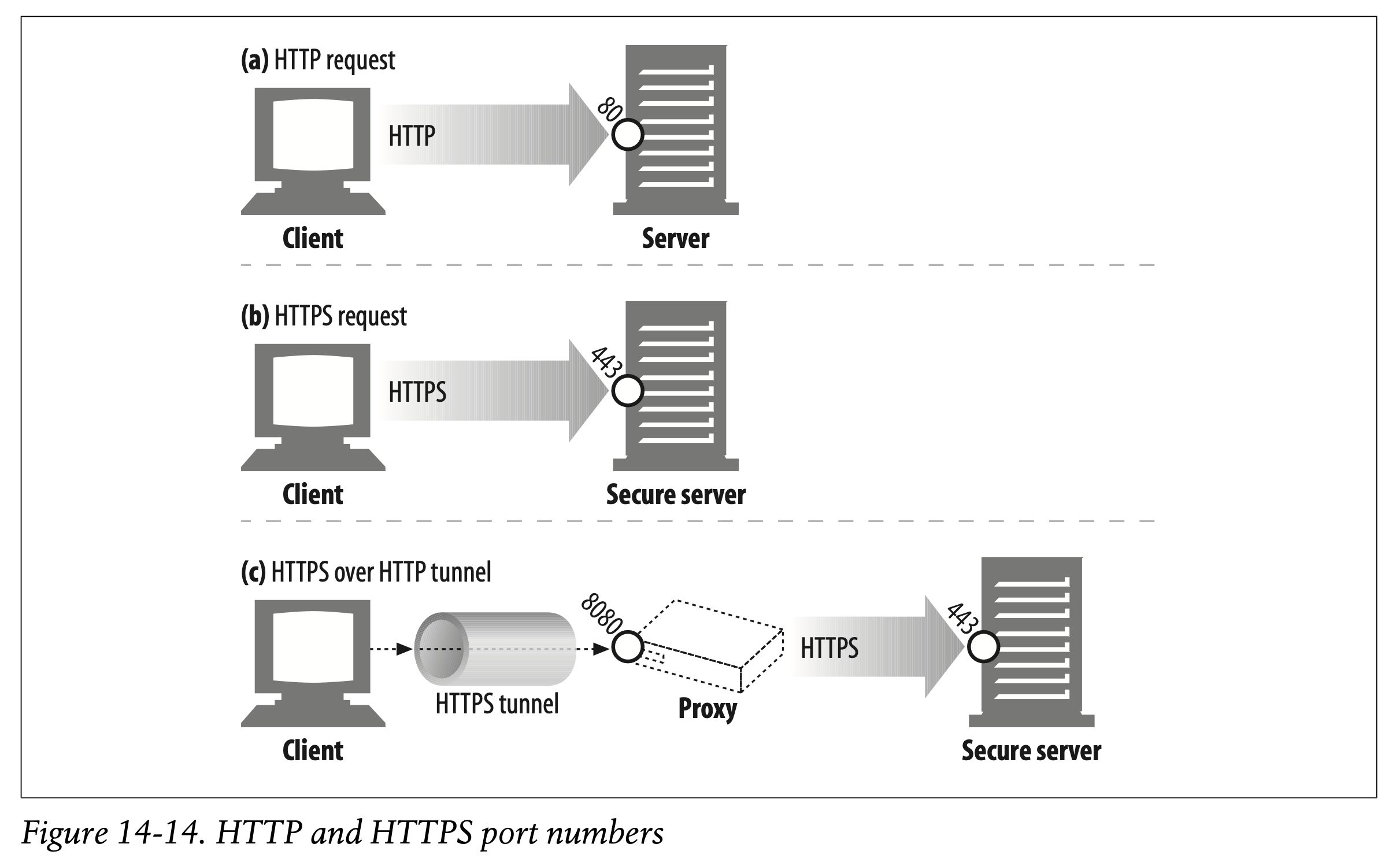
Because SSL traffic is a binary protocol, completely different from HTTP, the traffic is carried on different ports (SSL usually is carried over port 443). If both SSL and HTTP traffic arrived on port 80, most web servers would interpret binary SSL traffic as erroneous HTTP and close the connection. A more integrated layering of security services into HTTP would have eliminated the need for multiple destination ports, but this does not cause severe problems in practice.
-
SSL 트래픽은 HTTP와 완전히 다른 바이너리 프로토콜이기 때문에 다른 포트를 통해 전달되어야 합니다(일반적으로 SSL은 443 포트를 사용합니다).
-
SSL과 HTTP 트래픽이 모두 80번 포트로 도착하는 경우 대부분의 웹 서버는 SSL의 바이너리 트래픽을 HTTP로 잘못 해석하고 연결을 종료할 것입니다.
-
HTTP에 보안 서비스 레이어를 통합하면 복수의 destination port를 사용하지 않아도 되지만, 실제로는 심각한 문제를 발생시킬 수 있습니다.
Let’s look a bit more closely at how SSL sets up connections with secure servers.
- SSL이 보안 서버와 연결을 설정하는 방식에 대해 조금 더 면밀히 살펴봅시다.
Secure Transport Setup
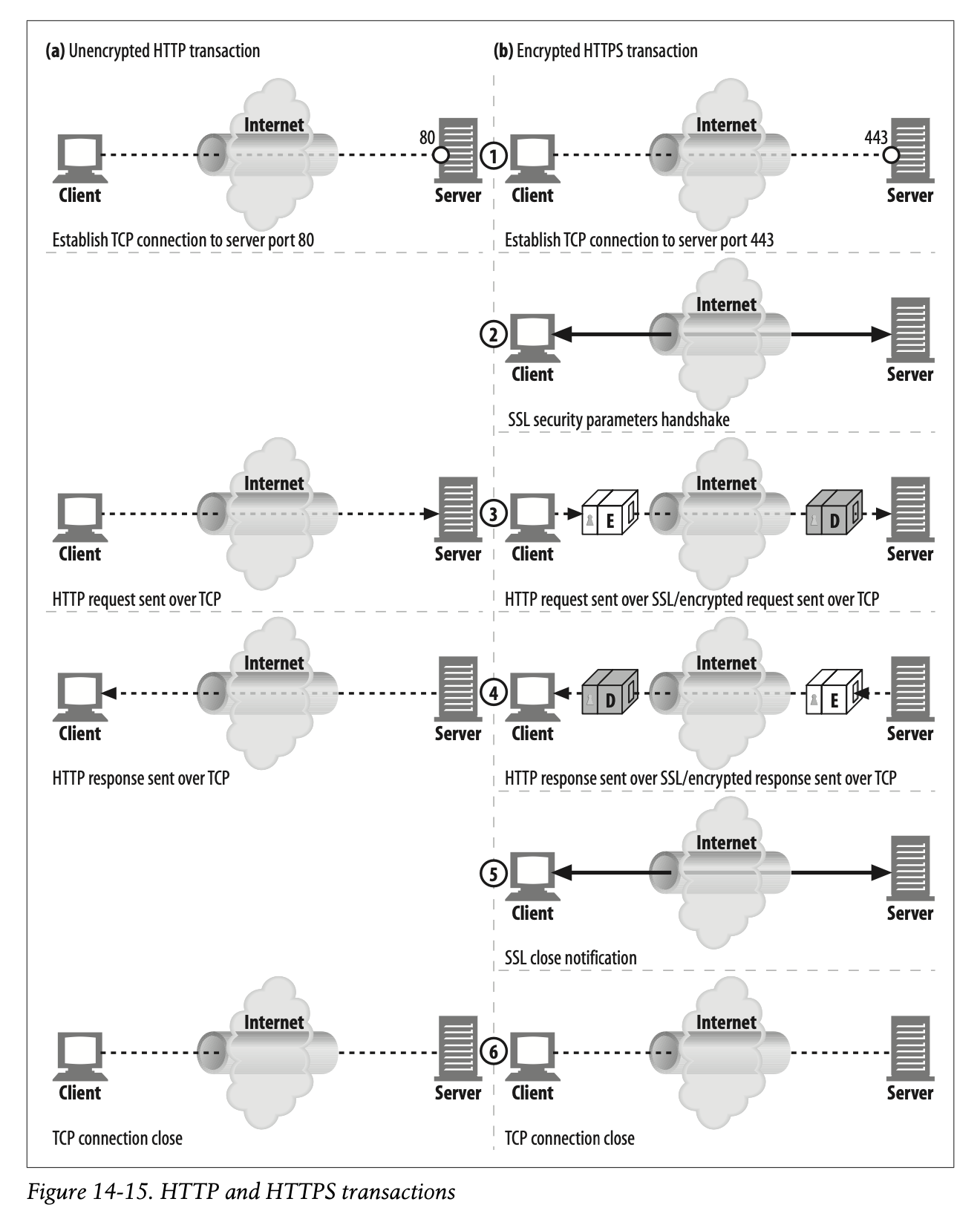
In unencrypted HTTP, a client opens a TCP connection to port 80 on a web server, sends a request message, receives a response message, and closes the connection. This sequence is sketched in Figure 14-15a.
-
암호화되지 않은 HTTP에서 클라이언트는 웹 서버의 80번 포트에 TCP 연결을 생성하여 메시지를 전송하고, 응답을 받아 연결을 종료합니다.
-
이 과정은 Figure 14-15a에 나타난 것과 같습니다.
The procedure is slightly more complicated in HTTPS, because of the SSL security layer. In HTTPS, the client first opens a connection to port 443 (the default port for secure HTTP) on the web server. Once the TCP connection is established, the client and server initialize the SSL layer, negotiating cryptography parameters and exchanging keys. When the handshake completes, the SSL initialization is done, and the client can send request messages to the security layer. These messages are encrypted before being sent to TCP. This procedure is depicted in Figure 14-15b.
-
SSL 보안 레이어로 인해 HTTPS의 전송 절차는 조금 더 복잡합니다.
-
HTTPS에서 클라이언트는 웹 서버의 443번 포트에 대해 연결을 생성합니다. 443은 보안 HTTP에 대한 default 포트번호입니다.
-
TCP 연결이 설정되고 나면 클라이언트와 서버가 SSL 레이어를 초기화합니다. 이때 암호화에 사용할 파라미터를 결정하고 키를 교환합니다.
-
handshake 과정을 완료하고 나서 SSL 초기화가 이루어지면 클라이언트는 보안 레이어에 요청 메시지를 전송할 수 있습니다.
-
메시지는 TCP에 전송되기 전에 암호화됩니다.
-
이 과정은 Figure 14-15b에 나타난 것과 같습니다.
SSL Handshake
Before you can send encrypted HTTP messages, the client and server need to do an SSL handshake, where they:
• Exchange protocol version numbers
• Select a cipher that each side knows
• Authenticate the identity of each side
• Generate temporary session keys to encrypt the channel
- 암호화된 HTTP 메시지를 전송하기 전 클라이언트와 서버는 SSL handshake를 수행합니다.
- 프로토콜 버전 번호 교환
- 클라이언트와 서버가 공유할 Cipher(암호화 알고리즘) 선택
- 클라이언트와 서버간 Authentication
- 임시 Session Key 생성 후 채널 암호화
Before any encrypted HTTP data flies across the network, SSL already has sent a bunch of handshake data to establish the communication. The essence of the SSL handshake is shown in Figure 14-16.
-
암호화된 모든 HTTP 데이터 파일이 네트워크로 흘러가기 전에 SSL은 미리 handshake 데이터 묶음을 전송하여 연결 설정을 완료합니다.
-
SSL Handshake의 핵심 요소는 Figure 14-16에서 묘사하고 있습니다.
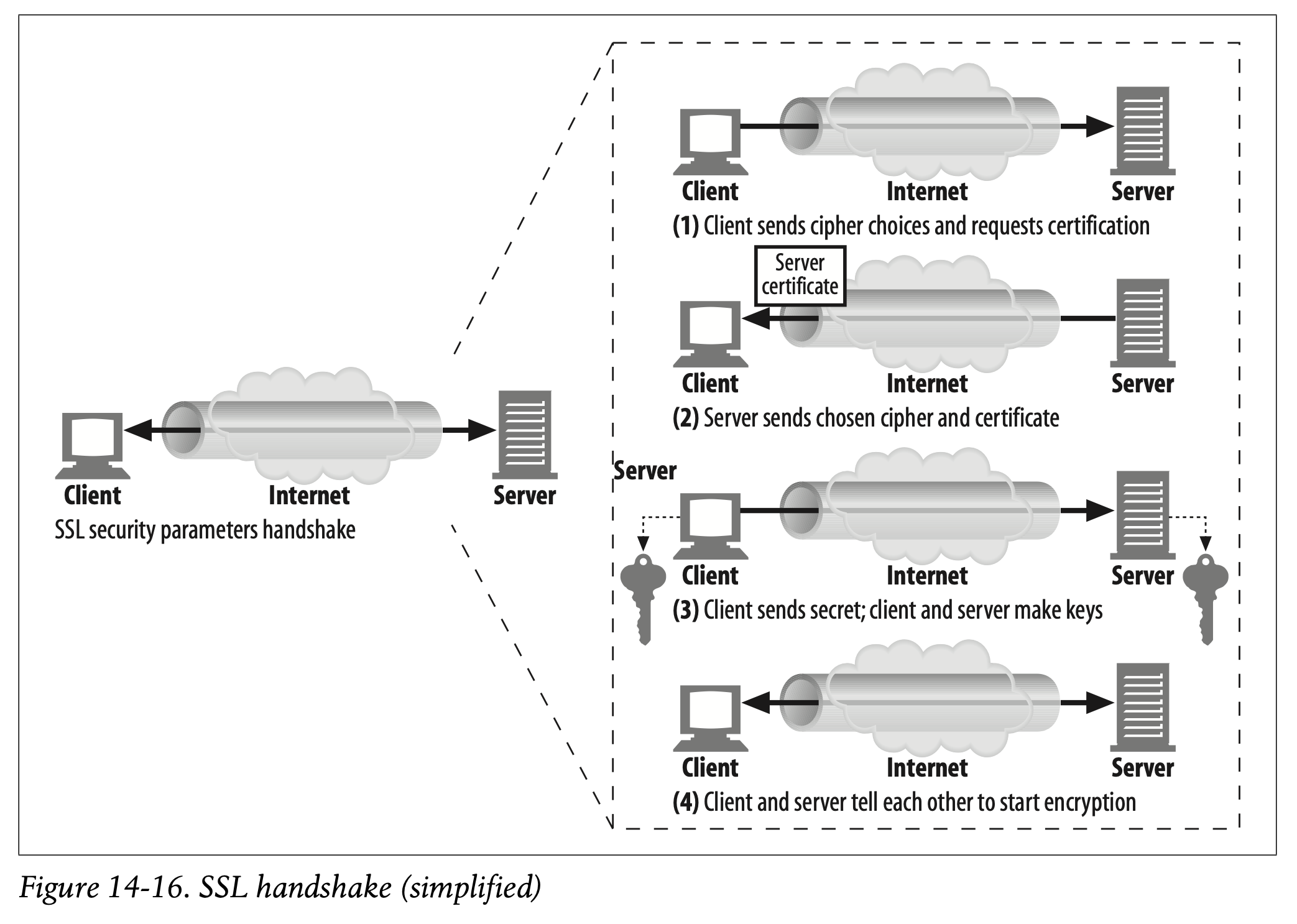
This is a simplified version of the SSL handshake. Depending on how SSL is being used, the handshake can be more complicated, but this is the general idea.
-
이것은 SSL handshake를 요약해서 설명한 그림입니다.
-
SSL이 어떻게 사용되는지에 따라 handshake 과정이 더 복잡해질 수 있지만 일반적인 아이디어는 위와 같습니다.
✏️ 요약
HTTPS Mechanism
- URL Scheme :
https - Port : 443 (SSL 바이너리 프로토콜의 default 포트번호)
- Transport Setup
- 웹 서버의 443번 포트에 대해 TCP 연결 생성
- SSL Handshake
- Cipher 선택지 전송 및 서버 인증서 요청
- 최종 선택한 Cipher 및 서버 인증서 반환
- 세션 키를 생성하여 서버의 Public Key로 암호화하여 전송
- 세션 키를 사용하여 암호화된 메시지 전송
✏️ 감상
시험 전 최고의 선택
저는 지금 학기를 병행하고 있는데 사실 내일 보안 과목 시험이 있어요 >< 바쁜 와중에도 TIL은 잊지 않았습니다(한 번 안 쓰기 시작하면 계속 안 쓸까봐 두려워요).
마침 정규 수업에도 Symmetric & Asymmetric Encryption, PKI에 관한 내용이 나와서 아쥬,, 럭키비키라고 볼 수 있습니당🍀 원서 읽기 하면서 동시에 시험 공부까지 할 수 있다니 미친 가성비랍니다. 시험 공부를 따로 많이 하지는 못해서 내일 결과가 어떻게 될지 잘 모르겠지만, 일단 HTTP 책 읽으면서 두 번 세 번 공부한 부분이 범위에 포함되니 어떻게든 되겠지 싶습니다??
아무튼 시험 잘 보고 이틀 뒤에 다시 돌아올게여 , ,, , ,