Chapter 14. Secure HTTP
(해석 또는 이해가 잘못된 부분이 있다면 댓글로 편하게 알려주세요.)
✏️ 원문 번역
Executing Our Simple OpenSSL Client
The following shows the output of our simple HTTP client when pointed at a secure server. In this case, we pointed the client at the home page of the Morgan Stanley Online brokerage. Online trading companies make extensive use of HTTPS.
-
하단의 이미지는 간단한 HTTP 클라이언트가 비공개 서버와 통신한 결과를 나타냅니다.
-
이 경우 클라이언트를 Morgan Stanley Online Brokerage의 홈페이지로 리디렉션 했습니다.
-
온라인 트레이딩 회사는 HTTPS를 광범위하게 사용하고 있습니다.

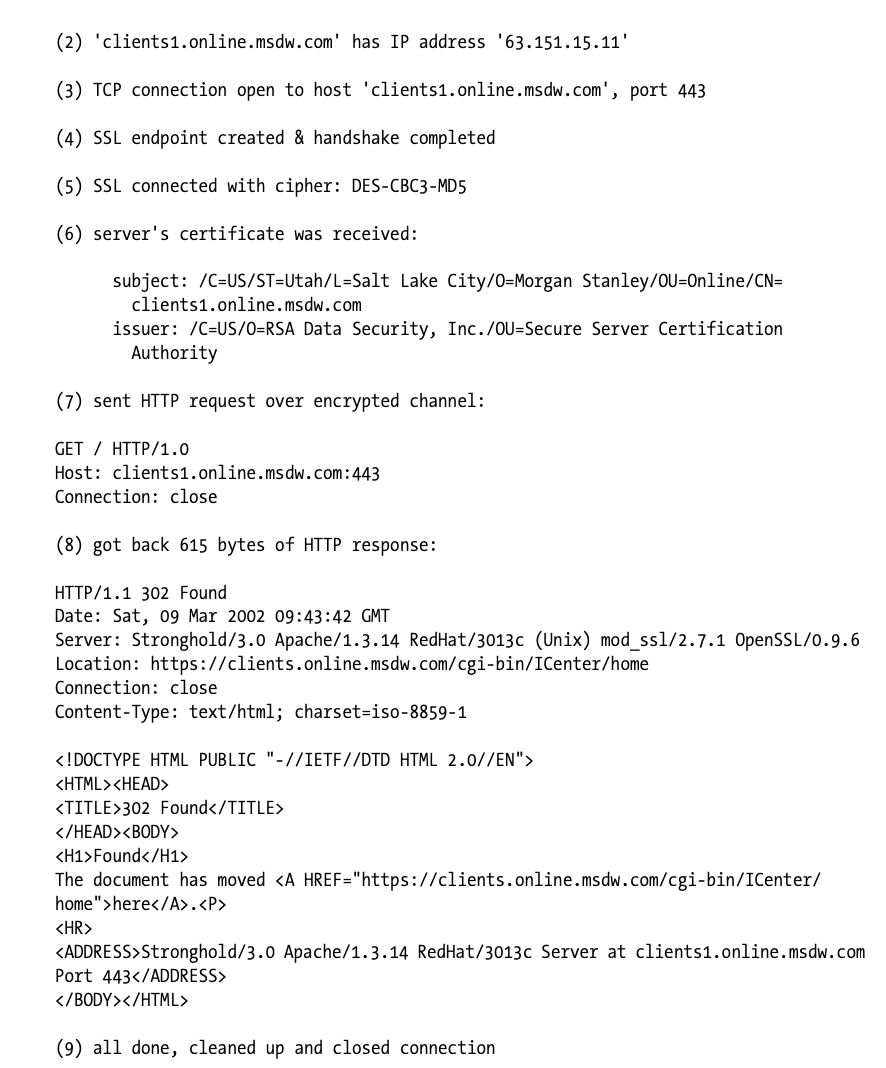
As soon as the first four sections are completed, the client has an open SSL connection. It can then inquire about the state of the connection and chosen parameters and can examine server certificates.
-
처음 네 개의 섹션이 완료되면 클라이언트는 SSL 연결을 생성합니다.
-
클라이언트는 연결의 상태와 선택된 파라미터를 추적하고 서버의 인증서를 검증할 수 있습니다.
In this example, the client and server negotiated the DES-CBC3-MD5 bulk-encryption cipher. You also can see that the server site certificate belongs to the organization “Morgan Stanley” in “Salt Lake City, Utah, USA”. The certificate was granted by RSA Data Security, and the hostname is “clients1.online.msdw.com,” which matches our request.
-
예제에서 클라이언트와 서버는 DES-CBC3-MD5 암호화 알고리즘을 채택하고 있습니다.
-
또한 여러분은 서버 웹 사이트 인증서가 "Salt Lake City, Utah, USA"의 "Morgan Stanley" 기관에 속해 있음을 확인할 수 있습니다.
-
인증서는 RSA Data Security에 의해 수여되었으며, 인증된 호스트명은 요청과 일치하는 "clients1.online.msdw.com"입니다.
Once the SSL channel is established and the client feels comfortable about the site certificate, it sends its HTTP request over the secure channel. In our example, the client sends a simple “GET / HTTP/1.0” HTTP request and receives back a 302 Redirect response, requesting that the user fetch a different URL.
-
SSL 채널이 설정되고 클라이언트가 사이트의 인증서를 확인하고 나면 보안 채널을 통해 HTTP 요청을 전송합니다.
-
예제에서 클라이언트는 단순한 "GET / HTTP/1.0" HTTP 요청을 전송한 후 302 Redirect 응답을 돌려 받습니다.
-
302 Redirect는 사용자가 다른 URL을 불러올 것을 요청하는 상태 코드입니다.
Tunneling Secure Traffic Through Proxies
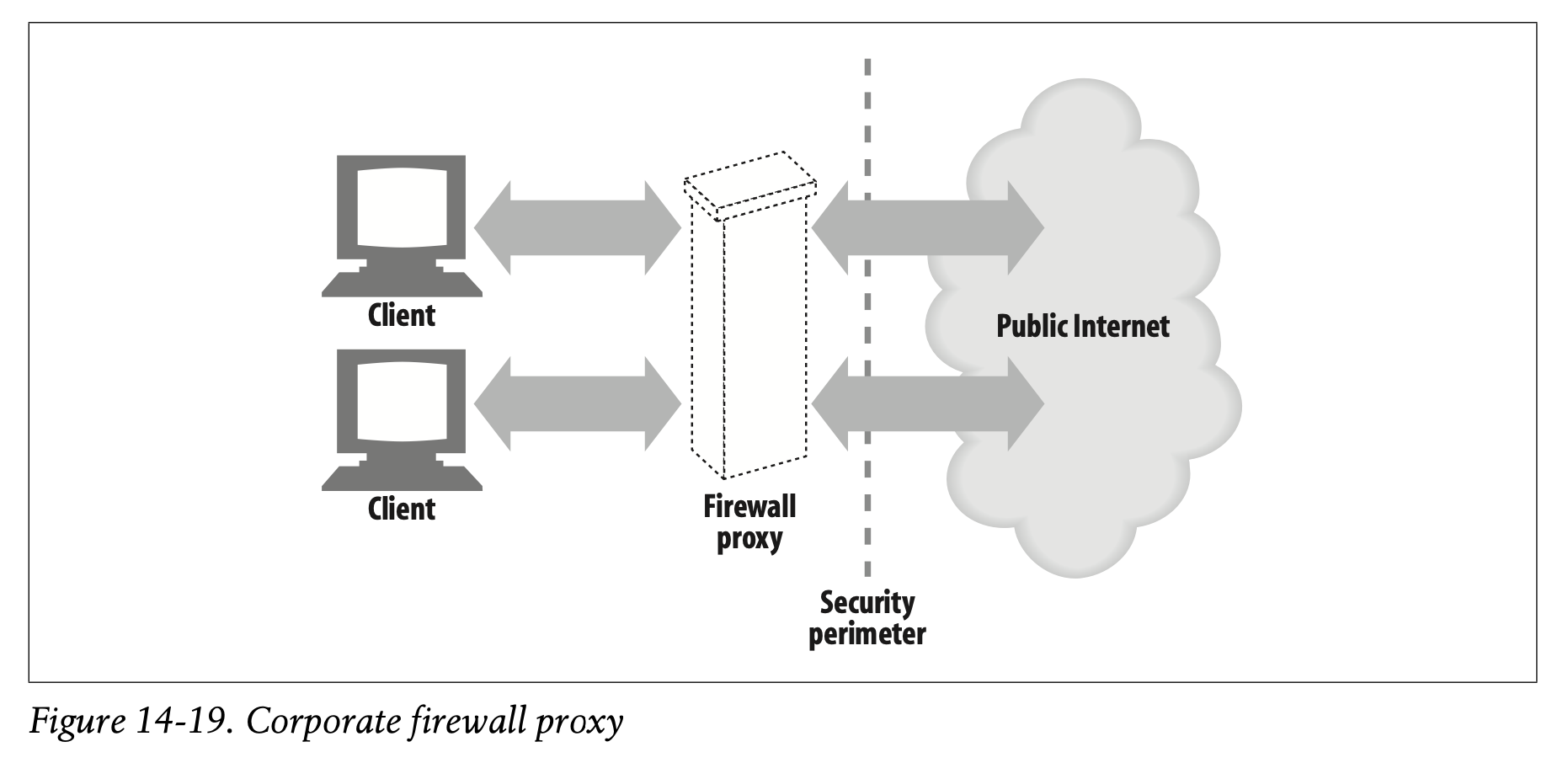
Clients often use web proxy servers to access web servers on their behalf (proxies are discussed in Chapter6). For example, many corporations place a proxy at the security perimeter of the corporate network and the public Internet (Figure 14-19). The proxy is the only device permitted by the firewall routers to exchange HTTP traffic, and it may employ virus checking or other content controls.
-
클라이언트는 종종 웹 프록시 서버를 통해 서버에 간접적으로 접근하기도 합니다(프록시는 Chapter 6에서 다루고 있습니다).
-
많은 기업들이 기업 네트워크와 공공 인터넷을 나누는 보안 경계에 프록시를 위치시킵니다. (Figure 14-19)
-
프록시는 방화벽 라우터에 의해 허용된 디바이스만 HTTP 트래픽을 주고받을 수 있게 합니다.
-
방화벽을 통해 바이러스를 확인하거나 콘텐츠를 제어하는 등의 작업을 수행할 수 있습니다.
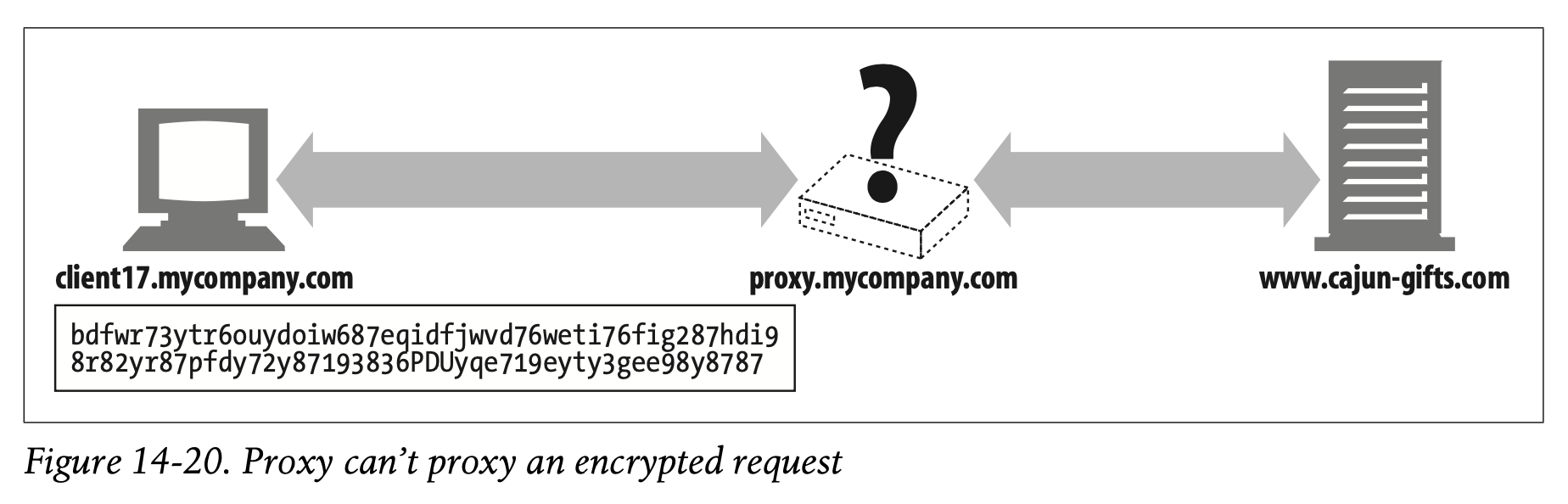
But once the client starts encrypting the data to the server, using the server’s public key, the proxy no longer has the ability to read the HTTP header! And if the proxy cannot read the HTTP header, it won’t know where to forward the request (Figure 14-20).
-
하지만 클라이언트가 서버의 Public Key로 암호화한 데이터를 전송하기 시작하면 프록시는 더 이상 HTTP 헤더를 이해할 수 없습니다.
-
만약 프록시가 HTTP 헤더를 읽을 수 없다면 어디에 요청을 포워딩 해야 하는지조차 알 수 없게 됩니다. (Figure 14-20)
To make HTTPS work with proxies, a few modifications are needed to tell the proxy where to connect. One popular technique is the HTTPS SSL tunneling protocol.
-
HTTPS가 프록시와 함께 동작하도록 하기 위해서는 프록시가 어디에 연결되어 있는지 전달할 수 있도록 약간의 변화를 주어야 합니다.
-
가장 대표적인 기술이 바로 HTTPS SSL 터널링 프로토콜입니다.
Using the HTTPS tunneling protocol, the client first tells the proxy the secure host and port to which it wants to connect. It does this in plaintext, before encryption starts, so the proxy can read this information.
-
클라이언트는 먼저 HTTPS 터널링 프로토콜을 사용하여 연결하고자 하는 보안 호스트와 포트번호를 프록시에게 전달합니다.
-
이 과정은 암호화가 시작되기 전 plaintext의 형태로 진행되므로 프록시가 해당 정보를 읽을 수 있습니다.
HTTP is used to send the plaintext endpoint information, using a new extension method called CONNECT. The CONNECT method tells the proxy to open a connection to the desired host and port number and, when that’s done, to tunnel data directly between the client and server. The CONNECT method is a one-line text command that provides the hostname and port of the secure origin server, separated by a colon. The host:port is followed by a space and an HTTP version string followed by a CRLF. After that there is a series of zero or more HTTP request header lines, followed by an empty line. After the empty line, if the handshake to establish the connection was successful, SSL data transfer can begin. Here is an example:
CONNECT home.netscape.com:443 HTTP/1.0
User-agent: Mozilla/1.1N
<raw SSL-encrypted data would follow here...>
-
plaintext 엔드포인트 정보를 전달하는 데는 HTTP가 사용되며, 확장 메서드인 CONNECT를 활용합니다.
-
CONNECT 메서드는 연결을 생성한 프록시에 희망 호스트와 포트 번호를 전달하고, 설정이 완료되면 클라이언트와 서버 사이에서 직접적으로 데이터를 터널링합니다.
-
CONNECT를 사용하면 한 줄의 텍스트 명령을 통해 콜론으로 구분된 비공개 원본 서버의 호스트명과 포트 번호를 제공할 수 있습니다.
-
host:port는 공백 뒤에 나타나며 그 뒤로 HTTP 버전 문자열이 뒤따릅니다. HTTP 버전 문자열 뒤에는 CRLF가 붙습니다.
-
HTTP의 요청 헤더 라인에 무언가 적혀 있다면 한 줄을 건너뛰고 뒤이어 등장합니다.
-
Handshake를 통해 연결을 성공적으로 설정한 경우 공백 라인 뒤로 SSL 데이터 전송이 시작될 수 있습니다.
-
아래는 실제 코드 예시입니다.
CONNECT home.netscape.com:443 HTTP/1.0
User-agent: Mozilla/1.1N
<raw SSL-encrypted data would follow here...>
After the empty line in the request, the client will wait for a response from the proxy. The proxy will evaluate the request and make sure that it is valid and that the user is authorized to request such a connection. If everything is in order, the proxy will make a connection to the destination server and, if successful, send a 200 Connection Established response to the client.
HTTP/1.0 200 Connection established
Proxy-agent: Netscape-Proxy/1.1
-
요청의 공백 라인이 끝나면 클라이언트는 프록시로부터 응답을 기다릴 것입니다.
-
프록시는 요청이 유효한지, 해당 연결에 요청을 보내도록 인가받은 사용자인지 확인하는 절차를 거칩니다.
-
모든 것이 순차적으로 이루어졌다면 프록시는 목적 서버와의 연결을 생성한 후 200 Connection Established 응답을 클라이언트에게 반환할 것입니다.
For more information about secure tunnels and security proxies, refer back to “Tunnels” in Chapter 8.
- 보안 터널링 및 보안 프록시에 대한 자세한 정보는 Chapter 8의 "Tunnels"를 참고하여 주시기 바랍니다.
✏️ 요약
SSL with Proxies
: 요청이 프록시를 거쳐 서버로 전달되는 경우 암호화된 HTTP 헤더를 번역할 수 없는 문제가 발생한다
- Plaintext의 형태로 원본 서버의 host:port 전달
- 요청 : HTTP CONNECT 메서드를 사용하여 원본 서버 정보 전달
- 응답 : 요청 유효성 검사, 신뢰할 수 있는 클라이언트인지 확인 후 200 Connection Established 반환
✏️ 감상
Part III 끝
오늘까지 해서 Part III(Identification, Authorization, and Security)을 끝까지 정독했습니다 와앙~ 257페이지부터 336페이지까지 약 80페이지 남짓한 분량이었는데 하루에 두세 페이지씩 야금야금 잘도 읽었네요,,😌
이제 정말 얼마 안 남았어요. 엄,, 사실 얼마 안 남은 건 아닌데 전체 495페이지 중에 한 160페이지 정도 남았겠네요. 올해 안에는 끝날 거예요 ^!^ 포기하지 않고 끝까지 읽을 수 있을 것인지 저도 참 기대하구 있답니다. 495페이지까지 읽고 책 덮는 순간 얼마나 기분이 좋을까요??!