Chapter 15. Entities and Encodings
(해석 또는 이해가 잘못된 부분이 있다면 댓글로 편하게 알려주세요.)
✏️ 원문 번역
Media Type and Charset
The Content-Type header field describes the MIME type of the entity body.* The MIME type is a standardized name that describes the underlying type of media carried as cargo (HTML file, Microsoft Word document, MPEG video, etc.). Client applications use the MIME type to properly decipher and process the content.
-
Content-Type 헤더 필드는 Entity Body의 MIME 타입을 나타냅니다.
-
MIME 타입은 화물로써 운반되는 미디어의 타입을 표현하는 표준화된 이름입니다(HTML 파일, Microsoft Word 문서, MPEG 비디오 등).
-
클라이언트 응용 프로그램은 MIME 타입을 활용하여 콘텐츠를 적절히 해석하고 처리합니다.
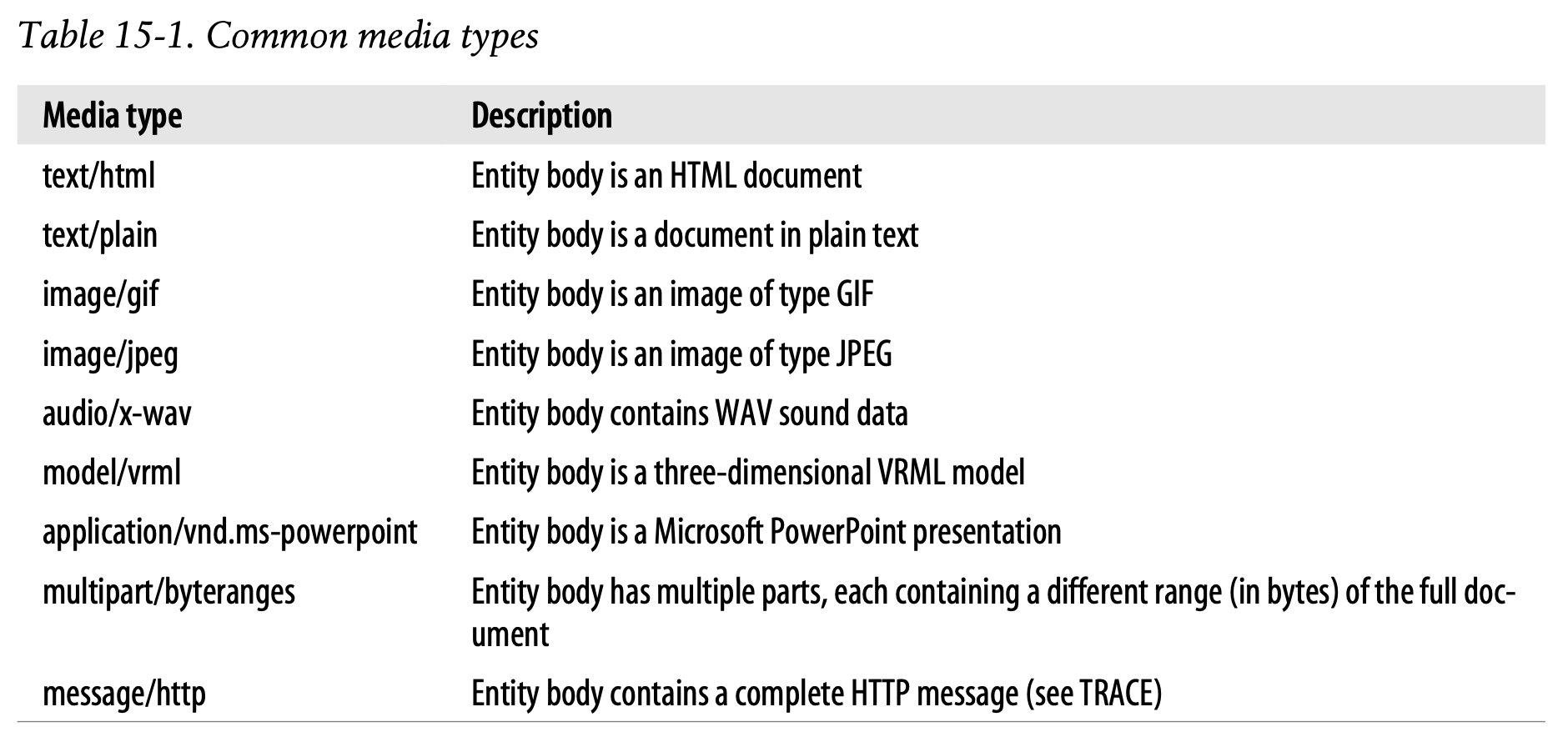
The Content-Type values are standardized MIME types, registered with the Internet Assigned Numbers Authority (IANA). MIME types consist of a primary media type (e.g., text, image, audio), followed by a slash, followed by a subtype that further specifies the media type. Table 15-1 lists a few common MIME types for the Content-Type header. More MIME types are listed in Appendix D.
-
Content-Type 값은 Internet Assigned Numbers Authority(IANA)에 등록된 표준화된 MIME 타입입니다.
-
MIME 타입은 {주요 미디어 타입}/{서브타입}의 형태로 구성되어 미디어 타입을 특정합니다.
-
Table 15-1은 Content-Type 헤더에 사용되는 몇 가지 일반적인 MIME 타입을 나열한 것입니다.
It is important to note that the Content-Type header specifies the media type of the original entity body. If the entity has gone through content encoding, for example, the Content-Type header will still specify the entity body type before the encoding.
-
Content-Type 헤더는 원본 Entity Body의 미디어 타입을 특정한다는 점에 유의합니다.
-
만약 Entity가 콘텐츠 인코딩을 거쳤더라도 Content-Type 헤더는 인코딩이 발생하기 전의 Entity Body를 특정할 것입니다.
Character Encodings for Text Media
The Content-Type header also supports optional parameters to further specify the content type. The “charset” parameter is the primary example, specifying the mechanism to convert bits from the entity into characters in a text file:
Content-Type: text/html; charset=iso-8859-4
-
또한 Content-Type 헤더는 콘텐츠의 타입을 구체화하기 위한 선택적인 매개변수를 지원합니다.
-
"charset" 매개변수는 엔티티의 비트를 텍스트 파일의 문자로 전환하는 매커니즘을 지정하기 위한 주요한 예시입니다.
We talk about character sets in detail in Chapter 16.
- Charater Set에 대해서는 Chapter 16에서 상세히 다룹니다.
Multipart Media Types
MIME “multipart” email messages contain multiple messages stuck together and sent as a single, complex message. Each component is self-contained, with its own set of headers describing its content; the different components are concatenated together and delimited by a string.
-
MIME "multipart" 이메일 메시지는 여러 개의 메시지를 결합하여 복잡한 하나의 메시지로 전송합니다.
-
각각의 구성 요소는 콘텐츠를 표현하는 헤더 집합을 별도로 포함하고 있습니다.
-
서로 다른 구성 요소는 연결되어 문자열로 구분됩니다.
HTTP also supports multipart bodies; however, they typically are sent in only one of two situations: in fill-in form submissions and in range responses carrying pieces of a document.
-
HTTP는 multipart 본문을 지원할 수 있습니다.
-
하지만 일반적으로 multipart 본문은 두 가지 상황 중 하나의 경우에만 전송됩니다.
- fill-in 양식 제출
- 문서의 일부를 전달하는 범위 응답
Multipart Form Submissions
When an HTTP fill-in form is submitted, variable-length text fields and uploaded objects are sent as separate parts of a multipart body, allowing forms to be filled out with values of different types and lengths. For example, you may choose to fill out a form that asks for your name and a description with your nickname and a small photo, while your friend may put down her full name and a long essay describing her passion for fixing Volkswagen buses.
-
HTTP fill-in 양식이 제출될 때 다양한 길이의 텍스트 필드와 업로드된 객체가 Multipart Body의 개별 부분으로 전송됩니다.
-
따라서 다양한 타입과 길이의 값으로 양식을 채울 수 있습니다.
-
예를 들어 여러분의 성명, 닉네임, 작은 사진을 요구하는 양식을 채우기를 선택할 수 있습니다.
-
반면 여러분의 친구는 성명, 폭스바겐 버스 수리에 대한 열정을 묘사하는 긴 에세이를 작성할 수도 있습니다.
HTTP sends such requests with a Content-Type: multipart/form-data header or a Content-Type: multipart/mixed header and a multipart body, like this:
Content-Type: multipart/form-data; boundary=[abcdefghijklmnopqrstuvwxyz]where the boundary specifies the delimiter string between the different parts of the body.
-
HTTP는 이러한 요청을
Content-Type: multipart/form-data헤더 혹은Content-Type: multipart/mixed헤더와 multipart 본문과 함께 전송합니다. -
boundary는 본문의 개별 부분 사이의 구분 문자열을 의미합니다.
The following example illustrates multipart/form-data encoding. Suppose we have this form:
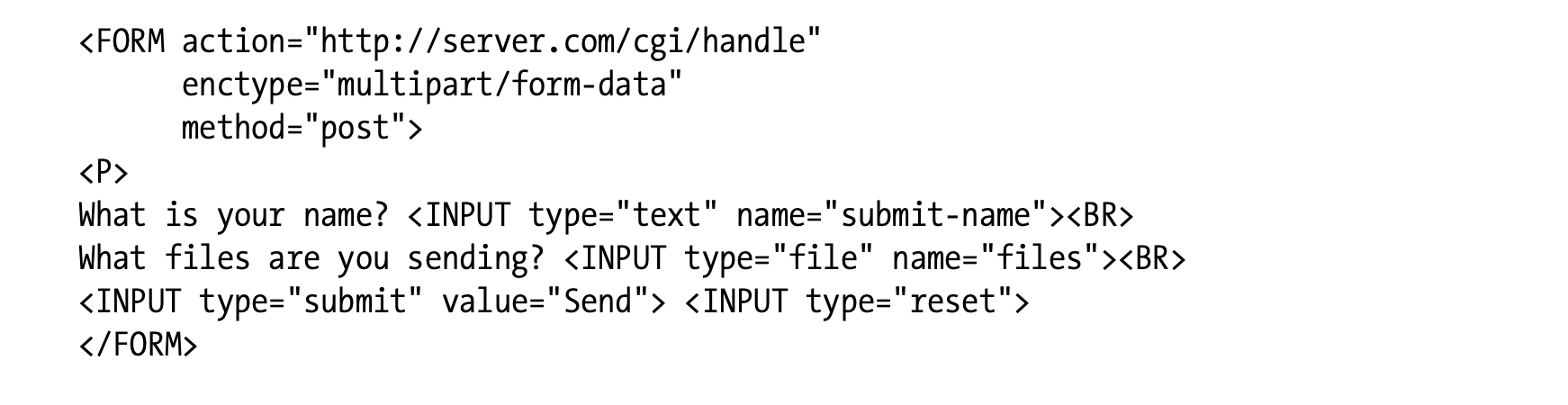
- 위의 예시는 multipart/form-data 인코딩을 나타냅니다.
If the user enters “Sally” in the text-input field and selects the text file “essayfile.txt,” the user agent might send back the following data:

- 만약 사용자가 text-input 필드에 "Sally"를 입력한 후 "essayfile.txt" 텍스트 파일을 선택한다면, 사용자 에이전트는 위와 같은 데이터를 돌려받을 것입니다.
If the user selected a second (image) file, “imagefile.gif,” the user agent might construct the parts as follows:

- 만약 사용자가 두 번째 파일(이미지)로 "imagefile.gif"를 선택하여 전송한다면, 사용자 에이전트는 위와 같이 개별 부분을 구성할 것입니다.
Multipart Range Responses
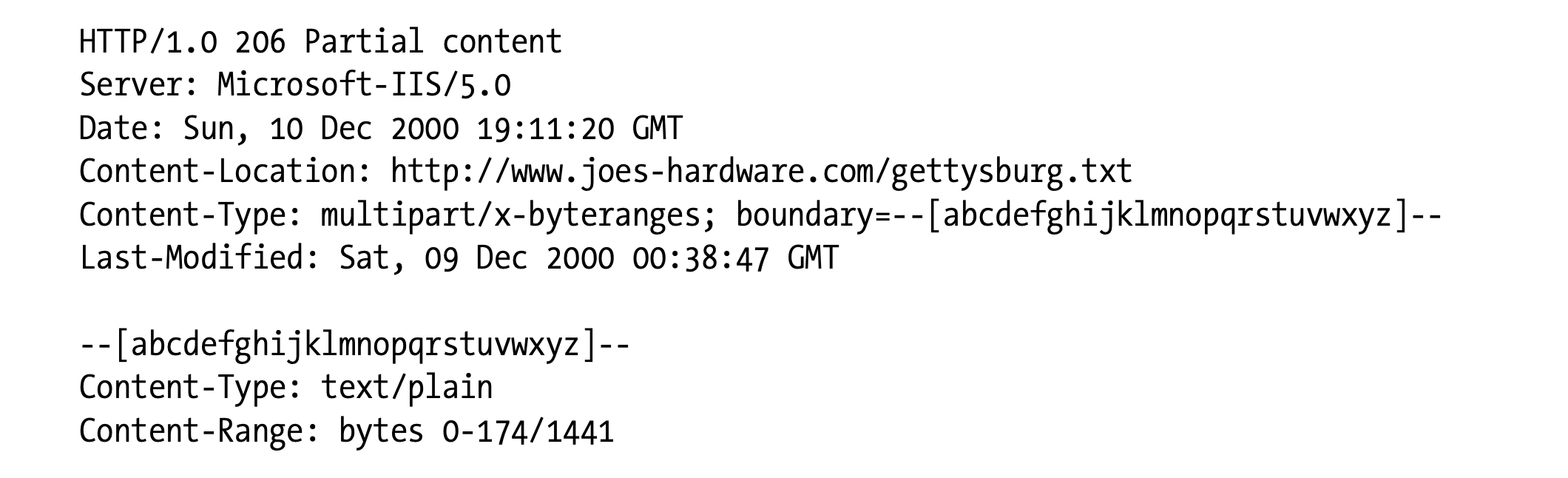
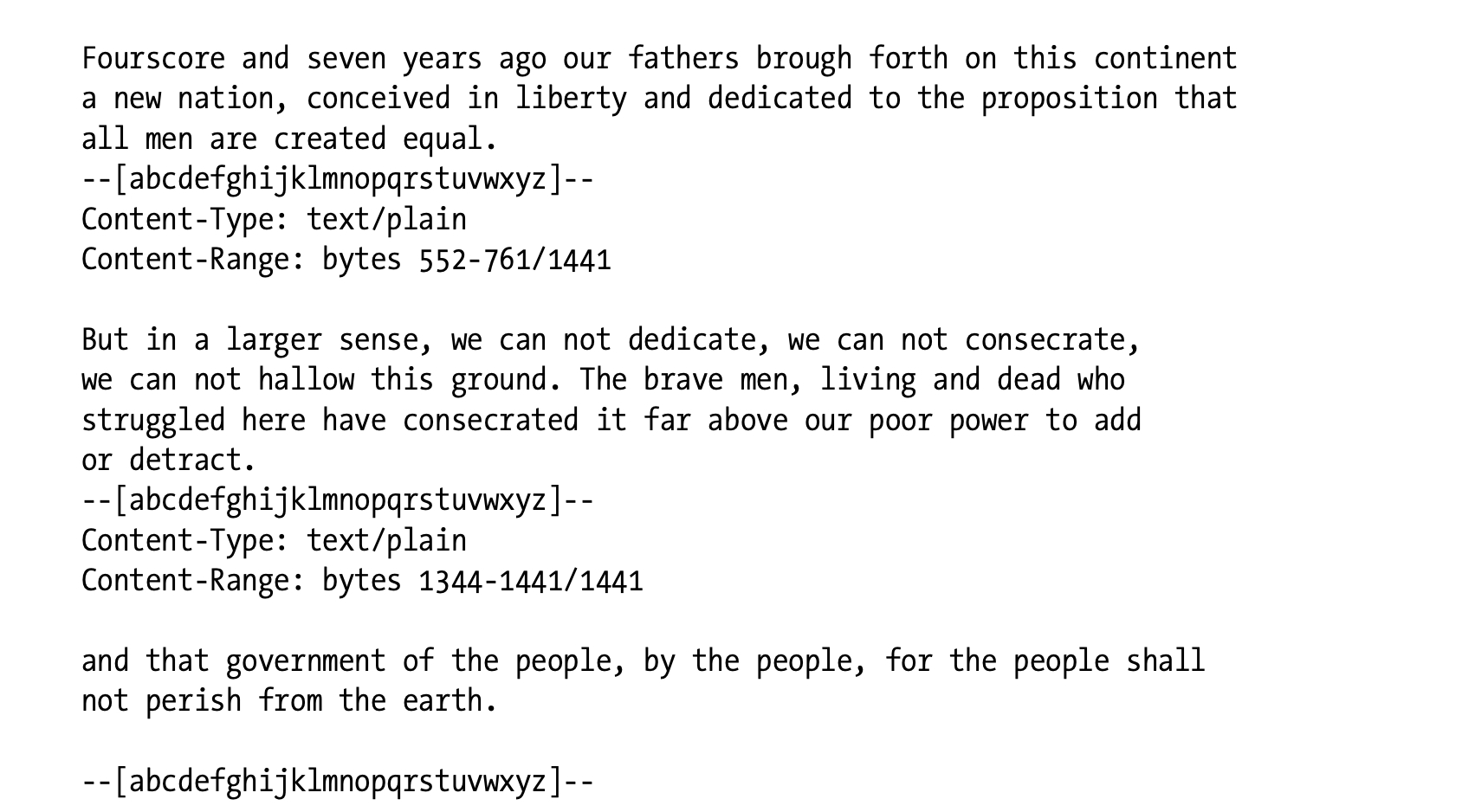
HTTP responses to range requests also can be multipart. Such responses come with a Content-Type: multipart/byteranges header and a multipart body with the different ranges. Here is an example of a multipart response to a request for different ranges of a document:
-
범위 요청에 대한 HTTP 응답 또한 multipart로 구성될 수 있습니다.
-
이러한 응답은
Content-Type: multipart/byteranges헤더와 함께 서로 다른 범위를 가진 Multipart Body로 반환됩니다. -
위의 예시는 문서의 서로 다른 범위 요청에 대한 Multipart 응답입니다.
✏️ 요약
Content-Type Header
: 원본 Entity Body의 MIME 타입 표현
- MIME : {주요 타입}/{서브 타입}
- (ex) text/html, text/plain, image/gif, multipart/byteranges
- 매개변수
charset: 엔티티 비트 -> 텍스트 문자 변환 매커니즘 지정boundary: 본문의 개별 컴포넌트를 구분하기 위한 문자열
- Multipart Entity Body
- 양식 제출 :
Content-Type: multipart/form-data,Content-Type: multipart/mixed - 범위 응답 :
Content-Type: multipart/byteranges
- 양식 제출 :
✏️ 감상
범위 응답(Range Response)
Multipart Entity가 사용되는 대표적인 상황 중 하나가 바로 "범위 응답(Range Response)"이었다. 범위 응답은 HTTP에서 클라이언트가 리소스의 일부분을 조회하거나 중단된 다운로드를 이어받을 때 사용할 수 있는 응답이다.
범위 응답의 경우 기본적으로 Range 헤더와 함께 사용되는데, 조회할 바이트의 범위를 Range: byte=100-299와 같은 방식으로 지정할 수 있다. 이때 범위를 하나만 지정하는 것이 아니라 Range: byte=-100, byte=101-200과 같이 여러 개를 지정하게 되면 서버는 Content-Type: multipart/byteranges 헤더를 통해 엔티티를 구분하여 전송하게 된다.
서버를 구현하다 보면 이래저래 Multipart를 쓸 일이 많은데 내부적으로 응답을 뜯어보면 위와 같이 구성되어 있다는 사실을 새로 알게 되었다 !!
정보처리기사 필기 보고 왔어요!
한 일주일 정도 빡세게 공부하고 시험 보고 왔는데 결과가 괜찮아서 천만다행이다.. 내가 제발 실기 시험까지 벼락치기를 하지는 않기를 바란다.