Chapter 15. Entities and Encodings
(해석 또는 이해가 잘못된 부분이 있다면 댓글로 편하게 알려주세요.)
✏️ 원문 번역
Content Encoding
HTTP applications sometimes want to encode content before sending it. For example, a server might compress a large HTML document before sending it to a client that is connected over a slow connection, to help lessen the time it takes to transmit the entity. A server might scramble or encrypt the contents in a way that prevents unauthorized third parties from viewing the contents of the document.
-
HTTP 응용 프로그램은 종종 전송하기 전에 콘텐츠 암호화를 요구할 수 있습니다.
-
서버는 느린 연결상에 놓인 클라이언트에게 거대한 HTML 문서를 전송하기 전에 압축을 수행하여 엔티티 전송에 소요되는 시간을 줄일 수 있습니다.
-
허가받지 않은 제삼자에게 문서 콘텐츠가 노출되는 것을 방지하기 위해 콘텐츠를 뒤섞거나 암호화 할 수도 있습니다.
These types of encodings are applied to the content at the sender. Once the content is content-encoded, the encoded data is sent to the receiver in the entity body as usual.
-
콘텐츠의 압축과 암호화는 송신단에서 적용됩니다.
-
콘텐츠가 인코딩 되고 나면 인코딩 된 데이터가 Entity Body에 실려 수신단으로 전송됩니다.
The Content-Encoding Process
The content-encoding process is:
- A web server generates an original response message, with original Content-Type and Content-Length headers.
-
콘텐츠 인코딩의 절차는 다음과 같습니다.
-
- 웹 서버가 원본 메시지에 대한 Content-Type과 Content-Length 헤더와 함께 응답을 생성합니다.
- A content-encoding server (perhaps the origin server or a downstream proxy) creates an encoded message. The encoded message has the same Content-Type but (if, for example, the body is compressed) a different Content-Length. The content-encoding server adds a Content-Encoding header to the encoded message, so that a receiving application can decode it.
- 콘텐츠 인코딩 서버(일반적으로 원본 서버 혹은 Downstream 프록시)는 인코딩된 메시지를 생성합니다. 인코딩 된 메시지는 본문이 압축된 경우에도 동일한 Content-Type 헤더를 갖지만, Content-Length의 길이는 달라집니다. Content-Encoding 서버는 인코딩 된 메시지에 Content-Encoding 헤더를 추가하여 메시지를 수신한 응용 프로그램이 디코딩 할 수 있게 합니다.
- A receiving program gets the encoded message, decodes it, and obtains the original.
- 수신 프로그램은 인코딩 된 메시지를 디코딩 하여 원본 메시지를 얻습니다.
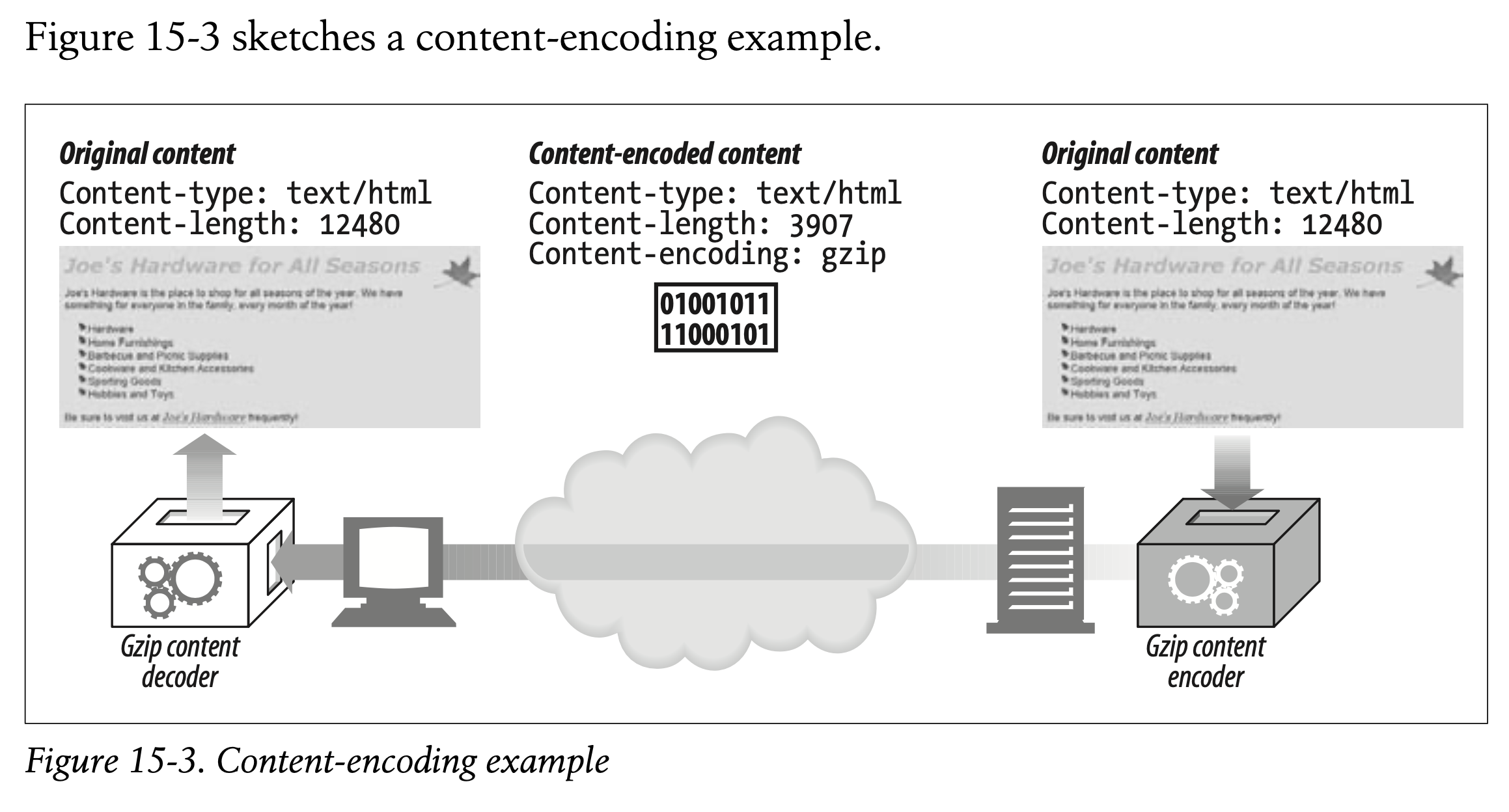
Here, an HTML page is encoded by a gzip content-encoding function, to produce a smaller, compressed body. The compressed body is sent across the network, flagged with the gzip encoding. The receiving client decompresses the entity using the gzip decoder.
-
gzip 콘텐츠 함수에 의해 인코딩 된 HTML 페이지는 더 작고 압축된 본문을 생성합니다.
-
압축된 본문은 gzip 인코딩으로 플래그가 지정된 채 네트워크를 통해 전송됩니다.
-
수신 클라이언트는 gzip 디코더를 사용하여 엔티티의 압축을 해제합니다.
This response snippet shows another example of an encoded response (a compressed image):
HTTP/1.1 200 OK
Date: Fri, 05 Nov 1999 22:35:15 GMT
Server: Apache/1.2.4
Content-Length: 6096
Content-Type: image/gif
Content-Encoding: gzip
[...]
- 위의 응답 스니펫은 인코딩된 응답의 또다른 예시를 보여줍니다.
Note that the Content-Type header can and should still be present in the message. It describes the original format of the entity—information that may be necessary for displaying the entity once it has been decoded. Remember that the Content-Length header now represents the length of the encoded body.
-
Content-Type 헤더는 여전히 메시지에서 확인할 수 있습니다.
-
Content-Type 헤더의 값은 엔티티의 원본 포맷을 나타냅니다.
-
원본 포맷은 디코딩 이후 엔티티를 표시할 때 필수적으로 사용될 수 있습니다.
-
인코딩 이후 Content-Length 헤더의 값은 인코딩 된 본문의 길이를 나타낸다는 점을 꼭 기억해주시기 바랍니다.
Content-Encoding Types
HTTP defines a few standard content-encoding types and allows for additional encodings to be added as extension encodings. Encodings are standardized through the IANA, which assigns a unique token to each content-encoding algorithm. The Content-Encoding header uses these standardized token values to describe the algorithm used in the encoding.
-
HTTP는 몇 가지 표준 콘텐츠 인코딩 타입을 정의함으로써 추가적인 인코딩 기법을 사용할 수 있게 합니다.
-
인코딩 기법은 IANA를 통해 표준화되며 각각의 콘텐츠 인코딩 알고리즘에 고유한 토큰을 할당합니다.
-
Content-Encoding 헤더는 표준화된 토큰의 값을 사용하여 해당 인코딩 방식이 사용되는 알고리즘을 표현합니다.
Some of the common content-encoding tokens are listed in Table 15-2.
- 일반적인 Content-Encoding 토큰이 Table 15-2에 나열되어 있습니다.
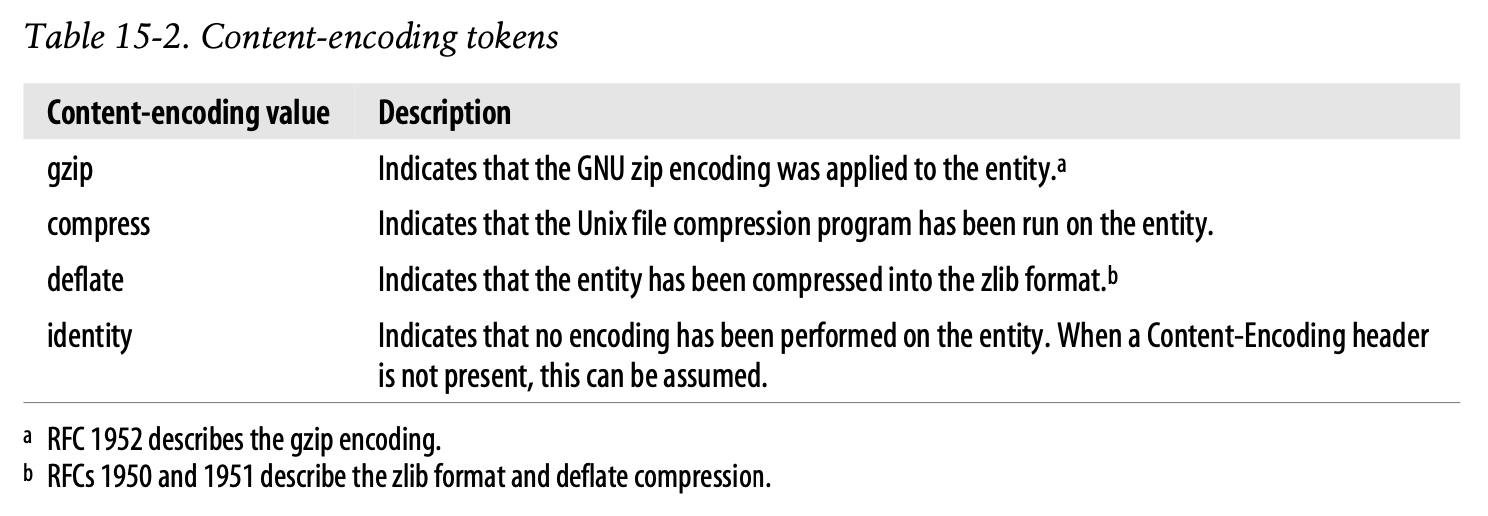
The gzip, compress, and deflate encodings are lossless compression algorithms used to reduce the size of transmitted messages without loss of information. Of these, gzip typically is the most effective compression algorithm and is the most widely used.
-
gzip, compress, deflate 인코딩은 정보의 손실 없이 전송된 메시지의 크기를 감소시키는 무손실 압축 알고리즘입니다.
-
일반적으로 gzip이 가장 효율적인 압축 알고리즘이며 가장 널리 사용되고 있습니다.
Accept-Encoding Headers
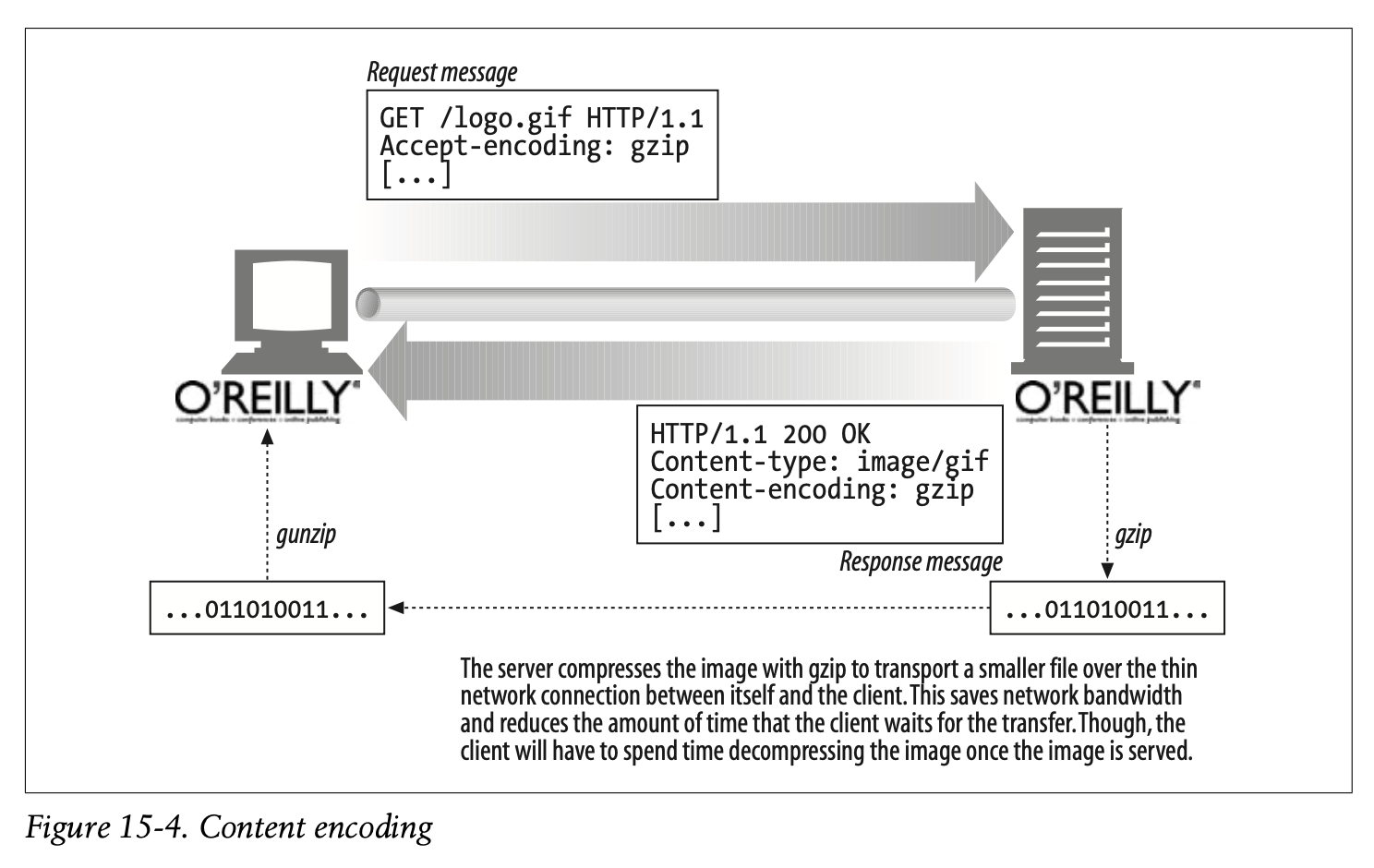
Of course, we don’t want servers encoding content in ways that the client can’t decipher. To prevent servers from using encodings that the client doesn’t support, the client passes along a list of supported content encodings in the Accept-Encoding request header. If the HTTP request does not contain an Accept-Encoding header, a server can assume that the client will accept any encoding (equivalent to passing Accept-Encoding: *).
-
클라이언트는 자신이 복호화 할 수 없는 방식으로 서버가 콘텐츠를 인코딩하는 것을 원하지 않습니다.
-
클라이언트는 지원되지 않는 방식으로 서버가 인코딩을 수행하지 않도록 하기 위해 지원 가능한 콘텐츠 인코딩의 리스트를 Accept-Encoding 요청 헤더에 실어 전송합니다.
-
만약 HTTP 요청이 Accept-Encoding 헤더를 포함하지 않는다면, 서버는 클라이언트가 모든 인코딩 방식을 허용하는 것으로 간주할 수 있습니다(
Accept-Encoding: *의 효과와 동일합니다).
Figure 15-4 shows an example of Accept-Encoding in an HTTP transaction.
- Figure 15-4는 HTTP 트랜잭션에서 Accept-Encoding의 예시를 나타냅니다.
The Accept-Encoding field contains a comma-separated list of supported encodings. Here are a few examples:
Accept-Encoding: compress, gzip
Accept-Encoding:
Accept-Encoding: *
Accept-Encoding: compress;q=0.5, gzip;q=1.0
Accept-Encoding: gzip;q=1.0, identity; q=0.5, *;q=0
-
Accept-Encoding 필드는 지원 가능한 인코딩 기법을 콤마로 구분합니다.
-
Accpet-Encoding 헤더의 몇 가지 예시를 상단에 나열합니다.
Clients can indicate preferred encodings by attaching Q (quality) values as parameters to each encoding. Q values can range from 0.0, indicating that the client does not want the associated encoding, to 1.0, indicating the preferred encoding. The token “*” means “anything else.” The process of selecting which content encoding to apply is part of a more general process of deciding which content to send back to a client in a response. This process and the Content-Encoding and Accept-Encoding headers are discussed in more detail in Chapter 17.
-
클라이언트는 각 인코딩의 파라미터로 Q(퀄리티) 값을 덧붙여 선호하는 인코딩 방식을 표시할 수 있습니다.
-
Q 값은 0.0부터 1.0까지 표현 가능하며 숫자가 클수록 선호도가 높습니다.
-
"*" 토큰은 "무엇이든 가능함"을 의미합니다.
-
어떤 콘텐츠 인코딩을 사용할지 선택하는 과정은 클라이언트에게 응답으로 어떤 콘텐츠를 반환할지 결정하는 포괄적인 프로세스의 일부분입니다.
-
해당 프로세스와 Content-Encoding, Accept-Encoding 헤더에 대해서는 Chapter 17에서 더 상세히 논의합니다.
The identity encoding token can be present only in the Accept-Encoding header and is used by clients to specify relative preference over other content-encoding algorithms.
- ID 인코딩 토큰은 Accept-Encoding 헤더에만 존재할 수 있으며 클라이언트가 다른 콘텐츠 인코딩 알고리즘에 대한 상대적인 선호도를 지정하는 데 사용됩니다.
✏️ 요약
Content-Encoding
: 서버가 사용한 콘텐츠 인코딩 기법 명시
- gzip, compress, deflate, identity 등
- 콘텐츠가 인코딩된 경우 Content-Length는 인코딩 된 콘텐츠의 길이로 명시
- 수신 프로그램은 Content-Encoding에 적힌 인코딩 기법을 사용하여 메시지 디코딩 수행
Accept-Encoding
: 클라이언트가 지원하는 콘텐츠 인코딩 기법 명시
- 0개 이상의 인코딩 기법을 콤마로 구분하여 나열한 형태
- * 토큰은 모든 인코딩 기법을 허용함을 의미
- 각 인코딩 기법에 대한 파라미터로 q 값 지정 가능
- q(Quality) : 선호하는 인코딩 방식을 0.0-1.0으로 지정
- q 값이 클수록 선호도가 높다
✏️ 감상
사실 너무 당연한 얘기라
오늘 내용은 크게 유익하진 않았던 것 같다...ㅋㅋㅋㅋㅋㅋ 그래도 HTTP에서 인코딩에 사용되는 헤더에 Content-Encoding과 Accept-Encoding이 있다는 사실을 다시 한 번 상기시키는 기회가 되었다..!