Intersection Observer
Intersection Observer란?
Intersection Observer는 특정 요소가 뷰포트(Viewport)나 다른 요소와 교차하는지를 비동기적으로 감지할 수 있는 API이다. 쉽게 말해, 스크롤 이벤트 없이도 요소가 화면에 보이는지 알 수 있게 도와주는 도구이다.
언제 사용해야 하는가?
이미지 Lazy Loading: 사용자가 스크롤할 때 이미지를 로드해서 초기 로딩 시간을 줄일 수 있다.
무한 스크롤 구현: 페이지 끝에 도달했을 때 추가 데이터를 로드할 때 유용하다.
애니메이션 트리거: 요소가 뷰포트에 들어올 때 애니메이션을 실행시킬 수 있다.
광고 노출 추적: 광고가 실제로 사용자에게 보여졌는지 확인할 때 좋다.
어떤 상황에 사용해야 하는가?
UI 라이브러리나 재사용 가능한 컴포넌트: 컴포넌트 내부에서 요소가 뷰포트에 들어오는 시점을 알아야 할 때 유용하다.
폼 요소 제어: input, select, textarea 등의 폼 요소에 직접 접근하여 포커스를 설정하거나 값을 조작해야 할 때.
애니메이션 적용: 특정 요소에 애니메이션을 적용할 때, 요소가 뷰포트에 들어올 때 애니메이션을 실행시키기 위해 사용할 수 있다.
사용 이점
성능 최적화: 스크롤 이벤트를 직접 사용하는 것보다 Intersection Observer를 사용하면 성능이 더 좋다.
코드 간결성: 복잡한 스크롤 로직을 피할 수 있어서 코드가 더 깔끔해진다.
비동기 처리: 교차 여부를 비동기적으로 처리하기 때문에 메인 스레드의 부하를 줄일 수 있다.
Intersection Observer의 options
Intersection Observer를 생성할 때 다양한 옵션을 설정할 수 있다. 이 옵션들은 관찰자의 행동을 세밀하게 조정할 수 있게 해준다.
root: 교차를 확인할 때 기준이 되는 요소를 지정한다. 기본값은 null이며, 이는 뷰포트를 기준으로 한다.
rootMargin: root의 경계 바깥이나 안쪽에 추가적인 여백을 설정할 수 있다. CSS와 비슷한 방식으로 값을 지정할 수 있다. (예: '0px 0px -10% 0px')
threshold: 교차 관찰을 수행할 요소의 가시성 비율을 지정한다. 0에서 1 사이의 값이나 배열로 설정할 수 있으며, 이 값은 요소가 얼마나 보여야 콜백이 실행될지를 결정한다.
코드 예시
이제 React 환경에서 Intersection Observer를 사용해서 애니메이션 트리거를 구현한 간단한 예제를 보자.
import { useEffect } from "react";

interface IntersectionObserverOptions {
  root?: Element | Document | null;
  rootMargin?: string;
  threshold?: number | number[];
}

const useIntersectionObserver = (
  callback: (entry: IntersectionObserverEntry) => void,
  element: Element | null,
  options: IntersectionObserverOptions,
  enabled: boolean
): void => {
  useEffect(() => {
    if (!element || !enabled) return;

    const observer = new IntersectionObserver((entries) => {
      entries.forEach((entry) => {
        callback(entry);
      });
    }, options);

    observer.observe(element);

    return () => {
      observer.disconnect();
    };
  }, [element, options, enabled, callback]);
};

export default useIntersectionObserver;
위와 같이 hooks를 만들어주고
import React, { useRef, useEffect, useState } from "react";
import AboutMe from "./_homeComponents/AboutMe";
import Skill from "./_homeComponents/Skill";
import EXPERIENCE from "./_homeComponents/Experience";
import styles from "@/app/main.module.scss";
import useIntersectionObserver from "./utils/useIntersectionObserver";
import { FaAngleDoubleDown } from "react-icons/fa";
import { LuMouse } from "react-icons/lu";
export default function HomePage() {
  const aboutMeRef = useRef<HTMLDivElement>(null);
  const skillRef = useRef<HTMLDivElement>(null);
  const experienceRef = useRef<HTMLDivElement>(null);
  const [animationBinded, setAnimationBounded] = useState(false);
  const [atBottom, setAtBottom] = useState(false);

  const handleIntersection = (
    entry: IntersectionObserverEntry,
    isLast?: boolean
  ) => {
    if (entry.target instanceof HTMLElement) {
      if (entry.isIntersecting) {
        if (!entry.target.classList.contains("fadeDown")) {
          entry.target.classList.add("fadeDown");
        }
      } else {
        if (entry.target.classList.contains("fadeDown")) {
          entry.target.classList.remove("fadeDown");
        }
      }
    }
  };

  const checkScrollPosition = () => {
    if (window.innerHeight + window.scrollY >= document.body.offsetHeight) {
      setAtBottom(true);
    } else {
      setAtBottom(false);
    }
  };

  useEffect(() => {
    setAnimationBounded(true);

    window.addEventListener("whill", checkScrollPosition);
    return () => {
      window.removeEventListener("whill", checkScrollPosition);
    };
  }, []);

  useIntersectionObserver(
    (entry) => {
      handleIntersection(entry);
    },
    aboutMeRef.current,
    { threshold: 0.1 },
    animationBinded
  );
  useIntersectionObserver(
    (entry) => {
      handleIntersection(entry);
    },
    skillRef.current,
    { threshold: 0.1 },
    animationBinded
  );
  useIntersectionObserver(
    (entry) => {
      handleIntersection(entry, true);
    },
    experienceRef.current,
    { threshold: 0.1 },
    animationBinded
  );

  return (
    <main className={`${styles.main} pb-5`}>
      <div className={styles.wrap}>
        <div className={styles.section + " fadeDown"} ref={aboutMeRef}>
          <AboutMe />
        </div>
        <div className={styles.section} ref={skillRef}>
          <Skill />
        </div>
        <div className={styles.section} ref={experienceRef}>
          <EXPERIENCE />
        </div>
      </div>
    </main>
  );
}
위와 같이 사용하면
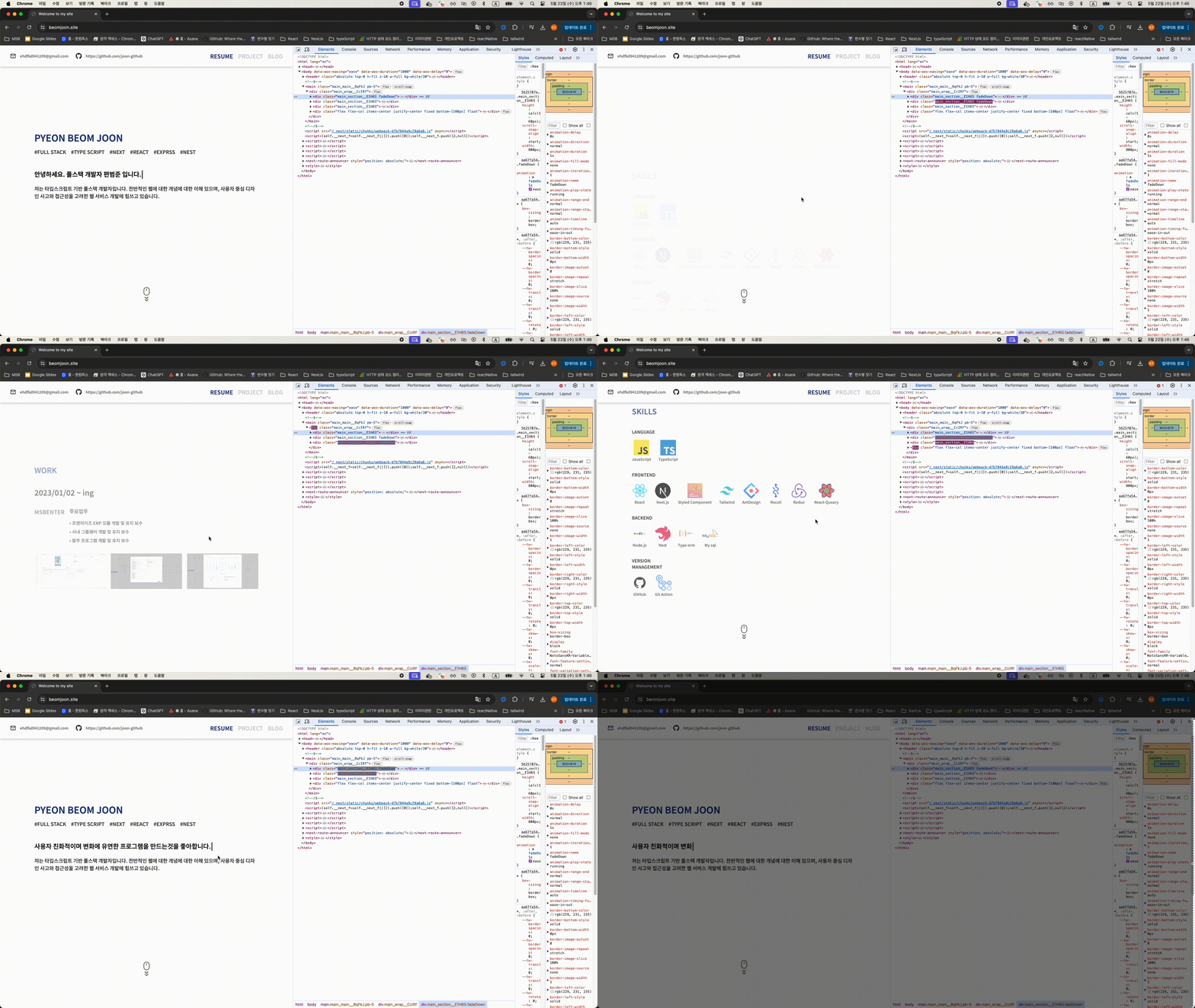
dom 이 감지되면 handleIntersection 함수가 실행되어 애니메이션이 적용되는것을 확인 할 수 있다.
요약
Intersection Observer는 요소가 뷰포트에 들어오거나 나가는 것을 감지하는 API이다.
언제 사용해야 하는가? : 이미지 Lazy Loading, 무한 스크롤, 애니메이션 트리거, 광고 노출 추적 등.
어떤 상황에 사용해야 하는가? : UI 라이브러리, 재사용 가능한 컴포넌트, 폼 요소, 애니메이션 등.
사용 이점: 성능 최적화, 코드 간결성, 비동기 처리.
options: root, rootMargin, threshold 등의 옵션을 통해 관찰자의 동작을 세밀하게 조정할 수 있다.
