flutter_grid
class _HomePage extends State<HomePage> {
Widget build(BuildContext context) {
return DefaultTabController(
length: 1,
child: Scaffold(
body: TabBar(tabs: [FirstTab()]),
),
);
}
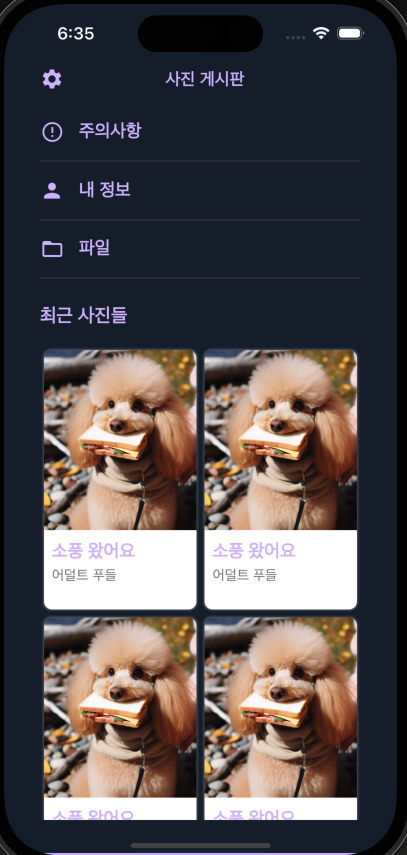
}이 부분의 firsttab에 들어간 화면이다.
크게 safearea안에 column으로 item을 나열해주고
crossAxisAlignment => start로 정렬시켜준다.
위의 설정아이콘이랑 제목은 row로 정렬해준 뒤에
오른쪽 여백을 sizedbox로 처리해주면 된다.
          Row(
              mainAxisAlignment: MainAxisAlignment.spaceBetween,
              crossAxisAlignment: CrossAxisAlignment.start,
              children: [
                Padding(
                  padding: const EdgeInsets.symmetric(vertical: 4),
                  child: Icon(Icons.settings),
                ),
                Padding(
                  padding: const EdgeInsets.symmetric(vertical: 4),
                  child: Text(
                    '사진 게시판',
                    style: TextStyle(
                      fontSize: 17,
                      fontWeight: FontWeight.bold,
                    ),
                  ),
                ),
                SizedBox(
                  width: 15,
                ),
              ],
            ),
밑의 메뉴항목들은 여백처리와 함께 똑같은 컴포넌트로 붙였다
 Padding(
              padding: const EdgeInsets.symmetric(vertical: 8.0),
              child: Row(
                children: [
                  Icon(Icons.error_outline),
                  SizedBox(
                    width: 15,
                  ),
                  Text(
                    '주의사항',
                    style: TextStyle(
                      fontSize: 18,
                      fontWeight: FontWeight.w600,
                    ),
                  )
                ],
              ),
            ),
Divider(),
이후에는 GridView를 써야한다. GridView는 사진 갤러리 등을 만들때 주로 쓰고, ListView는 캐러셀이나 목록을 만드는데에서 차이가 있다.
Expanded(
              child: GridView.builder(
                gridDelegate: SliverGridDelegateWithFixedCrossAxisCount(
                  crossAxisCount: 2,
                  childAspectRatio: 3 / 5,
                ),
                itemCount: photos.length,
                itemBuilder: (context, index) {
                  var photo = photos[index];
                  String imageUrl = photo['imageUrl']!;
                  String title = photo['title']!;
                  String writer = photo['writer']!;

                  return Container(
                    margin: EdgeInsets.only(
                      left: 4,
                      right: 4,
                      top: 4,
                      bottom: 4,
                    ),
                    decoration: BoxDecoration(
                      color: Colors.white,
                      borderRadius: BorderRadius.all(
                        Radius.circular(8),
                      ),
                      boxShadow: [
                        BoxShadow(
                          color: Colors.grey.withOpacity(0.5),
                          blurRadius: 1,
                          spreadRadius: 1,
                        ),
                      ],
                    ),
                    child: Column(
                      children: [
                        ClipRRect(
                          borderRadius: BorderRadius.only(
                            topLeft: Radius.circular(8),
                            topRight: Radius.circular(8),
                          ),
                          child: Image.network(
                            imageUrl,
                            fit: BoxFit.cover,
                            //현재 화면의 넓이를 가져옴
                            height: MediaQuery.of(context).size.width *
                                //화면 넓이 절반 사용
                                0.5 *
                                //이미지의 가로 세로 비율 : 5:3
                                5 /
                                3 *
                                //최종 이미지 높이
                                0.55,
                          ),
                        ),
                        Expanded(
                          child: Container(
                            padding: const EdgeInsets.all(8),
                            width: double.infinity,
                            child: Column(
                              crossAxisAlignment: CrossAxisAlignment.start,
                              children: [
                                Text(
                                  title,
                                  style: TextStyle(
                                    fontSize: 18,
                                    fontWeight: FontWeight.bold,
                                  ),
                                ),
                                Text(
                                  writer,
                                  style: TextStyle(
                                    fontSize: 14,
                                    color: Colors.grey[600],
                                  ),
                                ),
                                Spacer(),
                                SizedBox(height: 5),
                              ],
                            ),
                          ),
                        )
                      ],
                    ),
                  );
                },
              ),
            )
진화중인 돌리입니다 :>