- Class Component 단축키 : rcc + Enter
생성자 함수 : 가장 먼저 실행되는 공간
- state값, 변수 값 초기화 하는 공간
- super(props)와 함께 사용하는 것을 권고하고 있음
밑에서 this 문법 사용 시, 생성자 내에서 정의되지 않아 머그 발생
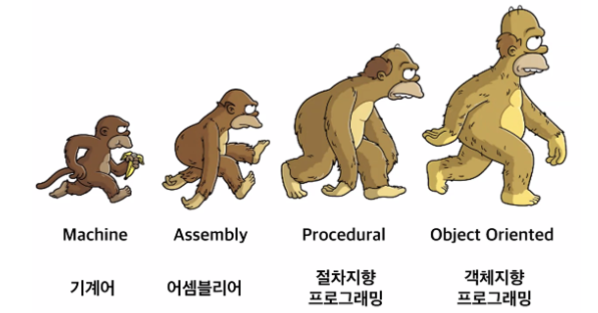
- 객체지향(OOP)의 장점과 단점
-
장점
-코드의 재사용 가능(유지보수에 용이) -
단점
-설계에 많은 시간이 소요
-클래스 문법으로 인한 부피 있는 코드 량
- 함수형 프로그래밍
-순수 함수를 조합하고 소프트웨어를 만드는 방식
-어떻게 할건지(How)를 나타내기보다 무엇(What)을 할 건지를 설명하는 선언형 프로그래밍 방식이다.


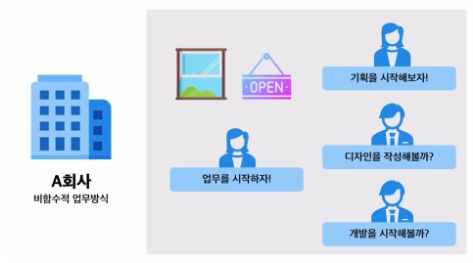
→ 비함수적 업무방식 - 무엇을 할지(What)를 나타내기보다 어떻게 할지(How)를 나타내는 방식
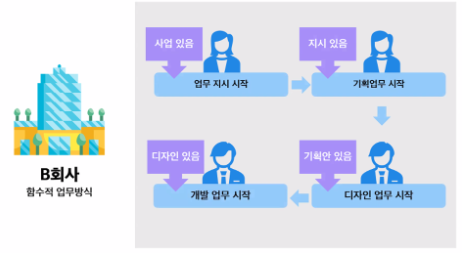
→ 함수적 업무방식 - 어떻게 할지(How)를 나타내기보다 무엇을 할지(What) 할건지 나타내는 방식
React Hooks
- 기존에 사용하던 방식과 달리 함수형 프로그래밍으로 리액트를 활용할 때, 쉽게 문법을 쓸 수 있도록 나온 기능
- use ~
- 함수형 컴포넌트가 클래스형 컴포넌트의 기능을 쓸 수 있도록 만들어주는 기능
- UseEffect(콜백함수, 어레이)
-React Component가 렌더링 될 때 마다 특정 작업을 할 수 있도록 해주는 리액트 훅
*콜백함수
함수 안에 있는 또 다른 함수
특정 이벤트가 호출되었을 때 실행할 함수
btn.addEventListener(’click’, ( )⇒{ })
- useEffect(( )⇒{로직 작성},[ ])
화면이 렌더링 되자마자 화면에 처음 보여져야 할 데이터들을 다룬다
= componentDidMount
마찬가지로 API Call 같은 무거운 작업 시 많이 사용 된다.
- UI 세팅이 완료되어 DOM에 접근이 가능하다
- 사용 예시 : API Call, setTimeout … etc
- useEffect(( )⇒{로직작성}, [state])
해당 state의 값이 바뀔 때 마다, 첫 화면 렌더링 때 useEffect가 호출된다
= componentDidUpdate
값이 바뀌는 것을 인지해야할 때 사용
- 갱신이 일어난 직후에 호출됨
- 사용 예시) state나 props 값이 갱신된 것을 확인할 때
ClassComponent에서는 시점을 지정할 수 있는 LifeCycle이라는게 존재 (EX13.JSX 참조)
=> Function Component에서는 사용이 불가능
대체 사용이 가능한 리액트 훅, useEffect를 사용
1) useEffect(함수, [])
-componentDidMount를 대체
-UI 세팅이 완료되어 DOM에 접근 가능
-API Call
※ 주의사항!
→ 비어있더라도 Array는 꼭 적어줘야함
→ useEffect(함수) - 모든 이벤트가 이뤄지는 것에 렌더링
2) useEffect(함수, [state])
-componentDidUpdate를 대체
-array 안에 있는 값이 갱신된 직후에 호출
-최초 렌더링 때 한 번 호출
-변화를 감지할 대상은 복수가 될 수도 있다.
- Lifecycle
-React Component에는 생명주기가 존재
-컴포넌트가 실행되거나, 업데이트 되거나, 삭제 될 때 특정 이벤트가 발생함!
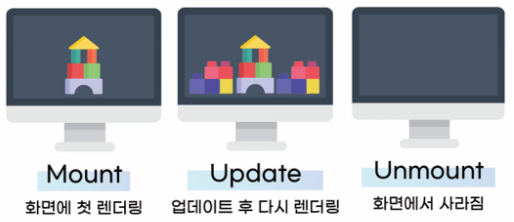
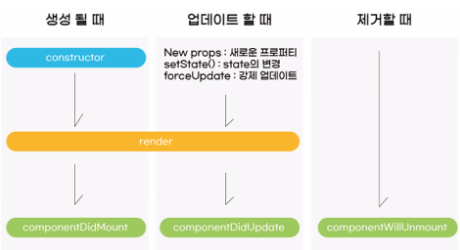
-
ComponentDidMount
-UI 세팅이 완료되어 DOM에 접근이 가능하다
-사용 예시 : API Call, setTimeout … etc -
ComponentDidUpdate
-갱신이 일어난 직후에 호출됨
-최초 렌더링에서는 호출되지 않는다
-사용 예시 : state나 props 값이 갱신된 것을 확인할 때
→ Lifecycle은 Function Component에서 사용할 수 없다
- UI 세팅이 마무리 되었을 때, 그 직후 실행
- 여기에서부터는 DOM 요소에 접근
- 무거운 데이터를 가져오는 API CALL 여기서 사용
=> 왜? 가벼운 화면 렌더링이 끝나고 API CALL을 해야 사용자의 불쾌함이 줄어들기 때문이다.
실습
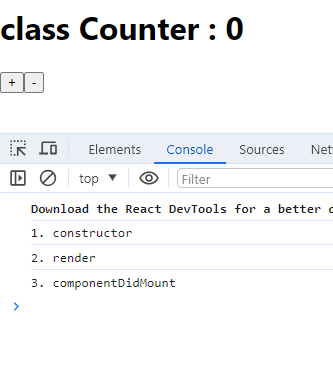
- Ex13.jsx(ClassComponent)
import React, { Component } from 'react'

/*
- Class Component 단축키 : rcc + Enter
-
*/
export default class Ex13 extends Component {

    componentDidMount(){

        /*
        - UI 세팅이 마무리 되었을 때, 그 직후 실행
        - 여기에서부터는 DOM 요소에 접근
        - 무거운 데이터를 가져오는 API CALL 여기서 사용
           => 왜? 가벼운 화면 렌더링이 끝나고 API CALL을 해야 사용자의 불쾌함이 줄어들기 때문이다.
        */
        console.log('3. componentDidMount');
    }

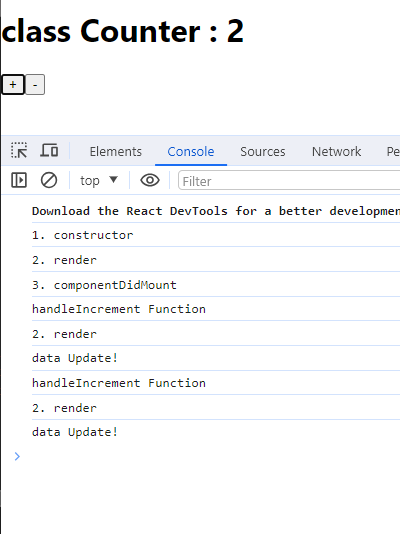
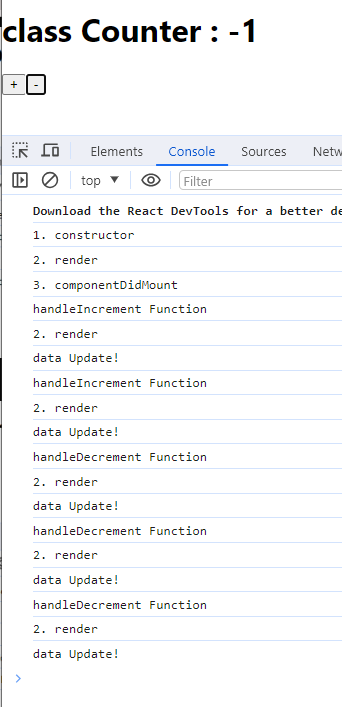
    componentDidUpdate(){
        console.log('data Update!');
    }

    constructor(props){

        console.log('1. constructor');

        /* 생성자 함수 : 가장 먼저 실행되는 공간
         - state값, 변수 값 초기화 하는 공간
         - super(props)와 함께 사용하는 것을 권고하고 있음
           밑에서 this 문법 사용 시, 생성자 내에서 정의되지 않아 머그 발생 */

         super(props);

         this.state = {
            counter : 0
         };

         this.handleIncrement = this.handleIncrement.bind(this);
         this.handleDecrement = this.handleDecrement.bind(this);
    }

    handleIncrement(){
        console.log('handleIncrement Function');
        this.setState({
            counter : this.state.counter += 1
        });
    }

    handleDecrement(){
        console.log('handleDecrement Function');
        this.setState({
            counter : this.state.counter -= 1
        });
    }

  render() {

    console.log('2. render');

    return (
      <div>
        <h1>class Counter : {this.state.counter}</h1>
        <button onClick={this.handleIncrement}>+</button>
        <button onClick={this.handleDecrement}>-</button>
      </div>
    )
  }
}
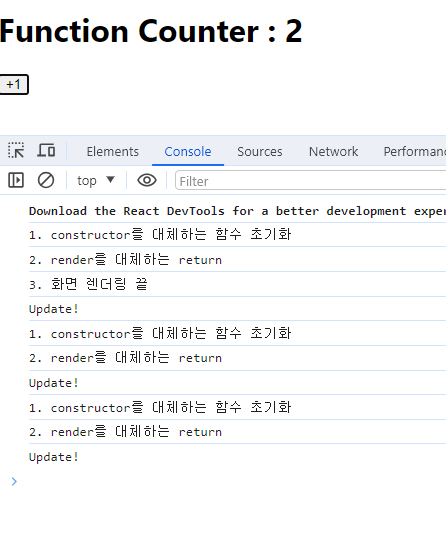
- Ex14.jsx(useEffect 개요 및 사용)
import React, { useEffect, useState } from 'react'

const Ex14 = () => {

    /*
    ClassComponent에서는 시점을 지정할 수 있는 LifeCycle이라는게 존재 (EX13.JSX 참조)
    => Function Component에서는 사용이 불가능

    대체 사용이 가능한 리액트 훅, useEffect를 사용

    1) useEffect(함수, [])
    - componentDidMount를 대체
    - UI 세팅이 완료되어 DOM에 접근 가능
    - API Call

    ※ 주의사항!
    -> 비어있더라도 Array는 꼭 적어줘야함
    -> useEffect(함수)
       모든 이벤트가 이뤄지는 것에 렌더링

    2) useEffect(함수, [state])
    - componentDidUpdate를 대체
    - array 안에 있는 값이 갱신된 직후에 호출
    - 최초 렌더링 때 한 번 호출
    - 변화를 감지할 대상은 복수가 될 수도 있다.
    */

    console.log('1. constructor를 대체하는 함수 초기화');

    useEffect(()=>{
        console.log('3. 화면 렌더링 끝');
    },[]);

    const [num, setNum] = useState(0);

    const btnCk = ()=>{
        setNum(num+1)
    }

    useEffect(()=>{
        console.log('Update!');
    },[num])

  return (
    <div>
        {console.log('2. render를 대체하는 return')}
        <h1>Function Counter : {num}</h1>
        <button onClick={btnCk}>+1</button>
    </div>
  )
}

export default Ex14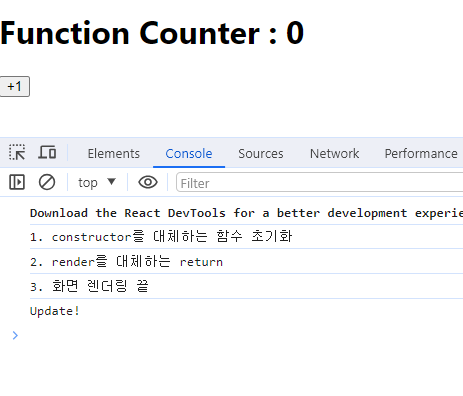
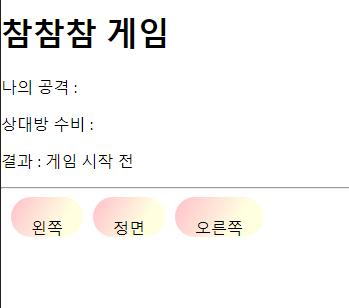
- Ex15.jsx(MiniGame - 참참참)
문제푸는 순서!
1. myChoice와 comChoice 세팅 화면에 보여지게
2. pos 배열이 가지고 있는 데이터를 활용해서 세개의 버튼을 띄워줄 것
3. 버튼 클릭 시, posRandom라는 함수 실행
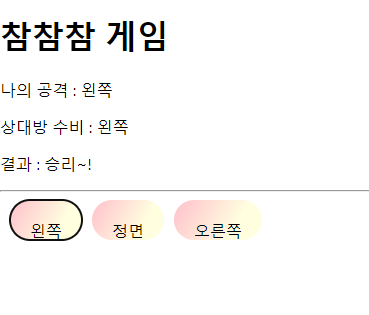
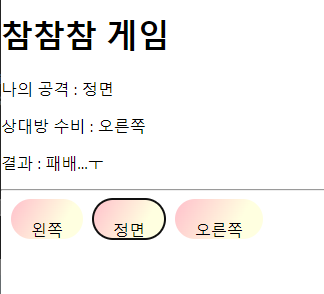
4. 버튼을 클릭한 값을 감지 => myChoice
난수를 받아와서 배열 안의 값 => comChoice
5. 만약에, 판이 바뀔 때 마다 myChoice, comChoice를 비교
-round 라는 변수
-round 라는 값이 바뀔 때 마다 승부 판정
import React, { useState, useEffect } from 'react'
import './ex15.css'

const Ex15 = () => {

    const posRandom = (e) => {

        setRound(round+1);

        console.log('posRandom function', e.target.innerText);

        // 나의 공격
        setMyChoice(e.target.innerText)

        // 상대방의 공격
        // 0~2 난수를 추출 => pos 안에 index로 적용
        let ranNum = parseInt(Math.random() * 3)
        console.log('ranNum', pos[ranNum]);
        setComChocie(pos[ranNum])
    }

    let pos = ['왼쪽', '정면', '오른쪽']

    let newPos = pos.map(item => <button key={item} onClick={posRandom}>{item}</button>)

    /*
    나의 선택 : myChocie
    상대방 수비 : comChoice
    결과 : result

    상대방의 선택은 랜덤하게 결정
    */

    const [myChocie, setMyChoice] = useState();

    const [comChoice, setComChocie] = useState();

    const [result, setResult] = useState("게임 시작 전");

    const [round, setRound] = useState(0);

    useEffect(()=>{

        if(round > 0) {
            myChocie == comChoice ? setResult('승리~!') : setResult('패배...ㅜ')
        }

       },[round])

  return (
    <div>
        <h1>참참참 게임</h1>
        <p>나의 공격 : {myChocie}</p>
        <p>상대방 수비 : {comChoice}</p>
        <p>결과 : {result}</p>

        <hr/>
        {/* pos 배열에 맡게 map 세팅 */}
        {newPos}
        {/* pos.map(item => <button key={item}>{item}</button>) */}
    </div>
  )
}

export default Ex15- ex15.css
button {
    height: 30px;
    font-size: 1em;
    background-image: linear-gradient(120deg, pink 0%, lightyellow 70%);
    border-radius: 20px;
    border: 0px;
    margin-left: 10px;
    padding: 20px;
}