라우터(Router)
사용자가 요청한 URL에 따라 해당 URL에 맞는 페이지를 보여주는 것


→ 눈속임으로 여러 페이지처럼 구현 → SPA의 장점은 그대로 유지
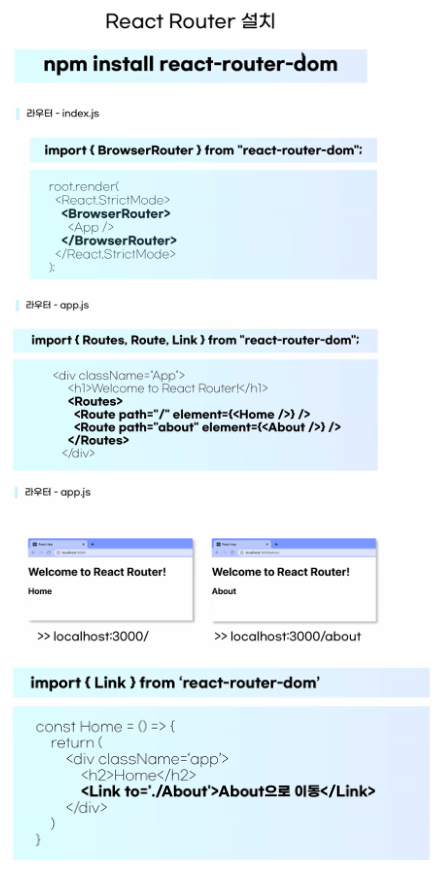
1) react router 설치
npm i react-router-dom
2) router를 사용할 수 있는 환경 세팅
-router 기능을 사용하고 싶으면, 그 사용하고 싶은 범위를
BrowserRouter라는 컴포넌트로 감싸주어야한다.(필수!)
-BrowserRouter가 하는 일 : 내가 받은 URL과 내가 보여줄 UI를 동기화 해주는 컴포넌트
-보통 index.js로 이동해서 App을 BrowserRouter로 감싼다.
3) Routes - Route
-Routes : 여러 Route(경로)들을 감싸서 그 중 조건에 맞는 라우트 하나만 렌더링 해준다.
과거에는 Switch라는 이름으로 사용되었다.
-Route : 여러 경로
-사용자 요청 "나 로그인 페이지 좀 줘"
-Routes "로그인? 기다려봐.. 여기있네 (로그인페이지 전달)"
-
import => 코드
최상위 컴포넌트
import {BrowserRouter} from 'react-router-dom'
라우터 사용 컴포넌트
import {Routes, Route, Link, ~} from 'react-router-dom' -
BrowserRouter
-라우터를 적용할 컴포넌트의 최상위 컴포넌트를 감싸는 래퍼 컴포넌트
-History API를 사용 url 설정 -
Routes
-Route를 묶어주는 부모 컴포넌트
-적합한 Route를 찾아주는 역할
-이전 버전에서는 Switch로 사용 -
Route
-경로를 설정해주는 컴포넌트
-path='/경로'
element={<컴포넌트/>}
-
Link
-특정 경로로 이동 컴포넌트
-a태그와 달리 새로운 페이지 요청 X
-History API로 경로만 변경
-to='/경로'
-
Link Component
a태그는 클릭 시 새로운 페이지를 불러오기 때문에 Link 컴포넌트를 대신 사용한다.
→ History API를 통해 브라우저 주소의 경로만 바꾸는 역할-웹 페이지에서는 원래 링크 이동 시 a태그를 사용함
-그러나, a태그 사용 시 페이지를 새로 불러오기 때문에 SPA로써의 장점 X
-History API라는 기능을 통해 브라우저 주소 경로만 바꾸는 기능이 내장되어있기 때문에 편한 사용자 경험 제고(1) import {Link} from 'react-router-dom'
(2) < Link to="URL경로" >링크의 이름< /Link >
- < a >태그와 < Link >태그의 차이?
Link태그는 '브라우저 주소'만 바꿀 뿐, 실제로 페이지를 불러오지는 않음!
그러나 < a href="#" >태그는 클릭할 때마다 페이지를 새로 불러오는 것
⇒ < a >태그를 사용하면 속도의 저하가 있으므로 Link를 쓰는 것을 권유
-
useNavigate(React Hooks)
React hooks 중 하나로, 페이지 이동을 도와주는 함수
-경로 변경 + 추가 로직
const nav = useNagivate()
num>10 && nav('/url')-사용 방법
1.const 변수 = useNavigate()
2.페이지 이동이 필요할 때 변수("경로")
ex) const nav = useNavigate()
nav('/about')
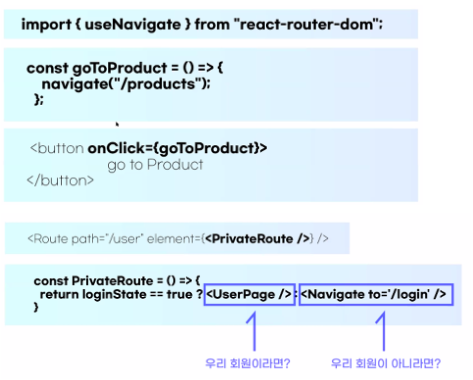
- 언제 Link를 쓰고, 언제 useNavigate를 쓸까?
- 클릭 시 바로 이동해야하는 로직 구현 ⇒ Link
ex) 클릭 시 로그인 페이지로 이동! - 페이지 전환 시, 추가 처리 로직이 필요할 시 ⇒ useNavigate
ex) 버튼을 클릭했을 때, 로그인 되어있다면 '마이페이지'로, 로그인이 되어있지 않다면 '로그인 페이지'로 이동!
- 클릭 시 바로 이동해야하는 로직 구현 ⇒ Link
-
useParams(React Hooks)
라우터 사용 시 Parameter 정보를 가져와 사용하고 싶을 때 쓰는 React Hooks
-url의 파라미터 값을 추출
const {num} = useParams();
<Route path='/url/:num'~/>-url의 파라미터 정보를 가져올 수 있음
-하나만 설정 가능하기 때문에, 물품의 고유한 ID값/번호를 설정하는데 적합1) < Route path="/url경로이름 : 파라미터 이름"/ >
ex) < Route path="/product/:num" >2) 파라미터를 사용할 컴포넌트로 와서
import {useParams} from 'react-router-dom'
let {파라미터 이름} = useParams()3) 페이지 이동을 할 때 URL에 num자리에 데이터를 입력
< Link to="/product/15" >
-
useSearchParams
라우터 사용 시 QueryString 정보를 가져와 관리하고 싶을 때 쓰는 React hooks
-url의 매개변수 값을 추출
const [query, setQuery] = useSearchParams();
< Link to='/url?key=value'~ >-URL의 쿼리 값을 가져와서 사용(? 이후의 데이터)
-여러 값을 구분해서 사용하고 싶을 때
-예를 들어, 똑같은 상품 페이지지만 랭킹을 통해 들어왔는지 서칭을 통해 들어왔는지, 광고페이지를 통해 들어왔는지 => 구분
-고유번호 이외에도 필요한 데이터가 있다면 사용ex)
< Link to="/product/1?" >
< Link to="/product/1?method=list" >-컴포넌트로 이동
const [query, setQuery] = useSearchParams();
query.get("method") 안에 데이터가 들어있음
실습
Project04
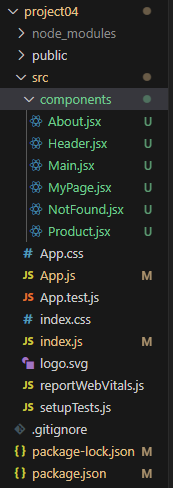
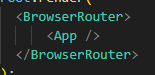
- index.js
import React from 'react';
import ReactDOM from 'react-dom/client';
import './index.css';
import App from './App';
import reportWebVitals from './reportWebVitals';
import {BrowserRouter} from 'react-router-dom'

const root = ReactDOM.createRoot(document.getElementById('root'));
root.render(
  <BrowserRouter>
      <App />
  </BrowserRouter>
);

// If you want to start measuring performance in your app, pass a function
// to log results (for example: reportWebVitals(console.log))
// or send to an analytics endpoint. Learn more: https://bit.ly/CRA-vitals
reportWebVitals();
- App.js
import {Routes, Route} from 'react-router-dom';
import './App.css';
import Main from './components/Main';
import About from './components/About';
import MyPage from './components/MyPage';
import Product from './components/Product';
import NotFound from './components/NotFound';
import Header from './components/Header';

function App() {

  return (
    <div className="App">
        <h1>Welcome to React Router!</h1>
        <Header/>

        <Routes>
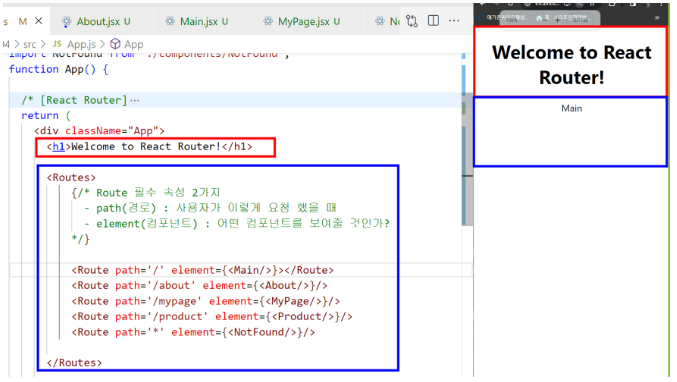
          {/*
          Route 필수 속성 2가지
          - path(경로) : 사용자가 이렇게 요청 했을 때
          - element(컴포넌트) : 어떤 컴포넌트를 보여줄 것인가?
          */}

          <Route path='/' element={<Main/>}></Route>
          <Route path='/about' element={<About/>}/>
          <Route path='/mypage' element={<MyPage/>}/>
          <Route path='/product/:num' element={<Product/>}/>
          <Route path='*' element={<NotFound/>}/>

        </Routes>

    </div>
  );
}

export default App;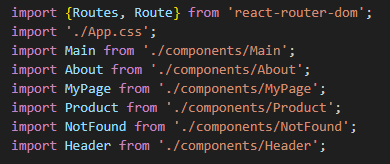
-components
- Main.jsx
import React from 'react'

const Main = () => {
  return (
    <div>Main</div>
  )
}

export default Main- MyPage.jsx
import React from 'react'

const MyPage = () => {
  return (
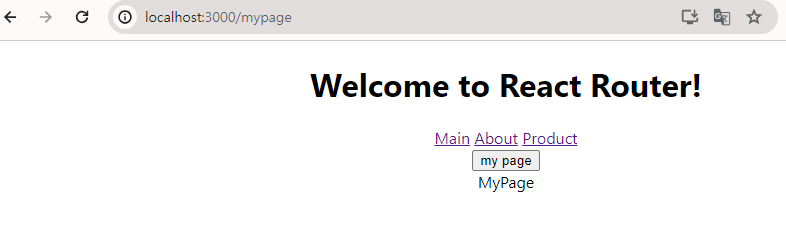
    <div>MyPage</div>
  )
}

export default MyPage- NotFound.jsx
import React from 'react'

const NotFound = () => {
  return (
    <div>NotFound</div>
  )
}

export default NotFound- About.jsx
import React from 'react'
import { Link } from 'react-router-dom'

const About = () => {

  return (
    <div>
        <h3>about</h3>
        <Link to="/product/1?method=list">[1] 곤듀랑 크리스마스 파티 하실분?</Link>
        <br/>
        <Link to="/product/2">[2] 리액트 예습/복습 하실분?</Link>
        <br/>
        <Link to="/product/3">[3] 장징어 같이 뚜까 때리실분?</Link>
    </div>
  )
}

export default About- Header.jsx
import React from 'react'
import { Link, useNavigate } from 'react-router-dom'

const Header = () => {

    const nav = useNavigate();

    let auth = true;

  return (
    <div>
        <Link to="/">Main</Link> {" "}
        <Link to="/about">About</Link> {" "}
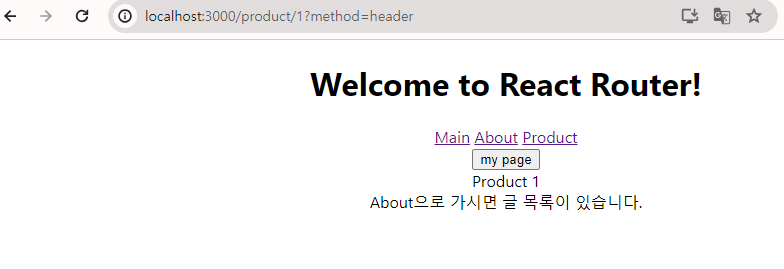
        <Link to="/product/1?method=header">Product</Link> <br/>
        <button onClick={()=>{auth ? nav('/mypage') : nav('/')}}>my page</button>
    </div>
  )
}

export default Header- Product.jsx
import React from 'react'
import { useParams, useSearchParams } from 'react-router-dom'

const Product = () => {

  // useParams
  let {num} = useParams()
  console.log('num', num);

  // useSearchParams
  const [query, setQuery] = useSearchParams();
  console.log('query', query.get('method'));

  return (
    <div>
      Product {num}
      <br/>
      {query.get('method') === "header"
        && <span>About으로 가시면 글 목록이 있습니다.</span>
      }
    </div>
  )
}

export default Product
-Main
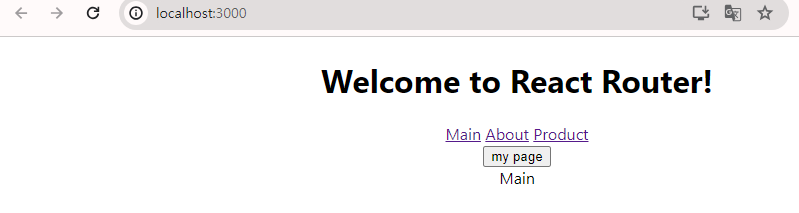
-About
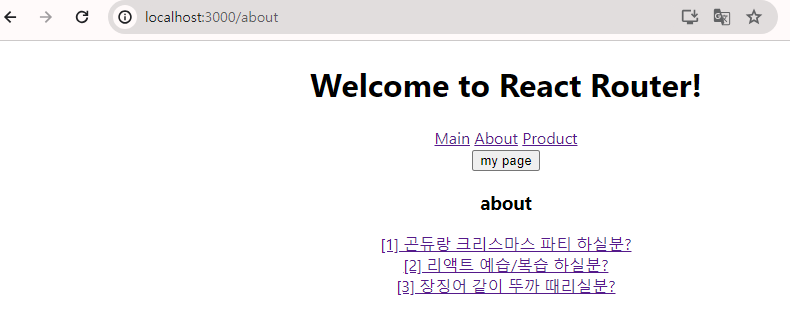
-About 1번 클릭
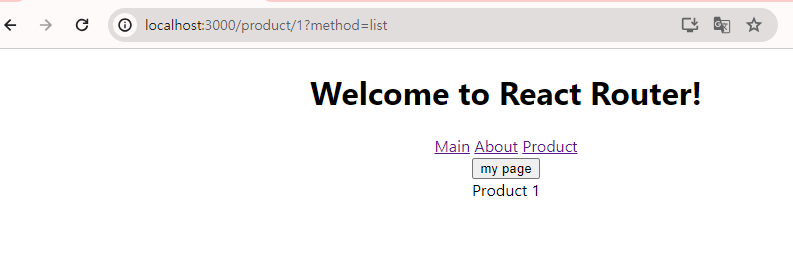
-Product
-MyPage
Project05
- 메인구성
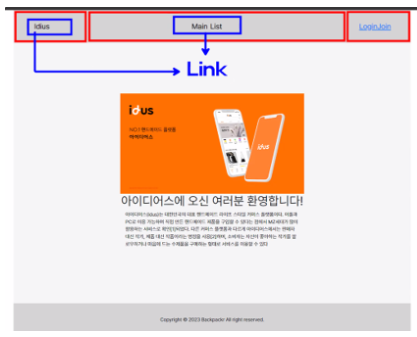
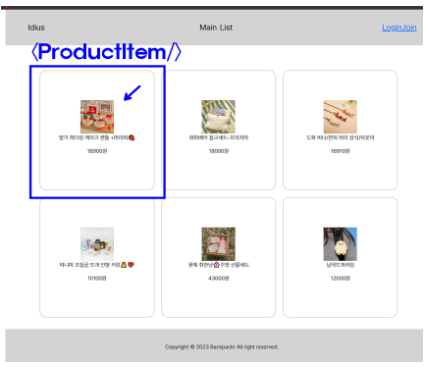
-
라우트 구성
-/ : Main.jsx
-/list : ProductList.jsx
-/detail : ProductDetail.jsx
-* Header와 Footer 는 라우트에 영향을 받지 않는다. -
메인 구성
-자율 -
Header 구성
-카톡 참조 -
List 구성
1) public 에 있는 bestList.json 파일을 가져올 거임 (axios 로)
2) 가져온 데이터로 화면을 세팅 (map 함수)
-ProductItem 으로
-내가 필요한 것들은 props로 전달 -
내가 클릭한 요소에 따라 다른 ProductDetail을 뽑아 줄 것
-useParams 를 사용 할 거임
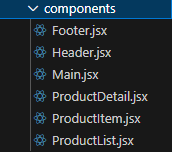
- index.js
import React from 'react';
import ReactDOM from 'react-dom/client';
import './index.css';
import App from './App';
import reportWebVitals from './reportWebVitals';
import {BrowserRouter} from 'react-router-dom'

const root = ReactDOM.createRoot(document.getElementById('root'));
root.render(
  <BrowserRouter>
    <App />
  </BrowserRouter>
);

// If you want to start measuring performance in your app, pass a function
// to log results (for example: reportWebVitals(console.log))
// or send to an analytics endpoint. Learn more: https://bit.ly/CRA-vitals
reportWebVitals();
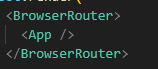
-import 추가

-수정
- App.css
*{
  margin: 0;
  padding: 0;
}

.container{
  height : 100vh;
  width: 100vw;
  display: block;
}

.container>div{
  display: flex;
  align-items: center;
}
.header-container{
  background-color: lightyellow;
  height: 10vh;
  justify-content: space-between;
  font-size: 1.5em;
  font-weight: bolder;
  padding: 0 5vw;
}

.header-container>a{
  color: black;
  text-decoration: none;
}

.footer-container{
  background-color: lightyellow;
  height: 10vh;
  justify-content: center;
}

.main-container{
  /* background-color: #FFFAE0; */
  height: 80vh;

  padding: 0 5vw;
  box-sizing: border-box;

  overflow: auto;
  flex-direction: row;
  flex-wrap: wrap;
  justify-content: space-evenly;
}

.main-container>.main-text{
  width: 45vw;
  font-size: 1.75rem;
}
.main-container>.main-image{
  width: 45vw;
  display: flex;
  justify-content: right;
}
.main-container>.main-image>img{
  height: 70vh;
}

.product-container{
  background-color: rgb(255, 232, 189);
  margin: 2.5vh 0;
  height: 75vh;
  border-radius: 20px;
  font-size: 1.75rem;

  display: flex;
  flex-direction: column;
  justify-content: center;
  align-items: center;

  padding: 3vw;
  box-sizing: border-box;
  /* overflow: hidden; */
  transition: 0.5s;
  cursor: pointer;
}

.product-container img{
  width: 30vw;
}

.product-container:hover{
  box-shadow: 0px 0px 10px 5px rgba(0, 0, 0, 0.1);
}

.detail-text>p{
  display: flex;
  flex-direction: row;
  justify-content: space-between;
}

.detail-container{
  flex-direction: row;
  width: 70vw;
}
.detail-image{
  display: flex;
  align-items: center;
}
.detail-text{
  margin-left: 3vw;
}- App.js
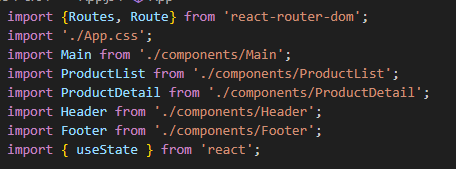
import {Routes, Route} from 'react-router-dom';
import './App.css';
import Main from './components/Main';
import ProductList from './components/ProductList';
import ProductDetail from './components/ProductDetail';
import Header from './components/Header';
import Footer from './components/Footer';
import { useState } from 'react';

function App() {

  /*
  (1) React-Router 라이브러리 설치
  - install + import
  - BrowserRouter, Routes, Route, ... etc

  (2) 컴포넌트 생성
  - 고정 컴포넌트 : Header, Footer
  - 페이지별 컴포넌트 : Main, ProductList, ProductDetail
  - 하위 컴포넌트 : ProductList 내 ProductItem

  (3) 컴포넌트 경로 설정
  - Main => '/'
  - ProductList => '/list'
  - ProductDetail => '/detail'
  */

  // App.js에서 list state를 관리
  const [list, setList] = useState([]);

  return (
    <div className="container">

      <Header/>

      <Routes>
        <Route path='/' element={<Main/>}/>
        <Route path='/list' element={<ProductList list={list} setList={setList}/>}/>
        <Route path='/detail/:num' element={<ProductDetail list={list}/>}/>
      </Routes>

      <Footer/>

    </div>
  );
}

export default App;
-import
- Header.jsx
import React from 'react'
import {Link} from 'react-router-dom'

const Header = () => {
  return (
    <div className='header-container'>
      <Link to="/">당근마켓</Link>
      <Link to="/list">상품목록</Link>
    </div>
  )
}

export default Header- Main.jsx
import React from 'react'

const Main = () => {
  return (
    <div className='main-container'>
      <div className='main-text'>
        <h1>
        당신 근처의 <br/>
        지역 생활 커뮤니티
        </h1>

        <p>
        동네라서 가능한 모든 것 <br/>
        당근에서 가까운 이웃과 함께해요.
        </p>

      </div>

      <div className='main-image'>
          <img src="https://d1unjqcospf8gs.cloudfront.net/assets/home/main/3x/rebranded-image-top-eb44f81acb1938b57ba029196887cdd56fbb66dc46aa5d8c6d8392a7d8c9e671.png"/>
      </div>

    </div>
  )
}

export default Main- Footer.jsx
import React from 'react'

const Footer = () => {
  return (
    <div className='footer-container'>
      <strong>전화</strong> 1544-9796
      <strong>고객문의</strong> cs@daangnservice.com
    </div>
  )
}

export default Footer- ProductItme.jsx
import React from 'react'
import {useNavigate } from 'react-router-dom';

const ProductItem = ({item, index}) => {

  console.log(item, index);

  /*
  해당 아이템 div을 클릭했을 때,
  아이템에 대한 상세페이지(ProductDetail)로 이동
  => useNavigate 사용
  => 상품별 고유번호 index 사용 : /detail/1, /detail/2
  */

  const nav = useNavigate();

  return (
    <div className='product-container'
    onClick={()=>{nav(`/detail/${index}`)}}>
      <img src={item.src}/>
      <br/>
      <p>{item.title}</p>
      <p>{item.price}원</p>
    </div>
  )
}

export default ProductItem- ProductList.jsx
import React, { useEffect } from 'react'
import axios from 'axios'
import ProductItem from './ProductItem';

const ProductList = ({list, setList}) => {

  /*
  (1) public 안 bestList.json 데이터 접근
      => axios, useEffect
  (2) 가지고 온 데이터 list에 세팅
  */

  useEffect(()=>{

    axios
    .get('http://localhost:3000/bestList.json')
    .then((res)=>{
      console.log(res.data.list);
      setList(res.data.list)
    })
    .catch()

  },[])

  console.log(list);

  return (
    <div className='main-container'>
      {list.map((item, index)=>
        <ProductItem key={index} item={item} index={index}/>
      )}
    </div>
  )
}

export default ProductList- ProductDetail.jsx
import React from 'react'
import { Link, useParams } from 'react-router-dom'

const ProductDetail = ({list}) => {

  let {num} = useParams();

  return (
    <div className='main-container'>
      <div className='product-container detail-container'>
        <div className='detail-image'>
          <img src={list[num].src} alt=""></img>
        </div>
        <div className='detail-text'>
          <h4>{list[num].title}</h4>
          <p>
            <span>가격 : {list[num].price}원</span>
            <span>배송비 : {list[num].delivery == 'free' ? '무료배송' : list[num].delivery + '원'}</span>
          </p>

          <Link to='/list'>목록으로 돌아가기</Link>

        </div>
      </div>
    </div>
  )
}

export default ProductDetail- 결과
-Main

-List
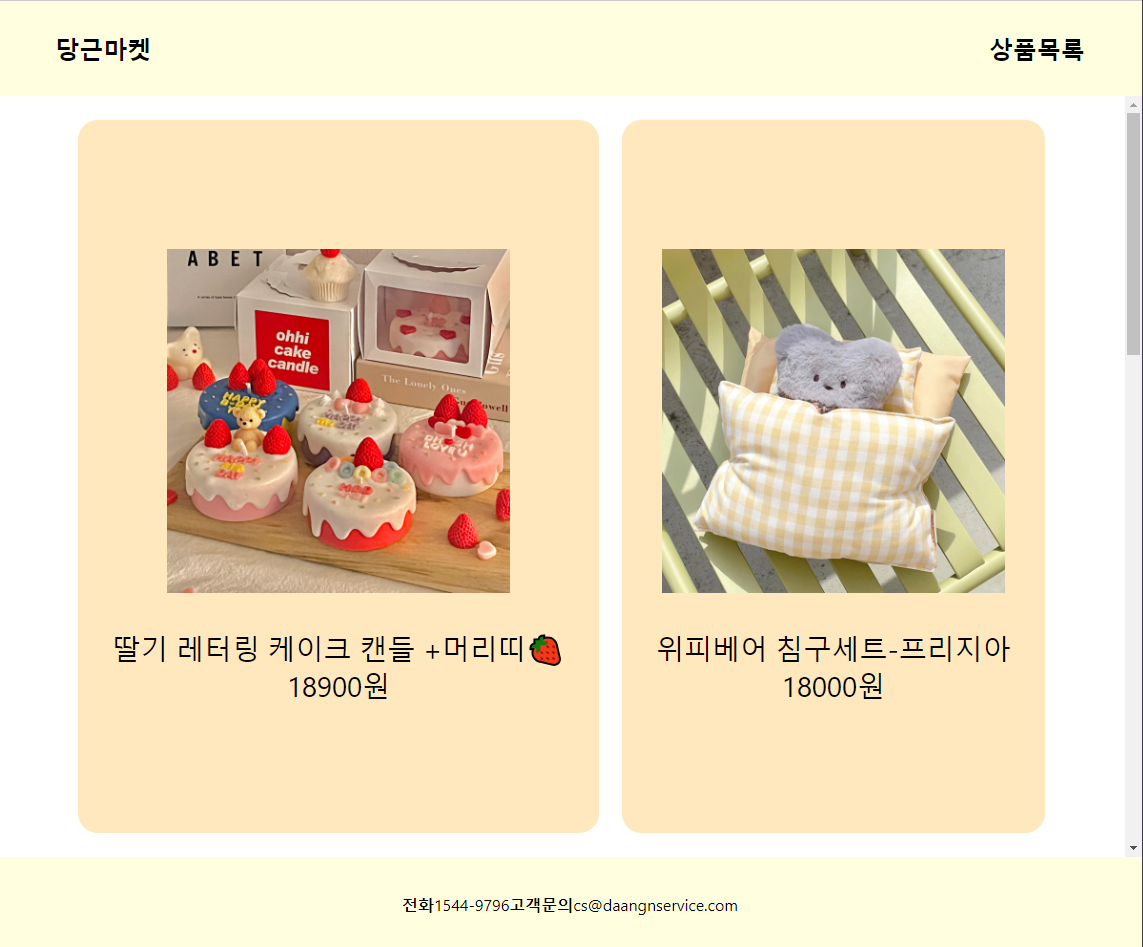
-Detail
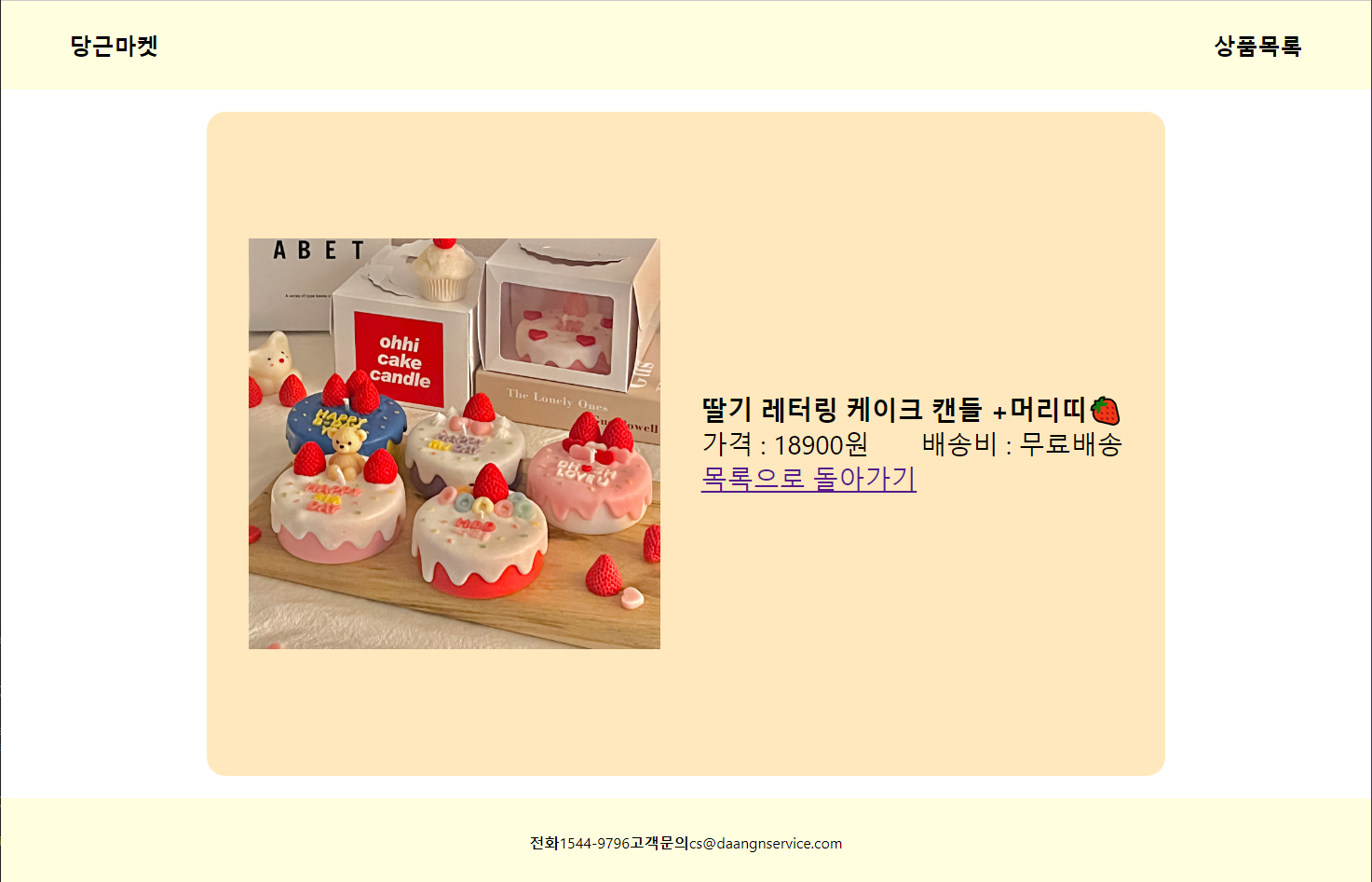
Project06
- index.jsx
import React from 'react';
import ReactDOM from 'react-dom/client';
import './index.css';
//import App from './App';
import reportWebVitals from './reportWebVitals';
import {BrowserRouter} from 'react-router-dom'
import App from './Player';

const root = ReactDOM.createRoot(document.getElementById('root'));
root.render(
  <BrowserRouter>
    <App />
  </BrowserRouter>
);

// If you want to start measuring performance in your app, pass a function
// to log results (for example: reportWebVitals(console.log))
// or send to an analytics endpoint. Learn more: https://bit.ly/CRA-vitals
reportWebVitals();
-import 확인

-수정
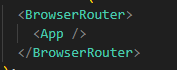
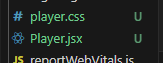
-player.css / Player.jsx 확인
- player.css
*{
    padding: 0;
    margin: 0;
}
h1{
    font-size: 5rem;
    margin: 5% 0;
}
.main-container{
    display: flex;
    flex-direction: column;
    align-items: center;
}
.main-container>a{
    font-size: 1.5em;
    font-weight: bold;
    text-decoration: none;
    color: black;
    background-color: lightgray;
    padding: 20px 30px;
    border-radius: 20px;
}
.list-container{
    display: flex;
    flex-direction: column;
    align-items: center;
}
.list-item{
    display: flex;
    flex-wrap: wrap;
    justify-content: space-evenly;
    cursor: pointer;
}
.item-container{
    display: flex;
    flex-direction: column;
    align-items: center;
    background: linear-gradient(320deg, blue , red);
    color: white;
    font-size: 1.2rem;
    font-weight: bold;
    width: 27.5%;
    padding: 2%;
    margin: 0.5%;
}
img{
    width: 100%;
    margin-bottom: 5%;
    /* border-radius: 50%; */
}
table{
    text-align: center;
    width: 100%;
}
td{
    background-color: rgba(255, 255, 255, 0.5);
    color: black;
    padding: 2.5% 0;
}
tr>td:nth-child(1){
    width: 30%;
}
tr>td:nth-child(2){
    width: 70%;
}- Player.jsx
import React, { useState } from 'react'
import {Routes, Route} from 'react-router-dom'
import Main from './components/Main';
import List from './components/List';
import Detail from './components/Detail';
import './player.css'

const Player = () => {

    /*
    컴포넌트 생성 및 라우팅 설정
    - 메인 페이지 : Main.jsx => /
    - 리스트 페이지 : List.jsx => /list
    - 상세 페이지 : Detail.jsx => /detail
    */

    // list state 초기화
    const [list, setList] = useState([]);

  return (
    <div>

        <Routes>
        <Route path='/' element={<Main/>}/>
        <Route path='/list' element={<List list={list} setList={setList}/>}/>
        <Route path='/detail/:num' element={<Detail list={list}/>}/>
      </Routes>

    </div>
  )
}

export default Player
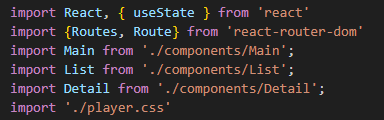
-import 확인
- Main.jsx
import React from 'react'
import {Link} from 'react-router-dom'

const Main = () => {

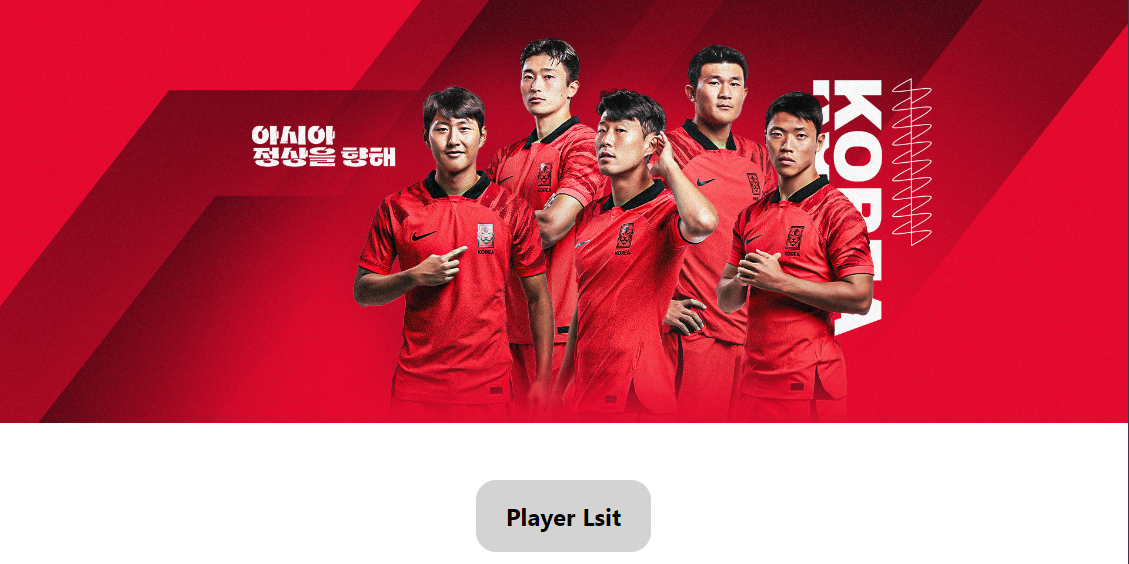
    // Player List 클릭 시 /list로 이동
  return (
    <div className='main-container'>
        <img src="https://img.kfa.or.kr/main_banner/170287775094134.jpg" alt="" width='100%'/>
        <Link to='/list'>Player Lsit</Link>
    </div>
  )
}

export default Main- List.jsx
import React, { useEffect } from 'react'
import Item from './Item'
import axios from 'axios'

const List = ({list, setList}) => {

  /*
  public 안의 json파일 데이터 가져오기
  */

  useEffect(()=>{

    axios
    .get('http://localhost:3000/player.json')
    .then((res)=>{setList(res.data.list)})

  }, [])

  console.log(list);

  return (
    <div className='list-container'>
      <h1>KOREA REPUBLIC</h1>
      <div className='list-item'>
        {list.map((item, index)=> <Item key={index} item={item} index={index}/>)}
      </div>
    </div>
  )
}

export default List- Item.jsx
import React from 'react'
import { useNavigate } from 'react-router-dom'

const Item = ({item, index}) => {

  /*
  프로필 카드 클릭 시 해당 선수 상세 페이지로 이동
  /detail/index

  Item.jsx => 클릭 시 경로 이동 (/detail/index)
  Detail.jsx => index 파라미터 설정
  Player.jsx => 파라미터 경로 추가 (/detail/~)
  */

  const nav = useNavigate();

  return (
    <div className='item-container' onClick={()=>{nav(`/detail/${index}`)}}>
      <img src={item.imgSrc} alt=""/>
      <table>
        <tbody>

          <tr>
            <td>이름</td>
            <td>{item.name}</td>
          </tr>

          <tr>
            <td>포지션</td>
            <td>{item.position}</td>
          </tr>

        </tbody>
      </table>
    </div>
  )
}

export default Item- Detail.jsx
import React from 'react'
import { useParams } from 'react-router-dom'

const Detail = ({list}) => {

    let {num} = useParams();

  return (
    <div className='item-container'>
      <img src={list[num].imgSrc} alt=""/>
      <table>
        <tbody>

          <tr>
            <td>이름</td>
            <td>{list[num].name}</td>
          </tr>

          <tr>
            <td>포지션</td>
            <td>{list[num].position}</td>
          </tr>

          <tr>
            <td>팀</td>
            <td>{list[num].team}</td>
          </tr>

          <tr>
            <td>나이</td>
            <td>{2023-list[num].age}세({list[num].age}년)</td>
          </tr>

          <tr>
            <td>키</td>
            <td>{list[num].height}cm</td>
          </tr>

          <tr>
            <td>몸무게</td>
            <td>{list[num].weight}kg</td>
          </tr>

        </tbody>
      </table>
    </div>
  )
}

export default Detail- 결과
-Main
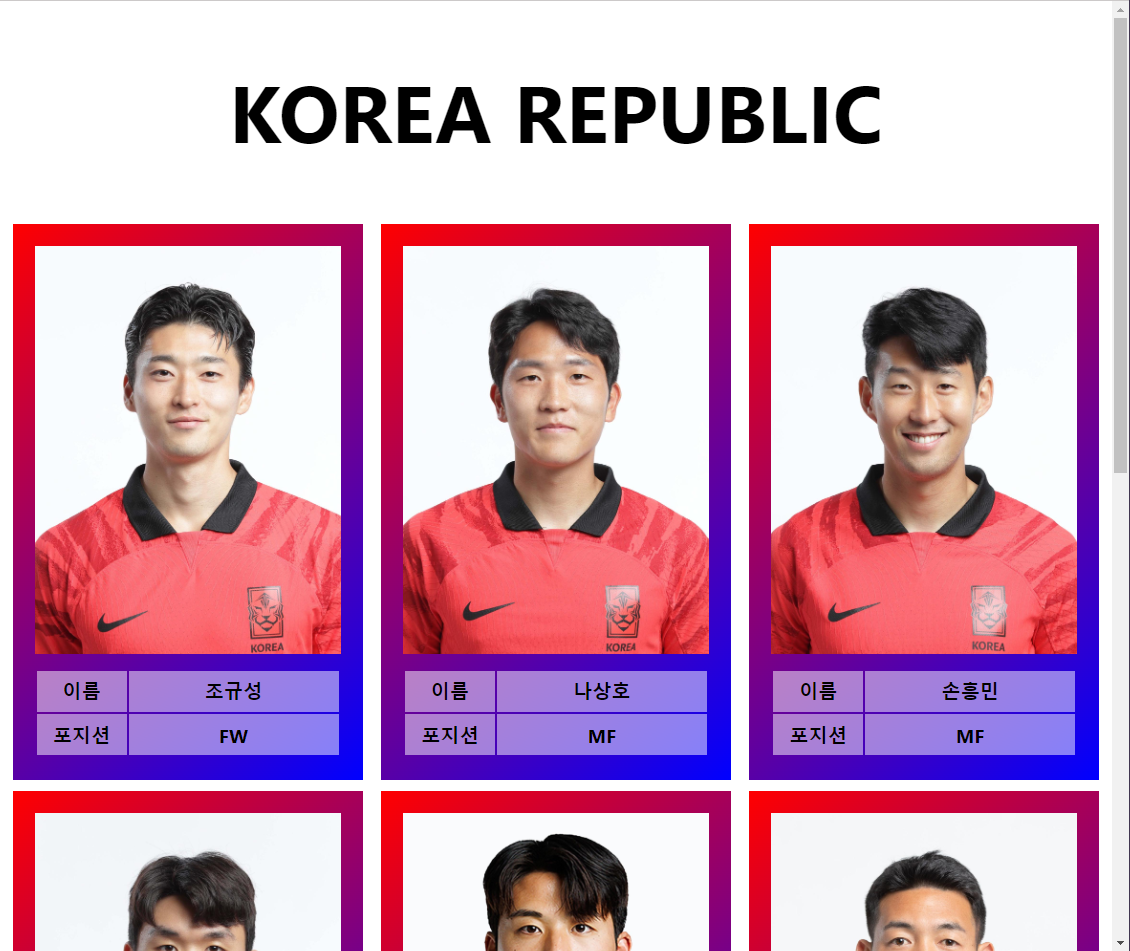
-List
-Detail