들어가기 전에
- 단순화하기 위해서 문체를 단정적으로 사용하지만 지극히 개인 의견일 뿐입니다.
- 본문과 관련해서 오류 지적이나 의견 있으시면 꼭 댓글 부탁드립니다.
- 글 작성 시점은 2024/09 입니다.
- 글 작성 기준은 UE5.4.4 입니다.
들어가며
언리얼을 다루다 보면 함수 이름이 직관적으로 받아들여지는 느낌과 달라서 직관 따로 이성 따로 움직이는 경우가 많습니다. 그 중 대표주자가 SetViewTarget 입니다(라고 생각합니다). 함수 이름을 처음 보면 바라보는 목표 지점을 설정하는 것 같은데 전혀 그렇지 않습니다(필자가 콩글리쉬가 강해서 그럴지도 모릅니다).
이번 포스팅에서는 SetViewTarget 을 머리에서 어떻게 변환해서 생각할지와 도대체 왜 AActor Class 에 GetActorEyesViewPoint(...) 가 있는지 생각해 보겠습니다. 그리고 UnrealEngine 에서 각종 View를 계산할 때 어느 시점을 기준으로 CameraLocation, CameraRotation 을 가져오는지 알아보고 FollowingCamera 를 어떻게 설정하면 좋을지도 다뤄 보겠습니다.
이번 포스팅에서는 다음은 자세히 다루지 않고 기본적인 내용만 다루기로 합니다.
- Camera Blending
- Fade In/Out
- PostProcessing
- Modifier
- etc...
Class Diagram
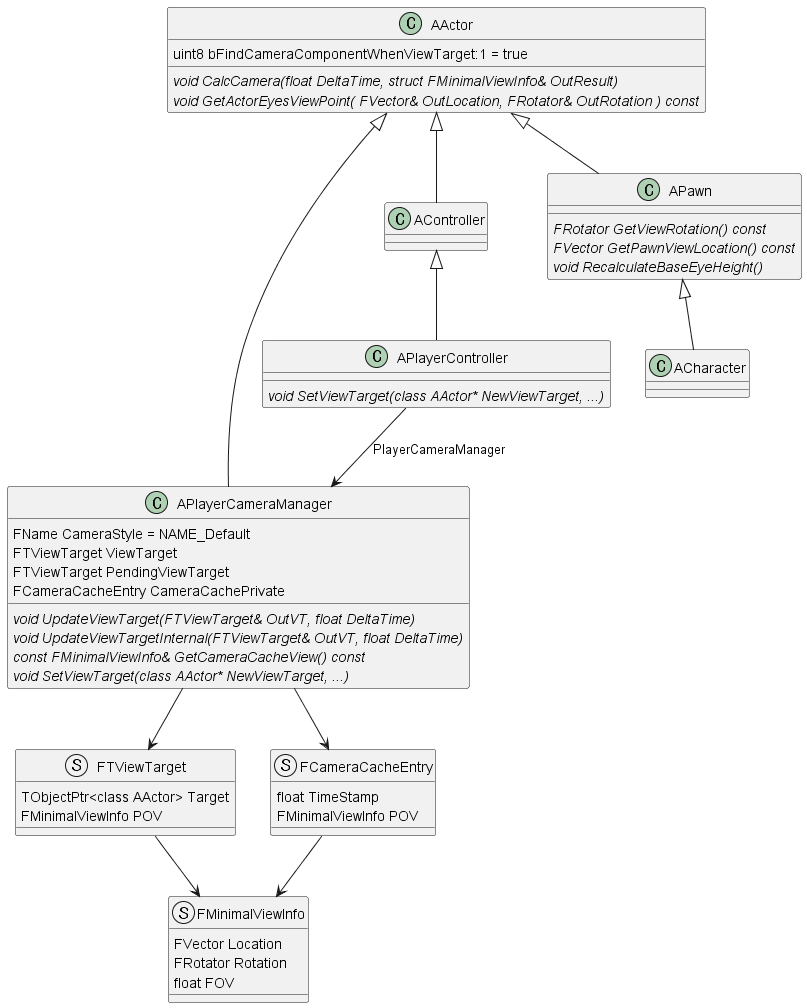
최종적으로 결정되어야 하는 값은 APlayerCameraManager::CameraCachePrivate 입니다. 이 값을 기준으로 각종 View 를 계산하게 됩니다. 결국 이 포스팅은 CameraCache 를 계산하는 과정에 대한 설명이 됩니다. FMinimalViewInfo 에 있는 Location 에서 Rotation 으로 머리를 돌리고 시야각 FOV 로 카메라가 설정된다고 생각하시면 됩니다. APlayerCameraManager 에게 Location, Rotation 을 물어보는 것은 결국 CameraCache 에서 값을 꺼내 가는 것이 됩니다.
FRotator APlayerCameraManager::GetCameraRotation() const
{
	return GetCameraCacheView().Rotation;
}

FVector APlayerCameraManager::GetCameraLocation() const
{
	return GetCameraCacheView().Location;
}
void APlayerCameraManager::GetCameraViewPoint(FVector& OutCamLoc, FRotator& OutCamRot) const
{
const FMinimalViewInfo& CurrentPOV = GetCameraCacheView();
OutCamLoc = CurrentPOV.Location;
OutCamRot = CurrentPOV.Rotation;
}대략적인 구조를 살펴보겠습니다.
- APlayerController 가 APlayerCameraManager 를 소유하고 있습니다.
- APlayerCameraManager 에는 FViewTarget Type 으로 ViewTarget, PendingViewTarget 을 가지고 있습니다.
- APlayerCameraManager 은 FMinimalViewInfo 이 주 내용인 FCameraCacheEntry 를 가지고 있습니다.
- FMinimalViewInfo 에는 Location, Rotation, FOV 가 주 정보로 담겨 있습니다.
이중 CameraStyle 은 APlayerCameraManager::UpdateViewTarget 안에 다음과 같이 정의되어 있습니다. CameraStyle 의 Default 값은 NAME_Default 이며 아래에 해당하지 않습니다. CameraStyle 이 지정되면 약간 다르게 동작하게 되는데 그건 직접 UpdateViewTarget Code 를 여러분이 직접 살펴보시기 바랍니다.
Camera Style Name
static const FName NAME_Fixed = FName(TEXT("Fixed"));
static const FName NAME_ThirdPerson = FName(TEXT("ThirdPerson"));
static const FName NAME_FreeCam = FName(TEXT("FreeCam"));
static const FName NAME_FreeCam_Default = FName(TEXT("FreeCam_Default"));
static const FName NAME_FirstPerson = FName(TEXT("FirstPerson"));
Sequence
자 그럼 시작해 보겠습니다.
UWorld::Tick(...)
UE_5.4/Engine/Source/Runtime/Engine/Private/LevelTick.cpp
void UWorld::Tick( ELevelTick TickType, float DeltaSeconds )
{
	...
	RunTickGroup(TG_PrePhysics);
    ...
    RunTickGroup(TG_StartPhysics);
    ...
    RunTickGroup(TG_DuringPhysics, false);
    ...
    RunTickGroup(TG_PostPhysics);
    ...
    PlayerController->UpdateCameraManager(DeltaSeconds)
    ...
}
UE_5.4/Engine/Source/Runtime/Engine/Private/PlayerController.cpp
void APlayerController::UpdateCameraManager(float DeltaSeconds)
{
    if (PlayerCameraManager != NULL)
    {       PlayerCameraManager->UpdateCamera(DeltaSeconds);
    }
}
World::Tick(...) 이 실제로 모든 Actor Tick 을 돌린다고 생각하셔도 됩니다. 위에 나오는 RunTickGroup 들은 각 Tick(ActorTick, ComponentTick)이 속한 Group 을 작동시킵니다. 여기서 중요한 점은 AActor 의 기본 TickGroup 은 PrimaryActorTick.TickGroup = TG_PrePhysics; 이고 AActorComponent 의 TickGroup 은 PrimaryComponentTick.TickGroup = TG_DuringPhysics; 라는 점입니다. TickGroup 은 다른 포스팅에서 다뤄 보기로 하겠습니다.
따라서 UpdateCamera 는 모든 Actor 가 작동(Tick) 을 수행하고 TickGroup 소속을 넘어서 맨 마지막에 작동합니다. 이 점이 아주 중요한데, Unity 를 다뤄 보신 분들이라면 Following Camera 를 만들 때 카메라가 부들부들 떨리는 걸 본 경험들이 있으실 것입니다. 10중 8, 9는 Update, FixedUpdate 주기 문제이거나 어느 Component, 어느 GameObject 가 먼저 수행하느냐에 따라서 발생하게 됩니다. 즉, Camera 가 바라보는 Object 좌표 갱신이 먼저냐 Camera 위치, 방향 계산이 먼저냐에 따라서 생기는 일이 대부분입니다.
하지만 위와 같이 Unreal 에서는 APlayerCameraManager 를 사용할 것을 반 강제하고 있고 계산 Timing 이 모든 Actor 연산 이후로 고정되어 있어서 카메라가 떨릴 일이 없습니다. 그런데 Camera 가 떨린다면 무언가를 잘못하고 있는 것입니다.
언리얼에서 작업자가 작업 후 Camera 가 떨린다고 해서 살펴보면, 대부분 CameraActor 를 만들어 두고 해당 CameraActor 를 SetViewTarget 으로 설정한 다음, CameraActor 의 Tick 에서 위치, 방향을 계산하는 경우가 상당수입니다. 정 CameraActor 를 따로 만들고 해당 CameraActor 가 특정 Actor 를 바라보게 하겠다면 다른 함수를 활용해야 합니다.
위의 해답은 이후 다시 생각해 보기로 하고 일단은 Code 를 따라가 보겠습니다.
APlayerCameraManager::DoUpdateCamera(...)
APlayerCameraManager::UpdateCamera 의 작동은 사전 검사할 것을 확인한 후 DoUpdateCamera(...) 를 호출하는 것입니다.
void APlayerCameraManager::UpdateCamera(float DeltaTime)
{
    check(PCOwner != nullptr);

    if ((PCOwner->Player && PCOwner->IsLocalPlayerController()) || !bUseClientSideCameraUpdates || bDebugClientSideCamera)
    {
	    DoUpdateCamera(DeltaTime);
    ...
void APlayerCameraManager::DoUpdateCamera(float DeltaTime)
{
FMinimalViewInfo NewPOV = ViewTarget.POV;
...
UpdateViewTarget(ViewTarget, DeltaTime);
...
NewPOV = ViewTarget.POV;
if (PendingViewTarget.Target != NULL)
{
...
UpdateViewTarget(PendingViewTarget, DeltaTime);
...
NewPOV = ViewTarget.POV;
NewPOV.BlendViewInfo(PendingViewTarget.POV, BlendPct);
...
}
...
FillCameraCache(NewPOV);
}DoUpdateCamera 의 주 역할은 현재 ViewTarget 으로 설정된 View를 갱신하고, 필요하면 전환 중(목표)인 PendingViewTarget 의 View도 계산하고 보간한 다음 CameraCache 에 저장하는 것입니다.
아래에서 다시 언급하겠지만 ViewTarget 은 카메라가 바라보는 곳이 아닙니다. 카메라의 위치, 방향(FMinimalViewInfo) 을 채우는 데 있어 어느 Actor(ViewTarget.Target) 에게 물어볼 것인가가 지정되어 있습니다. 그 값을 채우는 UpdateViewTarget 을 이어서 살펴보겠습니다.
APlayerCameraManager::UpdateViewTarget(...)
void APlayerCameraManager::UpdateViewTarget(FTViewTarget& OutVT, float DeltaTime)
{
    ...
    	if (ACameraActor* CamActor = Cast<ACameraActor>(OutVT.Target))
	{
		// Viewing through a camera actor.
		CamActor->GetCameraComponent()->GetCameraView(DeltaTime, OutVT.POV);
	}
	else
	{
        ...
		else if (CameraStyle == NAME_FirstPerson)
		{
			// Simple first person, view through viewtarget's 'eyes'
			OutVT.Target->GetActorEyesViewPoint(OutVT.POV.Location, OutVT.POV.Rotation);

			// don't apply modifiers when using this debug camera mode
			bDoNotApplyModifiers = true;
		}
		else
		{
			UpdateViewTargetInternal(OutVT, DeltaTime);
		}
    }


}
우선 살펴볼 것은 OutVT(ViewTarget)의 Target 이 ACameraActor 계열일 때입니다. CameraActor 를 상속받아서 만들면 위와 같이 CameraComponent 를 가져와서 해당 Component 에 물어보게 됩니다. 아래에 있는 CameraStyle 로는 아예 들어가지 않습니다.
현재 쫓아가고 있는 함수들은 APlayerCameraManager 의 ViewTarget, PendingViewTarget 모두 호출되는 곳이라는 걸 잊지 마시기 바랍니다. 즉, ViewTarget, PendingViewTarget 이 무엇이든 간에 물어보는 방식은 일단 APlayerCameraManager 가 결정합니다.
CameraStyle == NAME_FirstPerson 등은 아래 내용을 살펴본 다음 여러분이 직접 살펴보시기 바랍니다. 만약 Custom 한 CameraStyle 을 지정했거나, 아무런 지정을 하지 않으면 결국 UpdateViewTargetInternal 로 들어가게 됩니다.
APlayerCameraManager::UpdateViewTargetInternal(...)
void APlayerCameraManager::UpdateViewTargetInternal(FTViewTarget& OutVT, float DeltaTime)
{
	if (OutVT.Target)
	{
		FVector OutLocation;
		FRotator OutRotation;
		float OutFOV;

		if (BlueprintUpdateCamera(OutVT.Target, OutLocation, OutRotation, OutFOV))
		{
			OutVT.POV.Location = OutLocation;
			OutVT.POV.Rotation = OutRotation;
			OutVT.POV.FOV = OutFOV;
		}
		else
		{
			OutVT.Target->CalcCamera(DeltaTime, OutVT.POV);
		}
	}
}
만약 APlayerCameraManager 를 상속받아 Blueprint 를 만들고, PlayerController 에게 해당 BP를 사용하게 지정해두고 BlueprintUpdateCamera 를 구현해 두셨다면, 해당 BP 에 묻고 끝나게 됩니다.
아니면 드디어 해당 TargetActor 에게 CalcCamera 를 요청하게 됩니다.
만약 Custom CameraStyle 을 구현하고자 하신다면 UpdateViewTargetInternal 을 재정의하는 것이 가장 편할 것 같습니다.
AActor::CalcCamera
void AActor::CalcCamera(float DeltaTime, FMinimalViewInfo& OutResult)
{
	if (bFindCameraComponentWhenViewTarget)
	{
		// Look for the first active camera component and use that for the view
		TInlineComponentArray<UCameraComponent*> Cameras;
		GetComponents(/*out*/ Cameras);

		for (UCameraComponent* CameraComponent : Cameras)
		{
			if (CameraComponent->IsActive())
			{
				CameraComponent->GetCameraView(DeltaTime, OutResult);
				return;
			}
		}
	}

	GetActorEyesViewPoint(OutResult.Location, OutResult.Rotation);
}
void APlayerController::CalcCamera(float DeltaTime, FMinimalViewInfo& OutResult)
{
OutResult.Location = GetFocalLocation();
OutResult.Rotation = GetControlRotation();
}CalcCamera 는 무려 최상위 Class 라고 할 수 있는 AActor 에 기본 구현되어 있고, 재정의하고 있는 곳은 APlayerController 가 대표적입니다.
AActor::CalcCamera(...) 의 경우 기본 true 인 bFindCameraComponentWhenViewTarget 을 확인하고 아래 Component 중 UCameraComponent 를 찾아 있으면 해당 CameraComponent 에게 GetCameraView 를 요청합니다. TP_Person Template 예제에서 3인칭 카메라 값이 결정되는 곳이 바로 이곳입니다.
bFindCameraComponentWhenViewTarget 이 false 이거나, CameraComponent 가 없으면 GetActorEyesViewPoint 로 들어가게 됩니다.
AActor::GetActorEyesViewPoint(...)
따로 재정의되어 있지 않다면 기본적으로, 해당 Actor의 Location, Rotation 을 사용합니다.
void AActor::GetActorEyesViewPoint( FVector& OutLocation, FRotator& OutRotation ) const
{
	OutLocation = GetActorLocation();
	OutRotation = GetActorRotation();
}
Target 이 Pawn 계열이라면
void APawn::GetActorEyesViewPoint( FVector& out_Location, FRotator& out_Rotation ) const
{
    out_Location = GetPawnViewLocation();
    out_Rotation = GetViewRotation();
}
FVector APawn::GetPawnViewLocation() const
{
return GetActorLocation() + FVector(0.f,0.f,BaseEyeHeight);
}Target 이 Character 계열이면 추가적으로 웅크린 상태를 확인해서 EyeHeight 을 조정합니다.
void ACharacter::RecalculateBaseEyeHeight()
{
    if (!bIsCrouched)
    {
	    Super::RecalculateBaseEyeHeight();
    }
    else
    {
       BaseEyeHeight = CrouchedEyeHeight;
    }
}
무려 AActor 에 CalcCamera, GetActorEyesViewPoint 가 있는 이유가 뭘까요?
AActor 계열은 World 에 존재하는 Object들의 최고 상위 Class 입니다. UCameraComponent 도 있고 기본적으로 ACameraActor 도 제공되는데 왜 최상위 Class 에 저 함수가 있을까요?
몇 가지 이유를 추측해 볼 수 있는데, 지금부터는 완전히 필자 개인 추측이며 공식적으로 언급된 적이 있는지는 찾아보지 못했습니다.
첫째는 우선 다른 포스팅에서도 언급되겠지만 UnrealEngine 이 원래 Unreal Tournament(이하 UT) Code 에서 분리 발전되어 왔다는 것입니다. UT 는 FPS 게임이고 기본적인 카메라는 내가 조종하는 캐릭터의 눈 과 내 캐릭터가 죽었을 때 다른 캐릭터의 눈, 또는 자유롭게 날아다니는 Spectator 의 눈 입니다. UT가 처음 나왔을 때 카메라는 저거면 충분했고, 카메라의 대상이 되는 움직이는 객체도 딱 저 정도였을 것입니다.
둘째는 언리얼이 Component 기반으로 시작한 엔진이 아니라는 점입니다. 이는 다른 포스팅에서 자세히 다뤄 보겠습니다.
셋째는 현재 방식이 아주 유연하다는 점입니다. 처음에 보면 일견 복잡해 보이고 번거로워 보일 수 있는데, 사실 APlayerCameraManager 에게 일임함으로서 얻을 수 있는 이점이 상당히 많습니다. 예를 들어 특정 캐릭터 주위를 빙글빙글 돌게 만드는 카메라를 만든다고 했을 때, 다른 Class 수정 없이 APlayerCameraManager 에 기능 추가로 구현할 수도 있습니다(물론 Camera 역할 Actor를 돌릴 수도 있을 것입니다). CalcCamera 의 경우 PlayerController 에서도 재정의하고 있는데, 카메라 방향과 위치를 따로 제어할 때 사용되기도 합니다.
Following Camera
그럼 특정 캐릭터를 따라다니는 Following Camera 를 만드는 방법에 대해 생각해 보겠습니다. 꼭 위치까지 따라다니는 게 아니라, 특정 위치에서 고개만 돌리는 방법도 고려해 보겠습니다.
- 위치까지 다 따라다닌다면
CameraStyle == NAME_ThirdPerson으로 지정합니다. - 위치까지 다 따라다닌다면 TP_ThirdPerson 처럼 CameraComponent 를 Attach 시켜 둡니다. 단 이 방법은 특정 CameraComponent 가 있어야 하므로 구조상 제약이 생깁니다.
- 위치는 따로 지정하고 방향만 특정 Target 을 바라본다면, Target 을 PlayerController 로 지정하고 GetFocalLocation() 을 재정의합니다.
등등등... 여기서 중요한 건 ViewTarget Actor 의 Rotation 에 의존하지 말고, TargetActor의 CalcCamera 를 재정의하거나, APlayerCameraManager 에서 UpdateViewTarget_Internal 등을 계산할 때 바라볼 Target 을 구해서 그 시점에 Rotation 을 계산해야 한다는 것입니다.
APlayerCameraManager 교체하기
APlayerController 에서 Class 를 지정해 주시면 됩니다.
	/** PlayerCamera class should be set for each game, otherwise Engine.PlayerCameraManager is used */
	UPROPERTY(EditAnywhere, BlueprintReadOnly, Category=PlayerController)
TSubclassOf<APlayerCameraManager> PlayerCameraManagerClass;AMyPlayerController::AMyPlayerController(const FObjectInitializer& ObjectInitializer)
: Super(ObjectInitializer)
{
PlayerCameraManagerClass = AMyPlayerCameraManager::StaticClass();
}마무리
SetViewTarget 은 누구에게 카메라 계산을 맡길 것인가를 정하는 함수입니다.