들어가기 전에
- 내용을 단순화하기 위해 단정적인 문체를 사용하고 있으나, 어디까지나 개인적인 의견임을 미리 말씀드립니다.
- 본문과 관련하여 오류 지적이나 의견이 있으시면 댓글로 남겨 주시면 감사하겠습니다.
- 글 작성 시점은 2024/09 입니다.
- 글 작성 기준은 UE5.4.4 입니다.
들어가며
공식 문서에도 있고, 각종 블로그에도 있으며, 많은 곳에 UClass와 UObject에 대한 설명이 있지만, 그럼에도 불구하고 내용을 덧붙여 보고자 합니다. 오류가 있을 수도 있고, UE5.5.0에서는 또 변경되어 있을지도 모르지만, 그래도 한번 정리해 보겠습니다.
이번 포스팅에서는 언리얼 엔진에서
- UClass의 주목적
- UObject-UClass 상속 관계 및 특정 상황에서의 Instance 구성
- UClass Reflection이 무엇이고, 어떻게 활용하며, 어떻게 가능한 것인지에 대한 맛보기
- ClassDefaultObject
- UClass Reflection 내용을 어떻게 언리얼엔진이 채워 놓는지에 대한 맛보기
- 등등...
에 대해서 다루어 보겠습니다. 다른 포스팅에서도 마찬가지이지만, 여기서도 여러분께서 기본적인 UCLASS(...), UFUNCTION(...), UPROPERTY(...) 의 코딩 방법은 알고 계신다고 가정하겠습니다. 코드가 다소 나오지만 그리 어렵지는 않으니 한번 살펴봐 주시면 감사하겠습니다.
UClass의 주 목적
UClass는 특정 UObject의 내부 정보를 읽기/쓰기/순회/호출하는 데 필요한 메타데이터를 제공하는 것이 주 목적입니다. 공식 문서도 여러 곳에 흩어져 있어서 따로 링크를 달지는 않겠지만, UClass의 주목적은 이러한 Reflection 기능의 제공이라고 할 수 있습니다. C++에서는 기본적으로 지원하지 않는 기능이기 때문입니다. Reflection 기능의 사전적 정의를 먼저 살펴보겠습니다.
- 런타임 타입 정보 확인: 객체의 클래스나 인터페이스 정보를 실행 중에 확인
- 메서드 호출: 프로그램에서 메서드 이름을 문자열로 전달해 런타임에 해당 메서드를 호출
- 속성 접근 및 수정: 객체의 필드나 속성에 접근하거나 수정
- 클래스 생성: 런타임에 클래스나 객체를 동적으로 생성
위에서 '클래스 생성'은 BlueprintClass 생성이 담당하고 있다고 보셔도 될 것 같습니다. Runtime에서 언리얼엔진이 Class를 생성해서 사용하는 경우가 있을지는 의문이긴 합니다.
Reflection을 한국어로 굳이 번역하자면 '반영' 정도가 될 듯한데, 딱 부러지게 맞는 용어는 아닌 것 같습니다. 그냥 리플렉션으로 받아들이시는 것을 권장드립니다.
Sample Code 'UMyParent'
Class UMyParent
UCLASS()
class EKUE54_API UMyParent : public UObject
{
    GENERATED_BODY()
    protected:
    UPROPERTY(EditAnywhere, BlueprintReadWrite)
    int32 MyNumA = 1;

    UPROPERTY(EditAnywhere, BlueprintReadWrite)
    int32 MyNumB = 2;

    UFUNCTION(BlueprintCallable)
    int32 GetAddedNumA(int32 v);
};
Class UMyChild
UCLASS()
class EKUE54_API UMyChild : public UMyParent
{
    GENERATED_BODY()
};
Unreal Reflection Usage
위의 Sample Code가 있다고 했을 때, MyNumA를 String 기반으로 가져오는 방법은 다음과 같습니다.
Get Value
void PrintMyNumA()
{
    // UMyParent 클래스의 인스턴스가 있다고 가정
    UMyParent* ParentInstance = NewObject<UMyParent>();

    // 현재 클래스를 가져옴
    UClass* Class = UMyParent::StaticClass();

    // 'MyNumA'라는 이름의 프로퍼티를 찾음
    FProperty* FoundProperty = Class->FindPropertyByName(FName("MyNumA"));

    if (FoundProperty)
    {       // 프로퍼티가 int32 형인지 확인
       if (FIntProperty* IntProperty = CastField<FIntProperty>(FoundProperty))
       {          // 이 클래스의 인스턴스에서 MyNumA 값 가져오기
          int32 MyNumAValue = IntProperty->GetPropertyValue_InContainer(ParentInstance);

          // 값을 로그로 출력
          UE_LOG(LogTemp, Warning, TEXT("MyNumA Value: %d"), MyNumAValue);
       }
    }
    else
    {
       UE_LOG(LogTemp, Warning, TEXT("Property 'MyNumA' not found."));
    }
}
Property Iterating A
// UPROPERTY 순회 예제
void PrintUProperties(UObject* Object)
{
    if (Object == nullptr)
    return;

    UClass* Class = Object->GetClass();
    for (TFieldIterator<FProperty> PropIt(Class); PropIt; ++PropIt)
    {
	   FProperty* Property = *PropIt;
       FString PropertyName = Property->GetName();

       // 예제: int32 또는 float 값 가져오기
       if (FIntProperty* IntProp = CastField<FIntProperty>(Property))
       {
	       int32 Value = IntProp->GetPropertyValue(IntProp->ContainerPtrToValuePtr<void>(Object));
          UE_LOG(LogTemp, Log, TEXT("%s: %d"), *PropertyName, Value);
       }
       else if (FFloatProperty* FloatProp = CastField<FFloatProperty>(Property))
       {
	       float Value = FloatProp->GetPropertyValue(FloatProp->ContainerPtrToValuePtr<void>(Object));
          UE_LOG(LogTemp, Log, TEXT("%s: %f"), *PropertyName, Value);
       }
       else
       {
          UE_LOG(LogTemp, Log, TEXT("Property %s is not int or float"), *PropertyName);
       }
    }
}
Property Iterating B
void PrintClassProperties(UClass* Class)
{
    if (Class == nullptr)
    {
	    UE_LOG(LogTemp, Warning, TEXT("Class is null!"));
       return;
    }
    // ChildProperties로부터 필드 순회
    for (FField* Field = Class->ChildProperties; Field != nullptr; Field = Field->Next)
    {       // 필드 이름 출력
       UE_LOG(LogTemp, Log, TEXT("Field Name: %s"), *Field->GetName());

       // 필드가 FProperty 타입이면 추가 정보를 출력
       if (FProperty* Property = CastField<FProperty>(Field))
       {
	       UE_LOG(LogTemp, Log, TEXT("Property Type: %s"), *Property->GetCPPType());
       }
    }
}
Call Function
String 기반으로 GetAddedNumA를 호출하는 방법은 다음과 같습니다.
void CallGetAddedNumA()
{
    // UMyParent 클래스의 인스턴스 생성
    UMyParent* ParentInstance = NewObject<UMyParent>();

    // 현재 클래스의 UClass 정보 가져오기
    UClass* Class = UMyParent::StaticClass();

    // 'GetAddedNumA' 함수 찾기
    UFunction* Function = Class->FindFunctionByName(FName("GetAddedNumA"));
   if (Function)
    {       // 파라미터 구조체 준비 (인자와 반환값을 위한 구조체)
       struct FMyParams
       {
          int32 InputValue;
          int32 ReturnValue;  // 함수가 반환할 값을 저장
       };

       FMyParams Params;
       Params.InputValue = 10;  // 전달할 인자 값 설정

       // 함수 호출: 파라미터 구조체를 전달하고, 함수는 반환값을 해당 구조체에 채워 넣음
       ParentInstance->ProcessEvent(Function, &Params);

       // 반환값을 로그로 출력
       UE_LOG(LogTemp, Warning, TEXT("Returned Value: %d"), Params.ReturnValue);
    }
    else
    {
       UE_LOG(LogTemp, Warning, TEXT("Function 'GetAddedNumA' not found."));
    }
}
C++ Reflection 'HowTo'
위와 같은 동작이 C++에서 어떻게 가능한 것일까요? 이는 class 멤버 변수와 함수의 상대 주소값(offset)을 해당 class에서 미리 계산해 두고, this+offset 기반으로 값을 읽고(메모리에서), 함수를 호출할 수 있기 때문입니다. 아래 예제를 살펴보겠습니다.
Source Code
#include <iostream>
#include <cstdint>

class MyClass {
public:
    int a;
    int b;

    // 멤버 함수: c + a + b 출력
    void PrintSum(int c) {
        std::cout << "Sum: " << (c + a + b) << std::endl;
    }

    // static 멤버: 변수 a, b의 오프셋과 PrintSum 함수 포인터
    static size_t offset_a;
    static size_t offset_b;
    static void (MyClass::* PrintSumOffset)(int);
};

// static 변수 정의
size_t MyClass::offset_a = offsetof(MyClass, a);
size_t MyClass::offset_b = offsetof(MyClass, b);
void (MyClass::* MyClass::PrintSumOffset)(int) = &MyClass::PrintSum;

int main() {
    // MyClass 인스턴스 생성
    MyClass MyObj;
    MyObj.a = 10;
    MyObj.b = 20;

    // 포인터를 이용해 MyObj의 a, b 값을 가져오기
    int* pA = reinterpret_cast<int*>(reinterpret_cast<uint8_t*>(&MyObj) + MyClass::offset_a);
    int* pB = reinterpret_cast<int*>(reinterpret_cast<uint8_t*>(&MyObj) + MyClass::offset_b);

    std::cout << "Value of a: " << *pA << std::endl; // a의 값 출력
    std::cout << "Value of b: " << *pB << std::endl; // b의 값 출력

    // PrintSum 함수를 호출 (포인터를 통해서)
    (MyObj.*(MyClass::PrintSumOffset))(5); // c=5 인자로 전달

    return 0;
}
Output
Value of a: 10
Value of b: 20
Sum: 35
언뜻 이상해 보이실 수도 있지만, 사실 이상할 것은 없습니다. C++ Class를 컴파일하면 어셈블리 코드가 this 포인터에서 Offset을 더해서 작동하도록 원래 만들어지는데, 그것을 C++ 소스 단에서 직접 코딩한 것일 뿐입니다.
완전히 동일하지는 않지만, 언리얼에서 FField를 통해 값을 가져오는 부분을 살펴보겠습니다. 위 'Unreal Reflection Usage'에서 int32 MyNumAValue = IntProperty->GetPropertyValue_InContainer(ParentInstance); 부분을 따라가시면 아래 코드를 확인하실 수 있습니다.
UE_5.4/Engine/Source/Runtime/CoreUObject/Public/UObject/UnrealType.h
FORCEINLINE void* ContainerVoidPtrToValuePtrInternal(void* ContainerPtr, int32 ArrayIndex) const
{
    checkf((ArrayIndex >= 0) && (ArrayIndex < ArrayDim), TEXT("Array index out of bounds: %i from an array of size %i"), ArrayIndex, ArrayDim);
    check(ContainerPtr);

    if (0)
    {
       // in the future, these checks will be tested if the property is NOT relative to a UClass
       check(!GetOwner<UClass>()); // Check we are _not_ calling this on a direct child property of a UClass, you should pass in a UObject* in that case
    }

    return (uint8*)ContainerPtr + Offset_Internal + static_cast<size_t>(ElementSize) * ArrayIndex;
}
위에서 ContainerPtr가 UObject의 Pointer이고, Offset_Internal이 각 FField(여기서는 FIntProperty)에 저장되어 있는 UClass에서의 해당 변수 Offset Pointer입니다. ArrayIndex는 배열 타입일 경우 몇 번째 인자인지를 나타내는 것으로, 여기서는 '0'이라고 보시면 됩니다.
결국 각 FField가 UPROPERTY에 있는 변수에 대해 'Name', 'Type', 'OffsetPointer'를 가지고 있고, 각 UObject에 해당하는 UClass의 Instance가 FField 목록을 가지고 있다고 이해하시면 됩니다.
언리얼이 실제로 이 값을 어떻게 채워서 UClass Instance를 제공하는지는 아래에서 살펴보기로 하고, 우선은 '이렇게 동작하는구나' 정도로 이해해 주시면 감사하겠습니다. 이제 실제로 언리얼에서 어떻게 구성되어 있는지 대략적으로 살펴보겠습니다.
Class Diagram
우선 UObject, UClass 및 각종 Field들의 관계를 간략하게 살펴보겠습니다. 아래 Diagram 중 UMyParent와 UMyChild는 커스텀하게 상속 받은 Class로 가정하겠습니다.
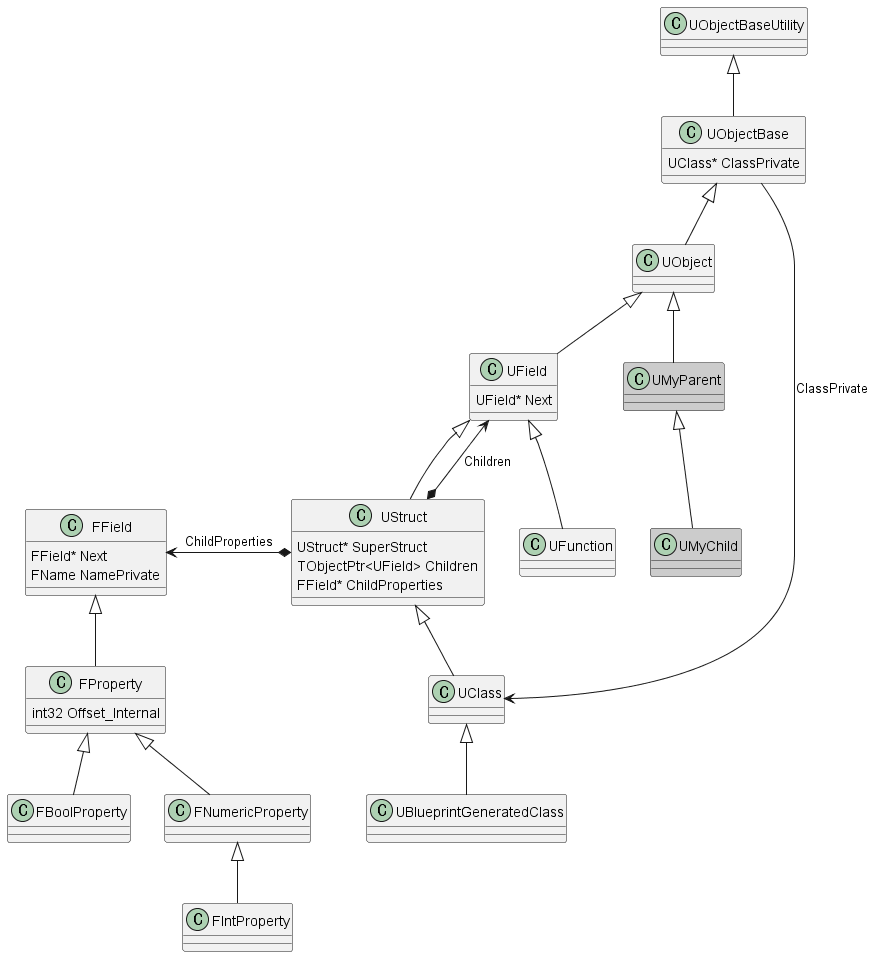
UClass
UClass가 UObject와 쌍으로 가장 자주 사용하게 되는 Class이며, Blueprint로 만들어지는 Class를 대변하는 UBlueprintGeneratedClass의 부모 Class입니다. 여기서는 Reflection 기능을 거의 제공해주는 UStruct에 초점을 맞추고 있기 때문에 자세히 살펴보지는 않겠습니다. GetSuperClass의 경우 아래와 같이 되어 있다는 정도만 참고해 주시면 됩니다.
/** Returns parent class, the parent of a Class is always another class */
UClass* GetSuperClass() const
{
    return (UClass*)GetSuperStruct();
}
...
/** Struct this inherits from, may be null */
UStruct* GetSuperStruct() const
{
    return SuperStruct;
}
UBlueprintGeneratedClass
UBlueprintGeneratedClass는 UBlueprint에서 만들어지는 Class입니다. 이 내용은 UBlueprint with _C를 다루는 별도의 포스팅에서 자세히 살펴보도록 하겠습니다.
UStruct
실제적으로 Reflection 기능을 제공하는 Class입니다. 간략히 살펴보면 다음과 같습니다.
- SuperStruct: 부모 Class를 표현하는 UStruct(UClass) Instance의 주소입니다. 혼동하시면 안 되는 부분인데, 여기서 부모 Class란 이 UStruct(UClass)가 표현하는 UObject Class의 부모 UClass에 대한 Instance를 의미합니다. 아래 ObjectDiagram에서 다시 다루겠습니다.
- Children: 사실상 해당 Class의 UFUNCTION(...) 목록을 담고 있습니다.
- ChildProperties: 사실상 해당 Class의 UPROPERTY(...) 목록을 담고 있습니다.
FProperty
FField를 상속 받아 UPROPERTY(...)에 해당하는 변수 정보 메타데이터를 가지고 있다고 보시면 됩니다.
UField 계열과 FField 계열 두 가지가 있는데, UPROPERTY(...) 계열이 UE5.1 즈음에 UField에서 FField 계열로 변경되었습니다. 참고하시기 바랍니다.
UClass <-> UObject
UObject를 상속받은 UMyObject Class를 만들었다고 했을 때, 엔진이 구동되면 UClass Instance인 'MyObject: UClass'와 UMyObject의 ClassDefaultObject(이하 CDO)인 'Default__MyObject: UMyObject'가 생성됩니다.
MyObject->GetClass(), UMyObject::StaticClass()로 'UClass' Instance를 가져올 수 있으며, 해당 UClass Instance로부터 'GetDefaultObject()' 함수를 통해 CDO에 접근하실 수 있습니다.
ClassDefaultObject
Class Default Object의 목적은 말 그대로 Class의 Default 값을 제공하는 것입니다. 언리얼 엔진에서 CDO 값은 어떻게 결정될까요? 우선 Class 멤버변수 선언부, 생성자, 상속 구조를 통해서 결정되고, Config로 채운 다음, BlueprintGeneratedClass에서는 Data 값으로 다시 덮어씌워지게 됩니다. 이 Default 값은 Editor에서 변수 값이 변경되었을 때 기본값으로 되돌리는 기능(특정 Instance와의 차이점 비교)과, UObject Instance를 NewObject로 생성하지 않고 UClass에서 CDO를 통해 값을 가져갈 수 있는 기능 등을 제공합니다.
예를 들어, 'B_MyBlueprint'라는 Blueprint를 만들었다면, 해당 'B_MyBlueprint'의 Package를 로딩하고 'UClass B_MyBlueprint'를 읽어온 다음, CDO를 통해 값을 가져갈 수 있습니다.
또한 Config를 통해 비슷한 동작을 수행하실 수 있습니다.
UMyConfig
#include "MyConfig.h"
#include "Engine/Engine.h"
#include "Misc/ConfigCacheIni.h"

UCLASS(config = Game)
class MYPROJECT_API UMyConfig : public UObject
{
    GENERATED_BODY()

public:
    // Configuration value
    UPROPERTY(config)
    int32 MyConfigValue;
};
DefaultGame.ini
[/Script/MyProject.MyConfig]
MyConfigValue=42
void PrintConfigValue()
{
// Get the CDO (Class Default Object) of UMyConfig
UMyConfig* DefaultConfig = GetDefault<UMyConfig>();
// Retrieve the config value
int32 ConfigValue = DefaultConfig->MyConfigValue;
// Log the value using UE_LOG
UE_LOG(LogTemp, Log, TEXT("Config Value from UMyConfig: %d"), ConfigValue);
}Object Diagram
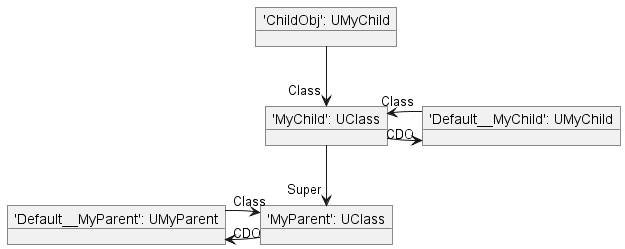
특정 시점에서의 Object Instance 관계를 살펴보겠습니다. 위 Diagram에서 'ObjectName: ObjectType'으로 표기되어 있습니다.
- ChildObj: UMyChild -> Class UMyChild를
NewObject<UMyChild>()를 통해 'ChildObj'라는 이름으로 Instance를 생성한 것입니다. - MyChild: UClass -> UMyChild의 메타정보를 가지고 있는 'UClass'입니다. 이 Object(Instance)의 이름이 'MyChild'입니다.
- MyParent: UClass -> Instance MyChild: UClass에서 GetSuperClass()로 얻어올 수 있는, UMyChild의 부모인 UMyParent의 메타정보를 가지고 있는 UClass Instance입니다.
- Default__MyChild: UMyChild -> UMyChild의 Default Object입니다. 이 CDO->GetClass()는 당연히 'UMyChild: UClass'입니다.
- Default__MyParent: UMyChild -> UMyParent UClass와 쌍을 이루는 CDO입니다.
그런데, 실제로는 여기에 한 가지가 빠져 있습니다. 위의 Class Diagram을 다시 확인해 주시기 바랍니다. UClass도 UObject의 Child Class인 것을 알 수 있습니다. 'UObject'에서 GetClass()를 하면 해당하는 UClass Instance를 얻어올 수 있습니다. 그렇다면 MyChild: UClass Instance에서 GetClass()를 하면 어떻게 될까요? 'Class: UClass'가 반환됩니다. 거기서 GetSuperClass()를 하면? 'Struct: UClass'가 반환됩니다.
Unreal HowTo
그러면 언리얼에서는 UClass의 내용을 어떻게 채워 놓는 것일까요? 이것이 여러분께서 익히 잘 알고 계신 Unreal Build Tool(이하 UBT)과 Unreal Header Tool(이하 UHT)의 역할이며, 이 중 특히 UHT가 UCLASS, UPROPERTY, UFUNCTION을 파싱하여 메타데이터를 생성하는 코드를 Generated합니다. 다른 부분도 마찬가지이지만, 이 부분은 특히 필자도 자세히 알지는 못합니다. 그래도 간략하게나마 살펴보겠습니다.
Sample Code 'UMyParent'에 있는 내용 중 UMyParent::StaticClass() 코드가 어떻게 만들어지는지 대략적으로 살펴보고, MyNumA, MyNumB, GetAddedNumA의 정보가 UClass Instance에 어떻게 기입되는지 확인해 보겠습니다.
당연히 이 마법 같은 일은 아래 3개의 조합으로 이루어집니다. GENERATED_BODY에서 기본 골격을 #define Macro 조합(이라고 쓰고 떡칠이라고 읽습니다)으로 뼈대를 만들고, 세부 뼈대 내용을 Generated된 코드로 채워 넣는 방식입니다. Project 이름이 EkUe54일 경우 Generated된 코드는 아래 폴더에 만들어집니다. EkUe54/Intermediate/Build/Win64/UnrealEditor/Inc/EkUe54/UHT/
GENERATED_BODY()- MyParent.generated.h
- MyParent.gen.cpp
UMyParent::StaticClass()를 찾아서
GENERATED_BODY()는 UE_5.4/Engine/Source/Runtime/CoreUObject/Public/UObject/ObjectMacros.h에
GENERATEDBODY(...) BODY_MACRO_COMBINE(CURRENT_FILE_ID,,LINE,_GENERATED_BODY);
이렇게 정의되어 있으며, Source File 이름과 라인 수를 조합하여 유니크한 이름의 GENERATED_BODY 골격을 만들어냅니다. 이 중 소스 파일 이름과 LINE 넘버는 C++ Compiler가 컴파일 시에 대체시켜 줍니다. 어떻게 보면 목적 코드를 바로 만들어주는 C++의 몇 안 되는 장점 중 하나라고 할 수 있습니다.
MyParent.generated.h를 보시면
#define FID_ProjectC_EkUe54_Source_EkUe54_MyParent_h_15_GENERATED_BODY \
PRAGMA_DISABLE_DEPRECATION_WARNINGS \
public: \
    FID_ProjectC_EkUe54_Source_EkUe54_MyParent_h_15_RPC_WRAPPERS_NO_PURE_DECLS \
    FID_ProjectC_EkUe54_Source_EkUe54_MyParent_h_15_INCLASS_NO_PURE_DECLS \
    FID_ProjectC_EkUe54_Source_EkUe54_MyParent_h_15_ENHANCED_CONSTRUCTORS \
private: \
PRAGMA_ENABLE_DEPRECATION_WARNINGS
가 만들어져 있으며, 따라서 MyParent.h에 있는 GENERATED_BODY()는 위 내용으로 대체됩니다.
INCLASS_NO_PURE_DECLS은 아래와 같이 되어 있습니다.
#define FID_ProjectC_EkUe54_Source_EkUe54_MyParent_h_15_INCLASS_NO_PURE_DECLS \
private: \
    static void StaticRegisterNativesUMyParent(); \
    friend struct Z_Construct_UClass_UMyParent_Statics; \
public: \
    DECLARE_CLASS(UMyParent, UObject, COMPILED_IN_FLAGS(0), CASTCLASS_None, TEXT("/Script/EkUe54"), NO_API) \
    DECLARE_SERIALIZER(UMyParent)
DECLARE_CLASS는 ObjectMacros.h에 다음과 같이 정의되어 있습니다.
#define DECLARE_CLASS( TClass, TSuperClass, TStaticFlags, TStaticCastFlags, TPackage, TRequiredAPI  ) \
private: \
    TClass& operator=(TClass&&);   \
    TClass& operator=(const TClass&);   \
    TRequiredAPI static UClass* GetPrivateStaticClass(); \
public: \
    /** Bitwise union of #EClassFlags pertaining to this class.*/ \
    static constexpr EClassFlags StaticClassFlags=EClassFlags(TStaticFlags); \
    /** Typedef for the base class ({{ typedef-type }}) */ \
    typedef TSuperClass Super;\
    /** Typedef for {{ typedef-type }}. */ \
    typedef TClass ThisClass;\
    /** Returns a UClass object representing this class at runtime */ \
    inline static UClass* StaticClass() \
    { \
       return GetPrivateStaticClass(); \
    } \
...
드디어 UMyParent::StaticClass() 코드가 어디서 만들어지는지 찾게 되었습니다.
MyNumA, MyNumB, GetAddedNumA 메타 데이터 기입을 찾아서
이 부분은 필자도 자세히 살펴보지는 못했지만, 위의 설명을 참고하시면 어떤 동작들을 하는지 감을 잡기에 충분하실 것으로 생각합니다. 세부 내용은 엔진 업데이트마다 수시로 변경됩니다. MyParent.gen.cpp를 보시면
static constexpr UECodeGen_Private::FMetaDataPairParam NewProp_MyNumA_MetaData[] = {
    { "Category", "MyParent" },
    { "ModuleRelativePath", "MyParent.h" },
};
static constexpr UECodeGen_Private::FMetaDataPairParam NewProp_MyNumB_MetaData[] = {
    { "Category", "MyParent" },
    { "ModuleRelativePath", "MyParent.h" },
};
...
static const UECodeGen_Private::FIntPropertyParams NewProp_MyNumA;
static const UECodeGen_Private::FIntPropertyParams NewProp_MyNumB;
static const UECodeGen_Private::FPropertyParamsBase* const PropPointers[];
static UObject* (*const DependentSingletons[])();
static constexpr FClassFunctionLinkInfo FuncInfo[] = {
    { &Z_Construct_UFunction_UMyParent_GetAddedNumA, "GetAddedNumA" }, // 3525413116
};
...
const UECodeGen_Private::FIntPropertyParams Z_Construct_UClass_UMyParent_Statics::NewProp_MyNumA = { "MyNumA", nullptr, (EPropertyFlags)0x0020080000000005, UECodeGen_Private::EPropertyGenFlags::Int, RF_Public|RF_Transient|RF_MarkAsNative, nullptr, nullptr, 1, STRUCT_OFFSET(UMyParent, MyNumA), METADATA_PARAMS(UE_ARRAY_COUNT(NewProp_MyNumA_MetaData), NewProp_MyNumA_MetaData) };
const UECodeGen_Private::FIntPropertyParams Z_Construct_UClass_UMyParent_Statics::NewProp_MyNumB = { "MyNumB", nullptr, (EPropertyFlags)0x0020080000000005, UECodeGen_Private::EPropertyGenFlags::Int, RF_Public|RF_Transient|RF_MarkAsNative, nullptr, nullptr, 1, STRUCT_OFFSET(UMyParent, MyNumB), METADATA_PARAMS(UE_ARRAY_COUNT(NewProp_MyNumB_MetaData), NewProp_MyNumB_MetaData) };
const UECodeGen_Private::FPropertyParamsBase* const Z_Construct_UClass_UMyParent_Statics::PropPointers[] = {
    (const UECodeGen_Private::FPropertyParamsBase*)&Z_Construct_UClass_UMyParent_Statics::NewProp_MyNumA,
    (const UECodeGen_Private::FPropertyParamsBase*)&Z_Construct_UClass_UMyParent_Statics::NewProp_MyNumB,
};
와 같은 내용을 확인하실 수 있습니다. 시간이 되실 때 한번 살펴보시기를 권장드립니다. 참고로 C++에서는 class 밖에 있는 global한 변수는 모듈이 올라올 때 초기화된다는 점을 알아두시면 도움이 됩니다.