들어가며
매번 햇갈려서 정리해 둘려고 한다.
문서
Definition type: “multi compile” or “shader feature”
위 링크에 답이 있다.
Whether to choose “multi compile” or “shader feature” depends on how you use the keywords. If you use the keywords to configure materials in your project and do not change their value from C# scripts at runtime, then you should use “shader feature” to reduce the number of shader keywords and variants in your project. If you enable and disable keywords at runtime using C# scripts, then you should use “multi compile” to prevent variants being stripped in error. For more information on shader stripping, see Shader variant stripping.
잡역
multi_compile 을 쓸지 shader_feature 을 쓸지는 당신이 해당 keyword(역자 : FOG_ON, SHADOW_ON 등)를 어떻게 사용할 지에 달려 있다. 만약 당신이 해당 keyword 등을 material 에서 설정하고, c# 으로 runtime에 변경하지 않는다면 'shader_feature' 을 사용해서 shader 갯수를 줄여야 한다. 만약 c# 으로 runtime 에 enable,disable 로 변경한다면 'multi_compile'을 사용해서 사용되지 않는 걸로 판별되어 build 에 포함되지 않는 문제를 피해야 한다.
왜냐하면 multi_compile 은 설정이 언제 바뀔지 모른다고 가정하고 모든 조합(각 muti_compile set 마다 하나씩 골라서)을 죄다 컴파일해서 빌드에 포함시키지만, shader_feature 는 material 이나 shader graph 에서 사용하는 걸로 설정 된 것만 빌드에 포함 시키기 때문이다.
Enable Keyword
sample shader
Shader "UnityShaderTutorial/shader_variants" {
    Properties {
    }
    SubShader
    {
        Pass
        {
            CGPROGRAM
            #pragma vertex vertexShader
            #pragma fragment fragmentShader
            #pragma multi_compile RED GREEN BLUE
            //#pragma shader_featulre RED GREEN BLUE

            float4 vertexShader (float4 vertex : POSITION) : SV_POSITION
            {
                return UnityObjectToClipPos(vertex);
            }

            fixed4 fragmentShader () : SV_Target
            {
                fixed4 col = fixed4 (0, 0, 0, 1);
                # ifdef RED
                    col = fixed4 (1, 0, 0, 1);
                # elif GREEN
                    col = fixed4 (0, 1, 0, 1);
                # elif BLUE
                    col = fixed4 (0, 0, 1, 1);
                # endif
                return col;
            }
            ENDCG
        }
    }
}
C#
실시간으로 언제 바뀔지 모르므로 multi_compile 을 사용.
Material
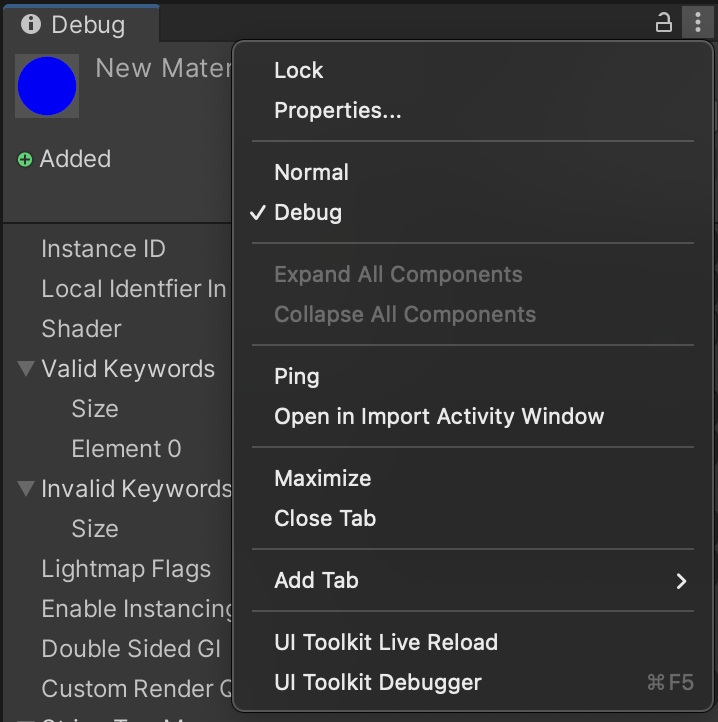
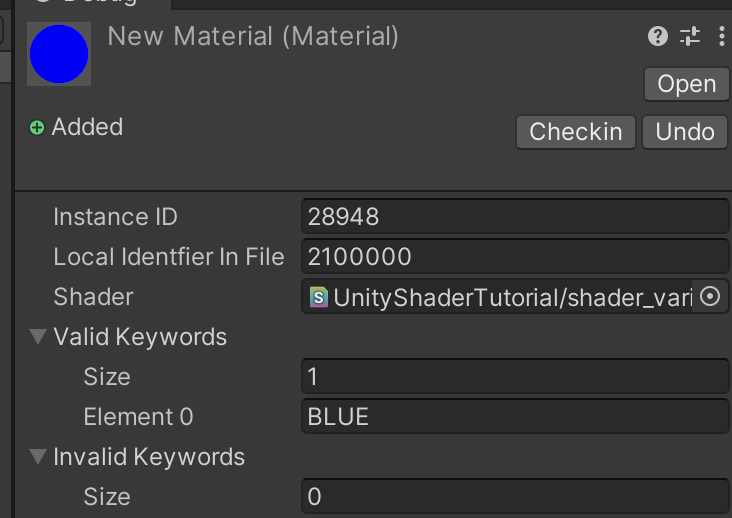
material 을 'debug inspector' 로 변경하고, Valid Keywords 을 하나 추가(size 늘림) 한다음, Invalid Keywords 를 통해서 Keyword 를 셋팅 하면 된다.
사용하는게 언젠지 확실하기 떄문에 shader_feature, multi_compile 모두 사용 가능하나 실시간으로 변경 안하는게 확실하다면 shader_feature 로 shader 조합 갯수를 줄이자.
결론
또 햇갈린건 아니겠지?