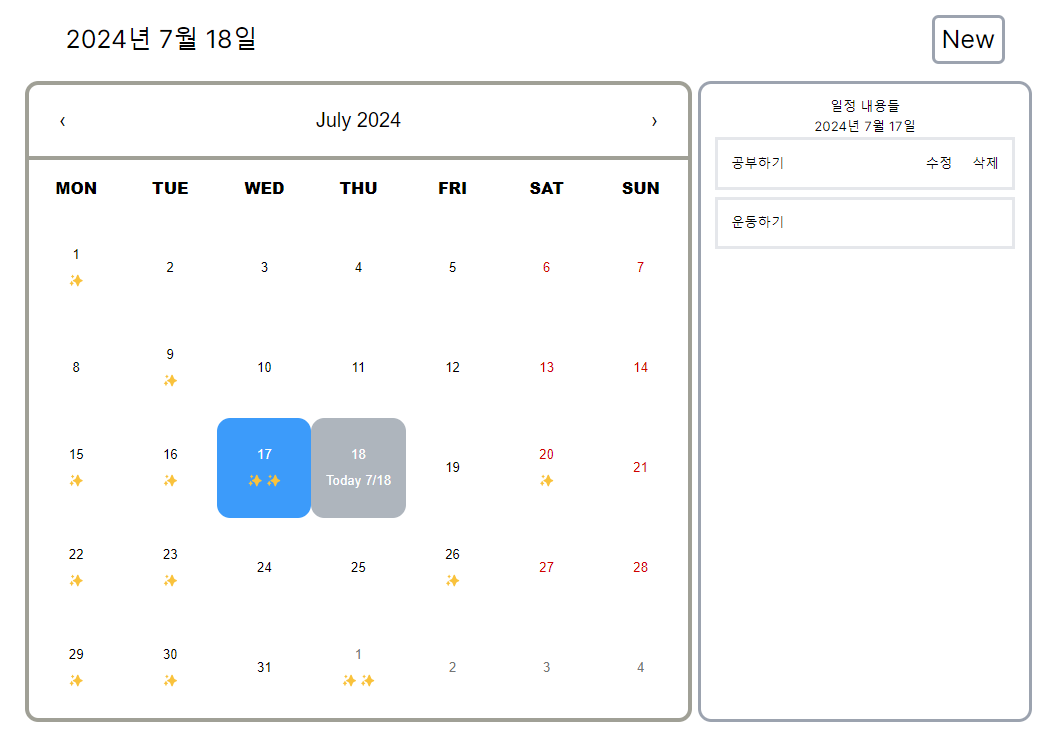
마지막으로 데이터베이스를 사용하고 생성, 수정, 삭제를 정리한다.
MongoDB를 사용하기로 했다.
Todo 불러오기
데이터베이스에서 Todo를 가져오는 코드를 작성했다.
import { connectDB } from "@/lib/database";

export async function getTodos() {
  try {
    const db = (await connectDB()).db("guam");
    const todosCollection = db.collection("todos");

    const todos = await todosCollection.find().toArray();

    // Convert MongoDB documents to plain objects
    const todosPlainObjects = todos.map((todo) => ({
      _id: todo._id.toString(),
      title: todo.title,
      date: todo.date,
    }));

    return todosPlainObjects;
  } catch (error) {
    console.error("Error fetching todos:", error);
    throw new Error("Failed to fetch todos");
  }
}
MongoDB에서 가져온 객체를 바로 return을 하니까 Only Plain Object만 클라이언트에게 넘어가야 한다고 오류가 발생했다. 그래서 받아온 데이터를 PlainObject로 바꾸어서 넘겨주었다.
찾아보니 JSON.stringify와 JSON.parse를 사용하면 된다고 해서 수정해봤는데 Date 객체가 자꾸 string으로 넘어오는(?) 이상한 버그가 발생해서 Plain Object로 변경해서 넘겨주기로 했다.
이를 활용하여 데이터를 가져오는 코드를 1차로 작성했다.
"use client"를 사용하면 async와 await을 사용하지 못해서 컴포넌트를 분리해야 했다.
// page.tsx
import "react-calendar/dist/Calendar.css";
import "../../assets/custom-calendar.css";
import { getTodos } from "@/lib/todos";
import TodoCalendar from "@/components/TodoCalendar";

export default async function CalendarPage() {
  // const [showModal, setShowModal] = useState<Boolean>(false);
  const today = new Date();
  const todos = await getTodos();
  console.log(todos);

  // const modalHandler = () => {
  //   setShowModal((prev) => !prev);
  // };

  return (
    <main className="mt-8">
      <div className="flex px-4 pb-4 justify-between items-center">
        <p className="p-4 text-3xl">
          {today.toLocaleString("ko-KR", {
            year: "numeric",
            month: "long",
            day: "2-digit",
          })}
        </p>
        <button
          className="p-2 text-3xl border-gray-400 border-4 rounded-lg"
          // onClick={modalHandler}
        >
          New
        </button>
      </div>
      <div className="flex justify-center gap-2">
        <TodoCalendar todos={todos} />
      </div>
      {/* {showModal && <NewTodoModal modalHandler={modalHandler} />} */}
    </main>
  );
}


// TodoCalendar.tsx
"use client";
import { useEffect, useState } from "react";
import Calendar from "react-calendar";
import TodosList from "./TodosList";

type ValuePiece = Date | null;
type Value = ValuePiece | [ValuePiece, ValuePiece];
type Todo = {
  _id: string;
  title: string;
  date: Date;
};

export default function TodoCalendar({ todos }: { todos: Todo[] }) {
  const offset = new Date().getTimezoneOffset() * 60000;
  const today = new Date();
  const [date, setDate] = useState<Value>(today);
  const [allTodos, setAllTodos] = useState<Todo[]>(todos);
  const [currentTodos, setCurrentTodos] = useState<Todo[]>([]);

  useEffect(() => {
    if (date instanceof Date) {
      const selectedDate = formattedDate(date);
      const filteredTodos = allTodos.filter(
        (todo) => formattedDate(todo.date) === selectedDate
      );
      setCurrentTodos(filteredTodos);
    } else {
      setCurrentTodos([]);
    }
  }, [date, allTodos]);

  const formattedDate = (date: Date) => {
    const year = date.getFullYear();
    const month = String(date.getMonth() + 1).padStart(2, "0");
    const day = String(date.getDate()).padStart(2, "0");
    return `${year}-${month}-${day}`;
  };

  const dateChangeHandler = (newDate: Value) => {
    setDate(newDate);
  };

  const isSameDay = (d1: Date, d2: Date) => {
    return (
      d1.getFullYear() === d2.getFullYear() &&
      d1.getMonth() === d2.getMonth() &&
      d1.getDate() === d2.getDate()
    );
  };

  const addContent = ({ date }: { date: Date }) => {
    let content = [];
    if (isSameDay(date, today)) {
      content.push(
        <p key={`today-${date.getDate()}`}>
          Today {date.getMonth() + 1}/{date.getDate()}
        </p>
      );
    } else {
      content.push(<br key={`break-${date.getDate()}`} />);
    }
    const todosForDate = allTodos.filter((todo) => isSameDay(todo.date, date));

    for (let i = 0; i < todosForDate.length; i++) {
      content.push(<span key={`todo-${i}-${date.getDate()}`}>✨</span>);
    }

    return <>{content}</>;
  };

  return (
    <>
      <Calendar
        value={date}
        onChange={dateChangeHandler}
        locale="en"
        prev2Label={null}
        next2Label={null}
        tileContent={addContent}
      />
      <TodosList date={date} todos={currentTodos} />
    </>
  );
}


// NewTodoModal.tsx
export default function NewTodoModal({
  modalHandler,
}: {
  modalHandler: () => void;
}) {
  return (
    <div
      className="fixed top-0 left-0 w-full h-full bg-black bg-opacity-40 flex justify-center items-center"
      onClick={modalHandler}
    >
      <form
        className="p-4 w-[480px] rounded-lg flex flex-col bg-white"
        onClick={(e) => e.stopPropagation()}
      >
        <p className="text-2xl pt-4 pb-8">일정 추가하기</p>
        <label htmlFor="title" className="text-2xl">
          Title
        </label>
        <input
          type="text"
          className="flex mt-4 border-gray-600 border py-2 px-4 "
          name="title"
          id="title"
        />
        <label htmlFor="date" className="pt-4 text-2xl">
          Date
        </label>
        <input
          type="date"
          className="flex mt-4 border-gray-600 border py-2 px-4 "
          name="date"
          id="date"
        />
        <div className="flex justify-end mt-8">
          <button
            className="border-none w-28 py-2 px-4 text-base"
            onClick={modalHandler}
          >
            Cancel
          </button>
          <button
            className="bg-green-700 text-white w-28 py-2 px-4 text-base hover:bg-green-500 transition"
            type="submit"
          >
            Save
          </button>
        </div>
      </form>
    </div>
  );
}
Page.tsx에서 Modal을 사용하기 위해서 useState를 사용해야 하는데, useState를 사용하면 async를 쓰지 못한다. 그래서 다른 방법을 생각해봤다.
해결방법
그래서 클라이언트 훅을 사용해야 하는 컴포넌트는 따로 빼기로 했다.
// page.tsx
import { Suspense } from "react";
import { getTodos } from "@/lib/todos";
import TodoWrapper from "@/components/TodoWrapper";

import "react-calendar/dist/Calendar.css";
import "../../assets/custom-calendar.css";

async function Todos() {
  const todos = await getTodos();
  return <TodoWrapper todos={todos} />;
}

export default function CalendarPage() {
  return (
    <main className="mt-8">
      <Suspense fallback={<p>Loading... Calendar</p>}>
        <Todos />
      </Suspense>
    </main>
  );
}
클라이언트 부분은 다 TodoWrapper 컴포넌트에 넣고, getTodos() 함수로 데이터를 가져오는 동안 로딩 표시를 Suspense를 이용해서 표시한다.
// TodoWrapper.tsx

"use client";
import { useEffect, useState } from "react";
import Calendar from "react-calendar";
import TodosList from "./TodosList";
import NewTodoModal from "@/components/NewTodoModal";

type ValuePiece = Date | null;
type Value = ValuePiece | [ValuePiece, ValuePiece];
type Todo = {
  _id: string;
  title: string;
  date: Date;
};

export default function TodoWrapper({ todos }: { todos: Todo[] }) {
  const offset = new Date().getTimezoneOffset() * 60000;
  const today = new Date();
  const [date, setDate] = useState<Value>(today);
  const [allTodos, setAllTodos] = useState<Todo[]>(todos);
  const [currentTodos, setCurrentTodos] = useState<Todo[]>([]);
  const [showModal, setShowModal] = useState<Boolean>(false);

  useEffect(() => {
    if (date instanceof Date) {
      const selectedDate = formattedDate(date);
      const filteredTodos = allTodos.filter(
        (todo) => formattedDate(todo.date) === selectedDate
      );
      setCurrentTodos(filteredTodos);
    } else {
      setCurrentTodos([]);
    }
  }, [date, allTodos]);

  const modalHandler = () => {
    setShowModal((prev) => !prev);
  };

  const formattedDate = (date: Date) => {
    const year = date.getFullYear();
    const month = String(date.getMonth() + 1).padStart(2, "0");
    const day = String(date.getDate()).padStart(2, "0");
    return `${year}-${month}-${day}`;
  };

  const dateChangeHandler = (newDate: Value) => {
    setDate(newDate);
  };

  const isSameDay = (d1: Date, d2: Date) => {
    return (
      d1.getFullYear() === d2.getFullYear() &&
      d1.getMonth() === d2.getMonth() &&
      d1.getDate() === d2.getDate()
    );
  };

  const addContent = ({ date }: { date: Date }) => {
    let content = [];
    if (isSameDay(date, today)) {
      content.push(
        <p key={`today-${date.getDate()}`}>
          Today {date.getMonth() + 1}/{date.getDate()}
        </p>
      );
    } else {
      content.push(<br key={`break-${date.getDate()}`} />);
    }
    const todosForDate = allTodos.filter((todo) => isSameDay(todo.date, date));

    for (let i = 0; i < todosForDate.length; i++) {
      content.push(<span key={`todo-${i}-${date.getDate()}`}>✨</span>);
    }

    return <>{content}</>;
  };

  return (
    <main>
      <div className="flex px-4 pb-4 justify-around items-center gap-4">
        <p className="p-4 text-3xl">
          {today.toLocaleString("ko-KR", {
            year: "numeric",
            month: "long",
            day: "2-digit",
          })}
        </p>
        <button
          className="p-2 text-3xl border-gray-400 border-4 rounded-lg"
          onClick={modalHandler}
        >
          New
        </button>
      </div>
      <div className="flex justify-center gap-2">
        <Calendar
          value={date}
          onChange={dateChangeHandler}
          locale="en"
          prev2Label={null}
          next2Label={null}
          tileContent={addContent}
        />
        <TodosList date={date} todos={currentTodos} />
      </div>
      {showModal && <NewTodoModal modalHandler={modalHandler} />}
    </main>
  );
}
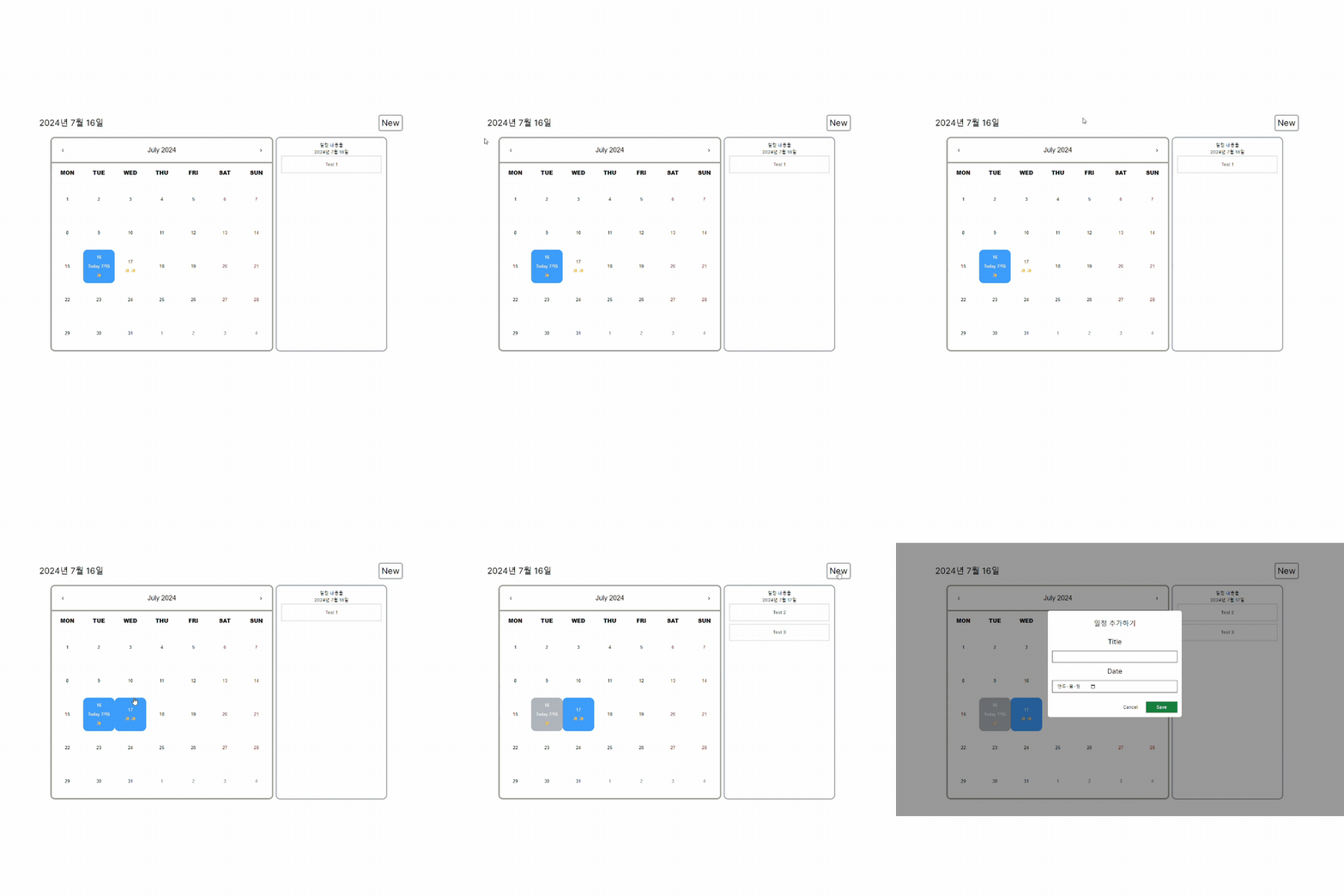
TodoWrapper에 클라이언트로 사용할 부분을 다 가져왔다. 딱히 달라진 코드는 없다.
아래는 실행 화면이다.
Todo 생성
server action을 보내기 위해서는 'use server' 사용해야 한다. 클라이언트에서 실행하려고 하면
It is not allowed to define inline "use server" annotated Server Actions in Client Components. │ To use Server Actions in a Client Component, you can either export them from a separate file with "use server" at the top, or pass them down through props from a Server Component.
이렇게 서버에서 실행하라고 오류가 발생한다...
아래는 처음에 작성했던 코드이다.
export default function NewTodoModal({
  modalHandler,
}: {
  modalHandler: () => void;
}) {
  async function createTodo(formData: FormData) {
    "use server";

    const todo = {
      title: formData.get("title"),
      date: formData.get("date"),
    };

    console.log(todo);
    // ...
  }
  return (
    <div
      className="fixed top-0 left-0 w-full h-full bg-black bg-opacity-40 flex justify-center items-center"
      onClick={modalHandler}
    >
      <form
        className="p-4 w-[480px] rounded-lg flex flex-col bg-white"
        onClick={(e) => e.stopPropagation()}
        action={createTodo}
      >
        <p className="text-2xl pt-4 pb-8">일정 추가하기</p>
        <label htmlFor="title" className="text-2xl">
          Title
        </label>
        <input
          type="text"
          className="flex mt-4 border-gray-600 border py-2 px-4 "
          name="title"
          id="title"
		  required
        />
        <label htmlFor="date" className="pt-4 text-2xl">
          Date
        </label>
        <input
          type="date"
          className="flex mt-4 border-gray-600 border py-2 px-4 "
          name="date"
          id="date"
		  required
        />
        <div className="flex justify-end mt-8">
          <button
            className="border-none w-28 py-2 px-4 text-base"
            onClick={modalHandler}
          >
            Cancel
          </button>
          <button
            className="bg-green-700 text-white w-28 py-2 px-4 text-base hover:bg-green-500 transition"
            type="submit"
          >
            Save
          </button>
        </div>
      </form>
    </div>
  );
}
Modal 창에서 server action으로 form을 전송하려고 했는데, Modal의 상위 컴포넌트가 클라이언트 컴포넌트라서 이를 수정했다. server action 함수를 다른 파일로 분리하고 createTodo를 import 했다.
export async function createTodo(formData: FormData) {
  try {
    const title = formData.get("title");
    const date = formData.get("date");

    if (title === null || date === null) {
      throw new Error("Check your form");
    }

    if (typeof date === "string") {
      const todo = {
        title: title as string,
        date: new Date(date),
      };
      const db = (await connectDB()).db("guam");
      const todosCollection = db.collection("todos");
      const result = await todosCollection.insertOne(todo);
      console.log(result);
      return { success: true };
    } else {
      throw new Error("date is not Date type");
    }
  } catch (error) {
    console.error("Error creating new todo", error);
    throw new Error("Failed to create new todo");
  }
}
그리고 폼 제출동안 제출 중임을 표시하기 위해 react-dom의 useFormstatus() 를 사용해서 버튼을 비활성화하고 글씨를 바꾼다. useFormstatus를 사용하기 위해서는 'use client'로 선언해주어야 한다. 하지만 이 하나를 위해 컴포넌트 전체를 클라이언트 컴포넌트로 바꾸는 것은 비효율적이다! 그래서 컴포넌트를 새로 생성해서 작업했다.
그리고 작성하던 중 하나 알게 된 사실이 있다. next/navigation의 redirect 함수를 server action 에서 사용하려고 하니까 오류가 발생했다. 그 이유는 try/catch 문 내에서 redirect를 사용하려고 하는 경우 에러가 발생한다. 그래서 try/catch 문을 삭제해주는 방식도 있었지만, 상태를 return 하고 Modal 컴포넌트에서 이를 해결하는 것으로 코드를 작성했다.
참고
// TodoSubmitButton.tsx
"use client";

import { useFormStatus } from "react-dom";

export default function TodoSubmitButton() {
  const { pending } = useFormStatus();

  return (
    <button
      className="bg-green-700 text-white w-28 py-2 px-4 text-base hover:bg-green-500 transition"
      type="submit"
      disabled={pending}
    >
      {pending ? "Saving..." : "Save"}
    </button>
  );
}


// NewTodoModal.tsx
import { createTodo } from "@/lib/todos";
import TodoSubmitButton from "./TodoSubmitButton";

export default function NewTodoModal({
  modalHandler,
}: {
  modalHandler: () => void;
}) {
  async function newTodo(formData: FormData) {
    const { success }: { success: boolean } = await createTodo(formData);
    if (success) {
      window.location.reload();
    } else {
      alert("일정 생성 실패");
    }
  }
  return (
    <div
      className="fixed top-0 left-0 w-full h-full bg-black bg-opacity-40 flex justify-center items-center"
      onClick={modalHandler}
    >
      <form
        className="p-4 w-[480px] rounded-lg flex flex-col bg-white"
        onClick={(e) => e.stopPropagation()}
        action={newTodo}
      >
        <p className="text-2xl pt-4 pb-8">일정 추가하기</p>
        <label htmlFor="title" className="text-2xl">
          Title
        </label>
        <input
          type="text"
          className="flex mt-4 border-gray-600 border py-2 px-4 "
          name="title"
          id="title"
          required
        />
        <label htmlFor="date" className="pt-4 text-2xl">
          Date
        </label>
        <input
          type="date"
          className="flex mt-4 border-gray-600 border py-2 px-4 "
          name="date"
          id="date"
          required
        />
        <div className="flex justify-end mt-8">
          <button
            className="border-none w-28 py-2 px-4 text-base"
            onClick={modalHandler}
          >
            Cancel
          </button>
          <TodoSubmitButton />
        </div>
      </form>
    </div>
  );
}
Todo 수정
생성과 마찬가지로 함수를 만들어서 간단하게 구현할 수 있다. 수정을 할때 주의할 점은 _id에 그냥 string 값이 아닌 MongoDb ObjectId를 넘겨주어야 한다.
import { ObjectId } from "mongodb";

export async function updateTodo(formData: FormData, id: string) {
  try {
    const title = formData.get("title");
    let date = formData.get("date");
    if (title === null || date === null) {
      throw new Error("Check your form");
    }
    if (typeof date === "string") {
      const db = (await connectDB()).db("guam");
      const todosCollection = db.collection("todos");
      const result = await todosCollection.updateOne(
        { _id: new ObjectId(id) },
        { $set: { title: title, date: new Date(date) } }
      );

      if (result.modifiedCount === 0) {
        throw new Error("No todo found to update");
      }

      return { success: true };
    } else {
      throw new Error("date is not Date type");
    }
  } catch (error) {
    console.error(error);
    throw new Error("Failed to update the todo");
  }
}
그리고 Todo 수정 컴포넌트를 따로 만들려다가 기존에 만들어두엇던 newTodo 컴포넌트를 재사용하기로 했다.
import { createTodo, updateTodo } from "@/lib/todos";
import TodoSubmitButton from "./TodoSubmitButton";
import { formattedDate } from "@/util/date";

type Todo = {
  _id: string;
  title: string;
  date: Date;
};

export default function TodoModal({
  modalHandler,
  mode,
  todo = { _id: "", title: "", date: new Date() },
}: {
  modalHandler: () => void;
  mode: string;
  todo?: Todo;
}) {
  let content;

  if (mode === "new") {
    content = "일정 추가하기";
  } else if (mode === "edit") {
    content = "일정 수정하기";
  }

  async function newTodoHandler(formData: FormData) {
    const { success }: { success: boolean } = await createTodo(formData);
    if (success) {
      window.location.reload();
    } else {
      alert("일정 생성 실패");
    }
  }
  async function updateTodoHandler(formData: FormData) {
    if (!todo) {
      new Error("업데이트 실패");
    }

    const { success }: { success: boolean } = await updateTodo(
      formData,
      todo._id
    );
    if (success) {
      window.location.reload();
    } else {
      alert("일정 수정 실패");
    }
  }

  return (
    <div
      className="fixed top-0 left-0 w-full h-full bg-black bg-opacity-40 flex justify-center items-center"
      onClick={modalHandler}
    >
      <form
        className="p-4 w-[480px] rounded-lg flex flex-col bg-white"
        onClick={(e) => e.stopPropagation()}
        action={mode === "new" ? newTodoHandler : updateTodoHandler}
      >
        <p className="text-2xl pt-4 pb-8">{content}</p>
        <label htmlFor="title" className="text-2xl">
          Title
        </label>
        <input
          type="text"
          className="flex mt-4 border-gray-600 border py-2 px-4 "
          name="title"
          id="title"
          required
          defaultValue={todo.title}
        />

        <label htmlFor="date" className="pt-4 text-2xl">
          Date
        </label>
        <input
          type="date"
          className="flex mt-4 border-gray-600 border py-2 px-4 "
          name="date"
          id="date"
          required
          defaultValue={formattedDate(todo.date)}
        />

        <div className="flex justify-end mt-8">
          <button
            className="border-none w-28 py-2 px-4 text-base"
            onClick={modalHandler}
          >
            Cancel
          </button>
          <TodoSubmitButton />
        </div>
      </form>
    </div>
  );
}
todo와 mode를 props로 받아와 이를 form의 defaultValue에 등록하였다.
Todo 삭제
export async function deleteTodo(id: string) {
  try {
    const db = (await connectDB()).db("guam");
    const todosCollection = db.collection("todos");

    const result = await todosCollection.deleteOne({ _id: new ObjectId(id) });

    if (result.deletedCount === 0) {
      throw new Error("No todo found to delete");
    }

    return { success: true };
  } catch (error) {
    console.error(error);
    throw new Error("Failed to delete the todo");
  }
}

...

async function deleteTodoHandler() {
    const sure = window.confirm("일정을 삭제하시겠습니까?");

    if (sure) {
      const { success }: { success: boolean } = await deleteTodo(todo._id);
      if (success) {
        window.location.reload();
      } else {
        alert("일정 삭제 실패");
      }
    } else {
      return;
    }
  }
삭제는 생성이나 수정보다 쉽게 구현되었다.