What Does Collate Mean When Printing? (Simple Guide)
If you’ve ever printed multiple copies of a document, you’ve probably seen the option “Collate” and wondered what it actually means. You’re not alone. Collate when printing refers to how pages are organized and grouped when multiple copies of a document are printed. Choosing the right option can save time, reduce confusion, and keep your documents perfectly ordered. In this guide, you’ll learn exactly what does collate mean when printing, when to use it, and how it affects your print jobs—explained in simple, everyday language.
What Does “Collate” Mean in Printing?
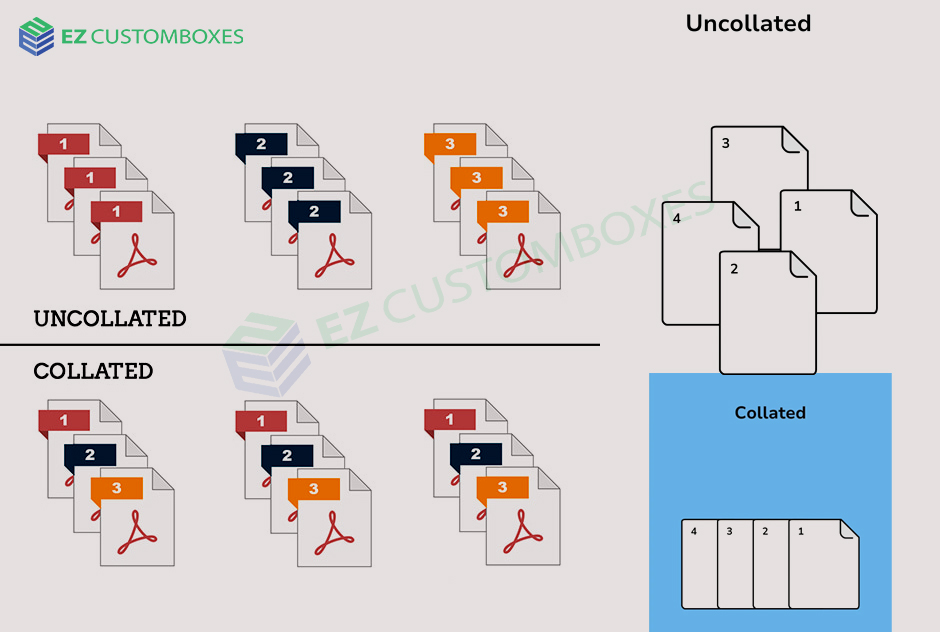
Collate means printing a complete set of pages in the correct order for each copy.
Simple Definition (Featured Snippet-Friendly)
When you collate a document while printing, each copy prints as a full, ordered set of pages (1–2–3, 1–2–3).
Collated vs Uncollated Printing (Key Differences)
Collated Printing
Each document prints as a full set before the next copy begins.
Example:
If you print 3 copies of a 3-page document, collated output looks like:
-
Copy 1: Page 1, Page 2, Page 3
-
Copy 2: Page 1, Page 2, Page 3
-
Copy 3: Page 1, Page 2, Page 3
✅ Best for reports, presentations, and handouts
Uncollated Printing
All copies of the same page print together.
Example:
-
Page 1, Page 1, Page 1
-
Page 2, Page 2, Page 2
-
Page 3, Page 3, Page 3
✅ Useful for bulk sorting or binding later
Why Does Collating Matter When Printing?
Choosing the right print setting helps you:
-
📄 Keep documents in the correct order
-
⏱ Save time organizing pages
-
📚 Prepare professional-looking reports
-
🧠 Avoid printing mistakes and reprints
For most everyday printing, collated printing is the better choice.
When Should You Use Collated Printing?
Use collate when printing:
-
School assignments or homework packets
-
Business reports and proposals
-
Meeting handouts
-
Manuals or multi-page documents
-
Client presentations
When Is Uncollated Printing Better?
Uncollated printing is helpful when:
-
You plan to bind or staple pages later
-
You’re using automated finishing equipment
-
You need stacks of the same page (like flyers or forms)
How to Collate When Printing (Step-by-Step)
On Windows or Mac
-
Open your document
-
Click Print
-
Find the “Collate” checkbox
-
Check it to enable collated printing
-
Click Print
💡 Most printers have collate enabled by default.
Does Collating Affect Print Speed?
Yes slightly.
-
Collated printing may be slower because pages are printed in order
-
Uncollated printing can be faster for large print jobs
However, the time saved from not sorting pages usually makes collating worth it.
Common Printing Mistakes to Avoid
-
❌ Forgetting to collate multi-page documents
-
❌ Printing uncollated handouts for meetings
-
❌ Assuming the printer will auto-sort without checking settings
Always preview your print settings before clicking Print.
Frequently Asked Questions (FAQ)
What does collate mean on a printer?
The collate meaning printing complete, ordered sets of pages for each copy of a document.
Should I collate when printing multiple copies?
Yes, if you want each copy to be ready to use without manual sorting.
What happens if I don’t collate?
Your printer will print all copies of page 1, then page 2, and so on requiring manual sorting.
Is collated printing the default setting?
What does collate mean. Most modern printers enable collating by default, but it’s always good to double-check.
Does collating use more ink or paper?
No. Collating only changes the order of printing, not ink or paper usage.
Key Takeaway
The collate meaning printer keeps your documents organized, professional, and ready to use.
For most print jobs especially reports, assignments, and presentations always choose collated printing.