✒️ Formatting
- Formatting이란, 코드를 작성할 때 일정한 포맷을 지키는 것을 의미한다
Formatting이 왜 필요한가?
- Readability
- Code의 성실성의 지표
가독성을 높이기 위해 코드를 잘 포맷팅해야 하며, 코드를 잘 작성한다는 인식을 줄 수 있기에 중요하다!
말그대로 성실성의 지표가 되기 때문~
다양한 포맷 형태가 존재한다.
필자는 K&R을 가장 선호한다..ㅎㅎ GNU, Whitesmiths 방식은 리얼 킹받음
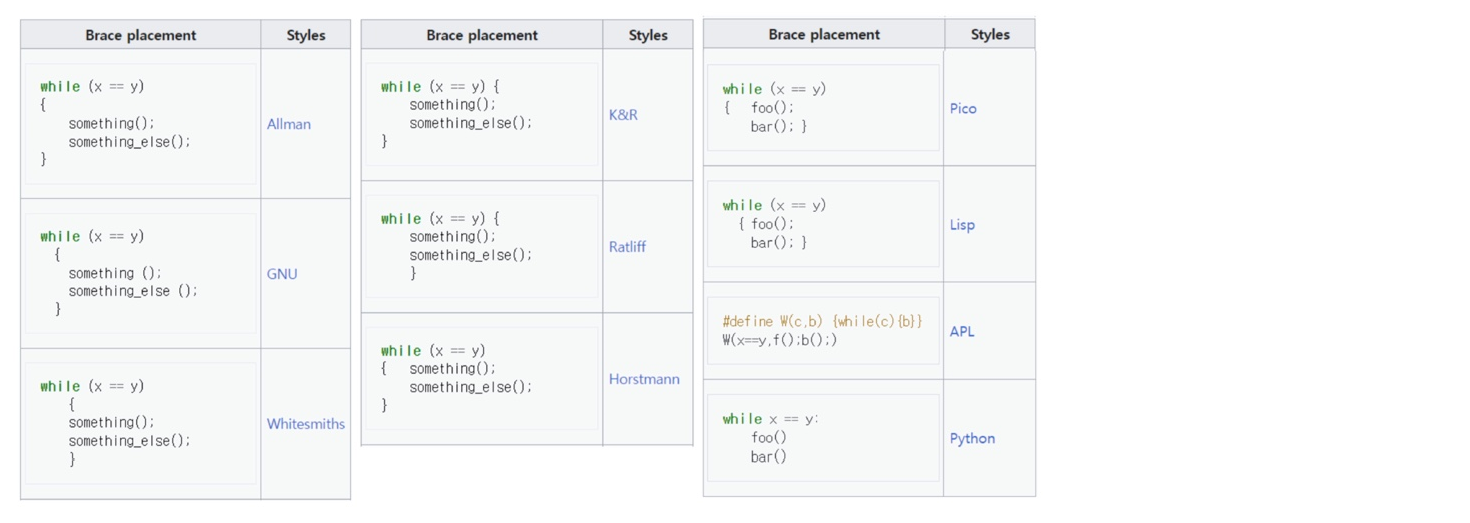
팀으로 작업하고 있다면, 팀끼리 어떤 포맷 방식을 사용할 것인지 정하고 모든 구성원이 그 포맷을 준수해야 한다
예를 들어, 괄호를 어디에 넣을 것인지, 들여쓰기 크기는 어느 정도로 할 것인가, 클래스, 변수, 메소드 이름을 어떻게 지을 것인지에 관하여 팀으로서 룰을 정해야 한다.
좋은 소프트웨어 시스템은 잘 읽히는 문서와도 같기 때문에 일관적인 스타일을 가진 코드를 작성하는 것이 필요하다 (책을 읽는데 문체가 계속 바뀐다고 생각해보면 너무 짜증날 것이다)
따라서, code formatting은 곧 소통의 방식이며, 전문 개발자의 첫 발걸음이 곧 소통이기 때문에 중요하다
코드가 작동되는 것이 물론 가장 중요하지만, 가독성을 확보하는 것 역시 중요하다
코딩 스타일과 코드의 가독성은 유지 가능성과 확장성에도 영향을 미치기 때문에 간과해서는 안된다.
📌 Vertical Formatting
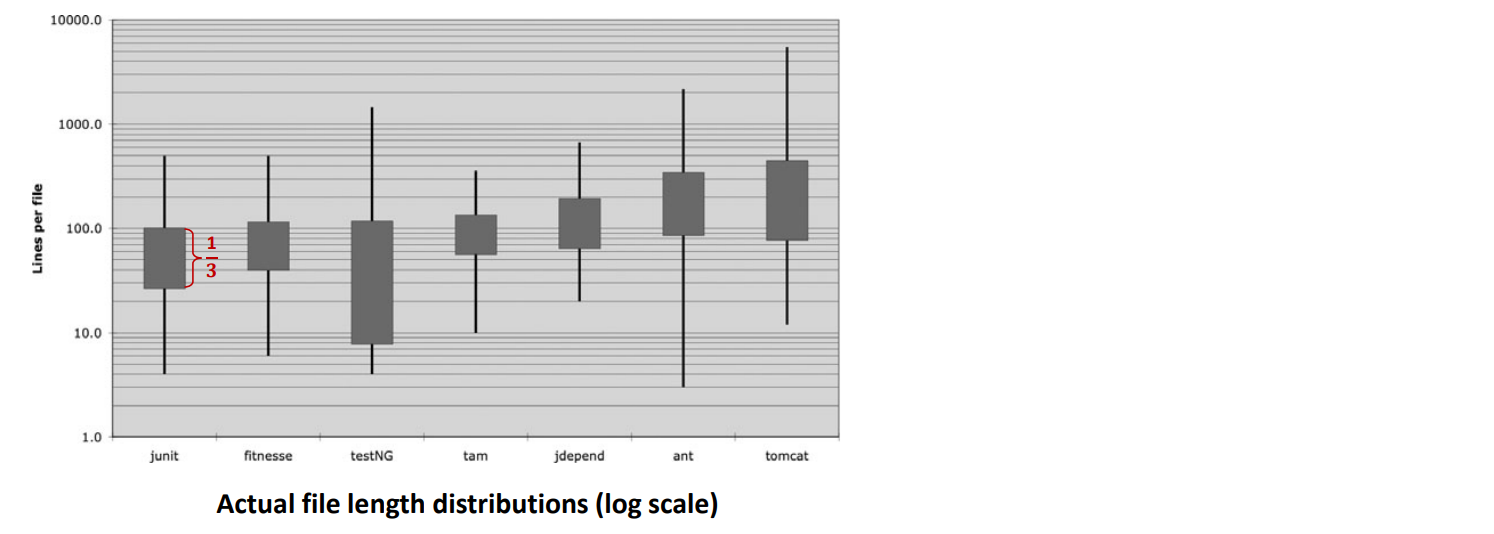
- 대부분의 파일은 200 라인 이내
- 500 라인을 넘어가는 파일은 거의 없음
- 작은 파일들로 큰 시스템을 만드는 것은 가능하다
- 상한선 500 라인이며, 대부분 200라인 길이다
잘 작성된 코드는 잘 작성된 신문지를 읽는 것과 유사하다
왜냐면 수직 방향으로 읽어가기 때문에
→ 헤드라인
→ 시놉시스 (첫 번째 문단)
→ 상세 내용 (아래로 내려가면서)
순으로 읽게 될 것이다.
따라서 잘 작성된 소스 파일은
→ 이름은 심플하되 설명적이어야 함
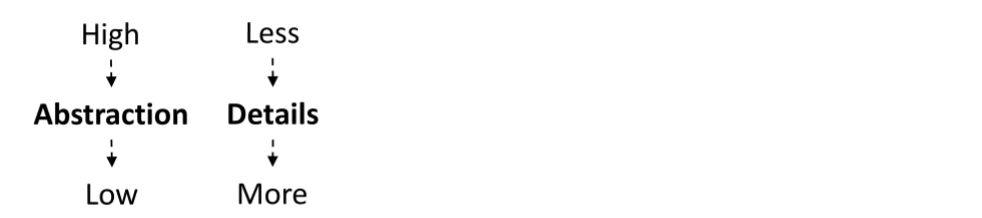
→ 가장 위에 있는 파트 : high-level 개념이어야 함
→ 끝에는 lowest level 함수와 디테일이 적혀져 있어야 함
신문도 많은 작은 기사들로 구성되어있는 것처럼, 소스 파일도 작은 함수들로 구성되어야 한다
🔻 Vertical Openness Between Concepts
- 개념 간의 수직적 개방성 : 개념들은 서로 빈 줄로 구분되어야 한다
- ex) 패키지 선언, import문, 각 함수 등
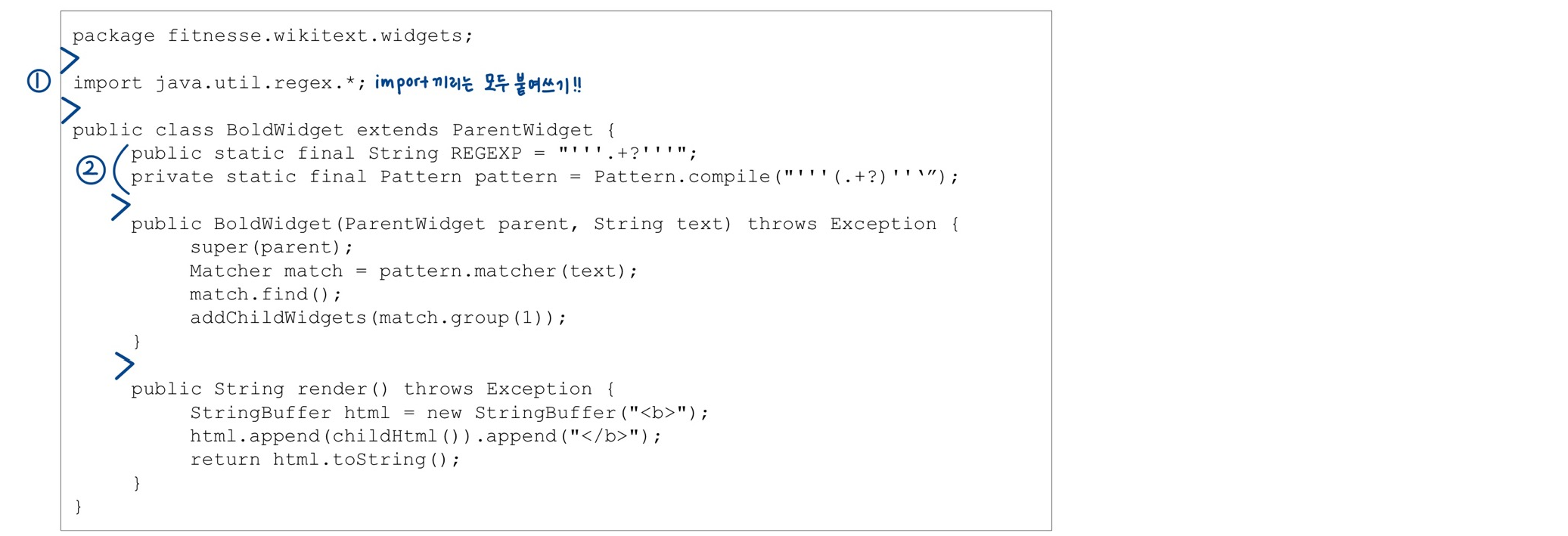
- package, import, class/function은 모두 구분짓기 위해 딱 한 줄만 줄바꿈을 해준다! 이때, import는 구분 짓고 싶은 욕구를 버리고 모두 붙여써야 함을 주의하자!
- 변수 선언은 함수 선언 후 바로 이어서 작성한다
- 메소드 선언은 한 줄 줄바꿈 후 작성한다
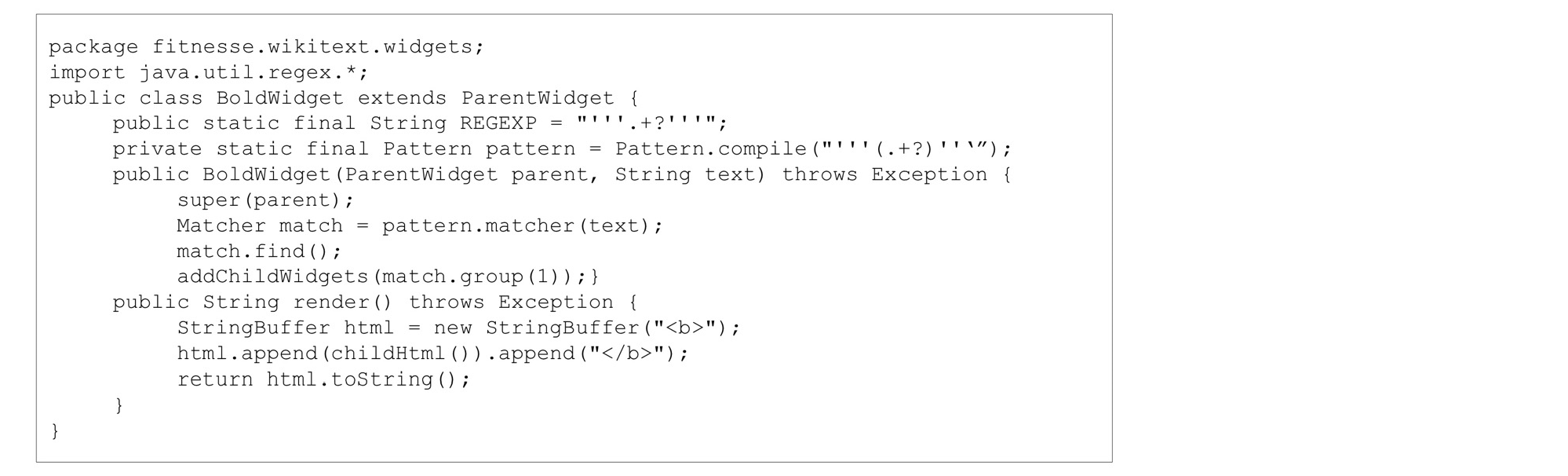
이처럼 줄바꿈이 없는 코드는 가독성이 현저하게 떨어진다.
✔️ 변수 간 분리를 하고 싶어질 때가 있을 수 있다.
하지만 이는 변수가 너무 많다는 안 좋은 signal임으로 코드를 정비할 필요가 있다!
🔻 Vertical Density
- 밀접하게 관련된 코드는 수직적으로 밀집되어 있어야 한다
- 개방성이 개념을 분리한다면, 수직적 밀집성은 밀접한 연관성을 의미한다
예시를 통해 수직적 밀집성을 깨뜨리는 사례를 살펴보자
🔹 BAD
public class ReporterConfig {
	/**
    * The class name of the reporter listener
    */
    private String m_className;

    /**
    * The properties of the reporter listener
    */
    private List<Property> m_properties = new ArrayList<Property>();

    public void addProperty(Property property) {
    	m_properties.add(property);
}- 불필요한 주석이 두 인스턴스 변수 간 가까운 연관성을 깨뜨리고 있다
- 변수명에 "m_"를 사용하는 것은 이제 X
- 한 가지 더 수정하자면
ReporterConfig이란 클래스명은 주석의 "reporter listener"이란 말과 mismatch 되어있다
🔹 GOOD (improved)
public class ReporterListener {
	private String className;
    private List<Property> properties = new ArrayList<Property>();

    public void addProperty(Property property) {
    	properties.add(property);
}- 이제 한 눈에 두 변수와 하나의 메소드가 있다는 것을 알 수 있다
- BAD code 예시처럼 눈을 많이 움직여야 하는 코드는 결코 좋지 않음!
🔻 Vertical Distance
- 개념적으로 연관이 있을 경우 수직적으로 가까이 배치시켜야 한다
- 밀접하게 관련된 개념들의 수직적 분리는 각 개념이 다른 개념의 이해에 얼마나 중요한지를 나타내야 한다
- 그렇지 않으면 독자들이 관련 변수, 함수 또는 클래스를 찾기 위해 코드를 여기저기 뛰어다니게 될 것이다
이제 아래 사항들을 살펴보자~!
- Variable declarations
- Instance variables
- Dependent functions
- Conceptual affinity
📍 Variable Declarations
- 변수들은 그것이 사용된 곳과 최대한 가까이에서 선언되는 것이 좋다
- 지역 변수들은 각 함수의 가장 위에 배치되어야 한다
- 왜냐면 우리 함수들은 짧을테니까..^^
(하하 맞죵,,) - 변수 선언이 함수 중간에 나오게 되면 찾으러 다니기 어렵다! 독자는 맨 위에 변수가 모두 선언되어 있을 것이라고 기대하고 있을 것..
- 왜냐면 우리 함수들은 짧을테니까..^^
👉 함수는 짧게, 변수 선언은 제일 위에!
🔹 example
private static void readPreferences() {
	**InputStream is = null;**

    try {
    	is = new FileInputStream(getPreferencesFile());
        setPreferences(new Properties(getPreferences()));
        getPreferences().load(is);
    } catch (IOException e) {
    	try {
        	if (is != null)
            	is.close();
        } catch (IOException e1) {
        }
    }
}
✔️ Control variables for loops
- loop에 사용되는 제어 변수는 보통 loop 안에서 선언되어야 한다
public int countTestCases() {
	int count = 0;

    for (**Test each** : tests)
    	count += each.countTestCases();
    return count;
}
✔️ 함수가 너무 긴 경우
- 드문 경우지만, 변수가 블록의 맨 위나 긴 함수 내의 루프 바로 앞에 선언될 수 있다
- 함수가 너무 길 경우에는 아래 코드처럼 넣어도 괜찮지만, 함수가 긴 것 자체가 BAD!
...
for (XmlTest test : suite.getTests()) {
	TestRunner tr = runnerFactory.newTestRunner(this, test);
    tr.addListener(textReporter);
    testRunners.add(tr);

    invoker = tr.getInvoker();

    for (ITestNGMethod m : tr.getBeforeSuiteMethods()) {
    	beforeSuiteMethods.put(m.getMethod(), m);
    }

    for (ITestNGMethod m : tr.getAfterSuiteMethods()) {
    	afterSuiteMethods.put(m.getMethod(), m);
    }
}
....
📍 Instance Variables
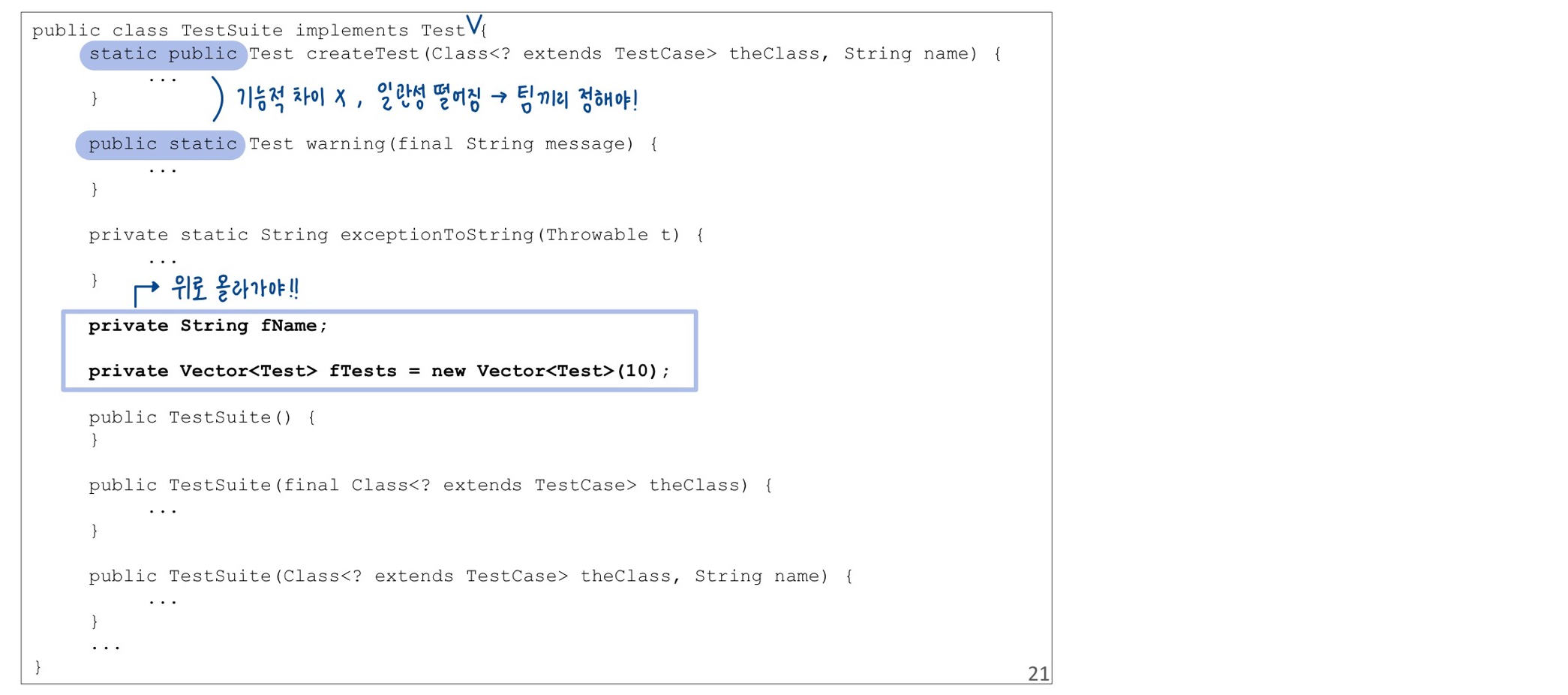
- 인스턴스 변수는 클래스의 가장 위에 선언되어야 한다
- 잘 디자인된 클래스는, 클래스의 많은 메소드에서 사용될 것이기 때문
- 따라서 모두가 선언된 곳을 보기 위해 어디로 가야하는지 알고 있어야 함
📍 Dependent Functions
- 만약 함수 호출이 있다면, 해당 함수는 수직적으로 가까이 배치되어야 한다
- caller가 callee 위에 배치되게 만들기 (호출하는 애가 호출 당하는 애보다 위에)
🔻 장점
- 독자는 함수의 정의가 곧 바로 나올 것이라고 믿게 된다
- 이런 방식은 호출된 함수를 쉽게 찾을 수 있게 해주며, 전체 모듈의 가독성을 향상시킨다
🔹 Example
public class WikiPageResponder implements SecureResponder {
	protected WikiPage page;
    protected PageData pageData;
    protected String pageTitle;
    protected Request request;
    protected PageCrawler crawler;

    public Response makeResponse(FitNesseContext context, Request request) throws Exception {
    	String pageName = getPageNameOrDefault(request, "FrontPage"); //[1]
        loadPage(pageName, context); //[2]
        if (page == null)
        	return notFoundResponse(context, request); //[3]
        else
        	return makePageResponse(context);
    }

    private String getPageNameOrDefault(Request request, String defaultPageName) {
    	String pageName = request.getResource();
        if (StringUtil.isBlank(pageName))
        	pageName = defaultPageName;
        return pageName;
    }

    protected void loadPage(String resource, FitNesseContext context) throws Exception {
    	WikiPagePath path = Patharser.parse(resource);
        crawler = context.root.getPageCrawler();
        crawler.setDeadEndStrategy(new VirtualEnabledPageCrawler());
        page = crawler.getPage(context.root, path);
        if (page != null)
        	pageData = page.getData();
    }

    private Response notFoundResponse(FitNesseContext context, Request request) throws Exception {
		return new NotFoundResponder().makeResponse(context, request);
	}

 	private SimpleResponse makePageResponse(FitNesseContext context) throws Exception {
 		pageTitle = PathParser.render(crawler.getFullPath(page));
 		String html = makeHtml(context);
 		SimpleResponse response = new SimpleResponse();
 		response.setMaxAge(0);
 		response.setContent(html);
 		return response;
 	}
...- getPageNameOrDefault()가 호출되었는데 가까이에 배치 되어있음!
- loadPage도 잇따라 정의가 되었는데, getPageNameOrDefault에서 정의할지 따로 뺄지 고민이 될 수 있다 → 이건 룰이 따로 없다! 독자가 뭘 더 궁금해할지 생각하고 작성해야 한다.
notFoundResponse와makePageResponse가 일관성이 떨어진다. 동사로 통일시키는게 낫다 →makeNotFoundResponse로 수정!
📍 Conceptual Affinity
- 특정한 개념적으로 근접하면 가까이 배치하자~!
✔️ Conceptual affinity
- 직접적인 의존성 (함수 호출 등)
- 변수를 사용하는 함수
- 비슷한 작업을 수행하는 함수들
근접성이 높을수록, 수직 거리가 좁아야 한다 (가까워야 한단 말...)
🔹Example
- 이 함수들은 개념적으로 근접성이 높다
public class Assert {
	static public void assertTrue(String message, boolean condition) {
    	if (!condition)
        	fail(message);
    }

    static public void assertTrue(boolean condition) {
    	assertTrue(null, condition);
    }

    static public void assertTrue(boolean condition) {
    	assertTrue(null, condition);
    }

    static public void assertFalse(String message, boolean condition) {
    	assertTrue(message, !condition);
    }

    static public void assertFalse(boolean condition) {
    	assertTrue(null, condition);
    }
    ...
🔻 Vertical Ordering
-
위에서도 언급했지만, 우리는 함수 호출로 인한 의존성이 아래 방향으로 보이길 바란다
- 호출을 받은 함수는 호출을 한 함수보다 아래에 있어야 한다
- 이것이 high level로부터 low level로 가는 좋은 흐름을 만들어 준다
-
즉, 맨 위에 abstraction이 높은 함수가, 아래 갈수록 detail한 정보가 따르는 것이다
-
이것은 신문 기사에서도 동일하다
- 가장 중요한 개념이 처음에 나오고
- low-level 디테일은 마지막에 나온다
-
Pascal, C, C++은 사용되기 전에 정의되거나 선언이 되어야만 사용이 가능하다
📌 Horizontal Formatting
코드 길이 통계에 따르면....
- 40% : 20~60 글자
- 30% : < 10 글자
정도이다. 80 글자 이상은 정말 긴 것!
보통은 보통 어떤 팀원의 모니터든 한 줄이 모니터에서 안 넘어가게 하는 것이 기준이 된다
이 지표는 프로그래머가 명백하게 짧은 라인을 선호한다는 것을 보여주기에, 우리는 라인을 짧게 만들기 위해 노력해야 한다
100 혹은 120 글자를 넘어가는 것은 부주의한 것
오른쪽으로 스크롤을 움직이는 일은 없어야 한다
어떠한 경우에서라도 스크린을 넘어 200 글자가 넘는 일은 없어야 한다
👉 설명적 변수를 활용하여 의미를 변수 이름에 담는 것이 코드의 길이를 줄일 수 있는 좋은 방법이다!
🔻Horizontal Openness and Density
- 강하게 연관된 것들은 공백을 사용하여 가까이 배치하고, 약하게 연관된 것들은 더 멀리 떨어뜨려 배치하라!
private void measureLine(String line) {
	lineCount++;
    int lineSize = line.length();
    totalChars += lineSize;
    lineWidthHistogram.addLine(lineSize, lineCount);
    recordWidestLine(lineSize);
}- 연산자 양옆은 공백이어야 한다
- 함수 이름과 여는 괄호 사이에는 공백을 넣지 말것
- 함수 호출 괄호 안에서는 인수들을 구분하여 배치할 것
public class Quadratic {
	public static double root1(double a, double b, double c) {
		double determinant = determinant(a, b, c);
		return (-b + Math.sqrt(determinant)) / (2*a);
	}

	public static double root2(int a, int b, int c) {
		double determinant = determinant(a, b, c);
		return (-b - Math.sqrt(determinant)) / (2*a);
	}

	private static double determinant(double a, double b, double c) {
		return b*b - 4*a*c;
	}
}- 연산자의 우선순위를 강조하기 위해
- 높은 우선순위 사이에 공백을 넣지 말것
- 낮은 우선순위 사이에는 공백을 넣을 것
- 위 코드에서
bb - 4a*c가 이에 해당
🔻Horizontal Alignment
public class FitNesseExpediter implements ResponseSender {
	private Socket                  socket;
	private InputStream             input;
	private OutputStream            output;
	private Request                 request;
	private Response                response;
	private FitNesseContext 		context;
	protected long                  requestParsingTimeLimit;
	private long 					requestProgress;
	private long 					requestParsingDeadline;
	private boolean 				hasError;

    public FitNesseExpediter(Socket s, FitNesseContext context) throws Exception {
		this.context = 				context;
		socket = 					s;
		input = 					s.getInputStream();
		output = 					s.getOutputStream();
		requestParsingTimeLimit = 	10000;
	}
위 코드가 깔끔해보이는가?
줄맞춤을 했으니 (열맞춤이라고 해야하나?) 멀리서보면 깔끔해보일 수 있다.
하지만, 정말 열심히 코드를 읽으며 이해를 해야할 때는 눈이 왔다갔다 해야해서 피로도가 높아지고, 결국엔 변수의 data type이 눈에 안들어오게 되어 도움이 되지 않는 형태이다!
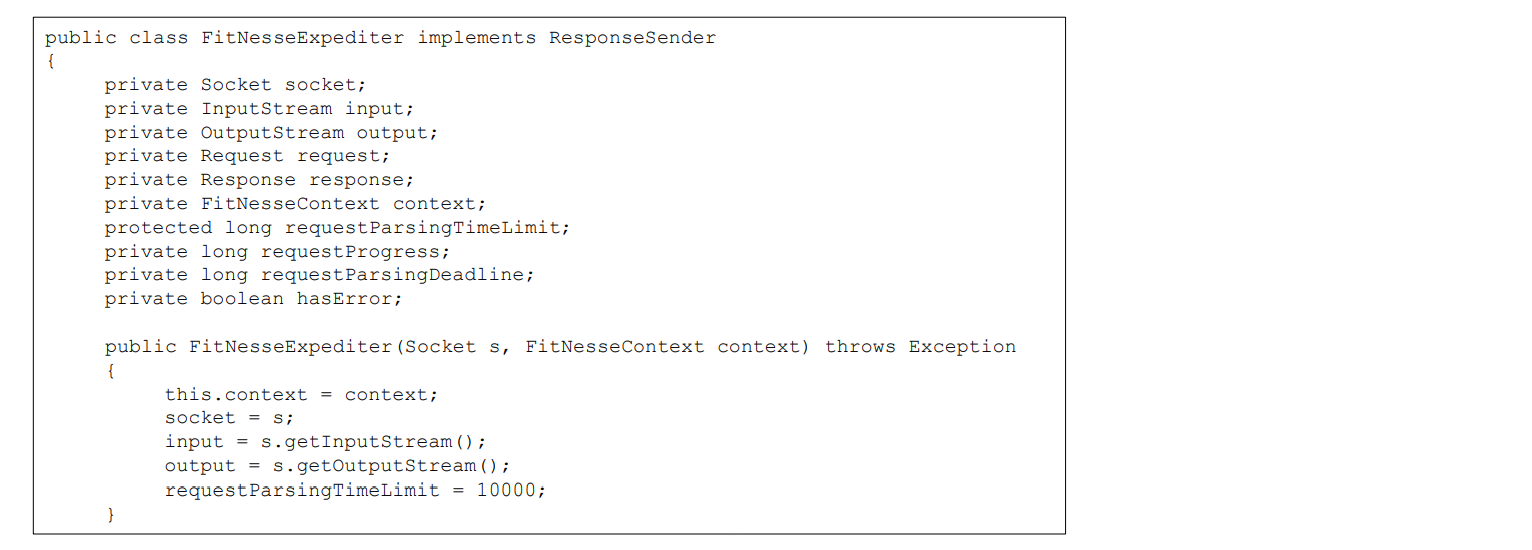
따라서 아래처럼 붙여서 사용하는 것이 옳은 방법이다
Class Extraction
선언할 변수가 너무 많을 시, 메소드와 관련 변수를 따로 class로 뽑아내는 것
📌 Indentation
-
소스파일은 마치 개요와 같이 계층 구조를 가지고 있다
- 파일 → 클래스 → 메소드 → 블록 → 블록 안의 블록
-
이 계층 구조가 눈에 잘 보이게 하려면 들여쓰기를 사용해야 한다!
- Class 선언 : 들여쓰기 필요 X
- Method 선언 : 클래스의 오른쪽으로 한 단계 들여쓰기
- Method 본체 : 메소드 선언의 오른쪽으로 한 단계 들여쓰기
- 블록 본체 : 포함시키는 블록의 으론쪽으로 한 단계 들여쓰기
-
이때, tab하고 space bar를 섞어쓰지 않도록 주의하자! Editor마다 사이즈가 다를 수 있기 때문!
- if문, while문이 짧다고 한 줄에 써버리는 경우와 같이, 들여쓰기 룰을 깨뜨리는 것을 피할 것!

📌 Dummy Scopes
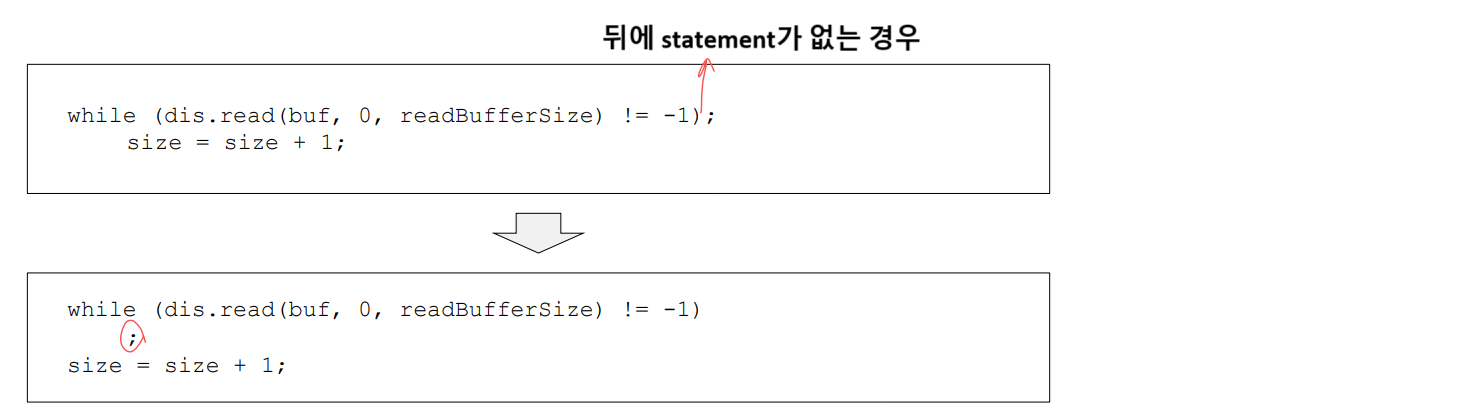
- 때때로 while 또는 for 문 본문이 더미 코드일 수 있다
- 이 경우 본문을 별도의 줄에 들여쓰는 것이 좋다
- 그렇지 않으면 while 루프 끝에 있는 세미콜론이 같은 줄에 조용히 앉아있는 것을 놓칠 수 있다
🔹 Good Coding Style Example
- Step down rule을 잘 보여주는 코드이다
- 하지만 그래도 더 좋게 고칠 수 있는 부분이 있으니 알아보자!
public class CodeAnalyzer implements JavaFileAnalysis { //[1]
	private int lineCount; //[2]
    private int maxLineWidth;
    private int widestLineNumber;
    private LineWidthHistogram lineWidthHistogram;
    private int totalChars;

    public CodeAnalyzer() {
    	lineWidthHistogram = new LineWidthHistogram();
    }

    public static List<File> findJavaFiles(File parentDirectory) { //[3]
    	List<File> files = new ArrayList<File>();
		findJavaFiles(parentDirectory, files); //[4]
		return files;
    }

    private static void findJavaFiles(File parentDirectory, List<File> files) {
    	for (File file : parentDirectory.listFiles()) {
        	if (file.getName().endsWith(".java")) //[5]
            	files.add(file);
            else if (file.isDirectory()) //[6]
            	findJavaFiles(file, files);
        }
    }

    public void analyzeFile(File javaFile) throws Exception {
    	BufferedReader br = new BufferedReader(new FileReader(javaFile));
        String line;
        while ((line = br.readLine()) != null)
        	measureLine(line); [[6]
    }

    private void measureLine(String line) {
    	lineCount++;
        int lineSize = line.length(); //[7]
        totalChars += lineSize;
        lineWidthHistogram.addLine(lineSize, lineCount);
        recordWidestLine(lineSize);
    }

    private void recordWidestLine(int lineSize) {
    	if (lineSize > maxLineWidth) {
        	maxLineWidth = lineSize;
            widestLineNumber = lineCount;
        }
    }

    public int getLineCount() {
    	return lineCount;
    }

    public int getMaxLineWidth() {
    	return maxLineWidth;
    }

    public int getWidestLineNumber() {
    	return widestLineNumber;
    }

    public LineWidthHistogram getLineWidthHistogram() {
    	return lineWidthHistogram;
    }

    public double getMeanLineWidth() {
    	return (double)totalChars/lineCount;
    }

    public int getMedianLineWidth() {
    	Integer[] sortedWidths = getSortedWidths();
        int cumulativeLineCount = 0;
        for (int width : sortedWidths) {
        	cumulativeLineCount += lineCountForWidth(width);
            if (cumulativeLineCount > lineCount/2)
            	return width;
        }
        throw new Error("Cannot get here");
   }

   private int lineCountForWidth(int width) {
       return lineWidthHistogram.getLinesforWidth(width).size();
   }

   private Integer[] getSortedWidths() {
       Set<Integer> widths = lineWidthHistogram.getWidths();
       Integer[] sortedWidths = (widths.toArray(new Integer[0]));
       Arrays.sort(sortedWidths);
       return sortedWidths;
   }
}
- 클래스명에서부터 코드를 분석하는 놈이라는 것을 알 수 있으므로 좋은 클래스명이다
- 변수 선언의 규모는 딱 위 코드만큼이 적정!
- 지정된 directory에 Javafile을 찾는 것임을 직관적으로 알 수 있으므로 좋은 코드
findJavaFiles(parentDirectory, files);에서 output argument를 사용하고 있다. 본래 output argument는 단 한 가지 경우를 빼놓고 사용하면 좋지 않다고 했는데, 그 한 가지 경우가 이것에 해당한다. 바로 recursive 함수에서는 boolean으로 결과를 잘 알리는 것이 어렵기 때문에 output argument가 필요하다!file.getName().endsWith(".java")는 chain을 형성하는 코드이다. 이는 뒤에 뭐가 어떤 파일들이 따르는지도 알고 있음을 명시하고 있다. 너무 tight하게 연관되어 있는 경우이므로 리팩토링이 필요하다.
→ 리팩토링을 한다면,file.doesNameEndWith로 수정이 가능하다!measureLine(line)가 step down rule을 잘 보여주고 있다. 함수 호출을 한 후 바로 아래 해당 함수가 정의되어 있기 때문line.length는 짧은 코드인데 굳이 변수에 저장을 해서 사용하는 이유가 궁금할 수 있다. 하지만 두 번 사용하고 있기 때문에 변수 선언을 해서 중복 제거를 한 것!
