
1. Situation
작년, 웹 프로젝트를 처음 시작할 시절에는 Docker의 쓰임 자체를 잘 몰랐었다.
하지만, Mac으로 바꾸게 되면서 Docker에 대해서 궁금해지기 시작했다.
그리고, 강의를 통해 공부하다가 직접 한 번 해보자! 싶어서 간단히 공부한 뒤 도입하기 시작했다.
2. Task
우선, 실행 환경은 Mac M3을 기준으로 진행한다.
- 윈도우에서는
WSL을 통해 다음 과정을 따라할 수 있다.
목표는 다음과 같다.
1. Docker image 및 MySQL Container 생성
2. MySQL Container 실행 및 접근
3. MySQL Database 생성
4. (Window) 로컬 MySQL -> (Mac, Docker) MySQL dump 수행
5. 생성된 MySQL Database 내 table 확인
3. Action
Docker 설치 및 확인
- 다음 링크(https://docs.docker.com/desktop/install/mac-install/)에서 Docker(이하, 도커)를 다운로드한다.
Docker Desktop for Mac with Apple silicon
- iterm2을 열어 도커 버전을 확인한다.
docker -v정상적으로 도커가 잘 설치되었다면 본격적으로 이미지 및 컨테이너를 생성해보자.
Docker image 및 MySQL Container 생성
- 우선, 사용할
MySQL이미지부터 생성한다.
docker pull mysql- 정상적으로 잘 생성되었는지 확인한다.
docker images- 이미지 파일을 실행시킬
컨테이너생성 및 실행한다.
docker run --name "생성할 컨테이너 이름" -e MYSQL_ROOT_PASSWORD="비밀번호" -p 3306:3306 mysql생성할 컨테이너 이름: 참고로 도커를 백그라운드로 실행할게 아니라면, 간단한 이름일수록 좋다.비밀번호: 비밀번호 또한 로컬 DB이므로 간단하게 할수록 좋다. 비밀번호를 잊을 일도 없어지기 때문에!
- 도커 컨테이너의 실행을 확인한다.
docker ps실행 중일 경우, 다음과 같이 하단에 노출된다.
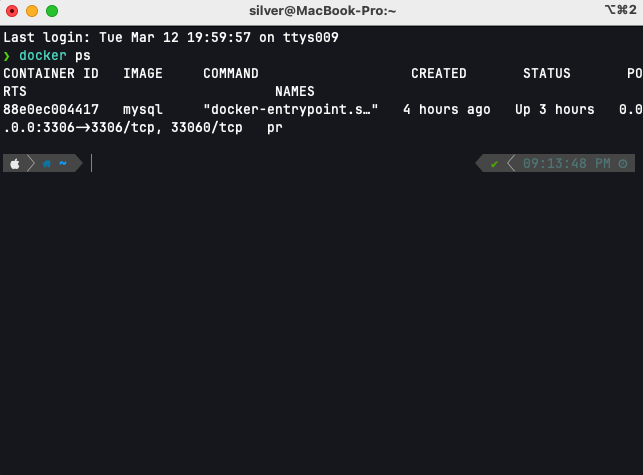
MySQL Container 실행 및 접근
- MySQL 서버 구동 확인한다.
- MySQL 서버가 컨테이너 내에서 정상적으로 구동 중인지 확인한다.
두 가지 방법이 있다.
첫 번째 방법은, CLI를 통해 확인하는 방법이다.
docker exec "컨테이너 이름" mysqladmin -p"비밀번호" ping이 경우, 정상적으로 구동 중이라면 mysql is alive라는 메세지가 노출이 된다.
두 번째 방법은 GUI를 통해 확인할 수 있다.
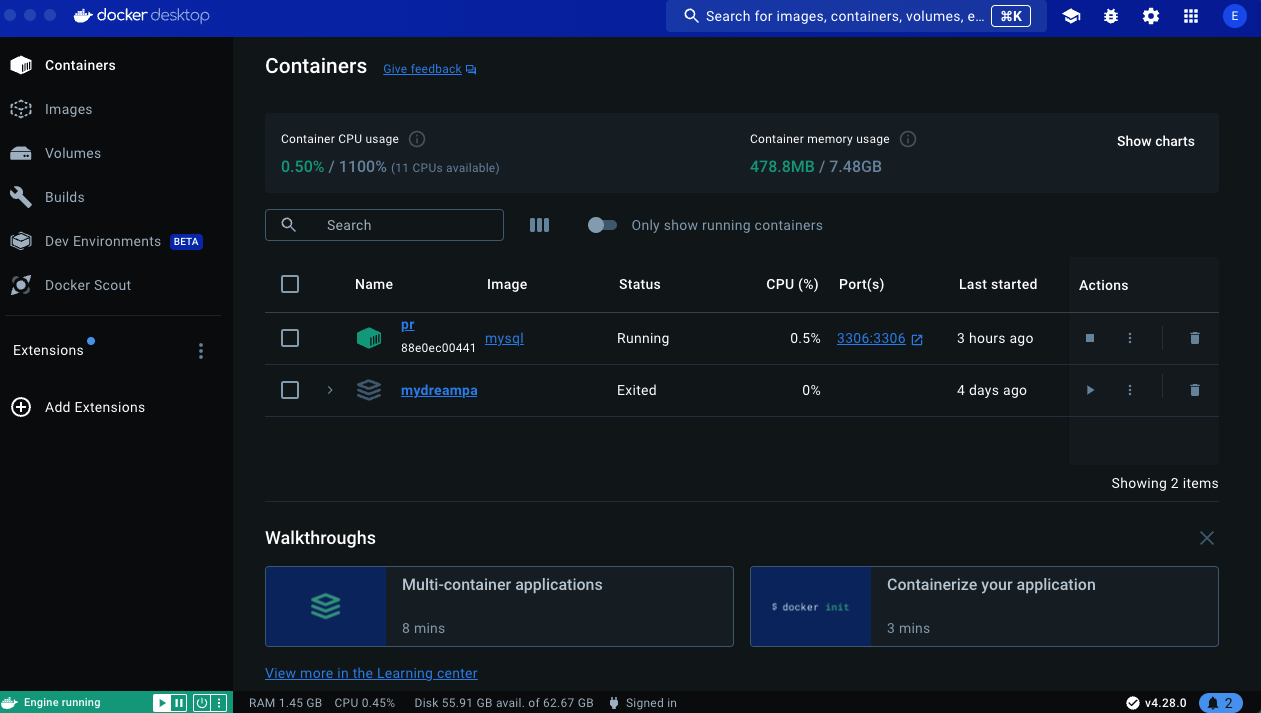
이렇게 초록색으로 표시된 컨테이너의 Status가 Running으로 표시된 것을 볼 수 있다.
만약, 정상적으로 구동이 안된다면
docker logs "컨테이너 이름"위 명령어를 통해 컨테이너의 로그를 출력하여 문제 상황을 확인해보자.
MySQL Container 실행 및 접근
MySQL컨테이너를 실행한다.
docker start "컨테이너 이름"또는 도커 대시보드 상에서 Actions의 실행 버튼을 통해 실행시킬 수도 있다.
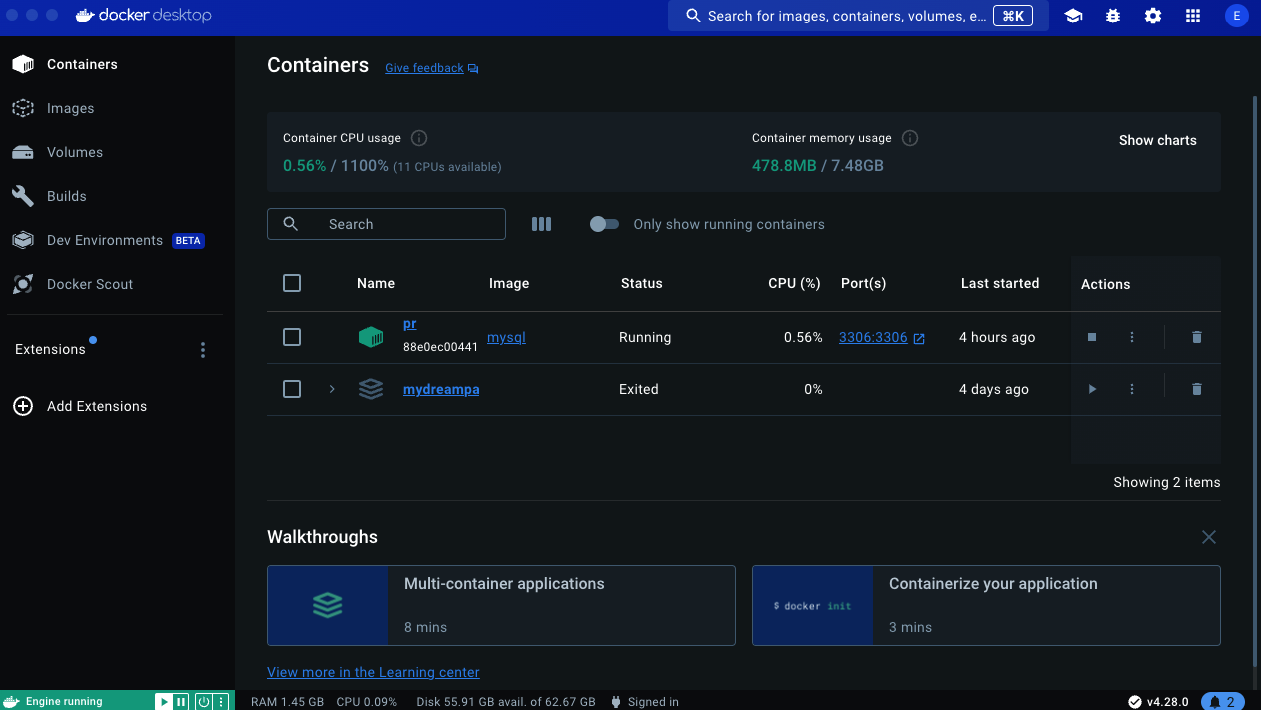
- MySQL에 접근한다.
docker exec -it "컨테이너 이름" mysql -uroot -p"비밀번호"- 데이터베이스가 존재하는지 확인한다.
USE "데이터베이스";이때, 데이터베이스가 없다면 다음 단계를 통해 데이터베이스부터 만들면 된다.
MySQL Database 생성
- 데이터베이스 생성.
docker exec -it $CONTAINER_NAME(컨테이너 이름) mysql -u$MYSQL_USER(mysql 아이디) -p$MYSQL_PASSWORD(mysql 비밀번호) -e "CREATE DATABASE IF NOT EXISTS 데이터베이스 이름;"(Window) 로컬 MySQL -> (Mac, Docker) MySQL dump 수행
💡 여기서부턴 도커의 개념을 잘 몰랐기 때문에, 마주했던 문제 상황에 대한 이야기이다.
문제 상황
- 이전에
Mac Community Server(https://dev.mysql.com/downloads/mysql/)를 통해 로컬에서 DB를 사용 중이었다. - 이때, 도커 MySQL 컨테이너를 통해 로컬에서 사용 중이던 DB 내 데이터에 접근하고자 했다.
- (1) 도커 내 mysql 컨테이너 생성
- (2) 로컬 DB의 아이디 및 비밀번호로 접속 시도
- 하지만,
ERROR 1698 (28000): Access denied for user 'root'@'localhost'이라는 오류만 계속 발생하였다.
원인 분석
정답은 도커 내 MySQL != MySQL Community Server의 MySQL이었기 때문이라고 추측한다.
본디, 도커 내에서 띄운 컨테이너는 가상 환경으로서 실환경인 로컬 환경과 다른 구조를 가진다.
가정
따라서,
(1) 도커로 띄운 mysql 서버 컨테이너에
(2) 로컬 DB의 계정으로
접근 할 수 없었던 것이다.
해결 방법
- 프로젝트의 기존 DB (Window)에서 덤프 파일을 뽑아내기
- 또는, 팀원 분에게 DB 덤프 파일을 제공받기
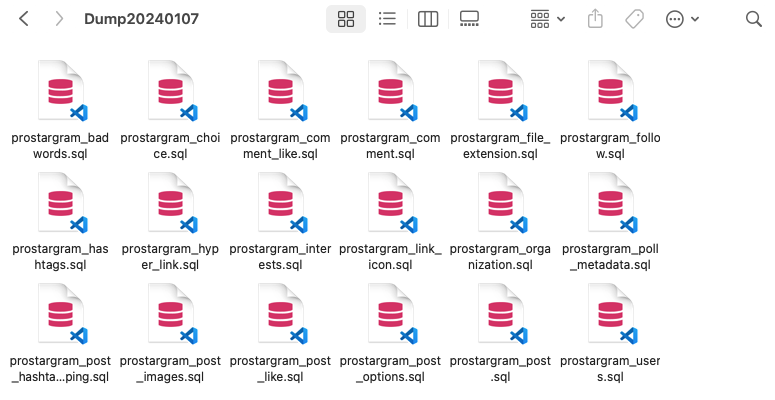
참고로, 덤프 파일을 뽑아내는 방법은 다음과 같다.
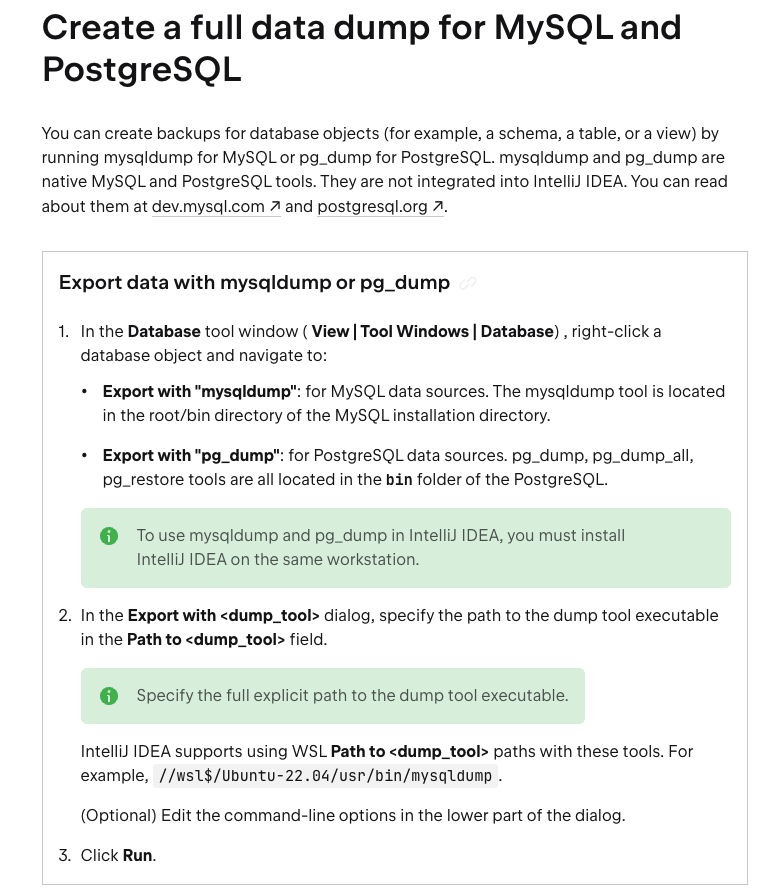
성공적으로 덤프를 하였다면, 다음과 같은 형태로 파일이 제공된다.
script.sh파일을 만든다.
touch /Users/silver/script.sh완성되면, 다음과 같은 파일이 경로에 생긴다.
nano 혹은 vim과 같은 CLI 편집기를 통해, 해당 파일에 접근한다.
nano /Users/silver/script.sh- 복원하고자 하는 도커 컨테이너 내에 해당 데이터베이스가 있는지 확인한다.
- 없을 경우,
"ERROR 1049 (42000): Unknown database '데이터베이스 이름'"이라는 오류를 마주할 수 있기 때문
docker exec -it $CONTAINER_NAME mysql -u$MYSQL_USER -p$MYSQL_PASSWORD -e "SHOW DATABASES;"만약, 없다면 도커 컨테이너 생성 및 실행 명령어를 입력한다.
docker exec -it $CONTAINER_NAME(컨테이너 이름) mysql -u$MYSQL_USER(mysql 아이디) -p$MYSQL_PASSWORD(mysql 비밀번호) -e "CREATE DATABASE IF NOT EXISTS 데이터베이스 이름;"script.sh에 접근하여, 다음 내용을 기입한다.
#!/bin/bash

# 컨테이너 이름, MySQL 사용자 이름 및 비밀번호 설정
CONTAINER_NAME=설정할 컨테이너 이름
MYSQL_USER=설정할 계정 이름
MYSQL_PASSWORD=설정할 비밀번호
DATABASE_NAME=설정할 데이터베이스 이름

# Dump 파일이 있는 폴더 경로
DUMP_FOLDER=/path/to/Dump20240107

# Docker 컨테이너로 폴더 내의 모든 .sql 파일을 복원
for sql_file in ${DUMP_FOLDER}/*.sql; do
  echo "Importing ${sql_file} into the database..."
  docker exec -i $CONTAINER_NAME mysql -u$MYSQL_USER -p$MYSQL_PASSWORD $DATABASE_NAME < $sql_file
done

echo "All data imported successfully!"
이때, CONTAINER_NAME, MYSQL_USER, MYSQL_PASSWORD, DATABASE_NAME은 각각 설정하고자 하는 내용들로 기입하면 된다.
script.sh파일에 실행 권한을 부여한다.
chmod +x /path/to/your/script.sh- 스크립트를 실행한다.
/path/to/your/script.sh- 쉘에 노출된
Importing이라는 키워드를 통해 정상적으로여러 .sql 파일들이 덤프되었음을 확인한다.
주의 사항
(1) 실행 중, 로그 내역 중에 mysql : [Warning] Using a password on the command line interface can be insecure."이라는 문구를 발견할 수 있다.
Importing /Users/silver/Dump20240107/prostargram_badwords.sql into the database...
mysql: [Warning] Using a password on the command line interface can be insecure.
Importing /Users/silver/Dump20240107/prostargram_choice.sql into the database...
mysql: [Warning] Using a password on the command line interface can be insecure.
Importing /Users/silver/Dump20240107/prostargram_comment.sql into the database...
mysql: [Warning] Using a password on the command line interface can be insecure.
Importing /Users/silver/Dump20240107/prostargram_comment_like.sql into the database...
mysql: [Warning] Using a password on the command line interface can be insecure.
Importing /Users/silver/Dump20240107/prostargram_file_extension.sql into the database...
mysql: [Warning] Using a password on the command line interface can be insecure.
Importing /Users/silver/Dump20240107/prostargram_follow.sql into the database...
mysql: [Warning] Using a password on the command line interface can be insecure.
Importing /Users/silver/Dump20240107/prostargram_hashtags.sql into the database...
mysql: [Warning] Using a password on the command line interface can be insecure.
Importing /Users/silver/Dump20240107/prostargram_hyper_link.sql into the database...
mysql: [Warning] Using a password on the command line interface can be insecure.
Importing /Users/silver/Dump20240107/prostargram_interests.sql into the database...
mysql: [Warning] Using a password on the command line interface can be insecure.
Importing /Users/silver/Dump20240107/prostargram_link_icon.sql into the database...
mysql: [Warning] Using a password on the command line interface can be insecure.
Importing /Users/silver/Dump20240107/prostargram_organization.sql into the database...
mysql: [Warning] Using a password on the command line interface can be insecure.
Importing /Users/silver/Dump20240107/prostargram_poll_metadata.sql into the database...
mysql: [Warning] Using a password on the command line interface can be insecure.
Importing /Users/silver/Dump20240107/prostargram_post.sql into the database...
mysql: [Warning] Using a password on the command line interface can be insecure.
Importing /Users/silver/Dump20240107/prostargram_post_hashtag_mapping.sql into the database...
mysql: [Warning] Using a password on the command line interface can be insecure.
Importing /Users/silver/Dump20240107/prostargram_post_images.sql into the database...
mysql: [Warning] Using a password on the command line interface can be insecure.
Importing /Users/silver/Dump20240107/prostargram_post_like.sql into the database...
mysql: [Warning] Using a password on the command line interface can be insecure.
Importing /Users/silver/Dump20240107/prostargram_post_options.sql into the database...
mysql: [Warning] Using a password on the command line interface can be insecure.
Importing /Users/silver/Dump20240107/prostargram_users.sql into the database...
mysql: [Warning] Using a password on the command line interface can be insecure.
비밀번호가 명령줄에 직접 포함되어 있을 때, 보안상 좋지 않다는 경고 메시지이다.
- 하지만, 덤프를 진행할 때(= 데이터를 임포트할 때)에는 영향을 주지 않는다.
(2) 덤프가 완료되었을 시점에, 다음과 같이 쉘에 노출된다.
❯ echo "All data imported successfully!"
dquote> chmod +x /path/to/your/script.sh

dquote>
만약, 이 상태에서 어떠한 타자도 입력이 되지 않는다면
닫는 따옴표(")가 없어서 입력을 기다리는 상황을 마주한 것이다.
즉,
dquote> 프롬프트는 닫는 따옴표(")가 없어서, 쉘이 추가 입력을 기다리고 있음을 나타내는 상태이다.
따라서, 그냥 "을 입력해주고 이어서 진행하면 된다.
검증
데이터가 정상적으로 복원되었는지 확인하기 위해, 도커 컨테이너 내부 MySQL에 접속해서 확인해보자.
- MySQL 쉘에 접속한다.
docker exec -it $CONTAINER_NAME mysql -u$MYSQL_USER -p$MYSQL_PASSWORD
- 데이터베이스를 선택한다.
- 이때, 쉬운 이해를 위해 실제로 사용했던 데이터베이스의 이름을 기재했다.
USE prostargram;- 테이블 목록 확인
SHOW TABLES;- 테이블 데이터 확인
SELECT * FROM users LIMIT 10;테이블별로 최대 10개의 레코드를 조회함으로써, 정상적으로 모든 과정이 잘 진행되었다면 데이터가 잘 노출될 것 이다.
4. Result
Docker를 이론으로만 접하다가, 그냥 한 번 해보자 싶었지만.. 아래의 3단계를 완료하기에는 꽤 오래 걸렸었다.
도커 이미지를 다운 -> 도커 컨테이너를 생성 -> Mysql 쉘에 접근하여 데이터 조작
하지만, 덤프라는 좋은 수단도 알게 되고, 쉘에서 조작할 mysql 명령어도 많이 접할 수 있어 좋은 시도였다고 생각한다.
특히, 새로운 기술을 경험할 때의 두려움을 덜어낼 수 있었던 경험의 일환이라고 느껴졌다.
마지막으로, 나의 수많은 질문을 들어준 여러 개발자 분들(GPT, 경태님, 진혁님, 윤기님, .. etc)께 감사함을 표한다.
Reference

슬퍼하는 도커 고래의 이미지가 인상적이네요,,, 고생하셨습니다