4. 입력과 출력
4.1 System.out
- System클래스는 in,out,err속성을 가지고 있습니다. 이 중 out은 시스템의 기본 출력장치를 의미한다.
System.out.print() // 화면에 정보를 출력하라는 의미입니다.
System.out.println()// 화면에 정보를 출력하고 줄 바꿈을 하라는 의미입니다.
System.out.printf() // 형식화한 문자열을 화면에 출력하라는 의미합
import java.util.Date;
public class FormatExample{
public static void main(String[] args){
int a = 12345;
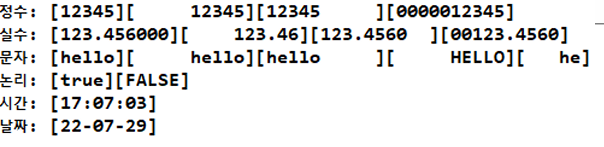
System.out.printf("정수: [%d][%10d][%-10d][%010d]\n",a,a,a,a);
double b = 123.456;
System.out.printf("실수: [%f][%10.2f][%-10.4f][%010.4f]\n",b,b,b,b);
String c = "hello";
System.out.printf("문자: [%s][%10s][%-10s][%10S][%5.2s]\n",c,c,c,c,c);
System.out.printf("논리: [%b][%B]\n", true, false);
Date d = new Date();
System.out.printf("시간: [%tH:%tM:%tS]\n", d, d, d);
System.out.printf("날짜: [%1$ty-%1$tm-%1$td]", d); //1$ --> 첫번쨰 것을 매핑한다는 의미
}
}
4.2 System.in.read() - 바이트 단위 입력
System.in은 표준 입력(키보드) 스트림이며 바이트 단위로 입력을 처리한다.System.in.read()는 1바이트만 읽기 때문에 영어, 숫자, 특수문자만 입력 가능하며, 한글은 처리할 수 없다.
int keyCode = System.in.read();
System.out.println(keyCode);      // 예: 'A' 입력 시 65 출력
System.out.printf("%c", keyCode); // A 출력
비유: 종이 한 장만 집을 수 있는 집게. 두꺼운 책(=한글)은 못 집는다.
4.2.1 InputStreamReader - 문자 단위 입력
- 바이트 스트림을 문자 스트림으로 바꾸는 역할을 한다.
System.in을 문자로 처리하게 하여 한글 입력도 가능하게 만든다.
Reader reader = new InputStreamReader(System.in);
int keyCode = reader.read();
System.out.println(keyCode);
System.out.println((char)keyCode);
비유: 손가락 대신 집게를 바꾸면 책도 집을 수 있게 되는 것처럼, InputStreamReader는 더 큰 문자를 처리할 수 있게 도와준다.
4.3 문자열 입력 (바이트 배열 이용)
System.in.read()를 통해 여러 바이트를 배열로 입력받고 문자열로 변환한다.
byte[] buffer = new byte[100];
int readCount = System.in.read(buffer);
String inputData = new String(buffer, 0, readCount);
System.out.println(inputData);
주의: 입력한 문자열 끝에 줄바꿈 문자(엔터)가 포함되어 함께 출력될 수 있다.
4.3.1 줄 단위 입력 (BufferedReader)
BufferedReader는 문자열을 한 줄씩 입력받을 수 있게 해준다.
Reader reader = new InputStreamReader(System.in);
BufferedReader in = new BufferedReader(reader);
String line = in.readLine();
System.out.println(line);
in.close();
비유: 한 줄씩 뜯어지는 메모장처럼 한 줄 단위로 입력받는 방식.
4.4 Scanner 사용
Scanner는 다양한 형식의 데이터를 입력받을 수 있는 유용한 도구.- 생성 시
Scanner scanner = new Scanner(System.in)으로 생성한다.
주요 메서드
next(): 공백 전까지 문자열 입력nextLine(): 한 줄 전체 입력nextInt(),nextDouble(),nextBoolean()등 다양한 타입 지원
Scanner scanner = new Scanner(System.in);
String name = scanner.next();
int age = scanner.nextInt();
double weight = scanner.nextDouble();
4.4.1 next() vs nextLine() 주의사항
nextInt()나nextDouble()같은 메서드는 엔터키를 소비하지 않는다.- 그다음
nextLine()을 쓰면 이전 줄의 남은 엔터가 그대로 입력되어 빈 문자열이 들어간다.
Scanner scanner = new Scanner(System.in);
int age = scanner.nextInt();      // 엔터는 안 소비됨
String name = scanner.nextLine(); // 바로 빈 문자열이 입력됨 (버그)
해결법
nextLine()으로 먼저 전체 줄을 받고 필요한 형으로 변환하는 방식 사용
int age = Integer.parseInt(scanner.nextLine());
String name = scanner.nextLine();
4.4.2 여러 줄 입력 받기 (hasNextLine() 활용)
- 줄 단위로 여러 줄 입력을 받아 저장하려면 반복문과
hasNextLine()사용 - 빈 줄(엔터만 입력)로 종료 처리
Scanner scanner = new Scanner(System.in);
StringBuilder lines = new StringBuilder();

while (scanner.hasNextLine()) {
    String line = scanner.nextLine();
    if (line.trim().isEmpty()) break;
    lines.append(line).append("\n");
}

System.out.println(lines.toString());
비유: 사용자가 "이제 그만" 하고 빈 줄을 입력할 때까지 메모장에 계속 적는 것과 같다.
정리
| 입력 방식 | 처리 단위 | 한글 처리 | 줄 단위 입력 | 다양한 타입 지원 | 특징 |
|---|---|---|---|---|---|
System.in.read() | 바이트 | X | X | X | 가장 기본, 1바이트만 읽음 |
InputStreamReader | 문자 | O | X | X | 한글 가능 |
BufferedReader | 줄 | O | O | X | 성능 좋고 직관적 |
Scanner | 토큰 / 줄 | O | O | O | 가장 다용도, 형변환 주의 |
연산자
1. 단순연산자
- 증가연산자와 감소연산자
public class IncremintExample {
	public static void main(String[] args){
		int a = 5;
		++a;
		System.out.println("전위증가:" + a);
		int b = 10;
		b++;
		System.out.println("후위증가: " + b);
	}
}
// 전위 증가 : 6
// 후위 증가 : 11- 다른 연산자랑 같이 사용되면?
public	class	IncrementExample2	{
	public	static	void	main	(String[]	args)	{
		int	i	=	1;
		int	j	=	i++;
		System.out.println("후위	연산자");
		System.out.println("i의	값은	"	+	i);
		System.out.println("j의	값은	"	+	j);
		int	x	=	1;
		int	y	=	++x;
		System.out.println("\n전위	연산자");
		System.out.println("x의	값은	"	+	x);
		System.out.println("y의	값은	"	+	y);
	}
}
// i의 값은 2
// j의 값은 1
// x의 값은 2
// y의 값은 2- 부호연산자
public class Sign0pExample{
	public static void main(String[] args){
		int a = 3;
		int b = - -a;
		System.out.println("a:	"	+	a);
		System.out.println("b:	"	+	b);
		int	c	=	3;
		int	d	=	--c;
		System.out.println("c:	"	+	c);
		System.out.println("d:	"	+	d);
		int	x	=	3;
		int	y	=	-x	+	-	--x	+	x--;
		System.out.println("x:	"	+	x);
		System.out.println("y:	"	+	y);
	}
}
// a: 3 b:3 c:2 d:2 x:1 y: -3 - 비트반전과 논리 반전 연산자: ~,!
public class Not0pExample {
	public static void main(String[] args) {
		byte binData = 0b0000_1000;
		System.out.println(binData);
		System.out.println(~binData);
		System.out.println((byte)0b1111_0111);

		boolean isTure = false;
		System.out.println(!isTrue);
	}
}
2. 2항 연산자
- 산술연산자 : +, -, *, / , %
- 각 자릿수의 합을 계산하는 프로그램
public class DivmodExample1 {
	public static void main(String[] args) {
		int number = 45;
		int tensDigit = number / 10;
		int unitsDigit = number % 10;
		int sum = tensDigit + unitDigit;
		System.out.println("각 자릿수의 합 : " + sum);
	}
}
2.1 비교연산자
- ==, ≠ , < , ≤ ,> , ≥
public class StringComparsionExample {

	public static void main(String[] args) {
		// TODO Auto-generated method stub
		String str1 = new String("hello");
		String str2 = new String("hello");
		System.out.println(str1 == str2);
		System.out.println(str1.equals(str2));
		String str3 = "world";
		String str4 = "world";
		System.out.println(str3 == str4);
		System.out.println(str3.equals(str4));
		str3 = str3.concat("ABC");
		System.out.println(str3);
		System.out.println(str3 == str4);
	}

}
2.2 비트연산자
- &(AND), |(OR). ^(XOR), - (NOT)
public class BitwiseExample {

	public static void main(String[] args) {
		// TODO Auto-generated method stub
		byte a= 5;
		byte b = 3;
		System.out.println(a & b);
		System.out.println(a | b);
		System.out.println(a ^ b);
	}

}
// 1
// 7
// 6- 비이동연산자 : >> , <<, >>>
, <<는 채워지는 비트는 부호비트
오른쪽으로 비트 이동하는데 채워지는 비트는 무조권 0
int a = 192;
int b = a >> 3;
// a => 11000000
// b => 00011000
2.3 논리연산자
- &, |, ^, &&, ! → 이렇게 써도 되지만 일반적으로
- &보다는 &&을 |보다는 ||을 사용한다.
- OR보다는 AND가 연산 순위가 높음
- 단축회로연산자 개념을 알아야한다. 밑의 코드를 보고 알자
- &이거 하나일떄는 앞이 false여도 실행을 한다. 하지만 단축연산자 &&일경우 앞의 조건식이 false이면 뒤의 조건식을 실행하지 않는다.
public	class	ShortCircuitExample	{
	public	static	void	main	(String[]	args)	{
		int	x=10,	y=20;
		System.out.println((x	!=	10)	&	(++y	==	21));	//	false
		System.out.println("y:	"	+	y);	//	y:	21
		System.out.println((x	==	10)	|	(++y	==	21));	//	true
		System.out.println("y:	"	+	y);	//	y:	22
		int	a=10,	b=20;
		System.out.println((a	!=	10)	&&	(++b	==	21));	//	false
		System.out.println("b:	"	+	b);	//	b:	20
		System.out.println((a	==	10)	||	(++b	==	21));	//	true
		System.out.println("b:	"	+	b);	//	b:	20
	}
}
2.4 대입연산자
- 대입 연산자에는 =, +=, -=, *=, /=, %=, <<=, >>=, >>>=, &=, ^=, |= 이 존재합니다.
public class AssignmentExample {
	public static void main(String[] args){
		int a = 5;
		int b = 5;
		a += 3;
		b += 3;
		System.out.println(a+ "\t" + b); // 8,  3
	}
}
3. 3항연산자
- 피연산자가 3개인 연산자를 말한다.
- ? 와 : 를 이용해서 표현하는 조건연산자(? : ) 한개만 있습니다.
(조건식 ? 연산식1 : 연산식 2) → 조건식이 참이면 연산식1이 반환되고 거짓이면 연산식2가 반환됩니다.
public class ConditionalExample{
	public static void main(String[] args){
		int a= 5 - (int)(Math.random() *10);  //0부터 1미만의 임의의 실수를 반환하고 10을 곱함

		int abs = a >= 0 ? a: -a;
		System.out.println(a + "의 절댓값 : " + abs);
		System.out.println(a >= 0 ? "0보다 크거나 같음" : "0보다 작음");
	}
}
인생 별거 없어