1. 조건문
1.1 if 구문
- 단순 if블록
import java.util.Scanner;

public class IfExample{
	public static void main(String[] args){
		Scanner scanner = new Scanner(System.in);

		System.out.print("점수를 입력하세요: ");
		int score = scanner.nexInt();

		System.out.println("점수: " +score);

		if(score >= 60){
			System.out.println("합격");
		}
		else if(score >= 40){
			System.out.println("좀만더 하셈");
		}
		else{
			System.out.println("불합격"):
		}
		scanner.close();
	}
}
1.2 switch 구문
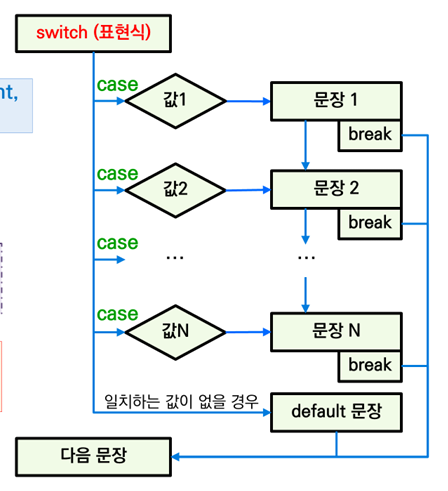
import java.util.Scanner;

public class SwitchCalcExample{
	public static void main(String[] args) {
		Scanner scanner = new Scanner(System.in);

		int num1 = scanner.nextInt();
		String op = scanner.next();
		int num2 = scanner.nextInt();

		switch(op.charAt(0)) {
		case '+' :
			System.out.println(num1 + num2);
			break;
		case 'x' :
			System.out.println(num1 * num2);
			break;
		case '/' :
			System.out.println(num1/num2);
			break;
		case '-':
			System.out.println(num1 - num2);
			break;
		default :
			System.out.println("잘못된 연산식입니다.");
		}
		scanner.close();
	}
}
import java.util.Scanner;
public class SwitchMonthDayExample {
public static void main(String[] args) {
Scanner scanner = new Scanner(System.in);
System.out.println("연도와 월을 입력하세요(예: 2000 2)");
int year = scanner.nextInt();
int month = scanner.nextInt();
int numDays = 0;
switch (month) {
case 1: case 3: case 5:
case 7: case 8: case 10:
case 12:
numDays = 31;
break;
case 4: case 6:
case 9: case 11:
numDays = 30;
break;
case 2:
if(((year % 4 == 0) && !(year % 100 == 0)) || (year % 400 == 0))
numDays = 29;
else
numDays = 28;
break;
default:
System.out.println("Invalid month.");
break;
}
System.out.println("Number of Days = " + numDays);
scanner.close();
}
}public class SwitchExpressionExample {
public static void main(String[] args){
int a = (int)(Math.random()*10);
char b = switch(a){
case 9, 8 -> 'A';
case 7,6,5 -> {
System.out.println("7,6,5 입니다.");
yield 'B'; //{}안에서 반환해야 할 경우 yield사용한다.
}
default -> 'C';
};
System.out.println(b):
}
}2. 반복문
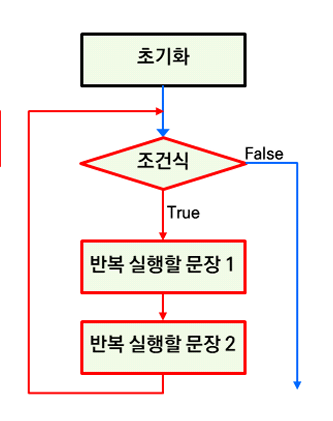
2.1 while 구문
- 반복횟수가 정해지지 않은 상황에서 사용한다.. 반복이 얼마나 진행될지를 조건에 따라 결정할 떄 유용하다.
public class WhileExample{
	public static void main(String[] args){
		int i = 1;
		int sum =0;
		while(i <= 10){
			sum = sum + i;
			i++;
		}
		System.out.println(sum); //55
	}
}
import java.util.Scanner;
public class InfiniteLoopExample {
public static void main(String[] args){
Scanner scanner = new Scanner(System.in);
While(true){
System.out.print("종료하려면 exit을 입력하시오: ");
String input = scanner.nextLine();
if(input.equals("exit")){
System.out.println("프로그램을 종료합니다.");
break;
}else{
System.out.println("입력한 값: " + input);
}
}
scanner.close();
}
}2.2 do ~ while 구문
- 무조권 1번은 실행이 된다.
public class DoWhileExample{
	public static void main(String[] args){
		int i = 1;
		int sum = 0;
		do{
			sum = sum + i;
			i++;
		}while( i <= 10);
		System.out.println(sum);
	}
2.3 for구문
public class ForExample {
	public static void main(String[] args){
		int sum = 0;
		for(int i =0; i <= 10; i++){
			sum = sum +i;
		}
		System.out.println(sum);
	}
}- 향상된 for구문 : 배열과 컬렉션에 들어있는 모든 요소에 대한 반복작업을 처리
for(int i =0; i<wekArray.length; i++){
System.out.println(weekArray[i]);- 중첩 for 문
for(int i =0; i<outerLimit; i++){
	// 외부 반복문의 실행문
	for((int j =0; j < innerLimit; j++){
		//내부 반복문
	}
}
3. 탈출문
3.1 BREAK
- 반복문이나 switch문을 중단하고 다음문장으로 제어를 이동시킵니다.
public class BreakExample1 {
	public static void main(String[] args){
		for(int i =0; i<10; i++){
			if(i==5){
				break;
			}
			System.out.println(i);
		}
	}
}
3.2 Continue
- 현재 반복을 중단하고 다음 반복을 진행합니다.
for(int i =0; i<10; i++){
	if(i==5){
		continue;
	}
}
// 0 1 2 3 4 6 7 8 9
3.3 return
- 메서드를 실행중인 위치에서 빠져나가며 값을 반환합니다.
public	class	ReturnExample	{
	public	static	void	main(String[]	args)	{
		int	a	=	20;
		int	b	=	30;
		System.out.println("넓이는:	"	+	calcRect(a,	b));
	}
	public	static	int	calcRect(int	width,	int	height)	{
		return	(width	*	height);
	}
}
//600
3.4 중첩 반복문에서 break와 continue
- 안쪽 반복문에서 break가 실행되면 안쪽 반복문만 종료되고 바깥 반복문은 여젼히 실행 중인 상태
 public	class	BreakExample2	{
	 public	static	void	main(String[]	args)	{
		 for(int	i=0;	i<3;	i++)	{
			 for(int	j=0;	j<2;	j++)	{
				 if(i==j)	{
					 break;
					}
					System.out.println(i	+	"	"	+	j);
				}//end	inner	for
			}//end	outer	for
			System.out.println("For	문	실행이	종료되었습니다.");
		}
	}
	// 1 0
	// 2 0
	// 2 1
	// For 문 실행이 종료되었습니다.
3.5 레이블을 가진 반복문
- continue 또는 break를 둘러싸고 있는 충첩된 루프가 둘 이상일떄 원하는 루프를 탈출하거나 건너뛰기 위해 레이블이 사용
public class LabeledLoopExample {
	public static void main(String[] args){
		outer : for(int i = 0; i <3; i++){
			for(int j =0; j < 3; j ++){
				if(j==2){
					break outer;
				}
				System.out.println(i + "\t" + j);
			}
		}
	}
}
인생 별거 없어