📌 Calc (1)
calc4.jsp
<%
	int x = 5;
	int y = 10;
%>
<!DOCTYPE html>
<html>
<head>
<meta charset="UTF-8">
<title>Insert title here</title>
<style>
	input {
		width: 50px;
		height: 50px;
	}
	.output{
		height: 50px;
		background: #e9e9e9;
		font-size: 24px;
		font-weight: bold;
		text-align: right;
		padding: 0px 5px;
	}

</style>
</head>
<body>
	<form action="calc3" method="post">
		<table>
			<tr>
				<td class="output"colspan="4"><%= x + y %></td>
			</tr>
			<tr>
				<td><input type="submit" name="operator" value="EC" /> </td>
				<td><input type="submit" name="operator" value="C" /> </td>
				<td><input type="submit" name="operator" value="BS" /> </td>
				<td><input type="submit" name="operator" value="/" /> </td>
			</tr>
			<tr>
				<td><input type="submit" name="value" value="7" /> </td>
				<td><input type="submit" name="value" value="8" /> </td>
				<td><input type="submit" name="value" value="9" /> </td>
				<td><input type="submit" name="operator" value="-" /> </td>
			</tr>
			<tr>
				<td><input type="submit" name="value" value="1" /> </td>
				<td><input type="submit" name="value" value="2" /> </td>
				<td><input type="submit" name="value" value="3" /> </td>
				<td><input type="submit" name="operator" value="+" /> </td>
			</tr>
			<tr>
				<td></td>
				<td><input type="submit" name="value" value="0" /> </td>
				<td><input type="submit" name="dot" value="." /> </td>
				<td><input type="submit" name="operator" value="=" /> </td>
			</tr>
		</table>
	</form>

</body>
</html>
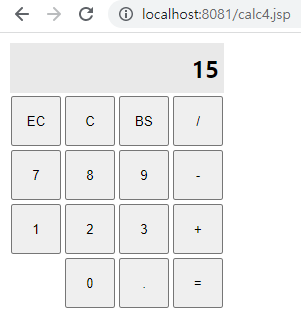
결과값
📌 Calc (2)
CalcServelt.java
package com.codingbox.servlet;

import java.io.IOException;
import java.io.PrintWriter;

import javax.servlet.ServletException;
import javax.servlet.annotation.WebServlet;
import javax.servlet.http.HttpServlet;
import javax.servlet.http.HttpServletRequest;
import javax.servlet.http.HttpServletResponse;

@WebServlet("/calc5")
public class CalcServelt extends HttpServlet{

	@Override
	protected void doGet(HttpServletRequest req,
			HttpServletResponse resp) throws ServletException, IOException {
		System.out.println("GET");
		doProcess(req, resp);
	}

	@Override
	protected void doPost(HttpServletRequest req,
			HttpServletResponse resp) throws ServletException, IOException {
		System.out.println("POST");
		doProcess(req, resp);
	}

	protected void doProcess(HttpServletRequest request,
			HttpServletResponse response) throws IOException {
		int num1 = Integer.parseInt(request.getParameter("num1"));
		int num2 = Integer.parseInt(request.getParameter("num2"));

		PrintWriter out = response.getWriter();
		out.println("<html><body>" + (num1 + num2)
					+ "</body></html>");
	}

}
calc5.jsp
<%@ page language="java" contentType="text/html; charset=UTF-8"
    pageEncoding="UTF-8"%>
<!DOCTYPE html>
<html>
<head>
<meta charset="UTF-8">
<title>Insert title here</title>
</head>
<body>
	<form action="calc5" method="get">
		첫번째 정수 <input type="text" name="num1"><br>
		두번째 정수 <input type="text" name="num2"><br>
		<input type="submit">
	</form>
</body>
</html>
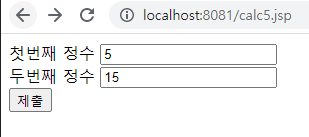
💡 결과값
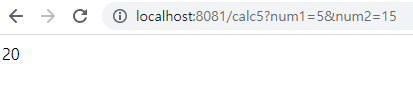
💡 최종 결과값
⭐️내가만든쿠키⭐️