Stack Widget
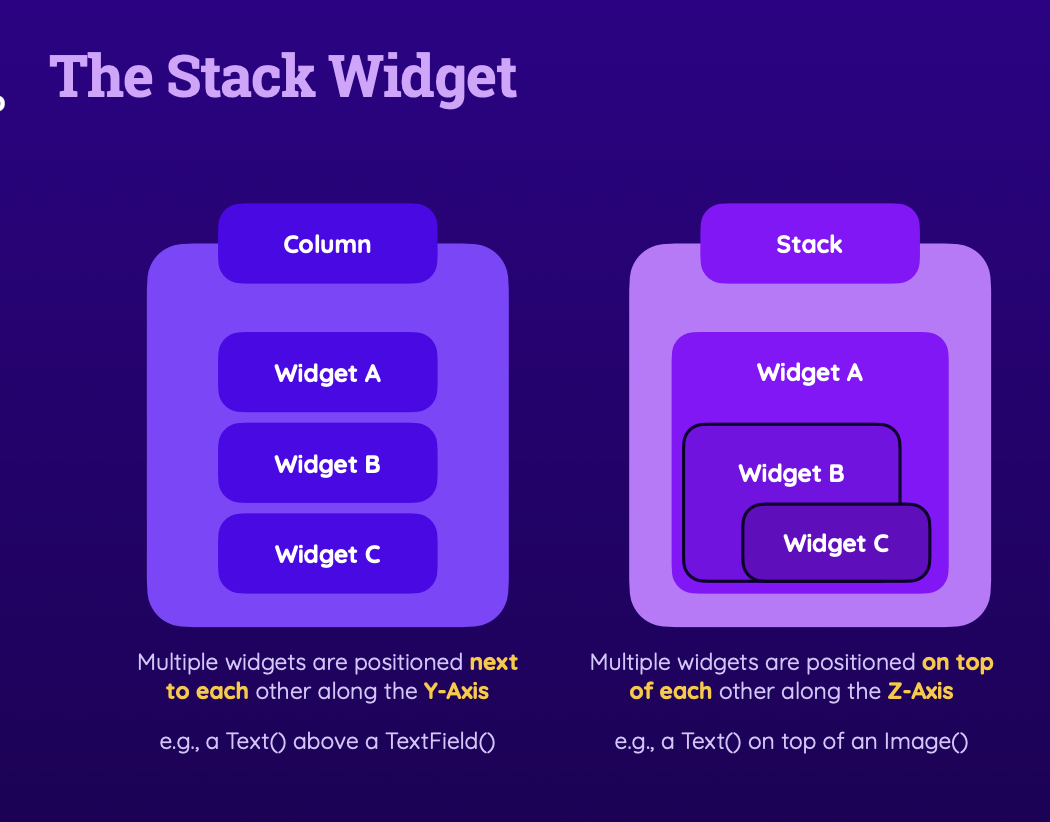
 Stack(
          children: [
            Hero(
              tag: meal.id,
              child: FadeInImage(
                placeholder: MemoryImage(kTransparentImage),
                image: NetworkImage(meal.imageUrl),
                fit: BoxFit.cover,
                height: 200,
                width: double.infinity,
              ),
            ),
            Positioned(
              bottom: 0,
              left: 0,
              right: 0,
              child: Container(
                color: Colors.black54,
                padding:
                    const EdgeInsets.symmetric(vertical: 6, horizontal: 44),
                child: Column(
                  children: [
                    Text(
                      meal.title,
                      maxLines: 2,
                      textAlign: TextAlign.center,
                      softWrap: true,
                      overflow: TextOverflow.ellipsis, // Very long text ...
                      style: const TextStyle(
                        fontSize: 20,
                        fontWeight: FontWeight.bold,
                        color: Colors.white,
                      ),
                    ),
const SizedBox(height: 12),- z-index(Axis)가 낮은 순으로 children에 작성(아래에 쌓일 요소 부터 작성)
z-index?
Card
Card(
      margin: const EdgeInsets.all(8),
      shape: RoundedRectangleBorder(
        borderRadius: BorderRadius.circular(8),
      ),
      clipBehavior: Clip.hardEdge,
      elevation: 2,
      child: InkWell(
        onTap: () {
          onSelectMeal(meal);
        },
shape
- 개체의 모양을 잡아주는 속성
clipBehavior
- Stack 위젯은 부모위젯에서 설정한 Shape값을 무시하기때문에 이를 강제하기 위해 사용하는 속성값
InkWell
https://velog.io/@sharveka_11/Flutter-8.-InkWell
https://api.flutter.dev/flutter/material/InkWell-class.html
InkWell(
      onTap: onSelectCategory,
      splashColor: Theme.of(context).primaryColor,
      borderRadius: BorderRadius.circular(16),
      child: Container(
        padding: const EdgeInsets.all(16),
        decoration: BoxDecoration(
            borderRadius: BorderRadius.circular(16),
            gradient: LinearGradient(
              colors: [
                category.color.withOpacity(0.55),
                category.color.withOpacity(0.9),
              ],
              begin: Alignment.topLeft,
              end: Alignment.bottomRight,
            )),
        child: Text(
          category.title,
          style: Theme.of(context).textTheme.titleLarge!.copyWith(
                color: Theme.of(context).colorScheme.onBackground,
              ),
        ),
      ),
    );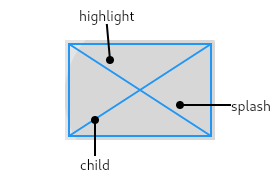
터치에 반응하는 네모난 영역, 반드시 Material 위젯의 자식위젯으로 존재해야함
터치시 사진처럼 탭한지점으로 부터 Splash색의 동그라미가 퍼져나감
onTap
Inkwell 클래스의 옵션 중하나로 탭할 경우 이벤트 처리기능을 수행할 수 있음
onDoubleTap, onLongPress등 다양한 상황의 이벤트 처리가 가능한 옵션들이 다수 존재
Drawers
- AppBar가 반드시 필요
- Sacffold 에 속해있는 속성
ListView vs ListTile
Column 위젯의 단점
최초에 로드되는 모든 데이터에 대해 일단 UI를 만들고 봄 -> 비 효율적
길이가 가변되는 위젯일 경우 가변시 계속 UI를 생성한다는 이야기
ListView
- Scrollable 위젯을 생성
- builder 메소더를 통해 무한 스크롤 및 itemCount 제공을 통한 더 효율적 렌더링이 가능
ListTile
- 해당 데이터를 한줄 한줄 나타내기 위한 타일 위젯(ListView는 세로로 쭈욱 나열)
- 반드시 Title 속성을 설정해주어야 함
ListTile(
            leading: Icon(
              Icons.settings,
              size: 26,
              color: Theme.of(context).colorScheme.onBackground,
            ),
            title: Text(
              'Filters',
              style: Theme.of(context).textTheme.titleSmall!.copyWith(
                    color: Theme.of(context).colorScheme.onBackground,
                    fontSize: 24,
                  ),
            ),
            onTap: () {
              onSelectScreen('filters');
            },
          ),
제 Velog에 오신 모든 분들이 작더라도 인사이트를 얻어가셨으면 좋겠습니다 :)