NFT 투표 플랫폼 만들기(프로젝트 2)

전체 코드 보기
Github
이번 팀 프로젝트에서는 NFT 기반 투표 플랫폼을 만들고자 하였다. 일정기간 NFT투표를 하여 투표참여자, 투표종료시 승리한 NFT에게 투표한 참여자들에게 인센티브를 지급하는 플랫폼을 목표로 하였다.
나는 프론트엔드를 담당하였다. 사용한 프레임워크와 라이브러리는 아래와 같다.
지난번 프로젝트에서는 CSS 스타일을 Bootstrap를 활용하였는데 이번에는 Tailwind를 사용하였다.
- react
- react-router-dom
- ethers.js
- Tailwind
- Flowbite
개발목표로 삼은 것은 아래와 같다.
- (로그인) Metamask 연동
- (마이페이지) 개인 프로필 변경 페이지
- (메인페이지) 투표 남은시간, 좋아요 수, NFT이미지, 작가, 가격
- (등록페이지) NFT등록
Home.js
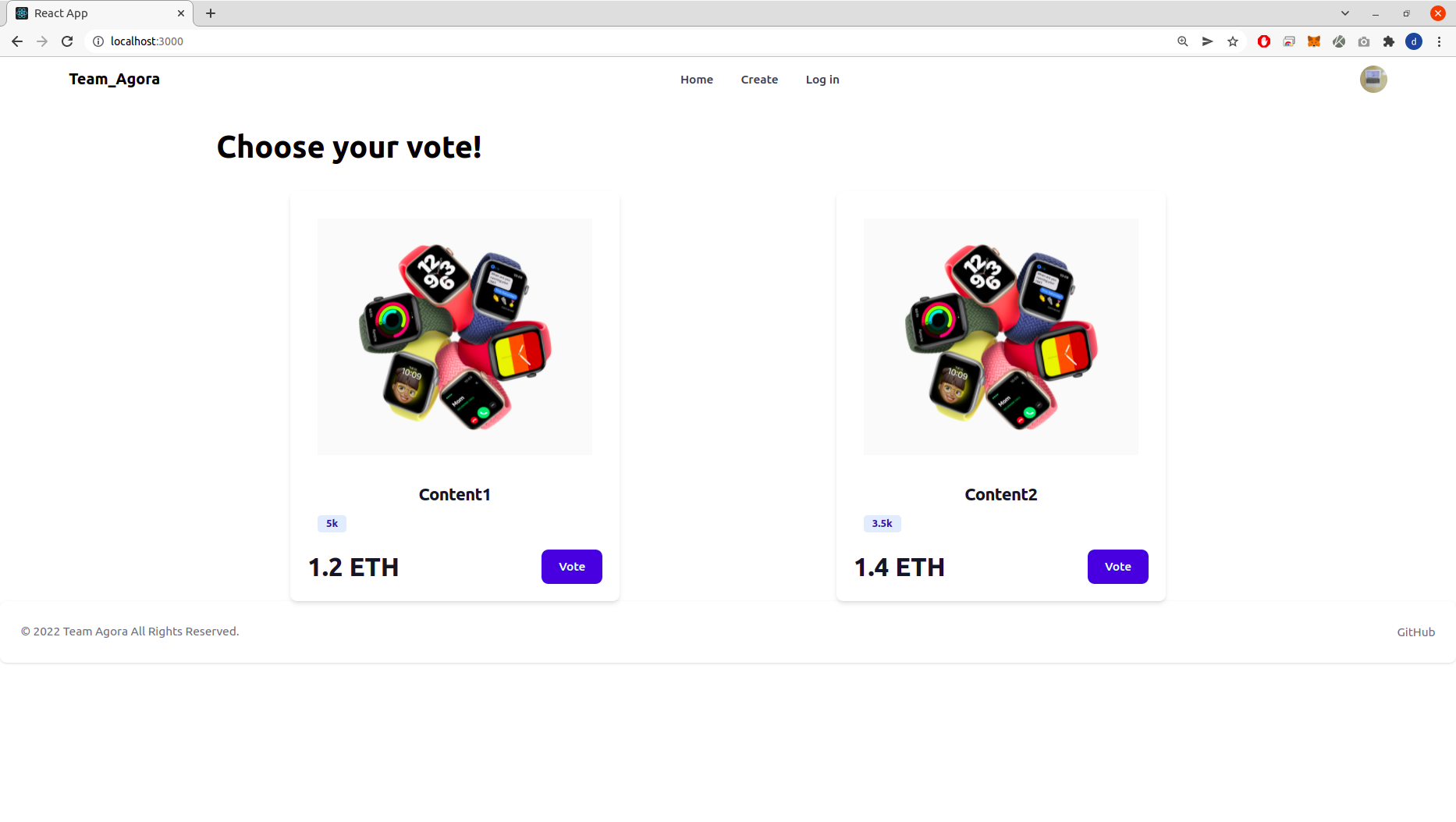
// Home.js
import React from 'react';

const Home = () => {

	return (
		<div className="mx-auto w-9/12">
			<div className="top mx-10 my-8">
				<h1 className="text-left font-bold text-4xl">Choose your vote!</h1>
			</div>
			<div class="flex justify-around">
				<div class="max-w-sm bg-white rounded-lg shadow-md dark:bg-gray-800 dark:border-gray-700">
					<a href="#">
						<img class="p-8 rounded-t-lg" src="https://www.apple.com/newsroom/images/product/watch/lifestyle/Apple_announces-watch-se_09152020_big.jpg.large.jpg" />
					</a>
					<div class="px-5 pb-5">
						<a href="#">
							<h3 class="text-xl font-semibold tracking-tight text-gray-900 dark:text-white">Content1</h3>
						</a>
						<div class="flex items-center mt-2.5 mb-5">
							<span class="bg-blue-100 text-blue-800 text-xs font-semibold mr-2 px-2.5 py-0.5 rounded dark:bg-blue-200 dark:text-blue-800 ml-3">{"5k"}</span>
						</div>
						<div class="flex justify-between items-center">
							<span class="text-3xl font-bold text-gray-900 dark:text-white">1.2 ETH</span>
							<a href="#" class="text-white bg-blue-700 hover:bg-blue-800 focus:ring-4 focus:ring-blue-300 font-medium rounded-lg text-sm px-5 py-2.5 text-center dark:bg-blue-600 dark:hover:bg-blue-700 dark:focus:ring-blue-800">Vote</a>
						</div>
					</div>
				</div>
				<div class="max-w-sm bg-white rounded-lg shadow-md dark:bg-gray-800 dark:border-gray-700">
					<a href="#">
						<img class="p-8 rounded-t-lg" src="https://www.apple.com/newsroom/images/product/watch/lifestyle/Apple_announces-watch-se_09152020_big.jpg.large.jpg" />
					</a>
					<div class="px-5 pb-5">
						<a href="#">
							<h3 class="text-xl font-semibold tracking-tight text-gray-900 dark:text-white">Content2</h3>
						</a>
						<div class="flex items-center mt-2.5 mb-5">
							{/* <svg class="w-5 h-5 text-yellow-300" fill="currentColor" viewBox="0 0 20 20" xmlns="http://www.w3.org/2000/svg"><path d="M9.049 2.927c.3-.921 1.603-.921 1.902 0l1.07 3.292a1 1 0 00.95.69h3.462c.969 0 1.371 1.24.588 1.81l-2.8 2.034a1 1 0 00-.364 1.118l1.07 3.292c.3.921-.755 1.688-1.54 1.118l-2.8-2.034a1 1 0 00-1.175 0l-2.8 2.034c-.784.57-1.838-.197-1.539-1.118l1.07-3.292a1 1 0 00-.364-1.118L2.98 8.72c-.783-.57-.38-1.81.588-1.81h3.461a1 1 0 00.951-.69l1.07-3.292z"></path></svg>
							<svg class="w-5 h-5 text-yellow-300" fill="currentColor" viewBox="0 0 20 20" xmlns="http://www.w3.org/2000/svg"><path d="M9.049 2.927c.3-.921 1.603-.921 1.902 0l1.07 3.292a1 1 0 00.95.69h3.462c.969 0 1.371 1.24.588 1.81l-2.8 2.034a1 1 0 00-.364 1.118l1.07 3.292c.3.921-.755 1.688-1.54 1.118l-2.8-2.034a1 1 0 00-1.175 0l-2.8 2.034c-.784.57-1.838-.197-1.539-1.118l1.07-3.292a1 1 0 00-.364-1.118L2.98 8.72c-.783-.57-.38-1.81.588-1.81h3.461a1 1 0 00.951-.69l1.07-3.292z"></path></svg>
							<svg class="w-5 h-5 text-yellow-300" fill="currentColor" viewBox="0 0 20 20" xmlns="http://www.w3.org/2000/svg"><path d="M9.049 2.927c.3-.921 1.603-.921 1.902 0l1.07 3.292a1 1 0 00.95.69h3.462c.969 0 1.371 1.24.588 1.81l-2.8 2.034a1 1 0 00-.364 1.118l1.07 3.292c.3.921-.755 1.688-1.54 1.118l-2.8-2.034a1 1 0 00-1.175 0l-2.8 2.034c-.784.57-1.838-.197-1.539-1.118l1.07-3.292a1 1 0 00-.364-1.118L2.98 8.72c-.783-.57-.38-1.81.588-1.81h3.461a1 1 0 00.951-.69l1.07-3.292z"></path></svg>
							<svg class="w-5 h-5 text-yellow-300" fill="currentColor" viewBox="0 0 20 20" xmlns="http://www.w3.org/2000/svg"><path d="M9.049 2.927c.3-.921 1.603-.921 1.902 0l1.07 3.292a1 1 0 00.95.69h3.462c.969 0 1.371 1.24.588 1.81l-2.8 2.034a1 1 0 00-.364 1.118l1.07 3.292c.3.921-.755 1.688-1.54 1.118l-2.8-2.034a1 1 0 00-1.175 0l-2.8 2.034c-.784.57-1.838-.197-1.539-1.118l1.07-3.292a1 1 0 00-.364-1.118L2.98 8.72c-.783-.57-.38-1.81.588-1.81h3.461a1 1 0 00.951-.69l1.07-3.292z"></path></svg>
							<svg class="w-5 h-5 text-yellow-300" fill="currentColor" viewBox="0 0 20 20" xmlns="http://www.w3.org/2000/svg"><path d="M9.049 2.927c.3-.921 1.603-.921 1.902 0l1.07 3.292a1 1 0 00.95.69h3.462c.969 0 1.371 1.24.588 1.81l-2.8 2.034a1 1 0 00-.364 1.118l1.07 3.292c.3.921-.755 1.688-1.54 1.118l-2.8-2.034a1 1 0 00-1.175 0l-2.8 2.034c-.784.57-1.838-.197-1.539-1.118l1.07-3.292a1 1 0 00-.364-1.118L2.98 8.72c-.783-.57-.38-1.81.588-1.81h3.461a1 1 0 00.951-.69l1.07-3.292z"></path></svg> */}
							<span class="bg-blue-100 text-blue-800 text-xs font-semibold mr-2 px-2.5 py-0.5 rounded dark:bg-blue-200 dark:text-blue-800 ml-3">{"3.5k"}</span>
						</div>
						<div class="flex justify-between items-center">
							<span class="text-3xl font-bold text-gray-900 dark:text-white">1.4 ETH</span>
							<a href="#" class="text-white bg-blue-700 hover:bg-blue-800 focus:ring-4 focus:ring-blue-300 font-medium rounded-lg text-sm px-5 py-2.5 text-center dark:bg-blue-600 dark:hover:bg-blue-700 dark:focus:ring-blue-800">Vote</a>
						</div>
					</div>
				</div>
			</div>
		</div>
	);

}

export default Home;
Create.js
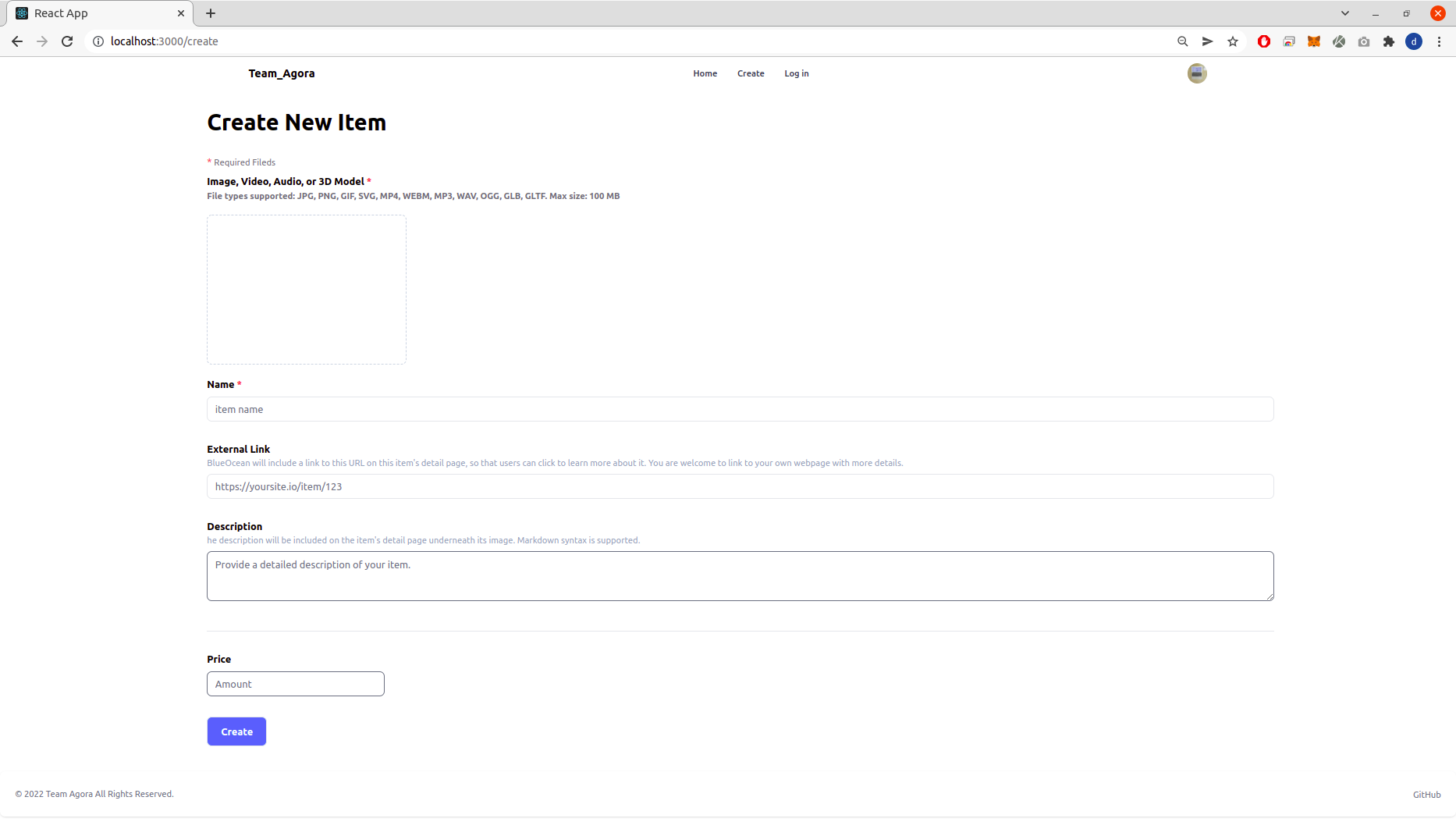
// Create.js
import React from 'react';
import 'flowbite'

const Create = () => {

	return(
        <div className="mx-auto  w-9/12">
			<div className="top mx-10 my-8">
                <h1 className="text-left font-bold text-4xl">Create New Item</h1>
            </div>
			<div className="bot text-left ml-10">
				<div className="mb-2">
						<span className="text-red-500">* </span>
						<span className="text-zinc-500 text-sm">Required Fileds</span>
					</div>
					<div className="input_img" onClick={'/'}>
						<p className="font-bold">Image, Video, Audio, or 3D Model<span className="text-red-500"> *</span></p>
						<p className="font-semibold text-sm text-zinc-500">File types supported: JPG, PNG, GIF, SVG, MP4, WEBM, MP3, WAV, OGG, GLB, GLTF. Max size: 100 MB</p>
						<button className="border-2 border-dashed border-slate-300 rounded-lg w-80 h-60 my-5 flex flex-row items-center justify-center">
						</button>
					</div>
				<div className="input_name mb-8">
					<p className="font-bold">Name <span className="text-red-500">*</span></p>
					<input onChange={'/'} value={''} className="border w-full h-10 rounded-lg px-3 mt-2" placeholder="item name"></input>
				</div>
				<div className="input_External_link mb-8">
                    <p className="font-bold">External Link </p>
                    <p className="text-slate-400 text-sm">BlueOcean will include a link to this URL on this item's detail page, so that users can click to learn more about it. You are welcome to link to your own webpage with more details.</p>
                    <input onChange={'/'} value={''} className="border w-full h-10 rounded-lg px-3 mt-2" placeholder="https://yoursite.io/item/123"></input>
                </div>
                <div className="input_Description mb-8 border-b-2 pb-10">
                    <p className="font-bold">Description</p>
                    <p className="text-slate-400 text-sm">he description will be included on the item's detail page underneath its image. Markdown syntax is supported.</p>
                    <textarea onChange={'/'} value={''} className="border w-full h-20 rounded-lg px-3 mt-2" placeholder="Provide a detailed description of your item."></textarea>
                </div>
                <div className="input_name mb-8">
                    <p className="font-bold">Price</p>
                    <input onChange={'/'} type="Number" value={'price'} className="border w-2/12 h-10 rounded-lg px-3 mt-2" placeholder="Amount"></input>
                </div>
                <button onClick={'/'}
                    className="border rounded-lg hover:bg-blue-700 w-24 h-12 font-bold text-center text-white bg-blue-500 flex mb-10">
                    <p className="m-auto">Create</p>
                </button>
			</div>
        </div>
	);

}

export default Create;
MyPage.js
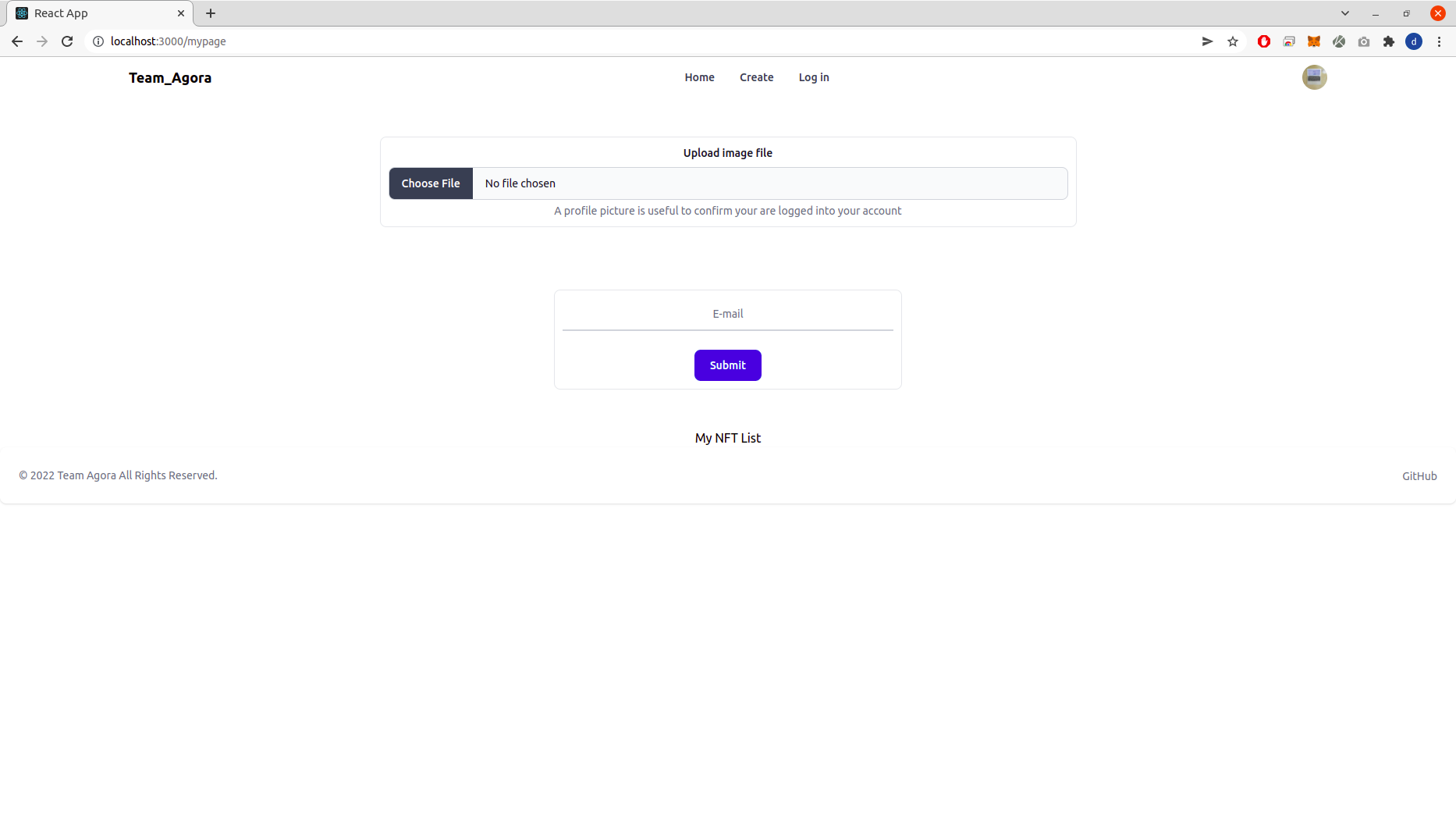
// MyPage.js
import React from 'react';
import 'flowbite';

const MyPage = () => {

	return (
		<div className='MyPage'>
			{/* flex flex-col = 수직 배치, space-y-20 = 간격마다 20씩, m-20 = 모든방향 마진 20 */}
			<div class="flex justify-center p-5 m-5">
				{/* https://tailwindcss.com/docs/width w-1/4 = 퍼센티지로 사이즈 조절(25%) */}
				<div class="border rounded-lg p-2.5 m-2.5 w-1/2">
						<label class="block mb-2 text-sm font-medium text-gray-900 dark:text-gray-300" for="user_avatar">Upload image file</label>
						<input class="block w-full text-sm text-gray-900 bg-gray-50 rounded-lg border border-gray-300 cursor-pointer dark:text-gray-400 focus:outline-none focus:border-transparent dark:bg-gray-700 dark:border-gray-600 dark:placeholder-gray-400" aria-describedby="user_avatar_help" id="user_avatar" type="file" />
						<div class="mt-1 text-sm text-gray-500 dark:text-gray-300" id="user_avatar_help">A profile picture is useful to confirm your are logged into your account</div>
				</div>
			</div>
			<div class="flex justify-center p-5 m-5">
				<div class="border rounded-lg p-2.5 m-2.5 w-1/4">
					<div class="relative z-0 mb-6 w-full group">
						<input type="email" name="floating_email" class="block py-2.5 px-0 w-full text-sm text-gray-900 bg-transparent border-0 border-b-2 border-gray-300 appearance-none dark:text-white dark:border-gray-600 dark:focus:border-blue-500 focus:outline-none focus:ring-0 focus:border-blue-600 peer text-center" placeholder="E-mail" required="" />
					</div>
					<button type="submit" class="text-white bg-blue-700 hover:bg-blue-800 focus:ring-4 focus:ring-blue-300 font-medium rounded-lg text-sm w-full sm:w-auto px-5 py-2.5 text-center dark:bg-blue-600 dark:hover:bg-blue-700 dark:focus:ring-blue-800">Submit</button>
				</div>
			</div>
			<div>
				<h1> My NFT List </h1>
			</div>
		</div>
	);

}

export default MyPage;
로그인 기능(Navbar.js)
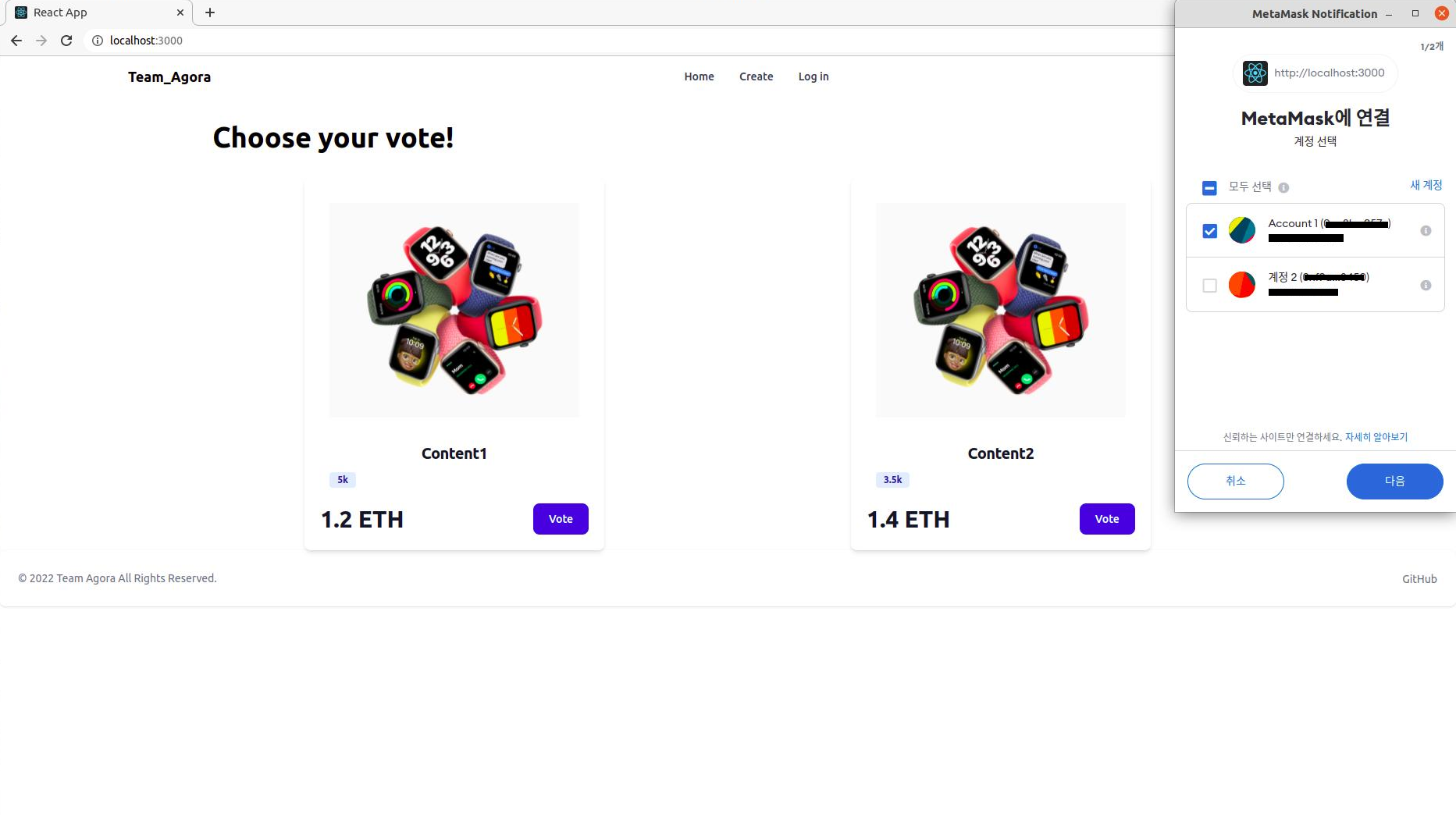
// Navbar.js
import React from 'react';
import { Link } from 'react-router-dom';
import 'flowbite' // Profile 이미지 클릭시 드롭다운 메뉴 구현+@

const Navbar = () => {

	const userName = 'Hong Gildong';
	const userAddress = '0x1234567890abcdefghijklk'

	return (
		<>
			<nav class="bg-white border-gray-200 px-2 sm:px-4 py-2.5 rounded dark:bg-gray-800">
				<div class="container flex flex-wrap justify-between items-center mx-auto">
					<Link to="/" class="flex">
						<span class="self-center text-lg font-semibold whitespace-nowrap dark:text-white">Team_Agora</span>
					</Link>
					<div class="flex items-center md:order-2">
						<button type="button" class="flex mr-3 text-sm bg-gray-800 rounded-full md:mr-0 focus:ring-4 focus:ring-gray-300 dark:focus:ring-gray-600" id="user-menu-button" aria-expanded="false" data-dropdown-toggle="dropdown">
							<span class="sr-only">Open user menu</span>
							<img class="w-8 h-8 rounded-full" src="https://picsum.photos/200" />
						</button>
						<div class="hidden z-50 my-4 text-base list-none bg-white rounded divide-y divide-gray-100 shadow dark:bg-gray-700 dark:divide-gray-600" id="dropdown">
							<div class="py-3 px-4">
								<span class="block text-sm text-gray-900 dark:text-white">{userName}</span>
								<span class="block text-sm font-medium text-gray-500 truncate dark:text-gray-400">{userAddress}</span>
							</div>
							<ul class="py-1" aria-labelledby="dropdown">
								<li>
									<Link to="/mypage" class="block py-2 px-4 text-sm text-gray-700 hover:bg-gray-100 dark:hover:bg-gray-600 dark:text-gray-200 dark:hover:text-white">My Page</Link>
								</li>
								<li>
									<Link to="/" class="block py-2 px-4 text-sm text-gray-700 hover:bg-gray-100 dark:hover:bg-gray-600 dark:text-gray-200 dark:hover:text-white">Sign out</Link>
								</li>
							</ul>
						</div>
						{/* <button data-collapse-toggle="mobile-menu-2" type="button" class="inline-flex items-center p-2 ml-1 text-sm text-gray-500 rounded-lg md:hidden hover:bg-gray-100 focus:outline-none focus:ring-2 focus:ring-gray-200 dark:text-gray-400 dark:hover:bg-gray-700 dark:focus:ring-gray-600" aria-controls="mobile-menu-2" aria-expanded="false">
							<span class="sr-only">Open main menu</span>
							<svg class="w-6 h-6" fill="currentColor" viewBox="0 0 20 20" xmlns="http://www.w3.org/2000/svg"><path fill-rule="evenodd" d="M3 5a1 1 0 011-1h12a1 1 0 110 2H4a1 1 0 01-1-1zM3 10a1 1 0 011-1h12a1 1 0 110 2H4a1 1 0 01-1-1zM3 15a1 1 0 011-1h12a1 1 0 110 2H4a1 1 0 01-1-1z" clip-rule="evenodd"></path></svg>
							<svg class="hidden w-6 h-6" fill="currentColor" viewBox="0 0 20 20" xmlns="http://www.w3.org/2000/svg"><path fill-rule="evenodd" d="M4.293 4.293a1 1 0 011.414 0L10 8.586l4.293-4.293a1 1 0 111.414 1.414L11.414 10l4.293 4.293a1 1 0 01-1.414 1.414L10 11.414l-4.293 4.293a1 1 0 01-1.414-1.414L8.586 10 4.293 5.707a1 1 0 010-1.414z" clip-rule="evenodd"></path></svg>
						</button> */}
					</div>
					<div class="hidden justify-between items-center w-full md:flex md:w-auto md:order-1" id="mobile-menu-2">
						<ul class="flex flex-col mt-4 md:flex-row md:space-x-8 md:mt-0 md:text-sm md:font-medium">
							{/* <li>
								<Link to="/" class="block py-2 pr-4 pl-3 text-white bg-blue-700 rounded md:bg-transparent md:text-blue-700 md:p-0 dark:text-white" aria-current="page">Home</Link>
							</li> */}
							<li>
								<Link to="/" class="block py-2 pr-4 pl-3 text-gray-700 border-b border-gray-100 hover:bg-gray-50 md:hover:bg-transparent md:border-0 md:hover:text-blue-700 md:p-0 dark:text-gray-400 md:dark:hover:text-white dark:hover:bg-gray-700 dark:hover:text-white md:dark:hover:bg-transparent dark:border-gray-700">Home</Link>
							</li>
							<li>
								<Link to="/create" class="block py-2 pr-4 pl-3 text-gray-700 border-b border-gray-100 hover:bg-gray-50 md:hover:bg-transparent md:border-0 md:hover:text-blue-700 md:p-0 dark:text-gray-400 md:dark:hover:text-white dark:hover:bg-gray-700 dark:hover:text-white md:dark:hover:bg-transparent dark:border-gray-700">Create</Link>
							</li>
						</ul>
					</div>
				</div>
			</nav>

		</>
	);

};

export default Navbar;