플레이어 이동
플레이어를 소수점 단위로 연산해서 이동시키면 이동할 때마다 플레이어가 인접 영역에서 못가는 영역이 있는지 체크해줘야 해서 서버쪽 컴퓨터에 부하가 심해진다. 따라서 유닛 단위로 플레이어를 움직이되 툭툭 끊기는 모습이 아닌 자연스럽게 이동하는 것처럼 보이게 해보자
public class PlayerController : MonoBehaviour
{
    public Grid _grid;
    public float _speed = 5.0f;

    Vector3Int _cellPos = Vector3Int.zero;

    MoveDir _dir = MoveDir.None;
    bool _isMoving = false;

    void Start()
    {
        Vector3 pos = _grid.CellToWorld(_cellPos) + new Vector3(0.5f, 0.5f);
        transform.position = pos;
    }

    void Update()
    {
        GetDirInput();
        UpdatePosition();
        UpdateMoving();
    }

    void UpdatePosition() // 실질적으론 이동했지만 클라 상에서만 스르륵 이동하는 것처럼 보이도록
    {
        if (_isMoving == false)
            return;

        Vector3 destPos = _grid.CellToWorld(_cellPos) + new Vector3(0.5f, 0.5f);
        Vector3 moveDir = destPos - transform.position;

        // 도착 여부 체크
        float dist = moveDir.magnitude; // 거리가 얼마나 남았냐
        if(dist < _speed * Time.deltaTime) // 시간이 지날수록 dist 값은 작아짐
        {
            transform.position = destPos;
            _isMoving = false;
        }
        else
            transform.position += moveDir.normalized * _speed * Time.deltaTime;
    }

    void GetDirInput()
    {
        if (Input.GetKey(KeyCode.W))
        {
            _dir = MoveDir.Up;
        }
        else if (Input.GetKey(KeyCode.S))
        {
            _dir = MoveDir.Down;
        }
        else if (Input.GetKey(KeyCode.A))
        {
            _dir = MoveDir.Left;
        }
        else if (Input.GetKey(KeyCode.D))
        {
            _dir = MoveDir.Right;
        }
        else
        {
            _dir = MoveDir.None;
        }
    }

    void UpdateMoving()
    {
        if (_isMoving == false) // 유닛 한칸 이동 끝날때까지 입력 못받게
        {
            switch (_dir)
            {
                case MoveDir.Up:
                    _cellPos += Vector3Int.up;
                    _isMoving = true;
                    break;
                case MoveDir.Down:
                    _cellPos += Vector3Int.down;
                    _isMoving = true;
                    break;
                case MoveDir.Left:
                    _cellPos += Vector3Int.left;
                    _isMoving = true;
                    break;
                case MoveDir.Right:
                    _cellPos += Vector3Int.right;
                    _isMoving = true;
                    break;
            }
        }
    }
}
Grid _grid 변수는 임시로 유니티 상에서 Grid 컴포넌트를 가지고 있는 Map_001을 추가해줬고
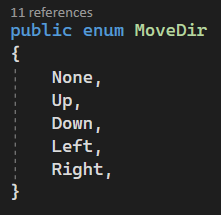
현재 내가 어느 방향을 가리키고 있는지 _dir 변수를 둬서 그 안에 정의해둔 MoveDir을 넣어주고 있다.
이렇게 넣어준 _dir은 UpdateMoving에서 case로 분기하여 1.0 단위로 이동시켜주는 것을 볼 수 있다.
셀과 플레이어의 위치
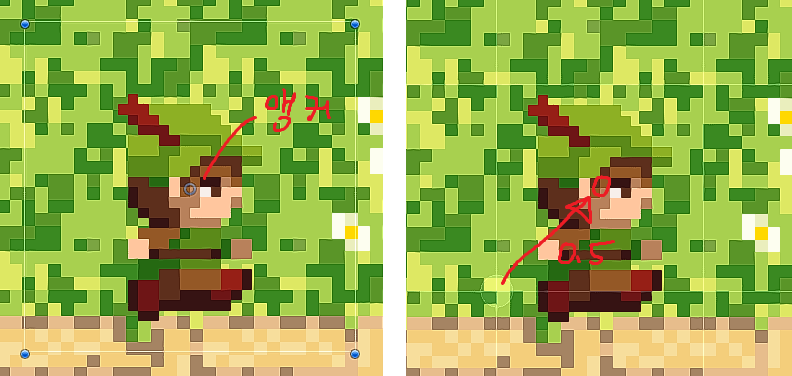
Start()에서 왜 + Vector3(0.5f, 0.5f)를 해줬을까?
플레이어의 앵커는 아래 이미지처럼 가운데에 위치하고 있고, 앵커를 중심으로 좌표가 계산된다. 강의에서는 플레이어 스프라이트를 최대한 그리드 유닛 안에 위치시키려고 하고 있는데 (오른쪽 이미지의 흰색 네모 선) x, y값을 0.5 증가시켜주지 않으면 오른쪽 이미지의 흰색 원 부분으로 앵커가 위치하게 된다.
플레이어를 유닛 단위로 움직이게 하고 싶은데 그걸 시각적으로 셀 단위로 움직이게 하는걸 보여주기 위해 이런 조치를 취해주었다.

개인 공부 정리