kubectl 및 eksctl 설정 - Amazon EKS
EKS 클러스터 생성을 위해 사전 준비가 필요하다.
| 도구 | 설치 여부 확인 |
|---|---|
| AWS CLI | aws --version |
| eksctl | eksctl version |
| kubectl | kubectl version --client |
위 과정을 먼저 해주도록 하자.
현재 이미 다 되어있다고 생각하고 진행.
Amazon EKS 클러스터 및 노드 생성**
fargate와 managed node가 있는데 managed node를 쓰도록 하자.
| 유형 | 설명 | 관리 주체 | 현재 권장 여부 |
|---|---|---|---|
| Fargate | 서버리스, Pod 단위 실행 | AWS | ✅ 추천 |
| Managed Node Group | EC2 기반, 노드 그룹 자동 관리 | AWS | ✅ 추천 |
| Unmanaged Node Group | EC2 직접 띄우고 직접 관리 | 사용자 | ❌ 비권장 (레거시) |
$ aws sts get-caller-identity        # IAM 정보 확인
{
    "UserId": "AIDAZKAHJ5QP5SS2V63RF",
    "Account": "639965457439",
    "Arn": "arn:aws:iam::639965457439:user/cloud6_user2"
}
공식 문서에 존재하는 명령어
하지만 아래 명령어는 클러스터에 대한 설정을 직접 해줄 수 있는 부분이 없어서 사용하지 않을 거임.
eksctl create cluster --name my-cluster --region region-code클러스터 생성 전에 해줘야 하는 설정들
EKS를 private subnet에 배치할 것이기 때문에 외부와 통신 가능하게 할 NAT Gateway 필요
퍼블릭 서브넷 + Elastic IP + NAT Gateway 생성이 선행되어야 한다.
퍼블릭 서브넷은 이미 VPC 생성할 때 생성함.
탄력적 ip 생성
aws ec2 allocate-address --domain vpcAllocationId 복사해야함.
$ aws ec2 allocate-address --domain vpc
{
    "PublicIp": "43.200.79.36",
    "AllocationId": "eipalloc-028b74ea0e70a0341",
    "PublicIpv4Pool": "amazon",
    "NetworkBorderGroup": "ap-northeast-2",
    "Domain": "vpc"
}
NAT Gateway 생성
안정성을 위해서라면 모든 가용영역의 퍼블릭 서브넷에 NAT를 둬야하지만 현재 개발환경이고 돈이 없어서 ㅠㅠ 일단 한 퍼블릭 서브넷에 두기로 한다.
aws ec2 create-nat-gateway \
  --subnet-id subnet-0bc333e11959056f7 \
  --allocation-id eipalloc-028b74ea0e70a0341 \
  --tag-specifications 'ResourceType=natgateway,Tags=[{Key=Name,Value=nat-gw-2a}]'
다른 프라이빗 서브넷의 라우팅 테이블들에 NAT Gateway 연결
가용영역 a의 프라이빗 서브넷
aws ec2 describe-route-tables \
  --filters Name=association.subnet-id,Values=subnet-07b01f2a26492a1a6 \
  --query "RouteTables[].RouteTableId"
결과
[
    "rtb-026bb7eb0e60d2303"
]
가용영역 b의 프라이빗 서브넷
aws ec2 describe-route-tables \
  --filters Name=association.subnet-id,Values=subnet-091389a48b4cc4563 \
  --query "RouteTables[].RouteTableId"
결과
[
    "rtb-077f790be87990393"
]
가용영역 c의 프라이빗 서브넷
aws ec2 describe-route-tables \
  --filters Name=association.subnet-id,Values=subnet-0d7a4d4f6c61404f8 \
  --query "RouteTables[].RouteTableId"
결과
[
    "rtb-09977d4de26793228"
]
라우팅 테이블 NAT에 등록
aws ec2 create-route \
  --route-table-id rtb-026bb7eb0e60d2303 \
  --destination-cidr-block 0.0.0.0/0 \
  --nat-gateway-id nat-02bfea50a5ba7931e
aws ec2 create-route \
--route-table-id rtb-077f790be87990393 \
--destination-cidr-block 0.0.0.0/0 \
--nat-gateway-id nat-02bfea50a5ba7931eaws ec2 create-route \
--route-table-id rtb-09977d4de26793228 \
--destination-cidr-block 0.0.0.0/0 \
--nat-gateway-id nat-02bfea50a5ba7931e결과
{
    "Return": true
}
검증 명령어
aws ec2 describe-route-tables \
  --route-table-ids rtb-026bb7eb0e60d2303 rtb-077f790be87990393 rtb-09977d4de26793228 \
  --query "RouteTables[].Routes"
클러스터 생성
yaml 파일로 클러스터를 구성하는 노드의 스펙 등을 직접 지정해준다.
cluster.yaml
apiVersion: eksctl.io/v1alpha5
kind: ClusterConfig

metadata:
  name: podopicker-cluster
  region: ap-northeast-2

#availabilityZones:
#  - ap-northeast-2a
#  - ap-northeast-2b
#  - ap-northeast-2c

vpc:
  id: vpc-0b47bbcf7e87012b7    # 👉 본인의 VPC ID로 수정
  subnets:
    private:
      ap-northeast-2a:
        id: subnet-07b01f2a26492a1a6       # 👉 실제 서브넷 ID로 수정
      ap-northeast-2b:
        id: subnet-091389a48b4cc4563
      ap-northeast-2c:
        id: subnet-0d7a4d4f6c61404f8

nodeGroups:
  - name: main-ng
    instanceType: m5.large
    desiredCapacity: 3
    minSize: 3
    maxSize: 6
    volumeSize: 30
    volumeType: gp3
    privateNetworking: true
    labels:
      role: general-purpose
    tags:
      environment: production
      team: podopicker
    iam:
      withAddonPolicies:
        autoScaler: true
        cloudWatch: true
    ssh:
      allow: false
클러스터 생성
eksctl create cluster -f cluster.yaml클러스터 목록 확인
aws eks list-clusters --region ap-northeast-2결과
$ aws eks list-clusters --region ap-northeast-2
{
    "clusters": [
        "podopicker-cluster"
    ]
}
노드 확인
$ kubectl get node
NAME                                              STATUS   ROLES    AGE   VERSION
ip-10-0-131-97.ap-northeast-2.compute.internal    Ready    <none>   47m   v1.32.3-eks-473151a
ip-10-0-152-149.ap-northeast-2.compute.internal   Ready    <none>   47m   v1.32.3-eks-473151a
ip-10-0-175-110.ap-northeast-2.compute.internal   Ready    <none>   47m   v1.32.3-eks-473151a
문제가 발생할 수 있음
여기 아래부터는 안봐도 되는 내용이긴 함.
기본적으로 위와 같은 명령어를 통해 클러스터를 만들면 IAM 권한이 생긴다.
그래서 아래 문제는 발생하지 않을텐데 그냥 발생하면 보면 됨.
OIDC가 없어서 생긴 문제
EKS 클러스터에서 ServiceAccount에 IAM 권한을 부여하기 위해 필요한 신뢰 주체(issuer URL)
OIDC가 없으면 IAM Roles for ServiceAccount (IRSA)를 쓸 수 없습니다.
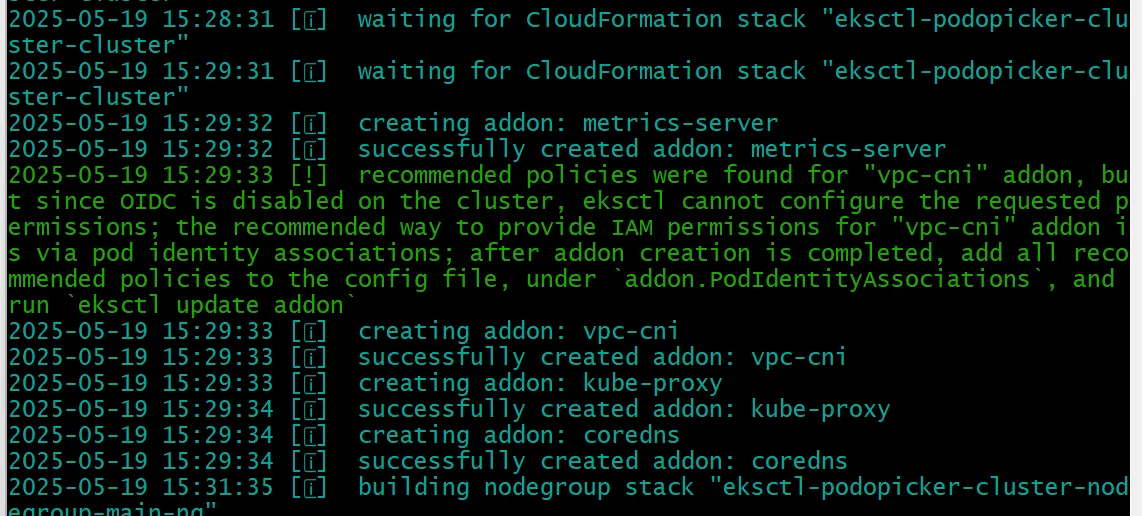
2025-05-19 15:29:31 [ℹ]  waiting for CloudFormation stack "eksctl-podopicker-cluster-cluster"
2025-05-19 15:29:32 [ℹ]  creating addon: metrics-server
2025-05-19 15:29:32 [ℹ]  successfully created addon: metrics-server
2025-05-19 15:29:33 [!]  recommended policies were found for "vpc-cni" addon, but since OIDC is disabled on the cluster, eksctl cannot configure the requested permissions; the recommended way to provide IAM permissions for "vpc-cni" addon is via pod identity associations; after addon creation is completed, add all recommended policies to the config file, under `addon.PodIdentityAssociations`, and run `eksctl update addon`
2025-05-19 15:29:33 [ℹ]  creating addon: vpc-cni
2025-05-19 15:29:33 [ℹ]  successfully created addon: vpc-cni
수동 IAM Role 생성 후 eksctl에 명시
EKS 클러스터용 IAM Role 생성
aws iam create-role \
  --role-name EKSClusterServiceRole \
  --assume-role-policy-document '{
    "Version": "2012-10-17",
    "Statement": [{
      "Effect": "Allow",
      "Principal": {
        "Service": "eks.amazonaws.com"
      },
      "Action": "sts:AssumeRole"
    }]
  }'
정책 연결
aws iam attach-role-policy \
  --role-name EKSClusterServiceRole \
  --policy-arn arn:aws:iam::aws:policy/AmazonEKSClusterPolicy

aws iam attach-role-policy \
  --role-name EKSClusterServiceRole \
  --policy-arn arn:aws:iam::aws:policy/AmazonEKSVPCResourceController
클러스터 삭제 명령어
eksctl을 사용할 때 클러스터 이름과 리전을 명시해서 삭제합니다:
eksctl delete cluster --name podopicker-cluster --region ap-northeast-2이 명령어는 다음을 모두 정리합니다:
- EKS Control Plane
- EC2 NodeGroup (EC2 인스턴스들)
- CloudFormation 스택
- eksctl이 자동으로 만든 리소스들 (VPC 포함, 수동 VPC는 보존됨)
