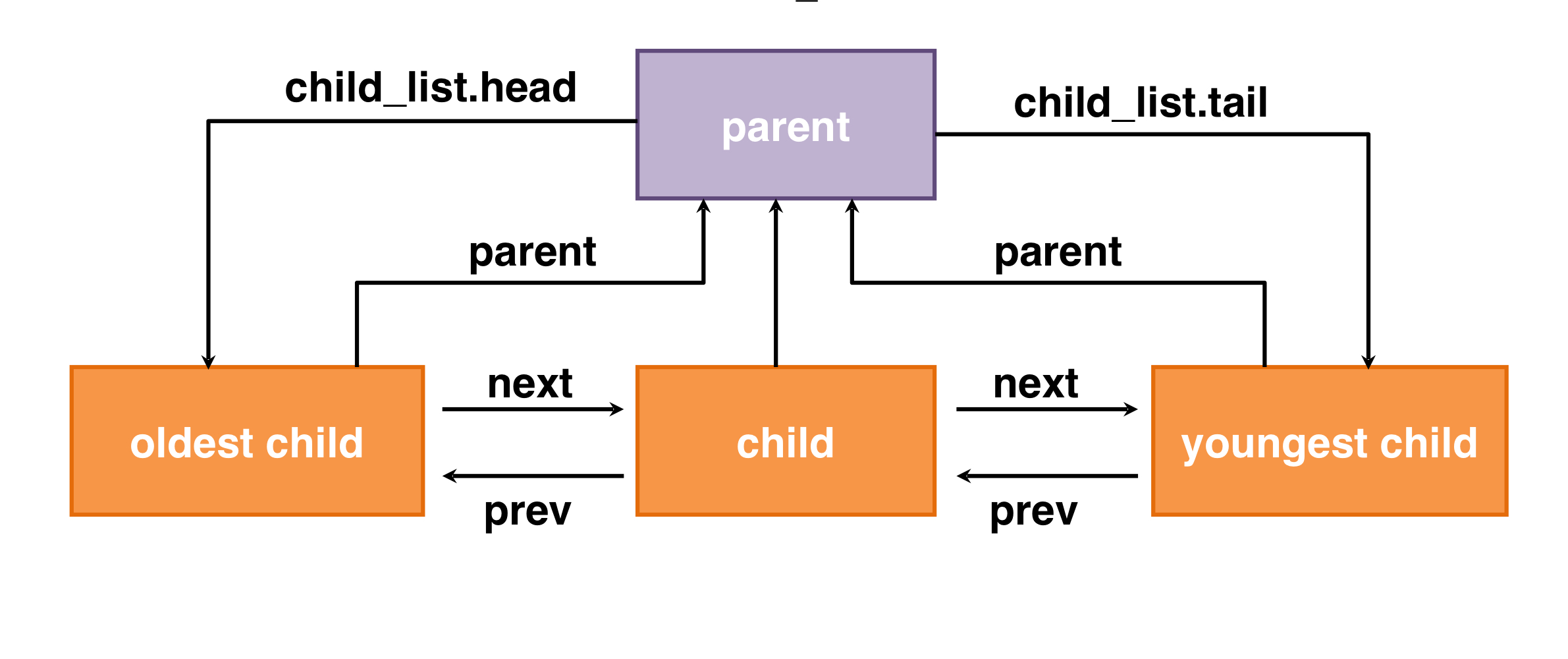
고난
1. syn-read, syn-write 테스트
이미 죽은 자식을 wait하려고 호출하는 경우가 존재하는 테스트이다.
이 테스트를 통과하기 위해 다음의 두가지 방법을 이용할 수 있다.
-
exit_sema를 이용하여 자식을 모두 종료대기 상태로 멈추게 한다. 그리고 부모가wait으로 호출한 자식만sema_up(&child->exit_sema)를 해줌으로써 종료하도록 한다. 이렇게 되면 각 자식은wait을 한번만 호출된다는 제약 조건을 만족하면서 별 무리없이 테스트를 통과할 수 있다.
하지만 자식 프로세스는 부모 프로세스가 자신을wait하지 않으면sema_up이 되지 않아 영영 종료될 수 없다. 따라서 부모 프로세스가 죽을 때 기다리는 모든 자식들에 대해sema_up을 해줘야만 메모리 낭비를 줄일 수 있다. -
현재 프로세스가 죽을 때 자신의
tid와exit_status를malloc으로 만든 구조체를 만들어 부모의child_exit_list에 넣고 바로 죽는다. 그리고 자신이 가지고 있는child_exit_list를free시켜준다.
1번과 달리wait의 여부와 상관없이 바로 죽으므로 메모리 낭비가 적다!
int
sys_wait(pid_t pid){
	// 자식 끝날때까지 기다리는 함수
	if(thread_current()->waiting_child == pid) return -1; // for test

	int exit_pid;
	if(exit_pid = get_exit_child_process(pid) != -1) {
		thread_current()->waiting_child = pid;
		return get_exit_child_process(pid);
	}
	thread_current()->waiting_child = pid;
	return process_wait(pid);
}pid가 이미 죽은 자식들을 저장하는 exit_child_list에 존재하는 지 여부를 먼저 get_exit_child_process 함수를 호출하여 검사한다. 만약 존재한다면 즉시 리턴하여 process_wait을 호출하지 않는다. 그렇기에 이미 죽은 자식 프로세스가 있었던 메모리에 접근하여 페이지 폴트가 나는 상황을 막을 수 있다.
void
process_exit (void) {
	struct thread *curr = thread_current ();

	for (int i = MIN_FD; i <= MAX_FD; i++)
    	sys_close(i);

	if(curr->loaded_file) file_close(curr->loaded_file);

	struct exit_info *my_info;
    my_info = (struct exit_info *)malloc(sizeof(struct exit_info));
    my_info->pid = curr->tid;
	my_info->exit_status = curr->exit_status;
	list_push_back(&curr->parent->exit_child_list,&my_info->p_elem);

	sema_up(&curr->wait_sema);
	// sema_down(&curr->exit_sema);
	while(!list_empty(&curr->exit_child_list)){
		free(list_entry(list_pop_back(&curr->exit_child_list),struct exit_info,p_elem));
	}
	process_cleanup ();

}process_exit함수는 다음과 같다.
- 함수는 죽을 때
malloc을 이용하여my_info구조체를 만들고 안에 자신의tid와exit_status를 담는다. 그리고 이를 자신의 부모의exit_child_list에 넣는다.- 이렇게 되면 자신이 죽어도 부모가
exit_child_list에서 자신의 정보를 볼 수 있기 때문에 안심하고 죽을 수 있다. 그렇기에 메모리를 낭비하지 않을 수 있다.
- 이렇게 되면 자신이 죽어도 부모가
- 마지막으로 자신(not 부모)이 가지고 있는
exit_child_list에 저장된my_info를 전부free한다.- 내가 죽는 순간이므로 내가
wait을 호출할 일은 더이상 없기 때문에exit_child_list가 필요 없으므로free하는 것은 자연스럽다.
- 내가 죽는 순간이므로 내가
이렇게 첫번째 고난을 넘겼다.😎
2. multi-oom
먼저
do_fork가 실패할 때까지fork를 수행하여 최대fork횟수를 얻은 뒤 모든 자식 프로세스를exit한다.
그리고 최대fork가능 횟수만큼 다시fork를 수행하고exit하기를 10번 반복한다.
만약 중간에 한번이라도 최대fork가능 횟수보다 적게fork에 성공한다면 실패를 리턴한다.
즉, 다시말해fork한 자식을exit하면서 memory leak이 있는 지 없는 지를 검사하는 테스트인 것이다.
테스트를 진행했지만 통과가 되지 않았다.
내 코드는 최대 243개를 fork할 수 있었는데, 만들고 지우는 과정을 왕복으로 4번 정도 수행하니 실패를 했다.
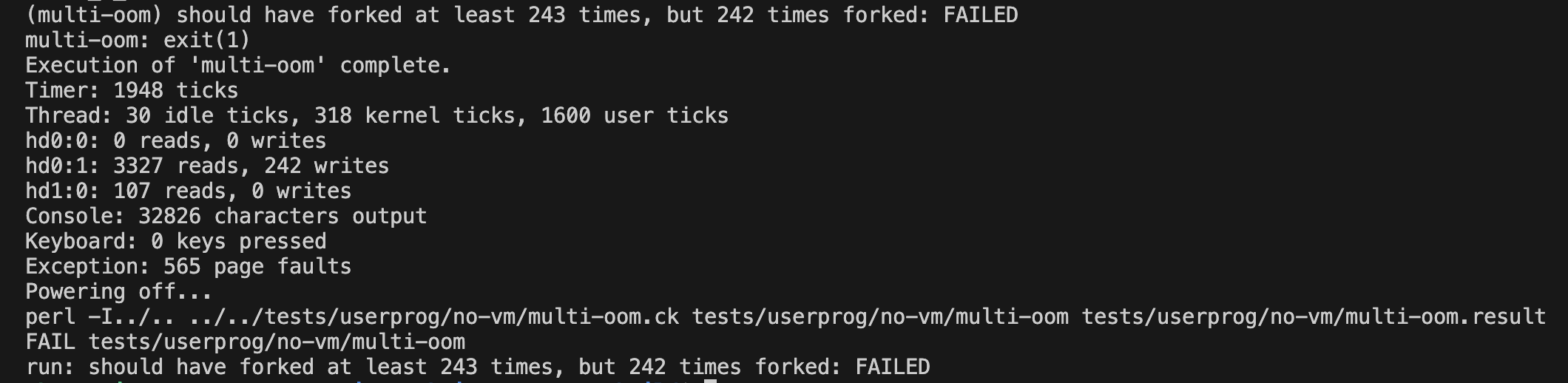
즉, 1000개 정도를 만들고 지우니 한번 fork를 할 수 없는 만큼의 memory leak이 발생한 것이다.
아주 사소한 곳에서 문제가 있음을 직감했고 디버그가 쉽지 않을 것이라 생각했다. 그렇게 5시간의 디버깅 끝에 문제점을 찾을 수 있었다.
int
sys_open(const char *file){
	if(!is_user_vaddr(file)) return -1;
	if(!pml4_get_page(thread_current()->pml4,file)) {
		sys_exit(-1);
	}
	if(file[0] == '\0')return -1; // empty에서 출력 형식 맞추기
	if(file == NULL) sys_exit(-1);

	lock_acquire(&sysfile_lock);
	for(int i=2; i<= 63;i++){
		if (thread_current()->fdt[i] == NULL){
			struct file *fd = filesys_open(file);
			if ( !fd ) {
				lock_release(&sysfile_lock);
				return -1;
			}
			else{
				thread_current()->fdt[i] = fd;
				lock_release(&sysfile_lock);
				return i;
			}
		}
	}

	lock_release(&sysfile_lock);
	return -1; // 실패
}
여기 sys_open함수에서 fd = 2부터 사용을 한다고 한 코드이다.
void
process_exit (void) {
	struct thread *curr = thread_current ();
	/* TODO: Your code goes here.
	 * TODO: Implement process term	ination message (see
	 * TODO: project2/process_termination.html).
	 * TODO: We recommend you to implement process resource cleanup here. */
	// if(curr->parent && curr->parent->waiting_child == curr ->tid){
		// list_push_back(&ready_list,&thread_current()->parent->elem);
		// thread_yield();
		// curr->parent->exit_status = curr->exit_status;
	// curr->parent->child_exit_status = curr->exit_status;

	for (int i = 3; i <= 63; i++)
    	sys_close(i);
  	...
하지만 여기 process_exit함수에서는 fd = 3부터 sys_close를 호출하여 파일을 닫아준다.
결국, fd = 2에 해당하는 파일은 닫히지 않고, 계속 남아있게 되는 것이다.
이것이 쌓이고 쌓여 중간에 실패를 하는 것이었다.😭
이 테스트를 수행한다면 해당 범위를 명확하게 free를 해주는 지 확인하시기 바란다.
int
sys_open(const char *file){
	if(!is_user_vaddr(file)) return -1;
	if(!pml4_get_page(thread_current()->pml4,file)) {
		sys_exit(-1);
	}
	if(file[0] == '\0')return -1; // empty에서 출력 형식 맞추기
	if(file == NULL) sys_exit(-1);

	lock_acquire(&sysfile_lock);
	for(int i=MIN_FD; i<= MAX_FD;i++){
		if (thread_current()->fdt[i] == NULL){
			struct file *fd = filesys_open(file);
			if ( !fd ) {
				lock_release(&sysfile_lock);
				return -1;
			}
			else{
				thread_current()->fdt[i] = fd;
				lock_release(&sysfile_lock);
				return i;
			}
		}
	}

	lock_release(&sysfile_lock);
	return -1; // 실패
}

void
process_exit (void) {
	struct thread *curr = thread_current ();
	/* TODO: Your code goes here.
	 * TODO: Implement process term	ination message (see
	 * TODO: project2/process_termination.html).
	 * TODO: We recommend you to implement process resource cleanup here. */
	// if(curr->parent && curr->parent->waiting_child == curr ->tid){
		// list_push_back(&ready_list,&thread_current()->parent->elem);
		// thread_yield();
		// curr->parent->exit_status = curr->exit_status;
	// curr->parent->child_exit_status = curr->exit_status;

	for (int i = MIN_FD; i <= MAX_FD; i++)
    	sys_close(i);
	...
이렇게 MIN_FD와 MAX_FD를 선언하여 하드코딩하지 않도록 하여 실수를 줄이도록 개선할 수 있었다..!
전체적인 소감
fork와 wait을 제외하고는 그렇게 어렵지 않았다. 내장 함수가 워낙 잘 구현되어 있었고, 간단한 논리로 충분히 구현이 가능했기 때문이다.
하지만 저 두개와 관련된 구현 및 테스트는 정말 어려웠다.
특히 semaphore와 관련된 오류들은 디버깅도 어렵고 왜 작동이 잘 안되는건지 감이 오지 않는 것이 힘들었다.
테스트가 통과되지 않았다면, 동작이 안될 가능성이 있는지 코드별로 꼼꼼하게 따져보고 의심하고 고민하는 과정을 통해 한층 성장하게 된 것 같다.
그리고 정확한 이해가 수반되지 않은 함수의 사용은 오히려 화를 부를 수 있다는 것을 느꼈다.
가령, 리스트에서 pop연산을 수행하는 내장 함수는 잘 작동하고 완벽하다고 생각했지만, 리스트가 비어있는데 호출하면 예외처리가 되어있지 않아 에러를 반환했다.
따라서 레거시 코드가 잘 작동해도 무조건적인 맹신으로 이어지지 않아야 할 것이다.
느낀 점
1. 복잡하게 하려고 하면 문제가 생긴다. 최대한 간단한 구조를 통해 구현하려고 노력하지 않으면 하나가 성공해도 다른 하나에서 문제가 발생할 확률이 높다.
2. divide and conquer가 중요하다. 하나의 기능을 뿅 하고 구현하려고 하기보다는, 그 기능을 여러 단계로 나누어 함수 단위로 구현하고 디버깅하는 것이 훨씬 쉽다.
3. 하드 코딩을 줄이자. 사소한 실수, 별거 아니라고 생각했던 코드가 마지막 테스트를 통과하지 못하게 했다는 점을 잊지말자.
4. 내장 함수가 완벽하게 작동한다는 것은 예외 처리를 하지 않아도 된다는 것이 아니며, 함수의 기능과 사용 목적은 별개라는 점을 잊지말자.
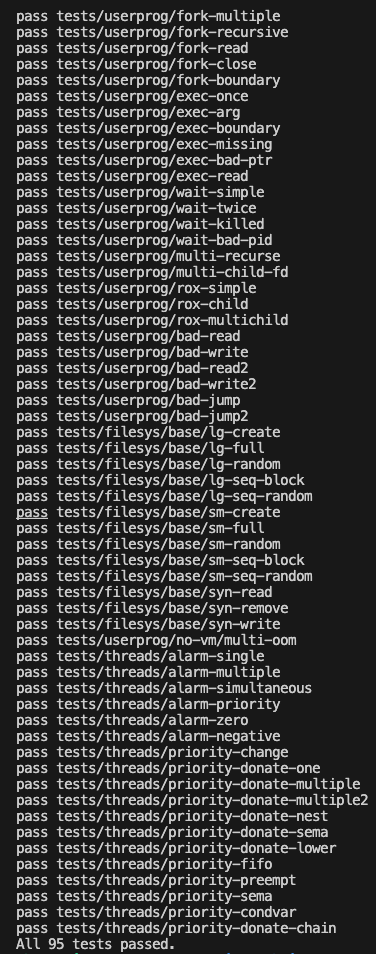
공부 내용
Passing the arguments and creating a thread
-
Parse the arguments & Push them user stack
-
Save tokens on user stack of new process
-
Tokenizing
char *strtok_r(char *s, const char *delimiters, char **save_ptr)
: Receive a string(s) anddelimitersand parse them bydelimiters
appendix
User stack과 kernel stack
특징 - 두 스택 모두 각 프로세스나 스레드 별도로 존재
커널 스택은 사용자 스택과 다른 방식으로 관리된다. 커널 스택은 각 프로세스나 스레드마다 별도로 존재함.
각 프로세스/스레드 별 커널 스택: 커널 모드에서 실행될 때 각 프로세스나 스레드는 자신만의 커널 스택을 사용. 이는 프로세스가 커널 모드에서 수행하는 작업(예: 시스템 호출 처리)을 위한 스택 공간을 제공.
사용 목적: 커널 스택은 주로 시스템 호출이나 인터럽트 처리와 같은 커널 수준의 작업을 위해 사용. 이 스택은 커널 모드에서의 로컬 변수 저장, 함수 호출 관리, 제어 흐름 관리 등에 사용.
메모리 관리: 커널 스택은 일반적으로 고정된 크기를 가지며, 이 크기는 운영 체제에 의해 결정되고 관리됨. 사용자 스택과 달리, 커널 스택은 일반적으로 동적으로 크기가 조정되지 않음.
접근 권한: 커널 스택은 커널 모드에서만 접근할 수 있으며, 사용자 모드의 코드나 프로세스에서는 접근할 수 없다. 이는 시스템의 보안과 안정성을 유지하는 데 중요하다.
운영 체제 내에서 다른 목적과 특성을 가진 두 종류의 메모리 스택이다.
사용 목적:
User Stack: 사용자 스택은 사용자 모드에서 실행되는 프로세스나 스레드에 의해 사용되며, 이 스택은 일반적으로 프로그램의 로컬 변수, 함수 호출, 리턴 주소 등을 저장하는 데 사용됨.
Kernel Stack: 커널 스택은 커널 모드에서 실행되는 프로세스나 스레드에 할당되며, 운영 체제의 커널이 시스템 호출이나 인터럽트 처리와 같은 작업을 수행할 때 사용됨.
메모리 위치 및 관리:
User Stack: 사용자 스택은 사용자 공간에 위치하며, 각 프로세스나 스레드마다 별도의 스택 공간을 가짐. 이 스택의 크기는 일반적으로 프로그램에 의해 관리되거나 운영 체제의 설정에 의해 제한됨.
Kernel Stack: 커널 스택은 커널 공간에 위치하며, 운영 체제에 의해 관리됨. 보통 각 프로세스나 스레드마다 별도의 커널 스택이 할당되며, 이는 커널 오퍼레이션의 독립성을 보장하는 데 중요한 역할을 함.
보안 및 접근 제어:
User Stack: 사용자 스택은 사용자 모드에서 접근 가능하며, 일반적인 애플리케이션 프로그래밍에서 사용. 이 스택에 대한 접근은 보안상의 이유로 커널 모드에서 실행되는 코드로 제한됨.
Kernel Stack: 커널 스택은 커널 모드에서만 접근 가능하며, 사용자 모드의 코드나 프로세스에서는 직접 접근할 수 없음. 이는 시스템의 안정성과 보안을 유지하는 데 중요한 역할을 함.
스택 크기:
User Stack: 일반적으로 사용자 스택은 크기가 가변적이며, 프로그램의 요구에 따라 동적으로 조정될 수 있음.
Kernel Stack: 커널 스택은 대개 고정된 크기를 가지며, 이는 운영 체제의 설계에 따라 달라짐. 커널 스택은 일반적으로 사용자 스택보다 작은 크기를 가짐.
이러한 차이점들은 운영 체제가 효율적으로 메모리를 관리하고, 사용자 공간과 커널 공간을 분리하여 시스템의 안전성과 안정성을 유지하는 데 기여.
Interrupt frame
인터럽트 또는 예외가 발생했을 때, 운영 체제나 인터럽트 처리기(interrupt handler)에 의해 생성되는 데이터 구조. 이 구조는 인터럽트 또는 예외 처리 동안의 프로세서 상태를 저장하는 데 사용됨. 이는 시스템이 인터럽트를 처리한 후 원래 프로그램 또는 프로세스로 정확하게 복귀할 수 있도록 함.
Interrupt frame은 보통 다음과 같은 정보를 포함:
레지스터 상태: 인터럽트가 발생한 시점에서의 CPU 레지스터 값들(예: 명령 포인터, 스택 포인터, 플래그 레지스터 등)이 저장됨. 이 정보는 인터럽트 처리가 완료된 후 프로그램이 이전 상태로 올바르게 복귀할 수 있도록 함.
인터럽트 번호 또는 예외 코드: 발생한 인터럽트 또는 예외의 유형을 식별하는 정보가 포함됨. 이를 통해 인터럽트 처리기는 적절한 처리 루틴을 결정할 수 있음.
인터럽트 또는 예외 발생 시의 코드 세그먼트 및 인스트럭션 포인터: 인터럽트가 발생한 코드 위치를 나타냄. 이는 시스템이 인터럽트 처리 후 정확한 위치로 프로그램 실행을 계속할 수 있게 함.
상태 정보: 때때로 인터럽트 처리기가 복원해야 할 추가 상태 정보가 포함될 수 있음.
	/* And then load the binary */
	success = load (file_name, &_if);
    ...

	/* Start switched process. */
do_iret (&_if);- load file from disk into memory -
_if에 저장 -> user stack을 initialize - 저장된 정보를 넘겨주면서
do_iret호출하여 process switching
2. 시스템 콜
시스템 콜 요청: 사용자 모드에서 실행되는 프로그램이 시스템 콜을 요청. 이는 보통 어셈블리 명령어 syscall (x86-64 아키텍처에서) 또는 int (보다 오래된 x86 아키텍처에서)을 사용하여 수행됨. 이 명령은 프로세서에게 커널 모드로 전환하여 특정 기능을 수행하도록 요청.
인터럽트 발생: syscall 명령은 인터럽트를 발생. 이 인터럽트는 프로세서가 사용자 모드에서 커널 모드로 전환하는 데 사용됨.
인터럽트 벡터 테이블 조회: 프로세서는 인터럽트 벡터 테이블(Interrupt Vector Table, IVT)을 참조하여 해당 인터럽트에 대응하는 인터럽트 핸들러의 주소를 찾음. 시스템 콜 인터럽트에는 특정 인터럽트 번호가 할당되어 있으며, 이 번호에 따라 인터럽트 핸들러가 결정됨.
struct intr_frame {
	/* Pushed by intr_entry in intr-stubs.S.
	   These are the interrupted task's saved registers. */
	struct gp_registers R;
	uint16_t es;
	uint16_t __pad1;
	uint32_t __pad2;
	uint16_t ds;
	uint16_t __pad3;
	uint32_t __pad4;
	/* Pushed by intrNN_stub in intr-stubs.S. */
	uint64_t vec_no; /* Interrupt vector number. */
/* Sometimes pushed by the CPU,
   otherwise for consistency pushed as 0 by intrNN_stub.
   The CPU puts it just under `eip', but we move it here. */
	uint64_t error_code;
/* Pushed by the CPU.
   These are the interrupted task's saved registers. */
	uintptr_t rip;
	uint16_t cs;
	uint16_t __pad5;
	uint32_t __pad6;
	uint64_t eflags;
	uintptr_t rsp;
	uint16_t ss;
	uint16_t __pad7;
	uint32_t __pad8;
} __attribute__((packed));
void
syscall_handler (struct intr_frame *f UNUSED) {
/* Projects 2 and later. */
// SYS_HALT, /* Halt the operating system. */
// SYS_EXIT, /* Terminate this process. */
// SYS_FORK, /* Clone current process. */
// SYS_EXEC, /* Switch current process. */
// SYS_WAIT, /* Wait for a child process to die. */
// SYS_CREATE, /* Create a file. */
// SYS_REMOVE, /* Delete a file. */
// SYS_OPEN, /* Open a file. */
// SYS_FILESIZE, /* Obtain a file's size. */
// SYS_READ, /* Read from a file. */
// SYS_WRITE, /* Write to a file. */
// SYS_SEEK, /* Change position in a file. */
// SYS_TELL, /* Report current position in a file. */
// SYS_CLOSE, /* Close a file. */
switch(f->R.rax){
case SYS_HALT:
sys_halt(); // done
break;
case SYS_EXIT:
sys_exit(f->R.rdi);
// deallocate the FDT, close all files
break;
case SYS_FORK:
f->R.rax = sys_fork(f->R.rdi, f); // not yet
break;
case SYS_EXEC:
f->R.rax = sys_exec(f->R.rdi); // not yet
break;
case SYS_WAIT:
f->R.rax = sys_wait(f->R.rdi);
break;
case SYS_CREATE:
f->R.rax = sys_create(f->R.rdi, f->R.rsi,f->rsp); // done
break;
case SYS_REMOVE:
f->R.rax = sys_remove(f->R.rdi);
break;
case SYS_OPEN:
f->R.rax = sys_open(f->R.rdi);
break;
case SYS_FILESIZE:
f->R.rax = sys_filesize(f->R.rdi);
break;
case SYS_READ:
f->R.rax = sys_read(f->R.rdi,f->R.rsi,f->R.rdx);
break;
case SYS_WRITE:
f->R.rax = sys_write(f->R.rdi,f->R.rsi,f->R.rdx);
break;
case SYS_SEEK:
sys_seek (f->R.rdi,f->R.rsi);
break;
case SYS_TELL:
sys_tell(f->R.rdi);
break;
case SYS_CLOSE:
sys_close(f->R.rdi);
break;
}
}Q. 왜 vec_no로 switch문을 돌리는게 아니라 f->R.rax로 돌리는 것일까?
A. ?
시스템 콜 핸들러 호출: 인터럽트 벡터 테이블에서 해당 인터럽트에 매핑된 시스템 콜 핸들러(syscall_handler)가 호출됨. 이 핸들러는 커널 내부에 정의되어 있으며, 시스템 콜의 종류와 파라미터를 분석하여 적절한 커널 함수를 호출.
시스템 콜 처리: 커널은 시스템 콜을 처리하고 결과를 사용자 모드로 반환. 이후, 프로세서는 다시 사용자 모드로 전환하여 프로그램의 실행을 계속함.
시스템 콜은 사용자 모드와 커널 모드 사이의 인터페이스 역할을 하며, 시스템 리소스에 대한 안전하고 통제된 접근을 제공한다.
Address Validation : How to detect?
-
Verify the validity of a user-provided pointer.
use the functions in
userprog/pagedir.c,threads/vaddr.h -
Check only that a user points below
PHYS_BASEInvalid pointer will case
page_fault. you can handle by modifying the code forpage_fault().
Accessing User Memory
lock 또는 malloc 잡고 page_fault시 해제를 꼭 해줘야함.
Add system calls : Process related system calls
-
void halt(void)- Shutdown pintos
- Use `void shutdown_power_off(void)
-
void exit(int status)- Exit process
- Use
void thread_exit(void) - It should print message "Name of process:exit(status)"
void exit(int status){ struct thread* cur = thread_current(); /* TO DO : Save exit status at process descriptor */ printf("%s: exit(%d)\n", cur->name, status); thread_exit(); -
pid_t exec(const char *cmd_line)- Run program which execute
cmd_line=fork()+exec()in Unix. - Create child process and execute program corresponds to
cmd_lineon it. - Pass the arguments to program to be executed.
- Retrun
pidof the new child process. - If it fails to load program or to create a process, return
-1. - Parent process calling
execshould wait until child process is created and loads the executable completely. -> not wait until child exit. process_execute()- Parent should wait until it knows the child process has successfully created and the binary file is successfully loaded.
- Semaphore
- Add a semaphore for "exec" to thread structure.
- Semaphore is initialized to 0 when the thread is first created.
- Call
sema_downto wait for the successful load of the executable file of the child process. - Call
sema_upwhen the executable file is successfully loaded. - where do we need to place
sema_downandsema_up?
- load status
- In the thread structure, we need a field to represent whether the file is successfully loaded or not.
- Run program which execute
-
int wait(pid_t pid)-
Wait for termination of child process whose process id is
pid -
If
pidis alive, wait till it terminates. Returns the status thatpidpassed to exit. -
If
piddid not callexit, but was terminated by the kernel, return-1 -
After the child terminates, the parent should deallocate its process descriptor.
-
waitfails and return-1ifpiddoes not refer to a direct child of the calling process.- The process that calls wait has already called wait on
pid.
-
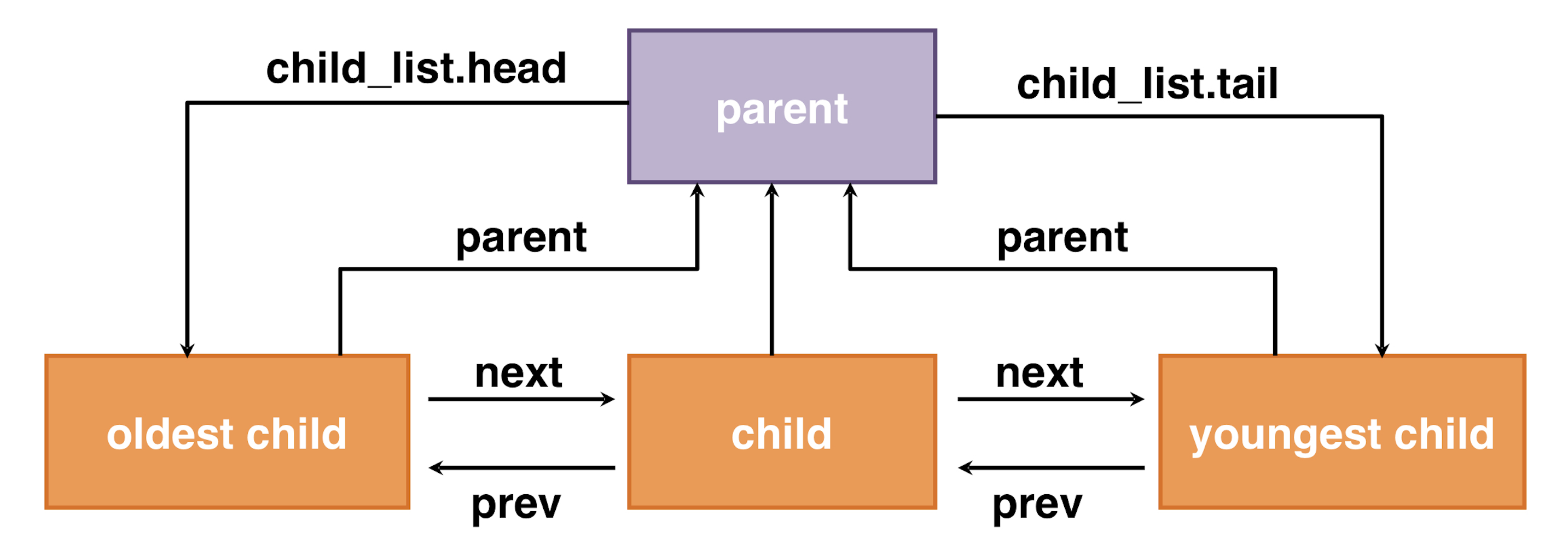
Process Hierarchy
-
int process_wait(tid_t child_tid UNUSED)- process_wait()
- Search the descriptor of the child process by using
child_tid. - The caller blocks until the child process exits.
- Once child process exits, deallocate the descriptor of child process and returns exit status of the child process.
- Search the descriptor of the child process by using
- Semaphore
- Add a semaphore for "wait" to thread structure.
- Semaphore is initialized to 0 when the thread is first created.
- In wait(
tid), callsema_dwonfor the semaphore of tid. - In exit() of process
tid, callsema_up. - where do we need to place
sema_downandsema_up?
- Exit status
- Add a field to denote the exit status to the thread structure.
- process_wait()
-
File Manimulation Related Syscalls
File Descriptor Table
- When the thread is created,
- Allocate FDT and initialize it.
- Reserve fd0, fd1 for stdin and stdout respectively.
- When thread is terminated,
- Close all files.
- Deallocate the FDT.
- Use global lock to avoid race condition on file,
- Define a global lock on syscall.h :
struct lock filesys_lock - Initialize the lock on
syscall_init()( Uselock_init()).
- Define a global lock on syscall.h :
- Modify
page_fault()for test- exit status
-1when page fault occurs.
- exit status
bool create(const char *file, unsigned initial_size)
- Use
bool filesys_create.
bool remove(const char *file)
- Remove file whose name is
file - File is removed regardless of whether it is open or closed.
int open(const char *file)
- Return its
fd. - Use
struct file *filesys_open(const char *name).
int filesize(int fd)
- Return the size of the file open as
fd. - Use
off_t file_length(struct file *file).
int read(int fd, void *buffer, unsigned size)
- Read
sizebytes from the file open asfdintobuffer. - Return the number of bytes actually read(0 at end of file), or -1 if fails.
- If
fdis 0, it reads from keyboard usinginput_getc(), otherwise reads from file usingfile_read()function.uint8_t input_getc(void)off_t file_read(struct file *file, void *buffer, off_t size)
int write(int fd, const void *buffer, unsigned size)
- Write
sizebytes frombufferto the open filefd. - Return the number of bytes actually written.
- If
fdis 1, it writes to the console usingputbuf(), otherwise write to the file usingfile_write()function.void putbuf(const char *buffer, size_t n)off_t file_write(struct file *file, const void *buffer, off_t size)
void seek(int fd, unsigned position)
- Changes the next byte to be read or written in open file
fdtoposition. - Use
void file_seek(struct file *file, off_t new_pos).
unsigned tell(int fd)
- Use
off_t file_tell(struct file *file).
void close(int fd)
- Use
void file_close(struct file *file).
Denying writes to executable
- When the file is loaded for execution, call
file_deny_write(). - When the file finishes execution, call
file_allow_write().
/* Prevents write operations on FILE's underlying inode
 * until file_allow_write() is called or FILE is closed. */
void
file_deny_write (struct file *file) {
	ASSERT (file != NULL);
	if (!file->deny_write) {
		file->deny_write = true;
		inode_deny_write (file->inode);
	}
}

/* Re-enables write operations on FILE's underlying inode.
 * (Writes might still be denied by some other file that has the
 * same inode open.) */
void
file_allow_write (struct file *file) {
	ASSERT (file != NULL);
	if (file->deny_write) {
		file->deny_write = false;
		inode_allow_write (file->inode);
	}
}