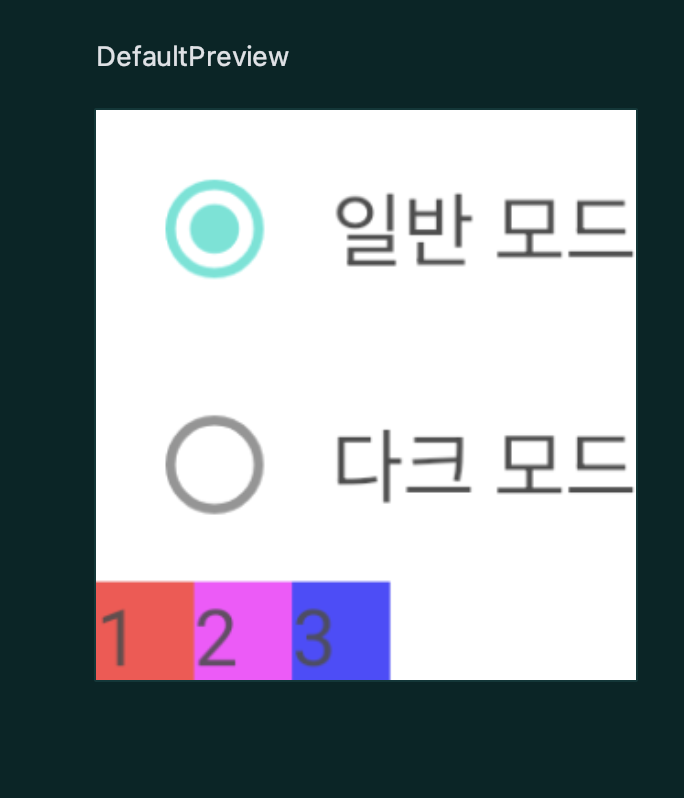
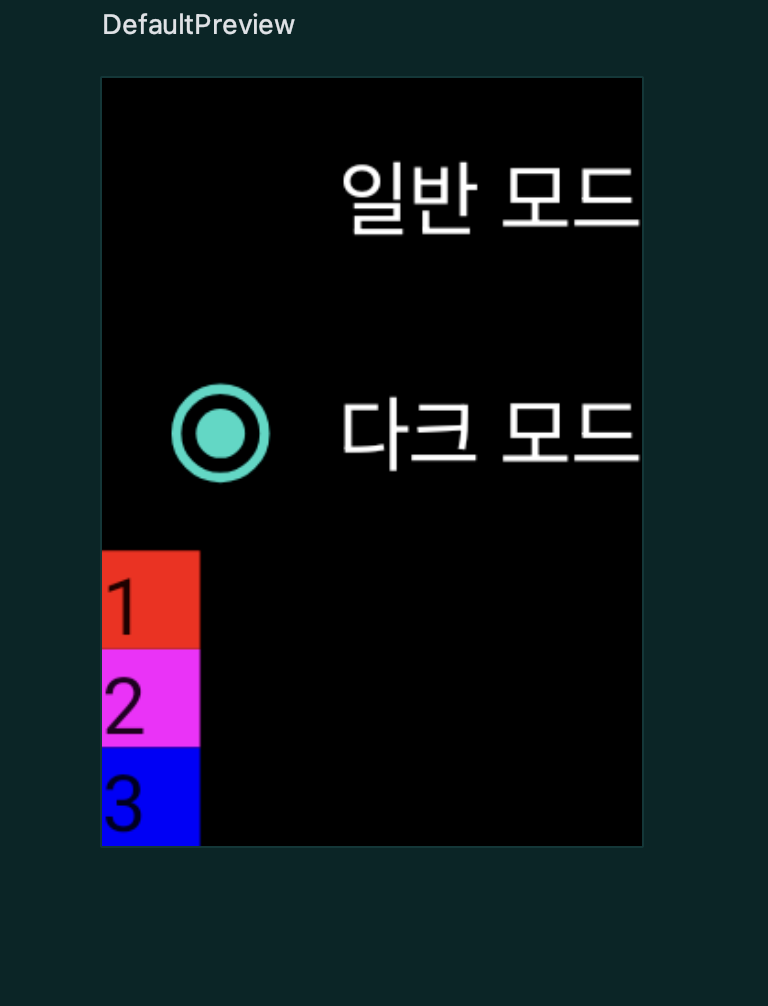
package kr.co.fastcampus.part1.chapter4_15

import android.os.Bundle
import androidx.activity.ComponentActivity
import androidx.activity.compose.setContent
import androidx.compose.animation.Crossfade
import androidx.compose.animation.animateColor
import androidx.compose.animation.core.animateFloat
import androidx.compose.animation.core.updateTransition
import androidx.compose.foundation.background
import androidx.compose.foundation.layout.*
import androidx.compose.foundation.selection.selectable
import androidx.compose.material.MaterialTheme
import androidx.compose.material.RadioButton
import androidx.compose.material.Surface
import androidx.compose.material.Text
import androidx.compose.runtime.*
import androidx.compose.ui.Alignment
import androidx.compose.ui.Modifier
import androidx.compose.ui.draw.alpha
import androidx.compose.ui.graphics.Color
import androidx.compose.ui.tooling.preview.Preview
import androidx.compose.ui.unit.dp
import kr.co.fastcampus.part1.chapter4_15.ui.theme.Animation2Theme

class MainActivity : ComponentActivity() {
    override fun onCreate(savedInstanceState: Bundle?) {
        super.onCreate(savedInstanceState)
        setContent {
            Animation2Theme {
                // A surface container using the 'background' color from the theme
                Surface(
                    modifier = Modifier.fillMaxSize(), color = MaterialTheme.colors.background
                ) {
                    Animation2Ex()
                }
            }
        }
    }
}

@Composable
fun Animation2Ex() {
    var isDarkMode by remember { mutableStateOf(false) }

    val transition = updateTransition(targetState = isDarkMode, label = "isDarkModeTransition")
    // 단계 1: `updateTransition` 수행하고 `targetState`를 `isDarkMode`로
    // 설정합니다. `transition`으로 리턴을 받습니다.
    val backgroundColor by transition.animateColor(label = "backgroundColor") { state ->
        when (state) {
            false -> Color.White
            true -> Color.Black
        }
    }
    // 단계 2: `transition`에 대해 `animateColor`를 호출해 `backgroundColor`를 받습니다.
    // 배경색상을 만듭시다. false일 때 하얀 배경, true일 때 검은 배경.
    val color by transition.animateColor(label = "text color") { state ->
        when (state) {
            false -> Color.Black
            true -> Color.White
        }
    }

    // 단계 3: 글자 색상을 만듭시다.

    // 단계 4: `animateFloat`를 호출해서 알파 값을 만듭시다.
    val alpha by transition.animateFloat(label = "alpha") { state ->
        when (state) {
            false -> 0.7f
            true -> 1f
        }
    }

    // 단계 5: 컬럼에 배경과 알파를 적용합시다.
    Column (modifier = Modifier.background(backgroundColor).alpha(alpha)) {
        // 단계 6: 라디오 버튼에 글자 색을 적용합시다.
        RadioButtonWithText(text = "일반 모드", color = color, selected = !isDarkMode) {
            isDarkMode = false
        }
        RadioButtonWithText(text = "다크 모드", color = color, selected = isDarkMode) {
            isDarkMode = true
        }

        // 단계 7: Crossfade를 이용해 `isDarkMode`가 참일 경우
        // `Row`로 항목을 표현하고 거짓일 경우 `Column`으로 표현해봅시다.
//        Row {
//            Box(modifier = Modifier
//                .background(Color.Red)
//                .size(20.dp)) {
//                Text("1")
//            }
//            Box(modifier = Modifier
//                .background(Color.Magenta)
//                .size(20.dp)) {
//                Text("2")
//            }
//            Box(modifier = Modifier
//                .background(Color.Blue)
//                .size(20.dp)) {
//                Text("3")
//            }
//        }
        Crossfade(targetState = isDarkMode) { state ->
            when (state) {
                false -> {
                    Row {
                        Box(
                            modifier = Modifier
                                .background(Color.Red)
                                .size(20.dp)
                        ) {
                            Text("1")
                        }
                        Box(
                            modifier = Modifier
                                .background(Color.Magenta)
                                .size(20.dp)
                        ) {
                            Text("2")
                        }
                        Box(
                            modifier = Modifier
                                .background(Color.Blue)
                                .size(20.dp)
                        ) {
                            Text("3")
                        }
                    }
                }

                true -> {
                    Column {
                        Box(
                            modifier = Modifier
                                .background(Color.Red)
                                .size(20.dp)
                        ) {
                            Text("1")
                        }
                        Box(
                            modifier = Modifier
                                .background(Color.Magenta)
                                .size(20.dp)
                        ) {
                            Text("2")
                        }
                        Box(
                            modifier = Modifier
                                .background(Color.Blue)
                                .size(20.dp)
                        ) {
                            Text("3")

                        }
                    }
                }
            }
        }
    }
}

@Preview(showBackground = true)
@Composable
fun DefaultPreview() {
    Animation2Theme {
        Animation2Ex()
    }
}

@Preview(showBackground = true)
@Composable
fun RadioButtonWithTextPreview() {
    Animation2Theme {
        RadioButtonWithText(
            text = "라디오 버튼",
            color = Color.Red,
            selected = true,
            onClick = {}
        )
    }
}

@Composable
fun RadioButtonWithText(
    text: String,
    color: Color = Color.Black,
    selected: Boolean,
    onClick: () -> Unit
) {
    Row(
        modifier = Modifier.selectable(
            selected = selected,
            onClick = onClick
        ),
        verticalAlignment = Alignment.CenterVertically
    ) {
        RadioButton(selected = selected, onClick = onClick)
        Text(text = text, color = color)
    }
}
모두 이루어져라