두 스크립트의 기본 골자만 적어둘려한다.
먼저 리소스매니저.
public class ResourceManager : Singleton<ResourceManager>
{
    public Dictionary<string, BaseUI> UIList = new Dictionary<string, BaseUI>();

    public T Load<T>(ResourceType type, string name) where T : UnityEngine.Object
    {
        if (string.IsNullOrEmpty(name))
        {
            Debug.LogWarning("[ResourceManager] Load failed: name is null or empty.");
            return null;
        }

        string path = (type == ResourceType.None) ? name : $"{type}/{name}";
        T obj = Resources.Load<T>(path);

        if (obj == null)
        {
            Debug.LogError($"[ResourceManager] Failed to load GameObject at path: Resources/{path}");
            return null;
        }

        return obj;
    }
}
리소스 폴더 내에 있는 폴더 명에 맞춰서 열거형을 만든다.
현재 내 리소스 폴더에는 아래와 같다.
None은 개별 폴더가 없는 경우.
public enum ResourceType
{
    None,
    JsonData,
    Item,
    Player,
    Sound,
    UI,
    Material
}
그리고 상속받은 싱글톤 스크립트의 경우.
public abstract class Singleton<T> : MonoBehaviour where T : MonoBehaviour
{
    [SerializeField] private bool dontDestroy = true;
    private static T _instance;
    public static T Instance
    {
        get
        {
            if (_instance == null)
            {
                // 씬에서 인스턴스 찾기
                _instance = FindObjectOfType<T>();

                if (_instance == null)
                {
                    Debug.LogError($"Singleton<{typeof(T)}> instance not found in the scene.");
                }
            }
            return _instance;
        }
    }

    protected virtual void Awake()
    {
    	//부모 구조 해제
        if (transform.parent != null)
            transform.SetParent(null);
        if (_instance == null)
        {
            _instance = this as T;
        }

        if (dontDestroy)
            DontDestroyOnLoad(gameObject);

        else if (_instance != this)
        {
            Debug.LogWarning($"Duplicate Singleton<{typeof(T)}> detected. Destroying duplicate.");
            Destroy(gameObject);
        }
    }
}
dontDestroy의 값에 따라서 씬 로드 중에 파괴할지 말지를 결정한다.
또한 매니저 구조가.
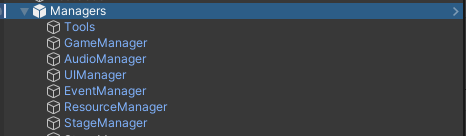
이런 식이니까 부모 관계를 해제시켜준다.

GameDeveloper