버전 확인
python
ubuntu@ubuntu:/$ strings ###.raw | grep "Linux version"
Linux version %s (%s)
Linux version %s (%s)
Linux version 3.10.0-1160.el7.x86_64 ([mockbuild@kbuilder.bsys.centos.org](mailto:mockbuild@kbuilder.bsys.centos.org)) (gcc version 4.8.5 20150623 (Red Hat 4.8.5-44) (GCC) ) #1 SMP Mon Oct 19 16:18:59 UTC 2020
Linux version 3.10.0-1160.el7.x86_64 ([mockbuild@kbuilder.bsys.centos.org](mailto:mockbuild@kbuilder.bsys.centos.org)) (gcc version 4.8.5 20150623 (Red Hat 4.8.5-44) (GCC) ) #1 SMP Mon Oct 19 16:18:59 UTC 2020
MESSAGE=Linux version 3.10.0-1160.el7.x86_64 ([mockbuild@kbuilder.bsys.centos.org](mailto:mockbuild@kbuilder.bsys.centos.org)) (gcc version 4.8.5 20150623 (Red Hat 4.8.5-44) (GCC) ) #1 SMP Mon Oct 19 16:18:59 UTC 2020###.raw에서 “Linux version” 문자열을 가져온 결과 Linux version 3.10.0-1160.el7.x86_64 인 것을 확인.
근데 Linux 중에서도 해당은 CentOS. 즉, CentOS 3.10.0-1160.el7.x86_64 으로 확인.
https://www.rpmfind.net/linux/RPM/centos/7.9.2009/x86_64/Packages/kernel-3.10.0-1160.el7.x86_64.html
문제 확인
리눅스 운영체제 상에서 메모리를 포렌식 분석할 때에는 프로파일이 필요하다는 점.
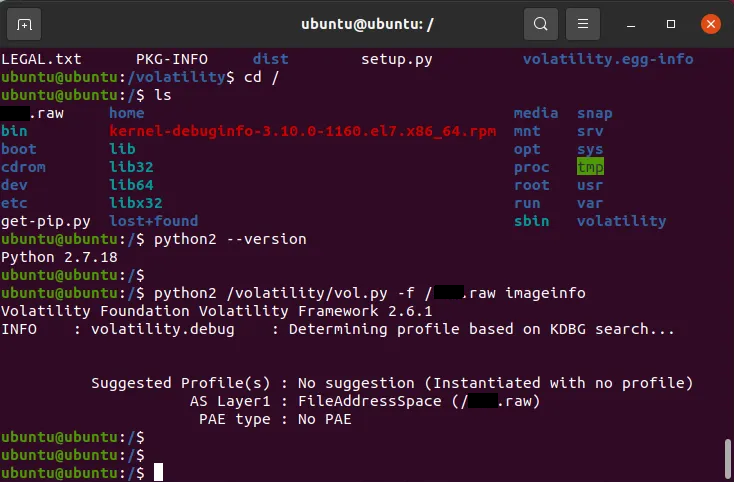
Volatility 2.6 in VMware Ubuntu
다음과 같이 나온다. profile을 확인할 수 없다는 에러.
python2 ./vol.py --info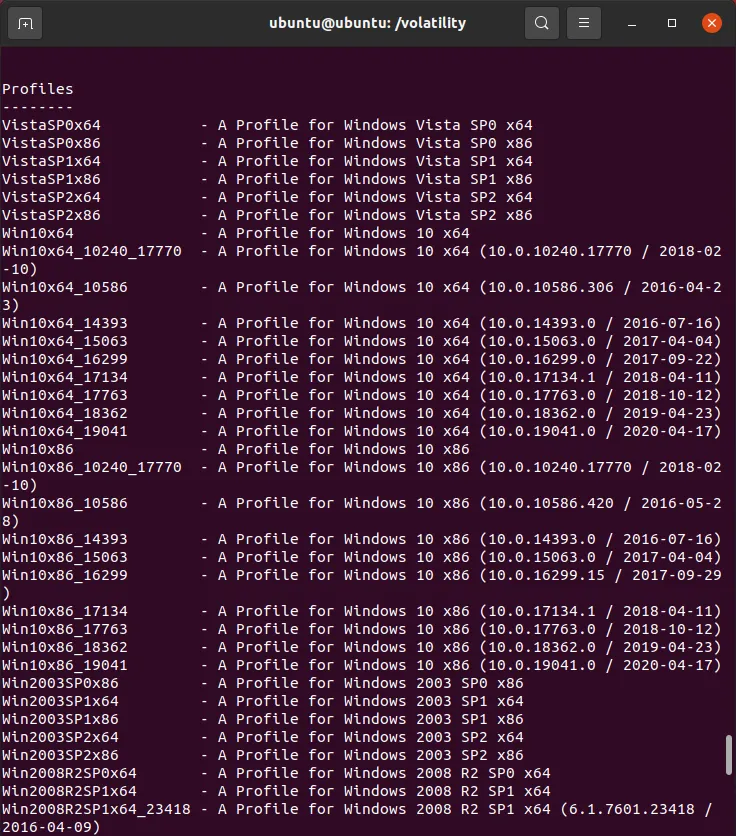
python2 ./vol.py --info
위 명령어를 통해 현재 설치된 Volatility 2.6이 가지고 있는 프로파일 리스트를 확인 가능.
CentOS 3.10.0-1160.el7.x86_64 없는 것 확인. (Windows에 대해서만 주로 갖고있음.)
프로파일 생성
Volatility 2.6에서 오류.
심볼 생성
Volatility 3 설치 후 심볼 생성으로 변경.
Windows에서 dwarf2json 사용해서 심볼 제작 → CentOS 3.10.0-1160.el7.x86_64 서칭이 불가능해서 Windows에서 Volatility를 사용하지만 Linux에서 심볼 생성 후 추출해서 사용하는 것으로….
http://repo1.xorcom.com/repos/centos/7/x86_64/Updates_OS_X86_64/Packages/k/
kernel-3.10.0-1160.el7.x86_64.rpm 를 다운받아 심볼을 생성하는 과정에 디버그 심볼이 제거된 ELF 파일로는 심볼을 생성할 수 없다고 한다.
http://debuginfo.centos.org/7/x86_64/kernel-debuginfo-3.10.0-1160.el7.x86_64.rpm
위 url에서 다시 kernel-debug-3.10.0-1160.el7.x86_64.rpm 를 받아 똑같은 과정을 거쳐 심볼을 생성한다.
dwarf2json.exe linux --elf C:\CentOS\vmlinux > C:\CentOS\linux-symbols-3.10.0-1160.json에러 과정이 엄청 많았는데 하나하나 다 스크린샷을 찍지 못했습니다.
정리
리눅스에서는 메모리 포렌식을 하기위해서는 프로파일(volatility 2.6) 또는 심볼(volatility 3)이 필요하고, ubuntu@ubuntu:/$ strings ###.raw | grep "Linux version" 를 통해 확인가능.
그렇게 얻은 OS 정보를 통해 dwarf2json.exe 를 사용하여 해당 OS 분석을 위한 심볼을 생성해주고, volatility 심볼 경로에 위치시킨 후 분석을 진행.
정리를 하고나니 뭔가 짧지만 진짜 위 과정을 성공시키는데 많은 일이 있었습니다…😂