JavaScript 정리
조건문
1. 기본골자
변수 선언 후 if로 시작
if-else if - else 구문
	```
	let a = 3;

	if(a>=7){
    console.log("7이상 입니다.");
    } else if(a>=5){
    console.log("5이상 입니다.");
    } else {
    console.log("5이하 입니다.")
    }
	```
이는 만약에 조건 ( 괄호안에있는것) 에 해당하면 console 그게 아니면 elseif로 가야한다.라는 의미이다.
또 아니면 else 로 가야한다. 라는 뜻이다.
역시 작성 가능하다.
switch-case 구문 :
이것은 해당하는 조건에 해당하는 case의 값을 적용하는 것이다.
만약에 해당 조건에 해당하는 케이스가 없다면 default 값이다.
    ```

    let country = "ko";
    switch(country){
	case "ko":
    	console.log("한국");
    case "cn":
    	console.log("중국");
    case "cn":
    	console.log("미국");
    default:
    	console.log("무국");
    }
    ```
만약 브레이크 없다면 다 케이스가 다 코드로 인식해서 결과로는 한국 중국 미국 무국 다 나옴
    ```
   	let country = "ko";
    switch(country){
	case "ko":
    	console.log("한국");
        break
    case "cn":
    	console.log("중국");
        break
    case "cn":
    	console.log("미국");
        break
    default:
    	console.log("무국");
        break
    }
    ```
함수
왜 배우냐 ? 일단 직사각형 넓이 만드는 프로그램 만들어 봅시다.
친구 : 직사각형 A 2개 넓이 만들어주라 길이 높이 제시 해줄게
2개 만들어 볼까요 ??
let width1 =10;
let height1 =20;
let area1 = width1 *height1
console.log(area1)
let width2 = 50;
let wiheight2 = 15;
let area2 = width2 *height2
console.log(area2)
친구 : 10개 가능할까 ?
하시팔 ... 디질래 ??? -> 이럴때 그냥 뚝딱 만들어내는 무언가가 있다면 간편하게 10개 만들 수 있음 -> 이 역할을 함수가 한다
함수만들기 1 틀만들고
function getArea(){
}
중괄호 안 채워라
function getArea(){
let width = 10;
let heitgh = 10;
let area = width * height;
console.log(area);
}
우리는 지금 함수를 선언함
이럼 끝 ??
ㄴㄴㄴ
함수
function getArea(){
let width = 10;
let height = 10;
let area = width * height;
console.log(area);
}
getArea();
함수를 호출해줘야함
매개변수 주는것
function getArea(width,height){
let area = width * height;
console.log(area);
}
getArea(100,100);
함수안에서 지정해주는게 아니라 함수 호출할때 함수에 매개변수를 전달함
전역변수 지역변수
지역변수는 함수 내부에서만
function getArea(width,height){
	let area = width * height;
    console.log(area);
    let area1 = 20
    console.log(area1);
}

getArea(10,10);

console.log(area1);
이렇게 하면 area1 적용 안되서 함수 다음 콘솔에서 출력안되고 오류 뜸
전역변수는 함수 외부에 선언 -> 이거는 함수 내부에도 적용됨
let area1 = 20
function getArea(width,height){
	let area = width * height;
    console.log(area);
    console.log(area1);
}

getArea(10,10);

console.log(area1);
이렇게 하면 100,20,20 결과 겟 할수 있다..
함수표현식 & 화살표 함수
let helloa = fuction (){
	return "안녕하세요 여러분";
    }; //함수표현식 -무명함수(변수에 담아서 표현)

function hellob() {
	return "안녕하세요 여러분";
    };//함수 선언식

const helloText = hello();
console.log(helloText)
머가 달라 ?
호이스팅이란게 있어 이것때문에
예를 들어
console.log(helloB());
console.log(helloA());

let helloA = function () {
	return "안녕하세요 여러분";
}; //함수표현식 -무명함수(변수에 담아서 표현)

function helloB() {
	return "안녕하세요 여러분";
    };//함수 선언식
결과
안녕하세요 여러분
Error in sandbox:
TypeError: helloA is not a function
함수 선언식은 위에 놔도 호이스팅 때문에 결과 출력 근데 표현은 아니야
콜백함수
function checkMood (mood){
if (mood === "good"){
sing()
}else{
cry()
}
}
function cry (mood){
console.log("cry")
}
function sing (mood){
console.log("sing")
}
function dance (mood){
console.log("dance")
}
checkMood("good")
근데이러면 고정됨 융통성이 있으려면 ??
function checkMood (mood,goodCallback,badCallback){
if (mood === "good"){
goodCallback()
}else{
badCallback()
}
}
function cry (){
console.log("cry")
}
function sing (){
console.log("sing")
}
function dance (){
console.log("dance")
}
checkMood("sad",sing,cry)
이런식으로 콜백함수 사용
객체
- 객체 만드는 방법 객체생성자 사용
let person = new Object(); /new 키워드 객체를 생성한다 는뜻
- 객체 만드는 방법 객체 리터럴
let person = {
  key: "value",
  key1: 132,
  key2: true,
  key3: undefined,
  key4: [1, 2],
  key5: function () {}
};
console.log(person.key2);

console.log(getPropertyValue("key1"));
function getPropertyValue(key) {
  return person[key];
}
- 출력법
1번 객체 전체
console.log(person);-
해당 키값의 벨류
console.log(person.key);2-1. 또다른 출력법
return person[key];
- 객체 추가방법
person.location = "한국";
person["gender"] = "금융";
console.log(person);
- 객체 수정
person["gender"] = "미미";- 객체 삭제
delete person["gender"]
하지만 딜리트 보다는 널
왜냐하면 delete는 실제로 메모리를 지우지는 않음 그래서 null 써라
person.name = null;
- 객체 함수 사용
const person = {
name: "정환",
key5: function () {
console.log("안녕")
}
};
person"key5"
객체안 함수 = 메서드
const person = {
name: "정환",
key5: function () {
console.log(안녕 나는 ${this["name"]});
}
};
person"key5";
- 여부 확인
console.log(`name : ${"name" in person}`);
console.log(`age : ${"age" in person}`);
배열
배열은 객체 처럼 두가지 방법으로 만들수 있다.
- 생성자 사용
let arr = new Array();- 객체 리터럴 처럼 배열리터럴 사용
let arr =[]; //배열 리터럴
예시)
let arr =[1,2,3,4,5];
console.log(arr);
->[1, 2, 3, 4, 5]
배열은 인덱스 있다.
0: 1
1: 2
2: 3
3: 4
4: 5
console.log(arr[0]);
이때 아무 자료형 넣어도 상관없다
예시)
let arr = [1,"2",true,undefined,{},function() {}];-> [1, "2", true, undefined, Object, ƒ ()]
배열 추가
- push
arr.push(6)
->[1, 2, 3, 4, 5,6]
arr.push({key: "value"})
->0: 1
1: "2"
2: true
3: undefined
4: Object
5: ƒ () {}
6: Object
key: "value"
반복문
특정명령 반복할 수 있도록 도와주는 것이 반복문
예를 들어 콘솔 이름 반복으로 하려면
console.log("ji")
console.log("ji")
console.log("ji")
console.log("ji")
console.log("ji")
...
이런식으로 코드가 길어짐
그래서 중복되는 코드를 줄이기 위해 반복문사용한다.
for(let i = 1; i <= 100 ; i++){
//반복수행할 명령
console.log("winterlood")
}
for(초기식(반복의 주체) ; 조건식 ; 반복을 할때마다 할 연산){
//반복수행할 명령
}
배열의 반복
const arr = [1, 2, 3];
for (let i = 0; i < arr.length; i++) {
//반복수행할 명령
console.log(arr[i]);
}
객체안 함수의 반복
let person = {
name: "이정환",
age: 25,
tall: 175
};
const personKeys = Object.keys(person);
for (let i = 0; i < personKeys.length; i++) {
const curKey = personKeys[i];
const curValue = person[curKey];
console.log(${curKey} : ${curValue});
}
배열 내장함수
const arr = [1, 2,3, 4, 5];
for (let i = 0; i < arr.length; i++) {
console.log(arr[i]);
}
이거를 줄여봄
arr.forEach((elm) => console.log(elm));
이렇게 나옴
이거는 아래와 같다.
arr.forEach(function (elm) {
console.log(elm);
});
const newArr = [];
arr.forEach(function (elm) {
newArr.push(elm*2)
});
새로운 arr 생성하고 요소 넣기
const newArr = arr.map((elm)=>{
return elm *2;
})
그걸 합쳐서 하면 아래와 같다.
const newArr = arr.map((elm)=>{
return elm *2;
});
주어진 요소가 존재하는지
const arr = [1, 2, 3, 4, 5];
let number = 3;
arr.forEach((elm) => {
if (elm === number) {
console.log(true);
}
});
console.log(arr.includes(number));
주어진 요소가 존재하는지
const arr = [1, 2, 3, 4, 5];
let number = 3;
arr.forEach((elm) => {
if (elm === number) {
console.log(true);
}
});
내장함수버전은 아래
console.log(arr.includes(number));
주어진 요소가 존재하는지 +인덱스
const arr = [1, 2, 3, 4, 5];
let number = 3;
console.log(arr.indexOf(number));
const arr = [
{ color: "red" },
{ color: "blue" },
{ color: "green" },
{ color: "mint" }
];
let number = 3;
console.log(arr.findIndex((elm) => elm.color === "green"));
//2
const arr = [
{ color: "red" },
{ color: "blue" },
{ color: "green" },
{ color: "mint" }
{ color: "blue" },
];
만약 이렇게 두개 있으면 처음꺼 반환
console.log(arr.find((elm) => elm.color === "green"));
find는 요소 그자체
//결과 :{ color: "green" },
console.log(arr.filter((elm) => elm.color === "green"));
//(1) [Object] 0: Object
슬라이스
console.log(arr.slice(0, 2));
//(2) [Object, Object]
0: Object
1: Object
배열 합치기
- concat
const arr = [
{ num1: 1, color: "red" },
{ num2: 2, color: "blue" },
{ num3: 3, color: "green" },
{ num4: 4, color: "mint" },
{ num5: 5, color: "mint" }
];
const arr2 = [
{ num4: 4, color: "mint" },
{ num5: 5, color: "mint" }
];
console.log(arr.concat(arr2));
- 정렬
let chars = ["나", "다", "가"];
chars.sort();
//원본배열의 정렬
console.log(chars);
["가", "나", "다"]
- 비교
let nums = [0, 1, 2, 5, 8, 5, 20, 15];
const compare = (a, b) => {
//1.같다
//2.크다
//3.작다
if (a > b) {
return 1;
}
if (a < b) {
return -1;
}
return 0;
};
// 원리 큰값이 뒤로 가게
nums.sort(compare);
console.log(nums);
- 배열 합치기 join
const arr = ["이정환", "님", "안녕하세요", "또오셨군요"];
console.log(arr.join(" "));
자바스크립트 응용
Truthy & Falsy
let a = "";
if (a) {
console.log("TRUE");
} else {
console.log("FALSE");
}
->true
let a = "dd";
if (a) {
console.log("TRUE");
} else {
console.log("FALSE");
}
->false
falsy 값
let a = "";
let a = null;
let a =0;
let a = -0;
let a = undefined;
let a = Nan;
- !person으로 falsy 속성 사용
const getName = (person) => {
if (!person) {
return "객체가 아닙니다";
}
return person.name;
};
let person = null;
const name = getName(person);
console.log(name);
삼항연산자
let a = -3;
a >= 0 ? console.log("양수") : console.log("음수");
조건 ? 참결과 : 거짓결과
삼항 연산자결과 변수에 저장 가능
let a = -3;
const result = a >= 0 ? "양수" : "음수";
console.log(result);
중첩 삼항연산자
//학 점 계산 프로그램
90점 이상일 경우 A+
50점 이상일 경우 B+
둘다 아니면 F
let score = 50;
score >= 90
? console.log("A+")
: score >= 50
? console.log("B+")
: console.log("F");
90넘으면
? => 첫조건 출력
-> : 다음조건 elif, else 느낌
- 단락 회로 평가
&& and 는 앞에가 false 이면 false
console.log(false && true);
console.log(true || false);
console.log(true);
// const getName = (person) => {
// if (!person) {
// return "ror체가 아닙니다.";
// }
// return person.name;
// };
위와 같은 조건함수를 단락 회로를 사용하면
아래처럼
아래는 만약에 person 객체에 값이 있으면
name 값이 아니면 객체가 아닙니다 값이 나오도록 구성함
const getName = (person) => {
  const name = person && person.name;
  return name || "객체가 아닙니다";
};

let person = { name: "이정환환" };
const name = getName(person);
console.log(name);
const getName = (person) => {
  // const name = person && person.name;
  return person && person.name;
};
let person = { name: "이정환" };
const name = getName(person);
console.log(name);
조건문 업그레이드
function isKoreanFood(food) {
  if (food === "불고기" || food === "이정환" || food === "떡볶이") {
    return true;
  }
  return false;
}

const food1 = isKoreanFood("불고기");
const food2 = isKoreanFood("파스타");
console.log(food1);
console.log(food2);
const getMeal = (mealType) => {
if (mealType === "한식") return "불고기";
if (mealType === "일식") return "파스타타";
if (mealType === "중식") return "맨보샤샤";
if (mealType === "양식") return "초밥밥";
return "굶기기";
};
console.log(getMeal("한식"));
console.log(getMeal("중중식"));
console.log(getMeal("일일식"));
console.log(getMeal("양식"));
meal의 밀타입 객체 벨류값을 출력하는법
const meal = {
  한식: "불고기",
  중식: "멘보샤",
  일식: "초밥",
  양식: "스테이크",
  인도식: "카레"
};

const getMeal = (mealType) => {
  return meal[mealType] || "굶기";
};

console.log(getMeal("중식"));
console.log(getMeal());
비구조화 할당
기본적으로 아래처럼
let arr = ["one", "two", "three"];

let [one, two, three] = arr;
console.log(one, two, three);
더 간단하게 하려면 arr 을 없에도 됨
let [one, two, three] = ["one", "two", "three"];

console.log(one, two, three);
이렇게 해도됨
let [one, two, three, four = "four"] = ["one", "two", "three"];

console.log(one, two, three, four);
스왑
let object = { one: "one", two: "two", three: "three", name: "이정환" };
let { name: myName, one: oneOne, two, three, abc = "four" } = object;
console.log(oneOne, two, three, myName, abc);
spread 연산자
아래처럼 쓰면 존나 피곤하다..
const cookie = {
base : "cookie",
madeIn : "korea",
}
const chocochipCookie = {
base : "cookie",
madeIn : "korea",
toping: "chocochip"
}
const bluberryCookie = {
base : "cookie",
madeIn : "korea",
toping: "blueberry"
}
const strawberryCookie = {
base : "cookie",
madeIn : "korea",
toping: "strawberry"
}
그래서 spread 연산자를 통해 중복값 넣을수 있다.
const cookie = {
base: "cookie",
madeIn: "korea"
};
const chocochipCookie = {
...cookie,
toping: "chocochip"
};
const bluberryCookie = {
base: "cookie",
madeIn: "korea",
toping: "blueberry"
};
const strawberryCookie = {
base: "cookie",
madeIn: "korea",
toping: "strawberry"
};
console.log(chocochipCookie);
결과
{base: "cookie", madeIn: "korea", toping: "chocochip"}
base: "cookie"
madeIn: "korea"
toping: "chocochip"
스프레드로 합치기 가능
const cookie = ["초코코", "칩"];
const strawcookie = ["딸기", "칩"];
const allcookie = [...cookie, "함정쿠키", ...strawcookie];
console.log(allcookie);
결과 :
concat과 다르게 중간에 넣을 수도 있다.
(5) ["초코코", "칩", "함정쿠키", "딸기", "칩"]
동기 비동기

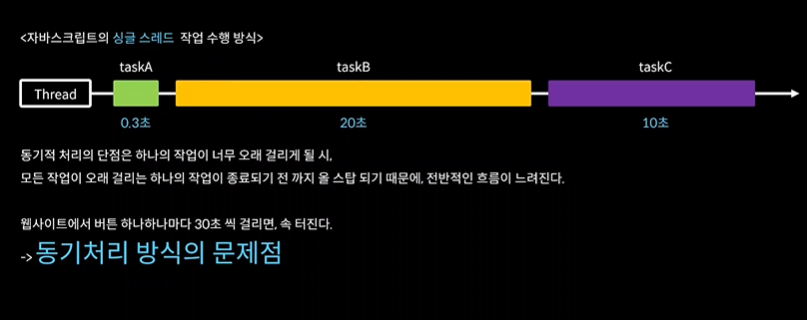
동기는 직렬방식 병목현상 생김
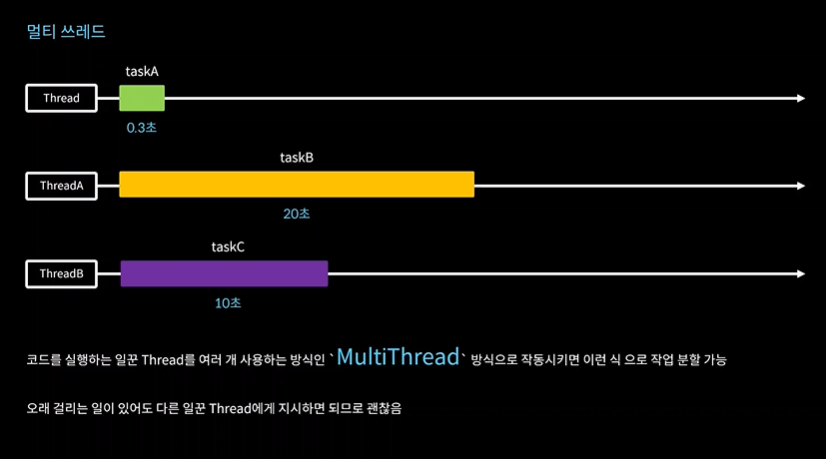
그레서 병렬 작업 하면 좋다. is 멀티스레드
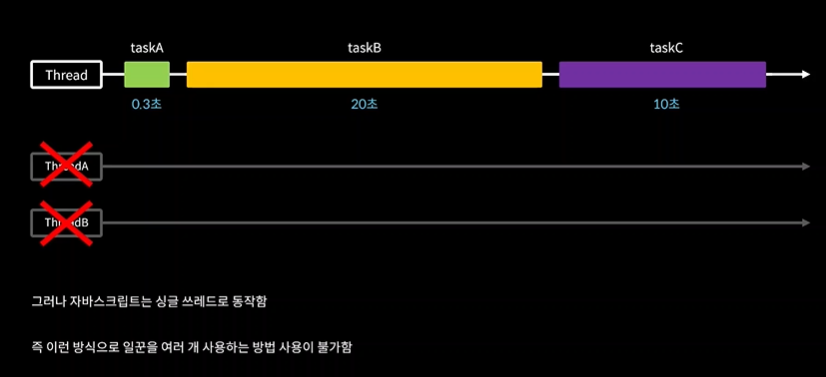
근데 자바는 싱글쓰레드 ....
그러면 ???? -> 비동기
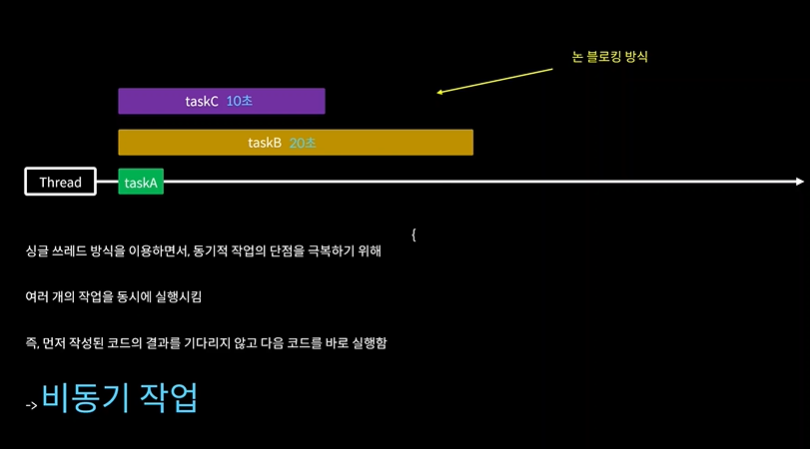
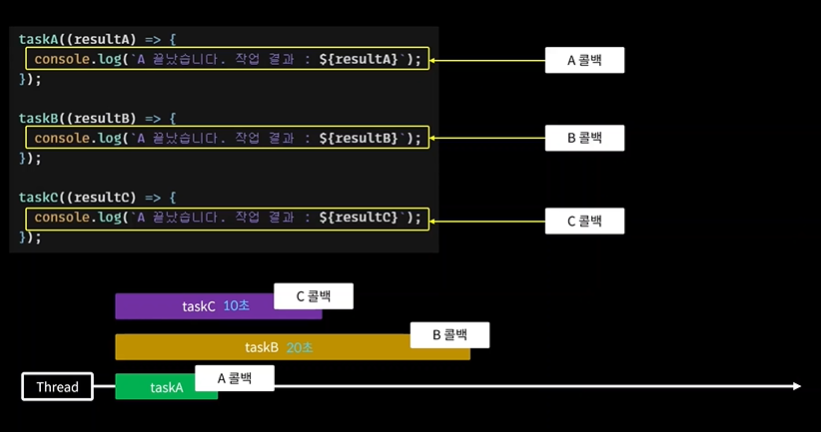
동기적방식 예시
function taskA() {
  console.log("A 작업 끝끝");
}

taskA();
console.log("코드 끝");
task A 끝나고 코드 끝 함수 사용
비동기로 하려면
setTime out ->자바스크립트의 비동기 함수이다
활용 방법 : 함수넣고 담에 딜레이 초 넣음 예를 들어 2000 넣어 그러면 2초뒤에 함수 실행함 function
taskA() {
setTimeout(() => {
console.log("A TASK END");
}, 2000);
}
taskA();
console.log("코드 끝");
function taskA(a, b, callback) {
  setTimeout(() => {
    const res = a + b; //지역상수 스코프내에서만 유효
    callback(res);
  }, 3000);
}
//두개의 파라미터를 받아서 3초뒤에 두개의 합을 구하는 함수
taskA(3, 4, (res) => {
  console.log("A Task RESULT : ", res);
});
console.log("코드 끝");
위의 경우에는 task 함수의 실행 a,b 를 받아서 지역변수 res에서 합을 구하고 3초뒤에 res 콜백함수를 실행하는 것이다. 실행하면 taskA의 함수로 출력됨
- 싱글스레드 동기 방식
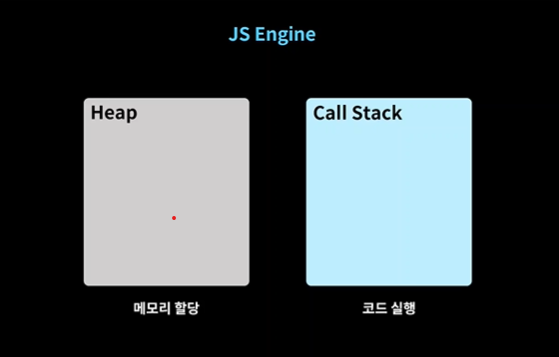
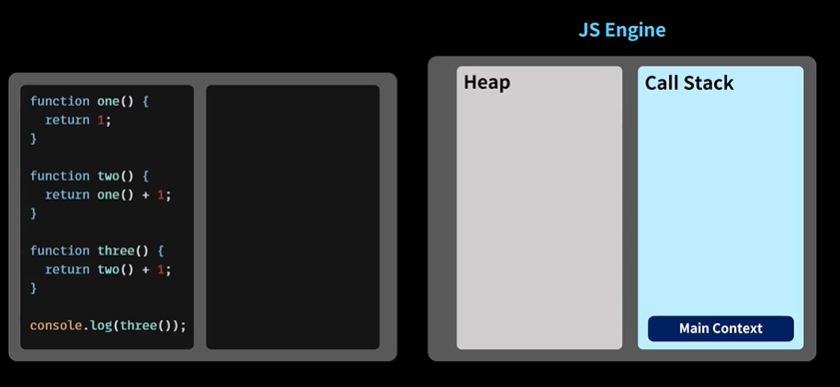
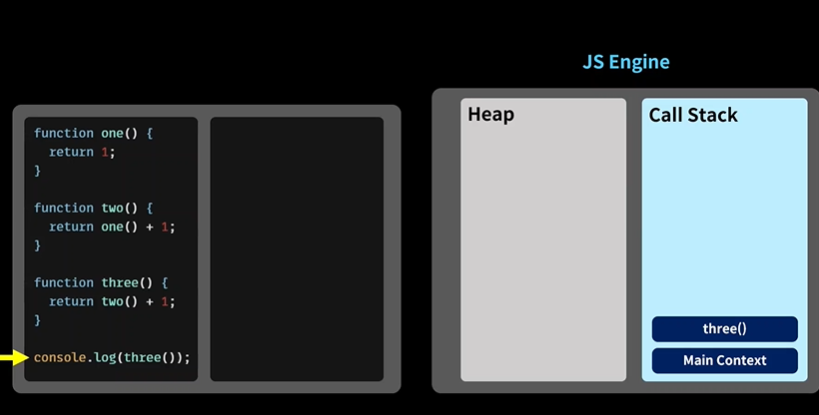
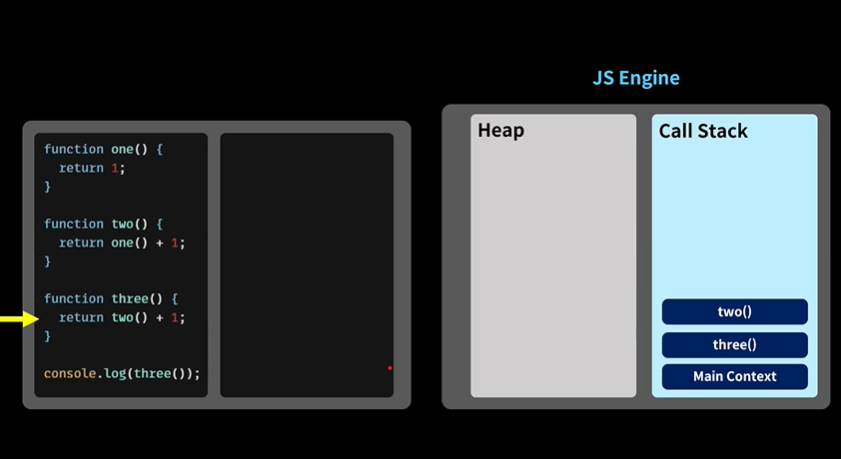
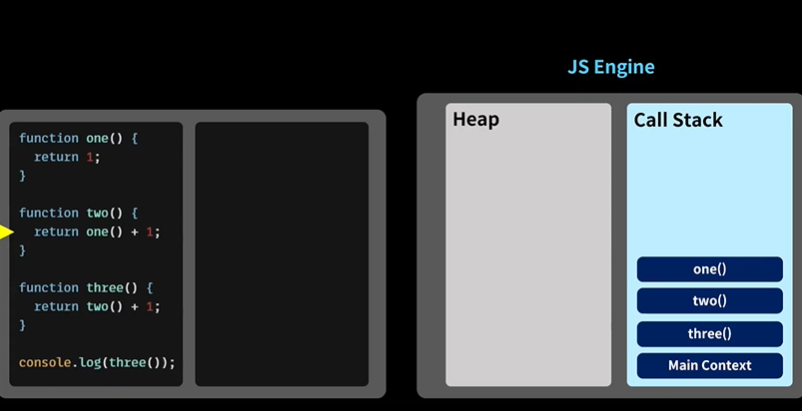
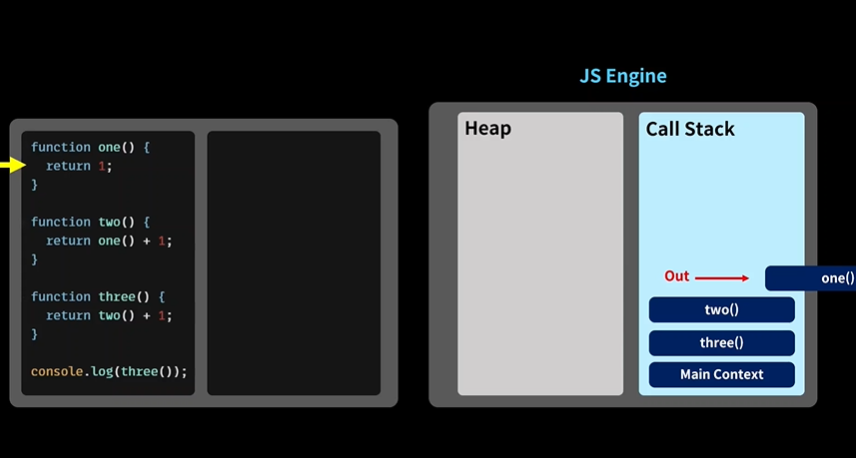
이후에 원투 쓰리포 다 끝나고 제거
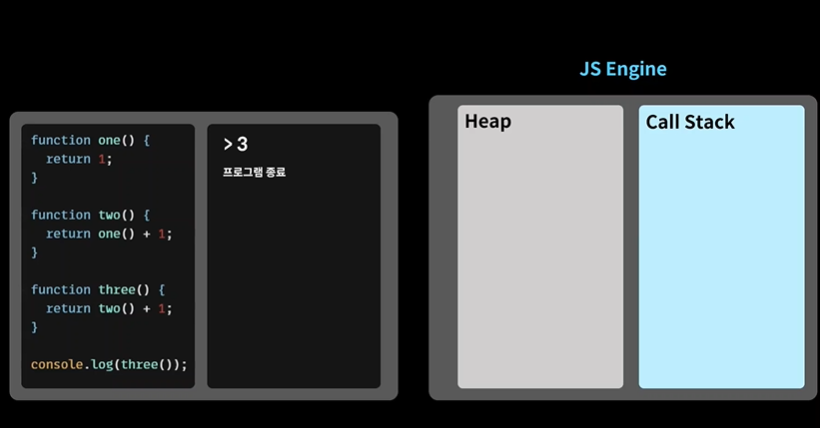
maincontext역시 나가면 끝, 종료
- 비동기 방식동작
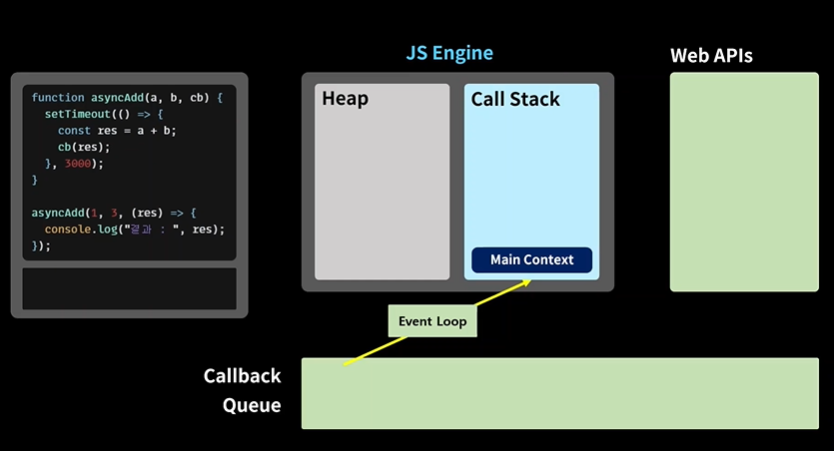
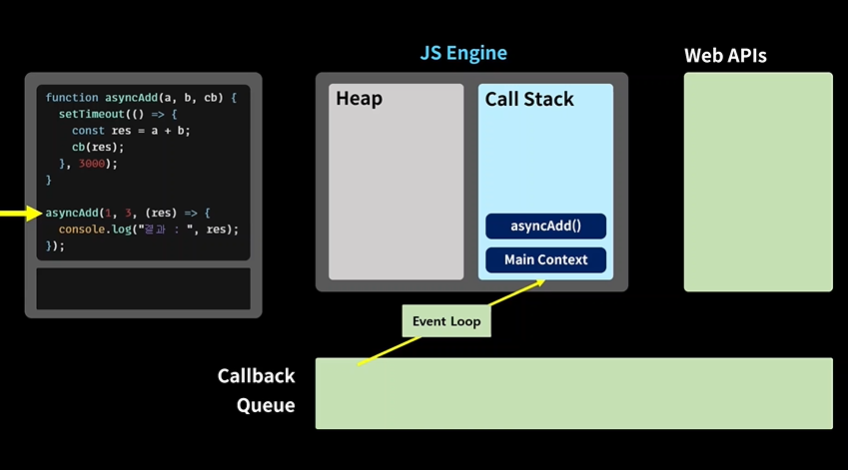
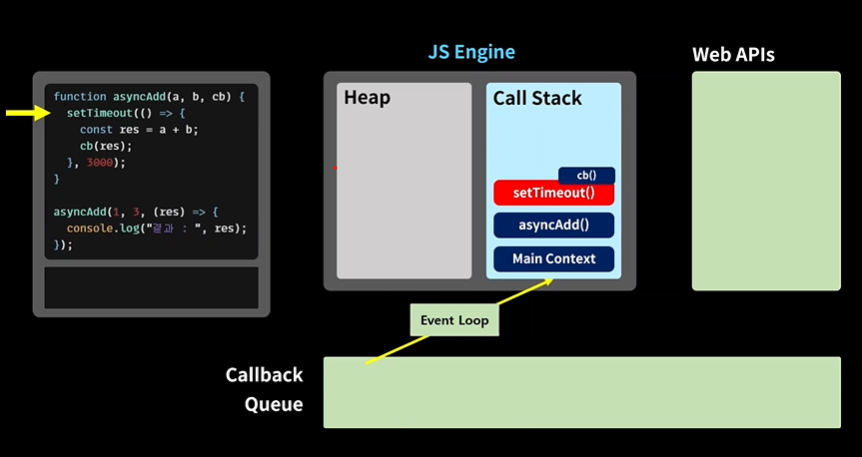
만약에 ㄹㅇ settime out 실행하면 3초뒤에 실행하고 되면서 오히려 늦어짐 그래서
webapis 로 넘김
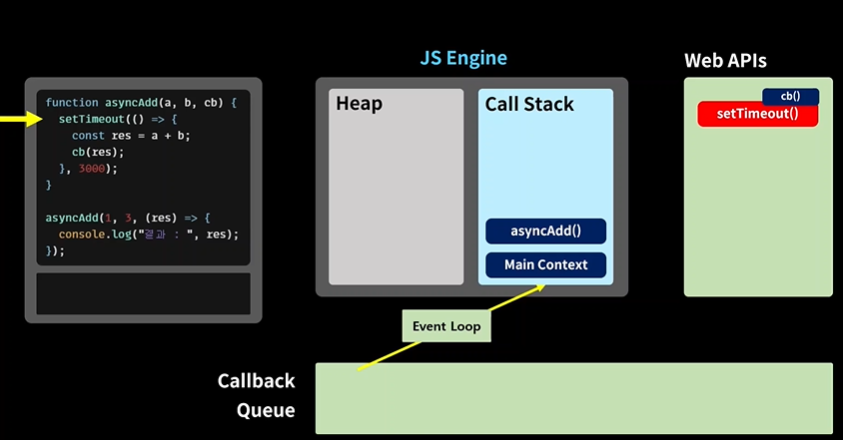
그래서 바로 다음코드 실행
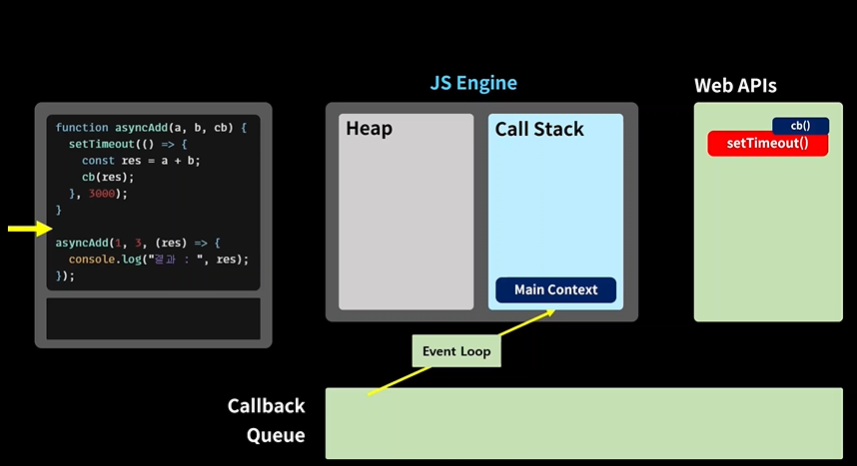
이제 시간 지나고 콜백 큐로 이동
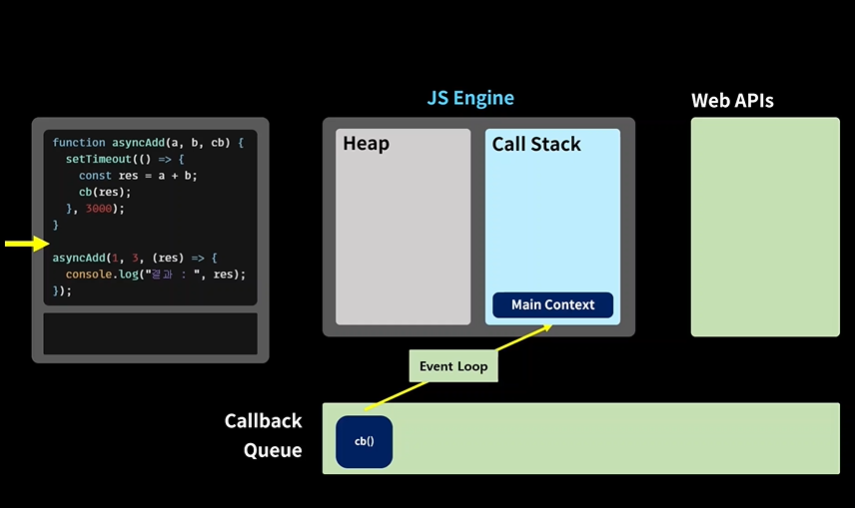
이후 콜 백 스택으로
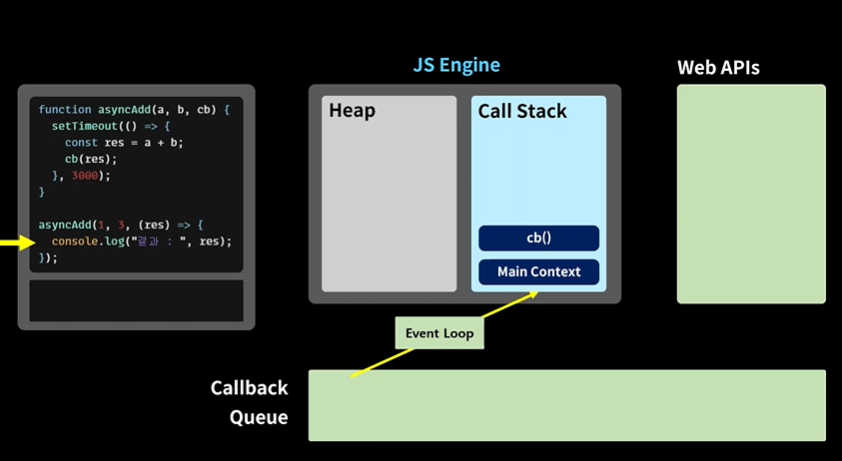
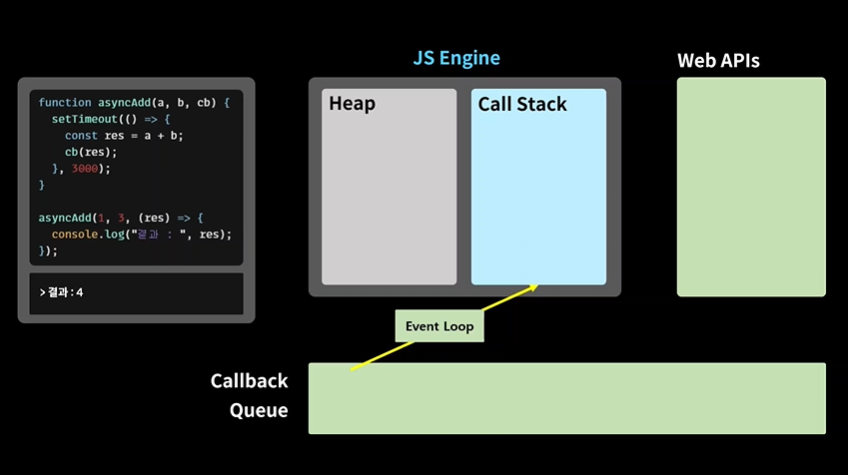
promise
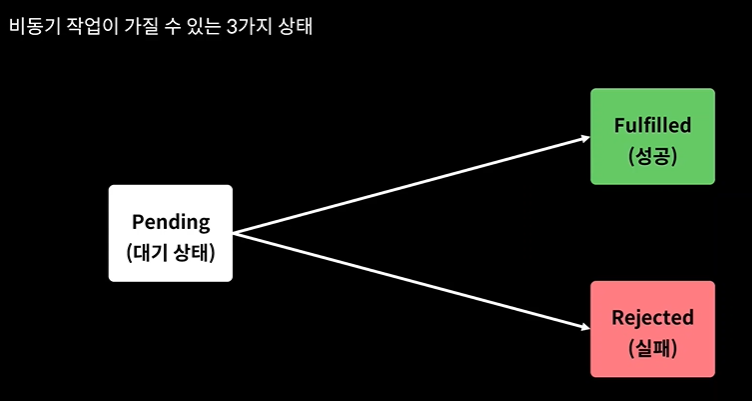
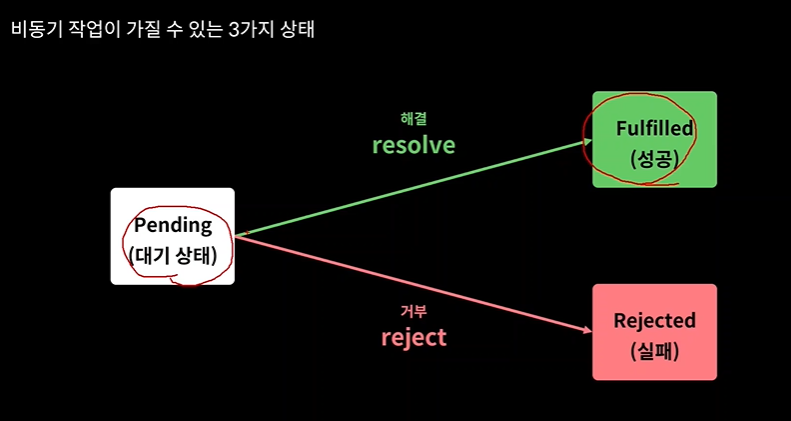
비동기 성공 -> 해결
비동기 실패 -> reject
function isPositive(number, resolve, reject) {
  setTimeout(() => {
    if (typeof number === "number") {
      //성공 -> resolve
      resolve(number >= 0 ? "양수" : "음수");
    }
    //실패 -> reject
    else reject("주어진 값이 숫자가 아닙니다.");
  }, 2000);
}

isPositive(
  [],
  (res) => {
    console.log("성공적으로 수행함 : ", res);
  },
  (err) => {
    console.log("실패하였음 : ", err);
  }
);
promise
function isPositiveP(number) {
  const executor = (resolve, reject) => {
    setTimeout(() => {
      if (typeof number === "number") {
        //성공 -> resolve
        console.log(number);
        resolve(number >= 0 ? "양수" : "음수");
      }
      //실패 -> reject
      else reject("주어진 값이 숫자가 아닙니다.");
    }, 2000);
  };

  const asyncTask = new Promise(executor);
  return asyncTask;
}
const res = isPositiveP([]);

res
  .then((res) => {
    console.log("작업 성공 ", res);
  })
  .catch((err) => {
    console.log("작업 실패 ", err);
  });
async
function delay(ms) {
  return new Promise((resolve) => {
    setTimeout(resolve, ms);
  });
}
async function helloAsync() {
  return delay(3000).then(() => {
    return "hello async";
  });
}

helloAsync().then((res) => {
  console.log(res);
});
await
function delay(ms) {
return new Promise((resolve) => {
setTimeout(resolve, ms);
});
}
async function helloAsync() {
return delay(3000).then(() => {
return "hello async";
});
}
helloAsync().then((res) => {
console.log(res);
});API 호출
다른 프로그램에게 데이터 받기 위해 말을 건다.
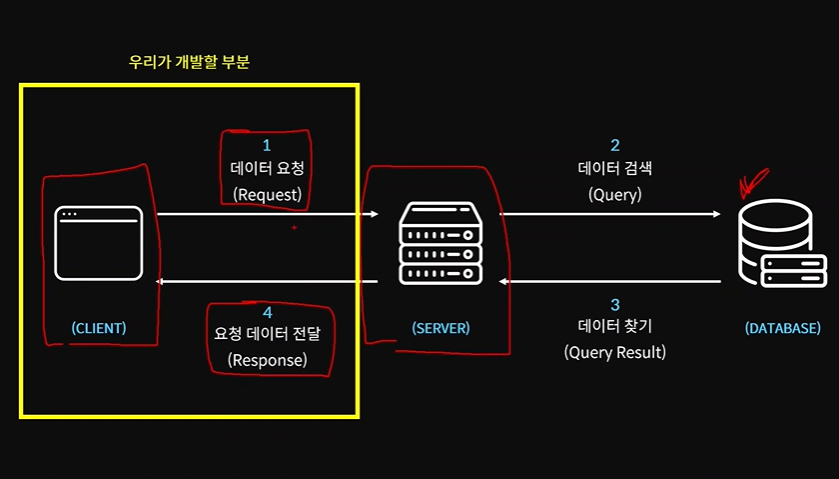
async function getData() {
let rawResponse = await fetch("https://jsonplaceholder.typicode.com/posts");
let jsonResponse = await rawResponse.json();
console.log(jsonResponse);
}
getData();