react-native 오류
오류 1
Parsing error: No Babel config file detected for ~~
이러한 오류 발생 import 부분에 빨간줄 그어짐
esLint가 제대로 작동되지 않아서 발생 된 듯 하다.
해결방법
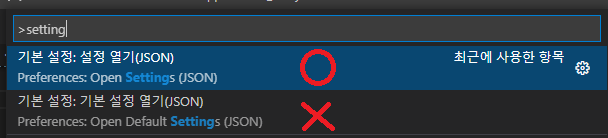
vscode VIEW -> COMMAND PALETE - > settings
나같은 경우 open user settings(json) 이었다.
"eslint.workingDirectories": [
{"mode": "auto"}
]
{
 "[javascript]": {
   "editor.defaultFormatter": "esbenp.prettier-vscode"
 },
 "editor.formatOnSave": true,
 "diffEditor.ignoreTrimWhitespace": false,
 "tabnine.experimentalAutoImports": true,
 "eslint.workingDirectories": [
   {"mode": "auto"}
]
}
문제 해결
오류 2
시발거 또 세팅에서 나를 괴롭힌다 ㅜ.ㅜ
앱창에서 아래오류
calling synchronize methods on native modules is not supported in chrome
터미널에서 아래오류
Error: Unable to resolve module ./debugger-ui/debuggerWorker.aca173c4 from C:\Users\SSAFY\Desktop\CLI0830\RNInsta/.:
해결방법
.callNativeSyncHooknode_modules/react-native/Libraries/BatchedBridge/MessageQueue.js
노드모듈에서 위의 경로로 이동 후 아래 거를 바꿔 주면 끝
callNativeSyncHook(
    moduleID: number,
    methodID: number,
    params: mixed[],
    onFail: ?(...mixed[]) => void,
    onSucc: ?(...mixed[]) => void,
  ): mixed {
    this.processCallbacks(moduleID, methodID, params, onFail, onSucc);
    if (global.nativeCallSyncHook) return global.nativeCallSyncHook(moduleID, methodID, params);
  }