1. 아래를 객체로 구현하시오.
grade.getGrade(90,90,90)
출력:
수입니다.
<!DOCTYPE html>
<html lang="en">
    <head>
        <meta charset="UTF-8" />
        <meta name="viewport" content="width=device-width, initial-scale=1.0" />
        <title>Grade Calculation</title>
        <script>
            // 성적 객체 생성 const 변수 선언시 사용
            const grade = {
                getGrade: function (kor, eng, math) {
                    let avg = (kor + eng + math) / 3;
                    // get grade 메서드(함수) 정의 후 평균 계산하여 avg 변수에 저장

					// 조건문 활용 if, else if, else return
                    if (avg >= 90) return "수입니다";
                    else if (avg >= 80) return "우입니다";
                    else if (avg >= 70) return "미입니다";
                    else if (avg >= 60) return "양입니다";
                    else return "가입니다";
                }
            };

            // 성적 평가 결과를 화면에 출력하는 함수
            function showGrades() {
                let results = "";
                results += "90, 90, 90: " + grade.getGrade(90, 90, 90) + "<br>";
                results += "85, 80, 90: " + grade.getGrade(85, 80, 90) + "<br>";
                results += "70, 75, 72: " + grade.getGrade(70, 75, 72) + "<br>";
                results += "60, 65, 68: " + grade.getGrade(60, 65, 68) + "<br>";
                results += "50, 55, 58: " + grade.getGrade(50, 55, 58) + "<br>";

                document.getElementById("output").innerHTML = results;
            }
        </script>
    </head>
    <body onload="showGrades()">
        <h1>성적 평가 결과</h1>
        <div id="output"></div>
    </body>
</html>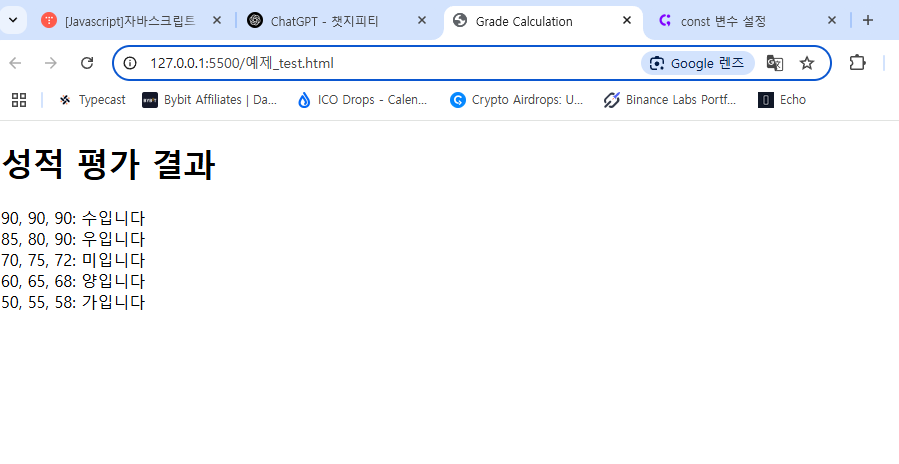
2. 입력시 prompt 함수로 가위,바위,보를 입력 받아,가위바위보 게임을 객체로 구현해 보세요.
출력)
당신: 가위
컴포터: 보
당신이 이겼습니다.
<!DOCTYPE html>
<html lang="en">
    <head>
        <meta charset="UTF-8" />
        <meta name="viewport" content="width=device-width, initial-scale=1.0" />
        <title>Rock</title>
        <script>
        const RPSGame = {
    choices: ["가위", "바위", "보"],

    getUserChoice: function () {
        let userChoice;
        do {
            userChoice = prompt("가위, 바위, 보 중 하나를 입력하세요:").trim();
        } while (!this.choices.includes(userChoice)); // 유효한 입력이 아니면 다시 입력받음
        return userChoice;
    },

    getComputerChoice: function () {
        const randomIndex = Math.floor(Math.random() * this.choices.length);
        return this.choices[randomIndex];
    },

    determineWinner: function (userChoice, computerChoice) {
        if (userChoice === computerChoice) {
            return "비겼습니다.";
        } else if (
            (userChoice === "가위" && computerChoice === "보") ||
            (userChoice === "바위" && computerChoice === "가위") ||
            (userChoice === "보" && computerChoice === "바위")
        ) {
            return "당신이 이겼습니다!";
        } else {
            return "컴퓨터가 이겼습니다!";
        }
    },

    play: function () {
        const userChoice = this.getUserChoice();
        const computerChoice = this.getComputerChoice();
        const result = this.determineWinner(userChoice, computerChoice);

        alert(`당신: ${userChoice}\n컴퓨터: ${computerChoice}\n${result}`);
    }
};

// 게임 실행
RPSGame.play();

</script>
    </head>
</html>
3. 디지털 시계를 구현하시오.
<!DOCTYPE html>
<html lang="en">
<head>
    <meta charset="UTF-8">
    <meta name="viewport" content="width=device-width, initial-scale=1.0">
    <title>Document</title>
    <script>
    //set interval(함수, 시간(ms))은 특정 시간마다 자동실행 되도록 설정
        setInterval(() =>{
            let timer = new Date();
            document.getElementById('clock').innerHTML = timer.getHours() + ':' + timer.getMinutes() + ':' + timer.getSeconds() + '<br>';
        }, 1000);
    </script>
</head>
<body>
    <h1 id="clock"></h1>
</body>
</html>
4. 클로저에 대하여 설명해 보시오.
5. arguments 객체에 대하여 설명하시오.
3줄 요약:
1. 클로져란 외부변수가 살아 있다는 말이다.
2. 함수에는 명시적 함수, 익명 함수, 화살표 함수가 있다.
3. 객체는 중괄호 이며, 객체에 들어 가는 함수는 메서드라고 표현하며, 익명함수로만 구현하여야 한다.

파이썬, SQL 개발