- getElementsByClassName: 많은 element를 가져올 때 씀
- getElementsByTagName: name을 할당할 수 있음
- querySelector: element를 CSS selector 방식으로 검색할 수 있음 (ex. h1:first-child) 단 하나의 element를 return 해준다.
첫번째 element만 가져오는데, 조건에 맞는 세개를다 가져오고 싶으면- querySelectorAll을 쓴다.
- querySelector("#hello);와 getElementById("hello");는 같은 일을 한다.
하지만 후자는 하위 요소를 가져오는 것을 못하므로 전자 위주로 쓴다.
getElementsByClassName
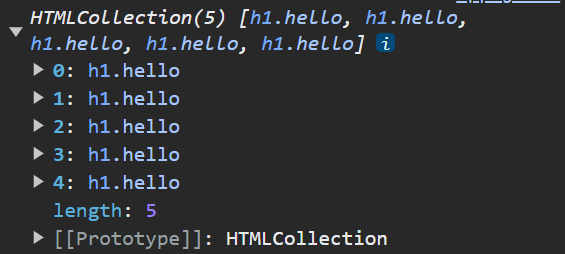
getElementsByClassName: 많은 element를 가져올 때 쓴다. (array 반환)
<!--html-->
<body>
    <h1 class="hello">Grab me!</h1>
    <h1 class="hello">Grab me!</h1>
    <h1 class="hello">Grab me!</h1>
    <h1 class="hello">Grab me!</h1>
    <h1 class="hello">Grab me!</h1>
    <script src="app.js"></script>
</body>
<app.js>
const hellos = document.getElementsByClassName("hello");

console.log(hellos);
<결과>
모든 h1 elements가 나온다.
⭐querySelector
element를 CSS selector 방식으로 검색할 수 있다.
<예시 1>
<body>
    <div class="hello">
        <h1>Grab me 1!</h1>
    </div>
    <div class="hello">
        <h1>Grab me 2!</h1>
    </div>
    <div class="hello">
        <h1>Grab me 3!</h1>
    </div>
    <script src="app.js"></script>
</body>
const title = document.querySelector(".hello h1");
//hello라는 class 내부에 h1 태그를 가져온다.
console.log(title);<결과>

querySelector는 동일한 class가 있다면 첫번째 element만 return한다.
<예시 2>
const title = document.querySelector("div.hello:first-child h1");

console.log(title);
<결과>

class명 hello를 가진 div 중 first child div의 h1 가져오기
<예시 3> style
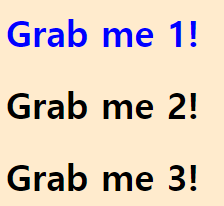
const title = document.querySelector("div.hello:first-child h1");

title.style.color ="blue";

console.log(title);
style
- h1 object 내부에 있는 object
- h1의 style을 JS에서 변경할 수 있다.
<결과>

querySelectorAll
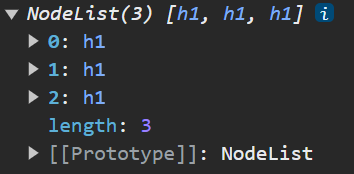
동일한 조건에 있는 element들을 전부 가져오고 싶다면 querySelectorAll을 쓴다.
const title = document.querySelectorAll(".hello h1");

console.log(title);
<결과>
같은 역할
id로 찾기 - > #는 id, .은 class
const title = document.querySelector("#hello");
const title = document.getElementById("hello");
위의 두 코드는 같은 의미이다. 하지만 후자는 하위 요소를 가져오지 못하기 때문에 전자 위주로 쓸 것.

개발은 즐거워🪇