들어가며
평소와 같이 컴포즈 스터디를 하던 도중… 스터디에서 Landscapist 얘기를 듣게 됩니다.
마침 회사에서 이 라이브러리를 쓰고 있어서...Landscapist에 꽂혔습니다.

Landscapist의 CoilImage와 Coil3의 AsyncImage 모두 내부적으로 Coil의 ImageLoader를 사용하여 이미지를 로딩합니다. 그렇다면 같은 엔진을 사용하는데 성능 차이가 있을까요? 성능 차이가 있다면 대체 왜 나는 것일까요? 저는 너무 궁금했습니다.
그래서 이 글에서는 두 라이브러리의 내부 구현을 분석하고, 실제 벤치마크를 통해 성능 차이를 확인해보겠습니다.
목표
- AsyncImage와 CoilImage의 구조적 차이점 이해
- 각 구현 방식이 성능에 미치는 영향 분석
- 실제 벤치마크 결과 비교
- 상황에 맞는 라이브러리 선택 기준 제시
선행 지식
이 글을 이해하기 위해서는 다음 개념에 대한 이해가 필요합니다:
- Jetpack Compose의 Composition, Layout, Draw 단계
- Modifier.Node API (Compose 1.3+)
- CompositionLocal과 StateFlow의 동작 방식
- Coroutine의 Continuation 개념
두 라이브러리의 차이점은 무엇일까?
설명하기 앞서, 밑의 글은 저의 흥미위주 주관적인 분석 결과임을 밝힘니다. 잘못된 정보가 있을 경우 알려주시면 감사하겠습니다.
Landscapist의 CoilImage와 Coil3의 AsyncImage의 차이점은 다음과 같습니다.
1. Constraints 획득 방식의 차이
이미지를 적절한 크기로 로딩하려면 Composable의 Constraints(제약 조건)를 알아야 합니다. 두 라이브러리는 이를 획득하는 방식이 다릅니다.
AsyncImage: Modifier.Node 기반
AsyncImage는 LayoutModifier를 직접 구현하여 Layout 단계에서 Constraints를 획득합니다.
// ContentPainterModifier.kt (Coil 내부)
class AbstractContentPainterNode : Modifier.Node(), LayoutModifierNode {
    override fun MeasureScope.measure(
        measurable: Measurable,
        constraints: Constraints,
    ): MeasureResult {
        constraintSizeResolver?.setConstraints(constraints)

        val placeable = measurable.measure(modifyConstraints(constraints))
        return layout(placeable.width, placeable.height) {
            placeable.placeRelative(0, 0)
        }
    }
}
CoilImage: BoxWithConstraints 기반
CoilImage는 BoxWithConstraints를 사용하여 Constraints를 획득합니다.
// Landscapist 내부 구조
@Composable
fun ImageLoad(...) {
    BoxWithConstraints {
        val constraints = this.constraints
        setConstraints(constraints)
        // 이미지 로딩 및 표시
    }
}
성능 영향
BoxWithConstraints는 내부적으로 SubcomposeLayout을 사용합니다. 이는 추가적인 Composition 단계가 필요하다는 의미입니다.
AsyncImage:
  Composition → Layout (constraints 획득) → Draw

CoilImage:
  Composition → Layout → SubComposition → Layout → Draw
100개의 이미지를 스크롤할 때, AsyncImage는 100번의 Composition이 발생하지만, CoilImage는 사실상 200번의 Composition이 발생합니다. 이 차이가 빠른 스크롤 시 성능 차이로 이어질 거라고 예상합니다.
2. 이미지 로딩 트리거 시점의 차이
AsyncImage: RememberObserver 기반
AsyncImage는 RememberObserver 인터페이스를 구현하여, Composition에 기억될 때 이미지 로딩을 시작합니다.
// AsyncImagePainter.kt
class AsyncImagePainter : RememberObserver {
    override fun onRemembered() {
        // Composition에 진입할 때 딱 1번 호출
        launchJob()
    }

    private fun launchJob() {
        scope.launch {
            imageLoader.execute(request)
        }
    }

    override fun onForgotten() {
        // Composition에서 제거될 때 정리
        job?.cancel()
    }
}
CoilImage: LaunchedEffect 기반
CoilImage는 LaunchedEffect와 key를 사용하여 이미지 로딩 시점을 결정합니다.
// Landscapist 내부 구조 (추정)
@Composable
fun CoilImage(
    recomposeKey: Any?,
    loadingKey: Any?,
    ...
) {
    LaunchedEffect(recomposeKey, loadingKey) {
        // key가 변경될 때마다 실행
        imageLoader.execute(request)
    }
}
성능 영향
LaunchedEffect는 매 Recomposition마다 key 비교를 수행해야 합니다.
빠른 스크롤 시나리오 (100개 아이템, 10회 Recomposition):

AsyncImage:
  - onRemembered: 100회 (아이템 등장 시에만)
  - Recomposition 시: 아무 작업 없음

CoilImage:
  - LaunchedEffect key 비교: 1,000회
  - 대부분 skip되지만 비교 비용 발생
3. Constraints 전달 메커니즘의 차이
AsyncImage: 직접 Continuation 관리
AsyncImage는 Coroutine의 Continuation을 직접 관리하여 Constraints를 전달합니다.
// ConstraintsSizeResolver.kt (Coil)
@Stable
class ConstraintsSizeResolver : SizeResolver, LayoutModifier {
    private var latestConstraints = ZeroConstraints
    private var continuations = mutableListOf<Continuation<Unit>>()

    override suspend fun size(): Size {
        if (latestConstraints.isZero) {
            var continuation: Continuation<Unit>? = null
            try {
                suspendCancellableCoroutine<Unit> {
                    continuation = it
                    continuations.add(it)
                }
            } finally {
                continuations.remove(continuation)
            }
        }
        return latestConstraints.toSize()
    }

    fun setConstraints(constraints: Constraints) {
        latestConstraints = constraints
        if (!constraints.isZero) {
            // 대기 중인 coroutine들을 직접 resume
            continuations.forEach { it.resume(Unit) }
            continuations.clear()
        }
    }
}
CoilImage: StateFlow 기반
CoilImage는 StateFlow를 사용하여 Constraints를 전달합니다.
// ConstraintsSizeResolver.kt (Landscapist)
internal class ConstraintsSizeResolver : SizeResolver {
    private val _constraints = MutableStateFlow(ZeroConstraints)

    override suspend fun size() = _constraints
        .mapNotNull(Constraints::inferredCoilSize)
        .first()

    override fun setConstraints(constraints: Constraints) {
        _constraints.value = constraints
    }
}
성능 영향
StateFlow는 편리하지만 숨겨진 비용이 있습니다.
AsyncImage (직접 Continuation):
  setConstraints → resume → size() 반환
  경로: 3단계

CoilImage (StateFlow):
  setConstraints → StateFlow.value =
    → equals 비교 → notify → mapNotNull → first → collect
  경로: 7단계 이상
MutableStateFlow는 값 비교, 동기화, Flow 연산자 체인의 오버헤드가 있습니다. 아래는 MutableStateFlow 내부 구현 코드 중 일부입니다.
// StateFlow.kt

override fun compareAndSet(expect: T, update: T): Boolean =
	updateState(expect ?: NULL, update ?: NULL)

private fun updateState(expectedState: Any?, newState: Any): Boolean {
    var curSequence: Int
    var curSlots: Array<StateFlowSlot?>? // benign race, we will not use it
    synchronized(this) {
        val oldState = _state.value
        if (expectedState != null && oldState != expectedState) return false // CAS support
        if (oldState == newState) return true // Don't do anything if value is not changing, but CAS -> true
        _state.value = newState
        curSequence = sequence
        if (curSequence and 1 == 0) { // even sequence means quiescent state flow (no ongoing update)
            curSequence++ // make it odd
            sequence = curSequence
        } else {
            // update is already in process, notify it, and return
            sequence = curSequence + 2 // change sequence to notify, keep it odd
            return true // updated
        }
        curSlots = slots // read current reference to collectors under lock
    }
    /*
       Fire value updates outside of the lock to avoid deadlocks with unconfined coroutines.
       Loop until we're done firing all the changes. This is a sort of simple flat combining that
       ensures sequential firing of concurrent updates and avoids the storm of collector resumes
       when updates happen concurrently from many threads.
     */
    while (true) {
        // Benign race on element read from array
        curSlots?.forEach {
            it?.makePending()
        }
        // check if the value was updated again while we were updating the old one
        synchronized(this) {
            if (sequence == curSequence) { // nothing changed, we are done
                sequence = curSequence + 1 // make sequence even again
                return true // done, updated
            }
            // reread everything for the next loop under the lock
            curSequence = sequence
            curSlots = slots
        }
    }
}
개별로는 미미하지만, 빠른 스크롤 시 누적 비용으로 나타납니다. 아마 이러한 이유로 Coil에서 직접 Continuatoin을 관리하지 않을까 싶습니다. 아니라면 대체 왜 번거롭게 관리하는지 모르겠어요 흑흑
4. 이미지 렌더링 방식의 차이
AsyncImage: Modifier.Node에서 직접 Draw
AsyncImage는 DrawModifierNode를 구현하여 직접 이미지를 그립니다.
// ContentPainterModifier.kt
internal class ContentPainterNode :
    Modifier.Node(),
    LayoutModifierNode,
    DrawModifierNode {

    override fun ContentDrawScope.draw() {
        // measure 단계에서 계산된 값 재사용
        translate(dx, dy) {
            with(painter) {
                draw(size, alpha, colorFilter)
            }
        }
    }
}
CoilImage: Image Composable 사용
CoilImage는 Compose의 기본 Image Composable에 painter를 전달합니다.
// Landscapist 내부 구조
@Composable
fun CoilImage(...) {
    // 이미지 로딩 후
    Image(
        painter = painter,
        contentDescription = contentDescription,
        contentScale = contentScale,
    )
}
성능 영향
Image Composable은 내부적으로 여러 레이어를 거칩니다.
CoilImage:
  CoilImage → Image → Layout → Semantics → Modifier.paint → PainterModifier → draw
  레이어: 5-6단계

AsyncImage:
  AsyncImage → ContentPainterNode → draw
  레이어: 2-3단계
벤치마크 결과
그렇다면 위의 차이점들이 성능에 어떤 영향을 미칠까요?
이를 위해 Galaxy S22에서 Macrobenchmark를 사용하여 성능을 측정했습니다.
다양한 CompilationMode로 테스트하여 BaselineProfile의 효과도 함께 분석했습니다.
다음은 측정한 스크린 코드입니다.
    @Composable
    fun BenchmarkTestScreen(
        items: List<ImageItem>
    ) {
        val scrollState = rememberLazyListState()

        Scaffold(
            modifier = Modifier
                .fillMaxSize()
        ) { innerPadding ->
            LazyColumn(
                state = scrollState,
                modifier = Modifier
                    .fillMaxSize()
                    .padding(innerPadding)
                    .semantics {
                        contentDescription = "image_lazy_column"
                    },
                horizontalAlignment = Alignment.CenterHorizontally,
                verticalArrangement = Arrangement.Center
            ) {
                items(
                    items = items,
                    key = { it.key }
                ) {
                    trace("ImageLoading") {
                        AsyncImage( // or CoilImage
                            model = it.url,
                            contentDescription = "AsyncImage",
                            contentScale = ContentScale.Crop,
                            modifier = Modifier.size(150.dp)
                        )
                    }
                }
            }
        }
    }
CompilationMode 설명
| 모드 | 설명 |
|---|---|
| None | JIT 컴파일만 사용 (앱 첫 실행 시뮬레이션) |
| Partial | BaselineProfile 적용 (Play Store 설치 후 환경과 유사) |
| Full | 전체 AOT 컴파일 (이론적 최대 성능) |
1. 이미지 로딩 성능 (ImageLoadingSumMs)
가장 큰 차이가 나는 지표입니다. 동일한 수의 이미지를 로딩하는 데 걸린 총 시간입니다.
| CompilationMode | CoilImage | AsyncImage | 차이 |
|---|---|---|---|
| None | 46.7ms | 30.3ms | AsyncImage 35% 빠름 |
| Partial | 30.4ms | 13.2ms | AsyncImage 57% 빠름 |
| Full | 30.4ms | 14.4ms | AsyncImage 53% 빠름 |
이미지 로딩 시간 (median)

CoilImage:   ████████████████████████████████████████ 46.7ms (None)
             ██████████████████████████ 30.4ms (Partial/Full)

AsyncImage:  ████████████████████████ 30.3ms (None)
             ██████████ 13.2ms (Partial)
AsyncImage가 이미지 로딩 자체에서 빠릅니다. 이는 앞에서 언급한 ConstraintsSizeResolver의 구현 차이(Continuation vs StateFlow)와 로딩 트리거 방식(onRemembered vs LaunchedEffect)의 영향으로 예상합니다.
2. 프레임 렌더링 성능 (frameDurationCpuMs)
| CompilationMode | CoilImage P50 | AsyncImage P50 | CoilImage P99 | AsyncImage P99 |
|---|---|---|---|---|
| None | 7.9ms | 6.1ms | 20.2ms | 17.6ms |
| Partial | 6.4ms | 5.4ms | 20.0ms | 22.7ms |
| Full | 5.0ms | 4.7ms | 17.8ms | 15.4ms |
frameDurationCpuMs P50 비교 (낮을수록 좋음)

None 모드:
  CoilImage:  ████████ 7.9ms
  AsyncImage: ██████ 6.1ms

Full 모드:
  CoilImage:  █████ 5.0ms
  AsyncImage: █████ 4.7ms
Partial 모드에서 AsyncImage의 P99가 22.7ms로 오히려 높게 나왔습니다. 이는 측정 변동성으로 보이며, Full 모드에서는 AsyncImage가 우위에 있습니다. 다시 측정하기에는 측정만 1시간 걸려서 생략하겠습니다.
3. BaselineProfile 효과 분석
None 모드(JIT만) 대비 Full 모드(전체 AOT)의 성능 향상률입니다.
| 메트릭 | CoilImage 향상률 | AsyncImage 향상률 |
|---|---|---|
| frameDurationCpuMs P50 | 7.9ms → 5.0ms (37% 개선) | 6.1ms → 4.7ms (23% 개선) |
| ImageLoadingSumMs | 46.7ms → 30.4ms (35% 개선) | 30.3ms → 14.4ms (52% 개선) |
BaselineProfile 효과 (None → Full 개선율)

CoilImage:
  프레임 렌더링: ████████████████████████████████████ 37% 개선
  이미지 로딩:   ███████████████████████████████████ 35% 개선

AsyncImage:
  프레임 렌더링: ███████████████████████ 23% 개선
  이미지 로딩:   ████████████████████████████████████████████████████ 52% 개선
흥미로운 발견:
- CoilImage는 프레임 렌더링에서 BaselineProfile 효과를 더 많이 받습니다 (37% vs 23%)
- 이는 CoilImage가 더 많은 코드 경로를 거치기 때문인 것으로 보입니다. (BoxWithConstraints, StateFlow, Image Composable 등)
4. 느린 스크롤 성능 (scrollImageListSlowGesture)
| 메트릭 | CoilImage | AsyncImage | 차이 |
|---|---|---|---|
| frameDurationCpuMs P50 | 5.0ms | 5.2ms | 거의 동등 |
| frameDurationCpuMs P99 | 16.5ms | 15.0ms | AsyncImage 9% 우위 |
| frameOverrunMs P99 | 16.2ms | 10.1ms | AsyncImage 38% 우위 |
느린 스크롤에서는 두 라이브러리의 차이가 줄어들지만, frameOverrunMs(프레임 드롭 지표)에서는 AsyncImage가 여전히 우위입니다.
5. 종합 비교표
| 항목 | CoilImage | AsyncImage | 승자 |
|---|---|---|---|
| 이미지 로딩 시간 | 30.4ms | 13.2ms | AsyncImage (+57%) |
| 프레임 렌더링 P50 | 5.0ms | 4.7ms | AsyncImage (+6%) |
| 프레임 렌더링 P99 | 17.8ms | 15.4ms | AsyncImage (+13%) |
| BaselineProfile 활용도 | 높음 (37%) | 중간 (23%) | CoilImage |
| 프레임 드롭 (P99) | 16.1ms | 16.0ms | 동등 |
구조적 차이 요약
┌─────────────────────────────────────────────────────────────────┐
│                    AsyncImage vs CoilImage                      │
├─────────────────────────────────────────────────────────────────┤
│                                                                 │
│  1. Constraints 획득                                             │
│     AsyncImage: Modifier.Node (단일 Composition)                │
│     CoilImage:  BoxWithConstraints (SubcomposeLayout)           │
│                                                                 │
│  2. 이미지 로딩 트리거                                          │
│     AsyncImage: onRemembered (Composition 라이프사이클)         │
│     CoilImage:  LaunchedEffect + key (매번 비교)                │
│                                                                 │
│  3. Constraints 전달                                            │
│     AsyncImage: 직접 Continuation 관리                          │
│     CoilImage:  StateFlow + Flow 연산자                         │
│                                                                 │
│  4. 이미지 렌더링                                               │
│     AsyncImage: DrawModifierNode에서 직접 draw                  │
│     CoilImage:  Image Composable 사용                           │
│                                                                 │
└─────────────────────────────────────────────────────────────────┘
마무리
요약
- 이미지 로딩 시간에서 가장 큰 차이
- AsyncImage가 이미지 로딩에서 57% 더 빠름 (13.2ms vs 30.4ms)
- 이는
ConstraintsSizeResolver구현 차이(Continuation vs StateFlow)의 직접적인 영향으로 예상
- 프레임 렌더링은 비슷하지만 AsyncImage 우위
- P50 기준 6% 차이 (4.7ms vs 5.0ms)
- P99 기준 13% 차이 (15.4ms vs 17.8ms)
- BaselineProfile 효과는 CoilImage가 더 큼
- CoilImage: 37% 개선 (더 많은 코드 경로 → 더 많은 최적화 여지)
- AsyncImage: 23% 개선 (이미 최적화된 구조)
- 구조적 차이가 성능 차이의 원인
- BaselineProfile을 적용해도 구조적 차이에서 오는 성능 격차는 유지됨
- AsyncImage의 Modifier.Node 기반 설계가 근본적인 성능 우위 제공
설계 철학의 차이
| CoilImage (Landscapist) | AsyncImage (Coil) | |
|---|---|---|
| 설계 목표 | 확장성, 플러그인 시스템 | 성능 최적화 |
| Compose 활용 | Composable 조합 | Modifier.Node 통합 |
| BaselineProfile 의존도 | 높음 | 낮음 |
라이브러리 선택 기준
| 기준 | 추천 |
|---|---|
| 이미지가 많은 리스트 | AsyncImage (로딩 시간 57% 단축) |
| 빠른 스크롤 UX | AsyncImage (프레임 렌더링 우위) |
| 테스트 용이성 | CoilImage (CompositionLocal Mock 주입) |
| 플러그인/확장성 | CoilImage (ImageComponent 시스템) |
| 공식 지원/유지보수 | AsyncImage (Coil 공식) |
| 간결한 코드 | AsyncImage |
| 이미지 효과 | CoilImage |
결론
성능이 중요하다면 AsyncImage를 선택하세요. 특히 이미지가 많은 리스트에서 AsyncImage는 로딩 시간과 프레임 렌더링 모두에서 확실한 우위를 보여줍니다.
하지만 확장성과 테스트 용이성, 그리고 이미지 효과가 더 중요하다면 CoilImage도 좋은 선택입니다.
Landscapist 는 아무래도 다양한 이펙트 효과를 지원하기 때문에 여러 플러그인을 넣다보니 이러한 차이점이 발생하는게 아닐까 싶습니다.
 val imageComponent = imageComponent {
        +PlaceholderPlugin.Loading(painterResource(id = R.drawable.poster))
        +PlaceholderPlugin.Failure(painterResource(id = R.drawable.poster))
        +ShimmerPlugin()
        +ZoomablePlugin()
        +CrossfadePlugin()
        +CircularRevealPlugin()
        +BlurTransformationPlugin()
        +PalettePlugin()
      }
이미지 효과를 저렇게 플러그인 하나로 간단하게 적용할 수 있다니….
이론적으로는 성능 차이가 있다고는 하지만, 육안으로 봤을 때는 차이가 없어 보였습니다. 정말 미미한 차입니다.
그래서 다양한 이미지 효과를 주고 싶다면 Landscapist 도 충분히 고려할만 하다고 생각합니다.
결국 어떤 가치를 우선시하느냐에 따라 선택이 달라집니다. 이 글이 여러분의 라이브러리 선택에 도움이 되길 바랍니다.
추가
https://github.com/skydoves/landscapist/issues/830
블로그 발행 전날, 성능에 관한 이슈에 답변이 달렸습니다.
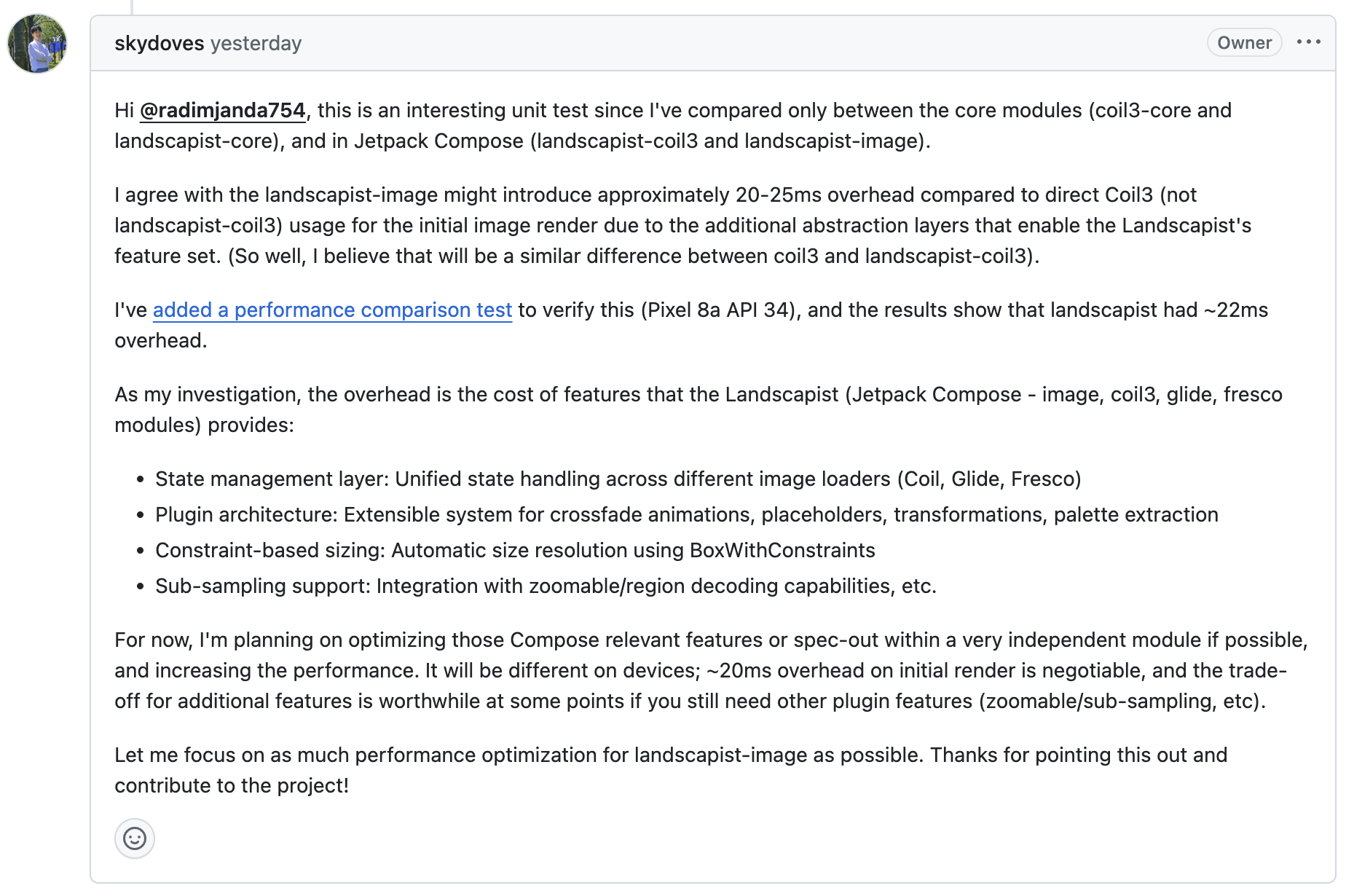
Landscapist가 제공하는 기능의 오버헤드로 인해 이런 성능 차이가 발생하며, 앞으로 성능 최적화에 집중하겠다고 합니다.

최적화 되었다고 나오면 또 뜯어봐야지!!!
Landscapist가 업데이트 되는 날 2부로 찾아오겠습니다.

안녕하세요, 게시글 너무 흥미롭게 잘 읽었습니다. 최근 2.9.3 릴리스에서 SubcomposeLayout 제거 및 여러 퍼포먼스 향상 업데이트가 있었는데요, LandscapistImage(landscapist-core)와 AsyncImage를 비교한 벤치마크를 다시 한번 해주시면 감사드리겠습니다 :)