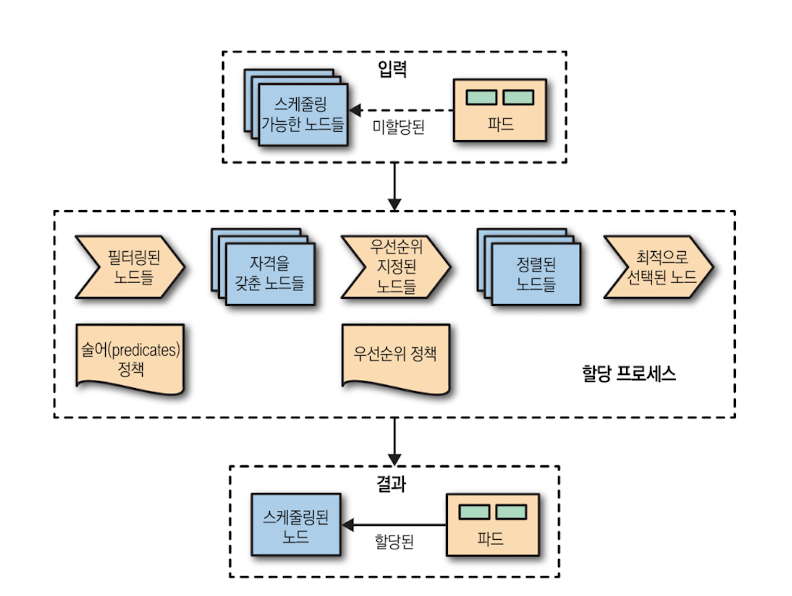
1. 개요
- 자동 배치(Automated Placement) 패턴은 다양한 자원 요구와 제약을 가진 파드(Pod)를 여러 노드에 일관되고 예측 가능하게 배치하는 쿠버네티스의 기본 전략입니다.
- 목표: 성능과 안정성을 유지하면서 최소한의 수동 개입으로 배치 결정을 자동화합니다.
2. 핵심 개념
1) Node Allocatable
- Allocatable = Node Capacity − (kube-reserved + system-reserved + eviction-threshold ...)
- 스케줄러는 Allocatable 한도를 초과하지 않도록 배치합니다. 운영 안정성을 위해 시스템 예약 설정을 권장합니다.
- Node Capacity : 노드에 붙어 있는 CPU 코어 수, 메모리 크기, 스토리지 용량
- kube-reserved : Kubernetes 시스템 컴포넌트가 사용할 리소스를 미리 예약
- system-reserved : 운영체제와 기타 데몬(OS 프로세스, 로그 수집기, 모니터링 에이전트 등)이 사용하는 리소스를 예약
- eviction-threshold : Kubelet이 파드를 축출하기 위해 사용하는 자원 여유 임계치
2) 컨테이너 자원 선언
resources.requests/resources.limits를 명확히 정의해 스케줄링 기준을 제공합니다.requests값이 노드 적합성 판단의 핵심 지표입니다.
3. 배치 제약 수단
1) nodeSelector(단순 라벨 매칭)
- 노드 라벨과의 완전 일치가 필요한 하드 제약입니다.
- 간단하지만 규모가 커지면 유지보수가 어려울 수 있습니다.
2) Node Affinity(정밀한 노드 선택)
requiredDuringSchedulingIgnoredDuringExecution: 하드 필터preferredDuringSchedulingIgnoredDuringExecution: 선호(가중치 기반 점수)
예시:
affinity:
  nodeAffinity:
    requiredDuringSchedulingIgnoredDuringExecution:
      nodeSelectorTerms:
      - matchExpressions:
        # 데이터센터/랙 등 환경에 맞는 토폴로지 도메인 값
        - key: topology.kubernetes.io/zone
          operator: In
          values: ["dc-a", "dc-b"]
        # 워커 풀 구분(예: compute, storage 등)
        - key: node-pool
          operator: In
          values: ["compute"]
    preferredDuringSchedulingIgnoredDuringExecution:
    - weight: 50
      preference:
        matchExpressions:
        # 고성능 디스크가 장착된 노드를 선호
        - key: disktype
          operator: In
          values: ["nvme-ssd"]
3) Pod Affinity / Anti-Affinity(파드 간 공존·분산)
- 라벨 +
topologyKey로 공존/분산을 제어합니다.
예시(존 단위 분산 강제):
affinity:
  podAntiAffinity:
    requiredDuringSchedulingIgnoredDuringExecution:
    - labelSelector:
        matchLabels:
          app: my-svc
      topologyKey: topology.kubernetes.io/zone
4) Taints & Tolerations(노드가 파드를 거부/선택)
- 노드에 테인트를 설정해 일반 파드를 거부하고, 특정 파드만 톨러레이션으로 허용합니다.
effect:NoSchedule,PreferNoSchedule,NoExecuteoperator: Exists는 value 없이 key만 있어도 매칭됩니다.
예시:
# 노드에 테인트 예시:
# kubectl taint nodes node1 accelerator=nvidia:NoSchedule
spec:
  tolerations:
  - key: "accelerator"
    operator: "Equal"   # Exists 사용 시 value 생략 가능
    value: "nvidia"
    effect: "NoSchedule"
4. 스케줄링 프로세스
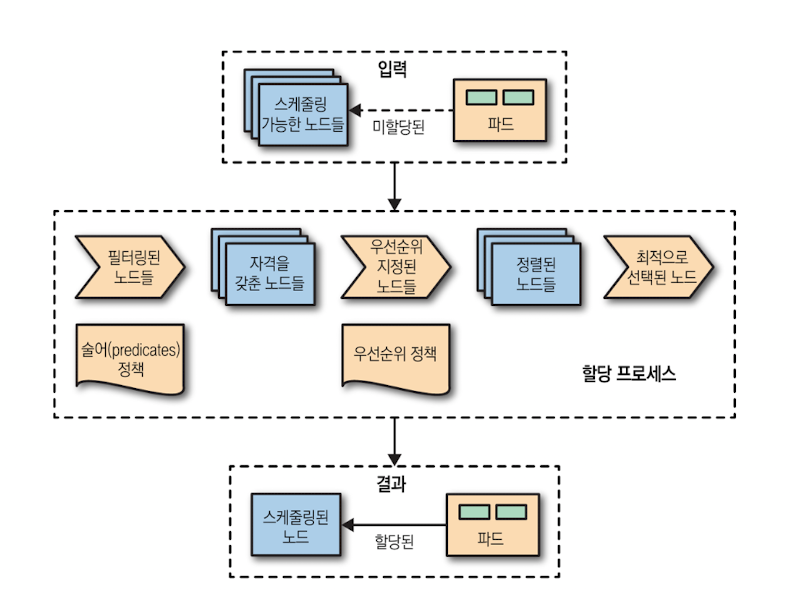
1) 입력
- 미할당 파드(Pending Pod)
- 스케줄 가능한 노드 집합(스케줄러 캐시 기준의 전체 노드)
2) Scheduling Cycle (필터·점수·선택)
-
QueueSort
파드 우선순위( PriorityClass ), 백오프 등을 반영한 큐에서 파드를 꺼냅니다.
-
PreFilter
필요한 리소스/제약을 사전 계산합니다(요청량, 토폴로지 스프레드, 어피니티 등 선검사).
-
Filter (구. Predicates)
조건을 만족하는 노드만 남깁니다.
- 리소스 적합성(CPU/메모리/스토리지 요청)
- Taints/Tolerations
- Node/Pod Affinity & Anti-Affinity
- TopologySpread, NodePorts 등 각종 제약
-
PostFilter(필요 시 Preemption)
후보 노드가 0개면, 낮은 우선순위 파드를 축출해 공간을 만들 수 있는지 시도합니다(PDB 준수).
-
Score (구. Priorities)
남은 노드에 0~100 점수를 부여합니다(리소스 균형, 토폴로지 분산, 이미지 지역성 등).
-
Normalize & Select
점수를 정규화·정렬하고 최고 점수 노드를 선택합니다. (동점이면 무작위 선택)
3) Binding Cycle (예약·승인·바인드)
-
Reserve
선택한 노드에 임시 예약해 경쟁 상태를 방지합니다.
-
Permit
외부 승인 훅(플러그인)이 있으면 허용/대기/거부를 결정할 수 있습니다.
-
PreBind
볼륨 바인딩(예: CSI, WFFC), 크리덴셜/오버헤드 반영 등 바인드 전 준비를 수행합니다.
-
Bind
파드의
spec.nodeName을 설정해 API 서버에 바인드합니다. -
PostBind
후처리를 수행하고 사이클 종료. 이후 Kubelet이 해당 노드에서 컨테이너를 생성합니다.
5. Descheduler(재분배)
1) 개념
- 정책 위반/불균형 상태의 파드를 퇴출(evict) 해 기본 스케줄러가 재스케줄하도록 유도합니다.
- 주의: PDB 위반, 로컬 스토리지 사용 등은 축출 대상 예외입니다.
apiVersion: descheduler/v1alpha1
kind: DeschedulerPolicy
strategies:
  RemovePodsViolatingNodeAffinity:
    enabled: true
    params:
      nodeAffinityType:
      - requiredDuringSchedulingIgnoredDuringExecution
2) 대표 전략
[LowNodeUtilization]
- 리소스가 적게 쓰이는 노드가 있을때 과도하게 사용되는 노드의 파드를 추축하여, 다시 스케줄링이 되어 덜 쓰이는 노드로 분산되도록 하는 기능
thresholds(이것보다 모든 지표가 낮으면 underutilized) /targetThresholds(이 중 하나라도 넘으면 overutilized). 지표는cpu,memory,pods(확장 리소스도 가능)이며, 노드 Allocatable 대비 파드의 requests 비율로 계산- Descheduler는 파드를 축출만 하고, 재배치(스케줄링)는 기본 스케줄러가 담당
[RemoveDuplicates]
- 레플리카세트나 디플로이먼트와 관련된 하나의 파드를 하나의 노드에 실행
- 만약 둘 이상의 파드가 있으면 초과 되는 파드는 제거
- 노드가 비정상상태가 되었을때ㅐ, 관리 컨티롤러가 다른 정상 노드에 새포운 파드를 실행시키는 시나리오에 유용
[RemovePodsViolatingNodeAffinity]
- 파드가 선언한 nodeAffinity(required / preferred)가 더 이상 현재 노드와 맞지 않을 때 그 파드를 축출합니다
- 노드 라벨이 바뀌어
requiredDuringSchedulingIgnoredDuringExecution을 만족하지 않거나, 이제는preferred...를 더 잘 만족하는 노드가 생긴 경우 등
[RemovePodsViolatingInterPodAntiAffinity]
- 파드가 선언한 inter-pod anti-affinity(다른 파드와 같은 노드에 함께 있지 말 것)를 깨고 공존 중인 경우 해당 파드를 축출합니다
6. 내용 보강
1) 기본 분산: DefaultPodTopologySpread 적극 활용
스케줄러 설정에서 클러스터 기본 분산 규칙(예: Zone/Hostname 균등)을 지정하고, 워크로드는 필요한 곳만 오버라이드합니다.
2) Pod Affinity/Anti-Affinity 확장 포인트
namespaceSelector로 크로스 네임스페이스 매칭을 지원합니다.matchLabelKeys/mismatchLabelKeys로 버전 섞임 방지, 테넌트 분리 등 고급 제어가 가능합니다.
affinity:
  podAffinity:
    preferredDuringSchedulingIgnoredDuringExecution:
    - weight: 100
      podAffinityTerm:
        topologyKey: topology.kubernetes.io/zone
        labelSelector:
          matchLabels:
            app: my-svc
        matchLabelKeys: ["version"]   # 현재 파드의 version 라벨 값을 따름
3) Scheduling Gates(GA) 실전 패턴
spec.schedulingGates로 의존 리소스가 준비될 때까지 스케줄 제외 상태로 두어, 불필요한 스케줄링/오토스케일 동작을 방지하고 자원 효율을 높입니다.
spec:
  schedulingGates:
  - name: wait.for.dependent.resource
4) DRA(Dynamic Resource Allocation)로 가속기 표준화
GPU/가속기 등은 ResourceClaim/DeviceClass 기반(DRA)으로 요청(스토리지 PVC와 유사)하는 패턴 전환을 권장합니다.
apiVersion: resource.k8s.io/v1beta1
kind: ResourceClaimTemplate
metadata:
  name: gpu-claim-tpl
spec:
  spec:
    devices:
      requests:
      - deviceClassName: nvidia-gpu
---
apiVersion: apps/v1
kind: Deployment
metadata:
  name: dra-example
spec:
  replicas: 1
  selector:
    matchLabels:
      app: dra-example
  template:
    metadata:
      labels:
        app: dra-example
    spec:
      resourceClaims:
      - name: gpu
        source:
          resourceClaimTemplateName: gpu-claim-tpl
      containers:
      - name: app
        image: nvidia/cuda:12.4.1-base-ubuntu22.04
        command: ["bash","-c","nvidia-smi || sleep 3600"]
5) Descheduler 정책 스키마 갱신
descheduler/v1alpha1 → descheduler/v1alpha2로 이전하고 최신 Helm 차트/프로필을 사용합니다.
apiVersion: descheduler/v1alpha2
kind: DeschedulerPolicy
profiles:
- name: default
  plugins:
    deschedule:
      enabled:
      - RemovePodsViolatingNodeAffinity
      - RemovePodsViolatingInterPodAntiAffinity
6) 스케줄러 프로파일 & 성능 튜닝
- 프로파일 다중화로 워크로드 유형별 플러그인/가중치를 분리합니다.
- 대규모 클러스터에서
percentageOfNodesToScore(노드 샘플링 비율)로 레이턴시를 제어합니다. NodeResourcesFit.RequestedToCapacityRatio로 빈패킹 vs. 여유 확보 전략을 수치화합니다.
7) Allocatable/Eviction 최신 운영 가이드
kube-reserved,system-reserved에 PID 예약을 포함하는 방안을 검토합니다.- 메모리/디스크 eviction 임계값은 Kubelet 설정으로 일원화하고 형상 관리를 권장합니다.
8) Pod Overhead 반영 확인
런타임 오버헤드는 스케줄링/할당에 포함됩니다. RuntimeClass 사용 시 오버헤드 누락으로 인한 과배치를 방지합니다.
9) TaintManager 분리에 따른 고려
노드 상태 기반 NoExecute 축출이 독립 컨트롤러로 동작합니다. 커스텀 컨트롤러/오퍼레이터는 이 구조를 전제로 설계합니다.
7. 실습
0) 공통 준비
- 버전/노드 확인
# 버전/노드 확인
k version
k get nodes -o wide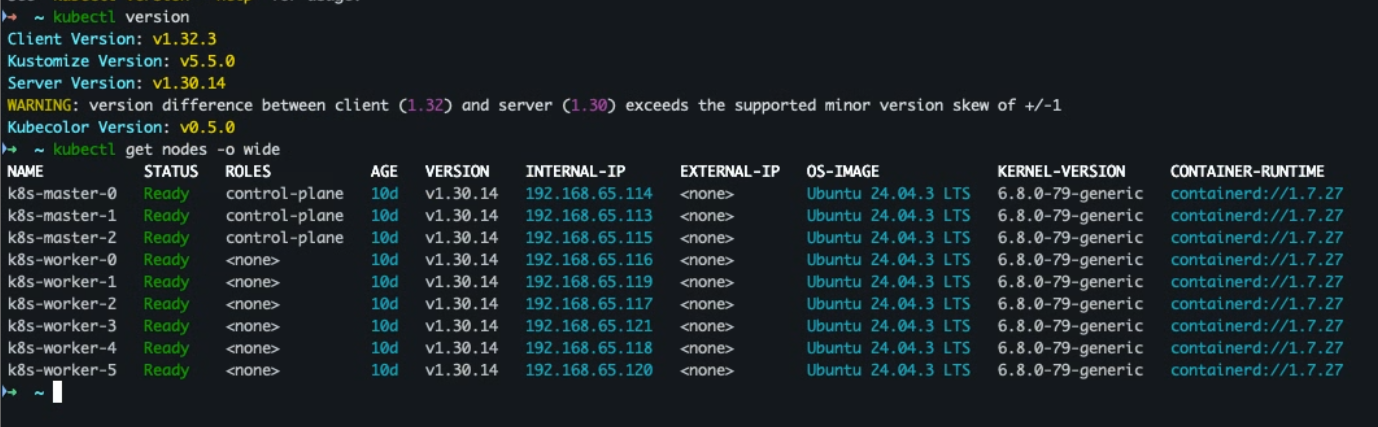
- 실습용 네임스페이스 및 라벨 생성
k create ns team-a
k label ns team-a group=web-tenants --overwrite
k describe ns team-a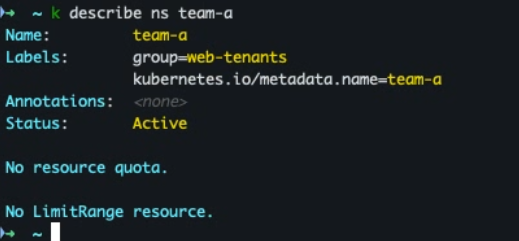
- 노드 라벨 지정
W1=$(kubectl get nodes -o name | grep -E 'worker|control' | sed -n '1p' | cut -d/ -f2)
W2=$(kubectl get nodes -o name | grep -E 'worker|control' | sed -n '2p' | cut -d/ -f2)

k label node "$W1" topology.kubernetes.io/zone=dc-a node-pool=compute disktype=nvme-ssd --overwrite
k label node "$W2" topology.kubernetes.io/zone=dc-b node-pool=compute disktype=nvme-ssd --overwrite
- 노드 존 지정
k get nodes -o name | awk 'NR%2==1{print $0}' \
  | xargs -I{} kubectl label {} topology.kubernetes.io/zone=zone-a --overwrite
k get nodes -o name | awk 'NR%2==0{print $0}' \
  | xargs -I{} kubectl label {} topology.kubernetes.io/zone=zone-b --overwrite
- 라벨 및 존 지정 확인
k get nodes -L topology.kubernetes.io/zone,node-pool,disktype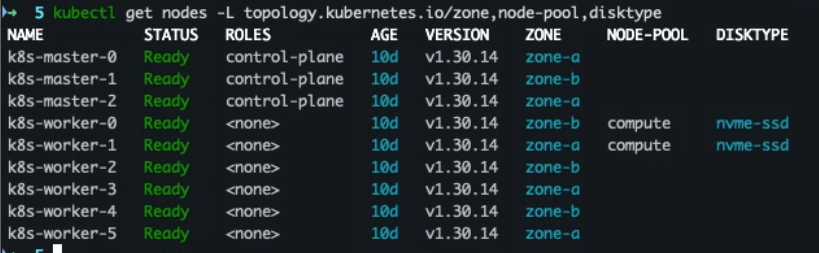
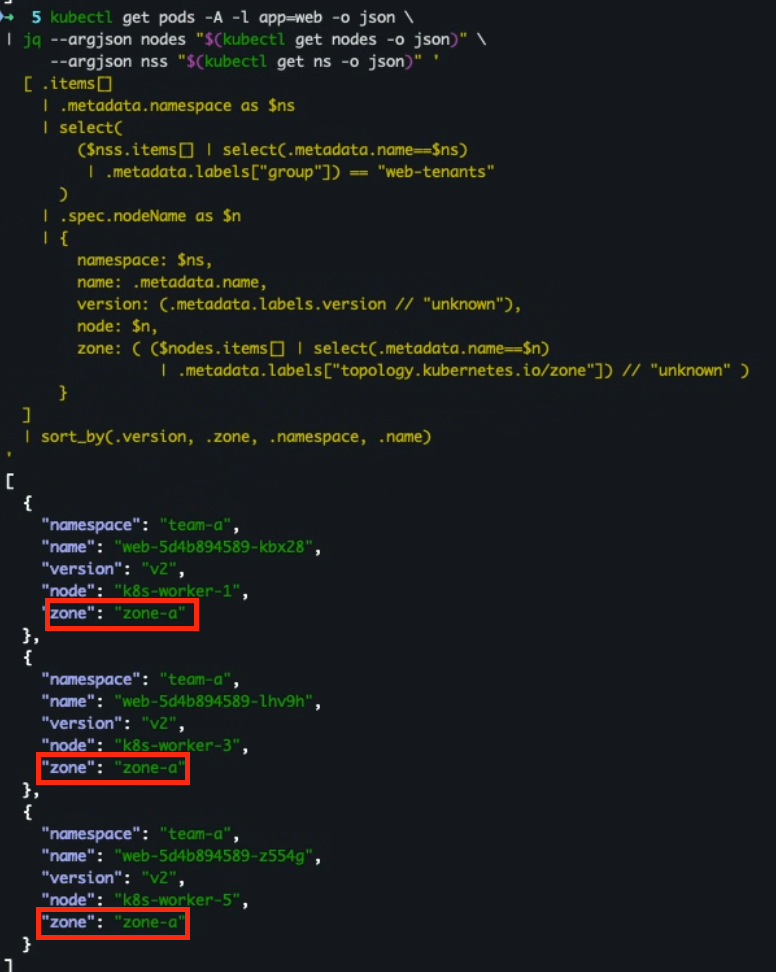
실습 1) Pod Affinity 확장: 버전 섞임 방지 + 크로스 네임스페이스
[실습 목적]
- ‘matchLabelKeys: ["version"]’와 ‘namespaceSelector’로 같은 버전 파드끼리
같은 토폴로지(예: 같은 zone)로 공존을 선호하는 동작을 확인합니다.
[실습]
- deploy-affinity.yaml 코드
apiVersion: apps/v1
kind: Deployment
metadata:
  name: web
  namespace: team-a
spec:
  replicas: 3
  selector:
    matchLabels:
      app: web
      version: v2
  template:
    metadata:
      labels:
        app: web
        version: v2
    spec:
      containers:
        - name: app
          image: nginx
      affinity:
        podAffinity:
          preferredDuringSchedulingIgnoredDuringExecution:
            - weight: 100
              podAffinityTerm:
                topologyKey: topology.kubernetes.io/zone
                matchLabelKeys:
                  - "version"
                namespaceSelector:
                  matchLabels:
                    group: web-tenants
                labelSelector:
                  matchLabels:
                    app: web
- 리소스 적용 및 파드 배치 확인
k apply -f deploy-affinity.yaml
k get pods -n team-a -l app=web -o wide
- 파드 단위 상세 조회
```bash
kubectl get pods -A -l app=web -o json \
| jq --argjson nodes "$(kubectl get nodes -o json)" \
     --argjson nss "$(kubectl get ns -o json)" '
  [ .items[]
    | .metadata.namespace as $ns
    | select(
        ($nss.items[] | select(.metadata.name==$ns)
         | .metadata.labels["group"]) == "web-tenants"
      )
    | .spec.nodeName as $n
    | {
        namespace: $ns,
        name: .metadata.name,
        version: (.metadata.labels.version // "unknown"),
        node: $n,
        zone: ( ($nodes.items[] | select(.metadata.name==$n)
                 | .metadata.labels["topology.kubernetes.io/zone"]) // "unknown" )
      }
  ]
  | sort_by(.version, .zone, .namespace, .name)
'
```
)
- 실습 완료후 삭제
kubectl kdelete deployments.apps web -n team-a
실습 2) Scheduling Gates: 의존 리소스 준비 전 스케줄 제외
[실습 목적]
- ‘schedulingGates’가 설정된 파드는 스케줄 대상에서 제외됨을 확인하고,
게이트 제거 시 곧바로 스케줄되는지 확인합니다.
[실습]
- 게이트가 걸린 파드 코드 생성 (pod-gated.yaml)
apiVersion: v1
kind: Pod
metadata:
  name: gated-pod
  namespace: team-a
spec:
  schedulingGates:
    - name: wait.for.dependency
  containers:
    - name: app
      image: busybox
      command:
        - sh
        - -c
        - echo ready && sleep 3600
- 파드 생성 및 확인
k apply -f pod-gated.yaml
k wait --for=condition=ready -n team-a pod/gated-pod --timeout=60s

k -n team-a get pod gated-pod -o wide
- 파드 조건 확인
kubectl -n team-a get pod gated-pod -o jsonpath='{.status.conditions[?(@.type=="PodScheduled")].reason}'; echo
- 게이트 해제 job 실행
k patch pod gated-pod -n team-a --type=json -p='[{"op":"remove","path":"/spec/schedulingGates"}]'
- 파드 상태 확인
k -n team-a get pod gated-pod -o wide -w
- 이벤트 변동 확인
k -n team-a get events \
  --field-selector involvedObject.kind=Pod,involvedObject.name=gated-pod -w
- 실습 완료 후 삭제
kubectl delete pod gated-pod -n team-a
실습 3) Descheduler(v1alpha2) 프로필로 불균형 자동 개선
[실습 목적]
- Descheduler가 불균형(저활용/과밀) 또는 정책 위반을 감지해 파드를 축출(evict) 하고,
기본 스케줄러가 재분배하도록 유도함을 확인합니다.
[사전 준비 사항]
- descheduler 설치
helm repo add descheduler https://kubernetes-sigs.github.io/descheduler/
helm repo update
helm upgrade --install descheduler descheduler/descheduler \
  -n kube-system --create-namespace \
  --set schedule="*/30 * * * *"
- 생성 확인
kubectl get pods -n kube-system
[실습]
- 본래 cronjob으로 일정 시간 마다 자동적으로 실행되나.. 실습을 위해 수동으로 실행
- 정책 파일(
descheduler-policy.yaml)# descheduler-policy.yaml apiVersion: v1 kind: ConfigMap metadata: name: descheduler namespace: kube-system data: policy.yaml: | apiVersion: descheduler/v1alpha2 kind: DeschedulerPolicy profiles: - name: default pluginConfig: - name: DefaultEvictor args: nodeFit: true - name: LowNodeUtilization args: thresholds: { pods: 16 } # <16% = 저활용 (13~15%도 잡힘) targetThresholds: { pods: 19 } # >19% = 과밀 (20% 바로 해당) - name: RemovePodsViolatingNodeAffinity args: nodeAffinityType: - requiredDuringSchedulingIgnoredDuringExecution plugins: balance: enabled: ["LowNodeUtilization"] deschedule: enabled: ["RemovePodsViolatingNodeAffinity"]
- 정책 파일 적용
kubectl apply -f descheduler-policy.yaml
- 적용 확인
kubectl -n kube-system get configmap descheduler -o jsonpath='{.data.policy\.yaml}{"\n"}'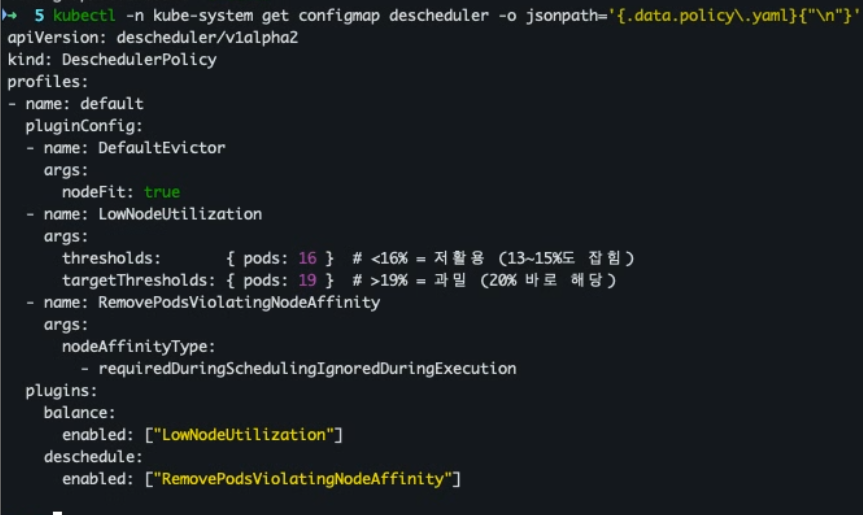
- 전체 워커 노드 중에서 1개 워커 노드에만 몰리게 설정하기
# 0번을 제외한 나머지 5개 워커 노드 cordon 설정
kubectl cordon k8s-worker-1 k8s-worker-2 k8s-worker-3 k8s-worker-4 k8s-worker-5
- 워커 노드 확인
kubectl get nodes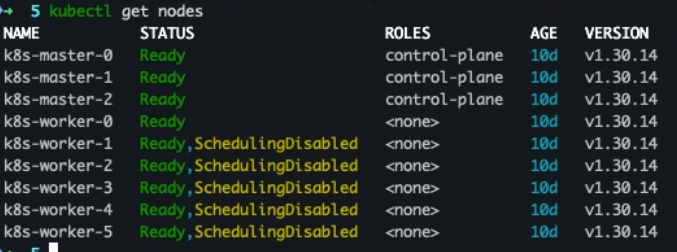
- k8s-worker-0에 파드 몰리게 하기
kubectl create ns team-a 2>/dev/null || true

cat << 'EOF' | kubectl apply -f -
apiVersion: apps/v1
kind: Deployment
metadata:
  name: fill
  namespace: team-a
spec:
  replicas: 60
  selector: { matchLabels: { app: fill } }
  template:
    metadata: { labels: { app: fill } }
    spec:
      containers:
        - name: c
          image: nginx
EOF
- 파드 분포 확인
# 1번 확인 방법
kubectl -n team-a get pods -l app=fill -o wide

# 2번 확인 방법
kubectl -n team-a get pods -l app=fill -o custom-columns=NODE:.spec.nodeName --no-headers \
| sort | uniq -c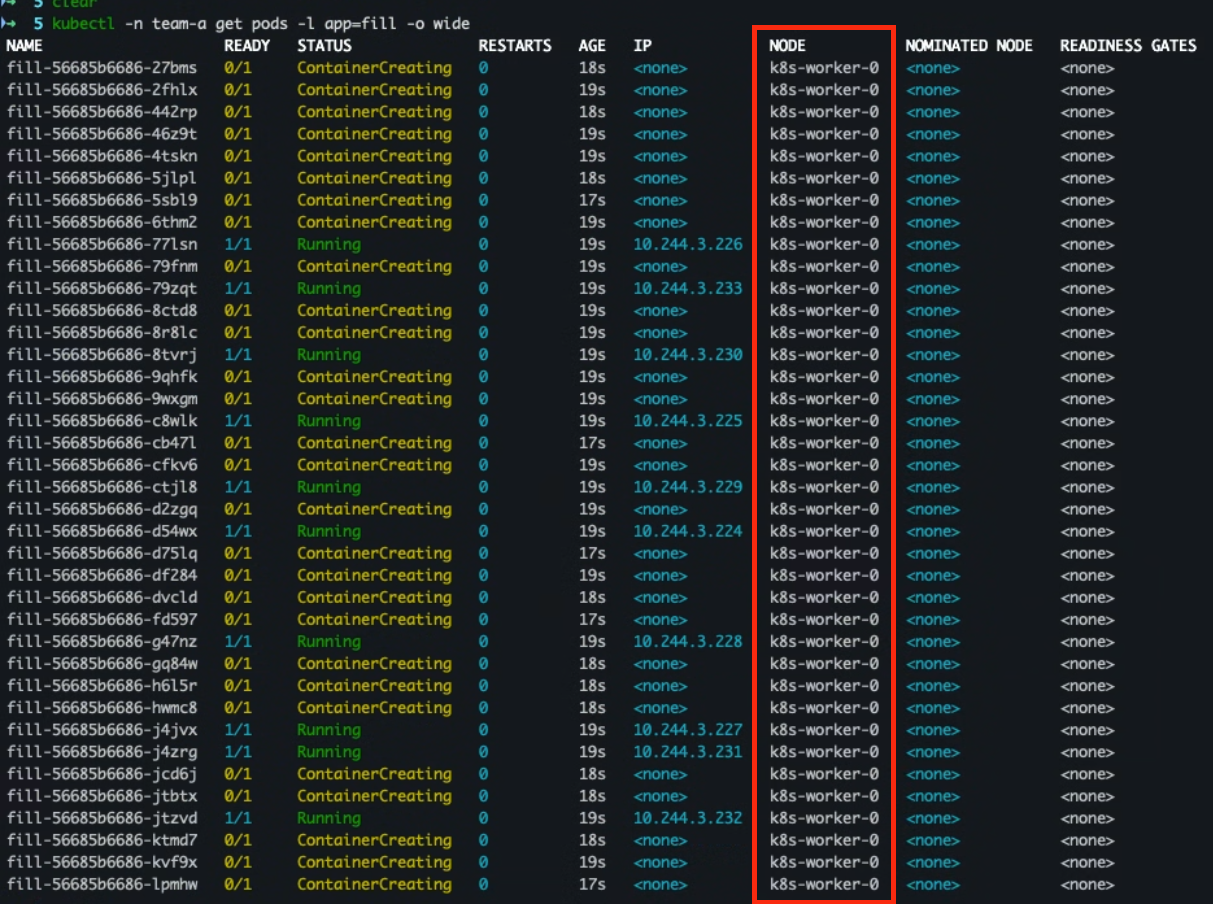

- uncordon 실행
kubectl uncordon k8s-worker-1 k8s-worker-2 k8s-worker-3 k8s-worker-4 k8s-worker-5
kubectl get nodes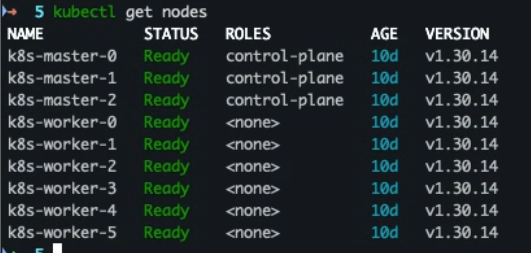
- job 수동 실행
kubectl -n kube-system create job --from=cronjob/descheduler descheduler-manual-$(date +%s)
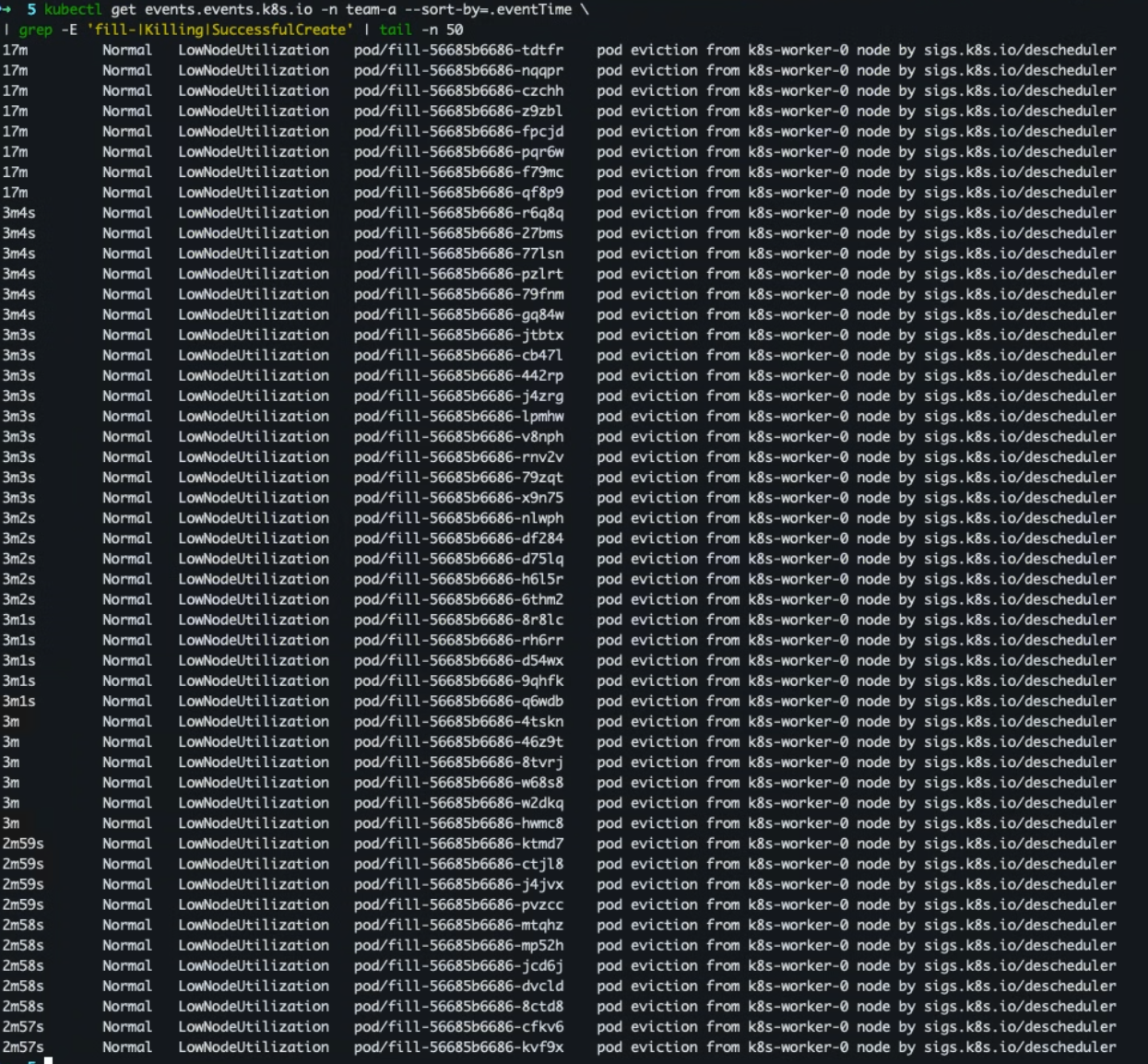
- 로그/이벤트 확인
kubectl -n kube-system logs -f $(
  kubectl -n kube-system get pod -l app.kubernetes.io/name=descheduler \
    --sort-by=.metadata.creationTimestamp -o name | tail -n1
)
kubectl get events.events.k8s.io -n team-a --sort-by=.eventTime \
| grep -E 'fill-|Killing|SuccessfulCreate' | tail -n 50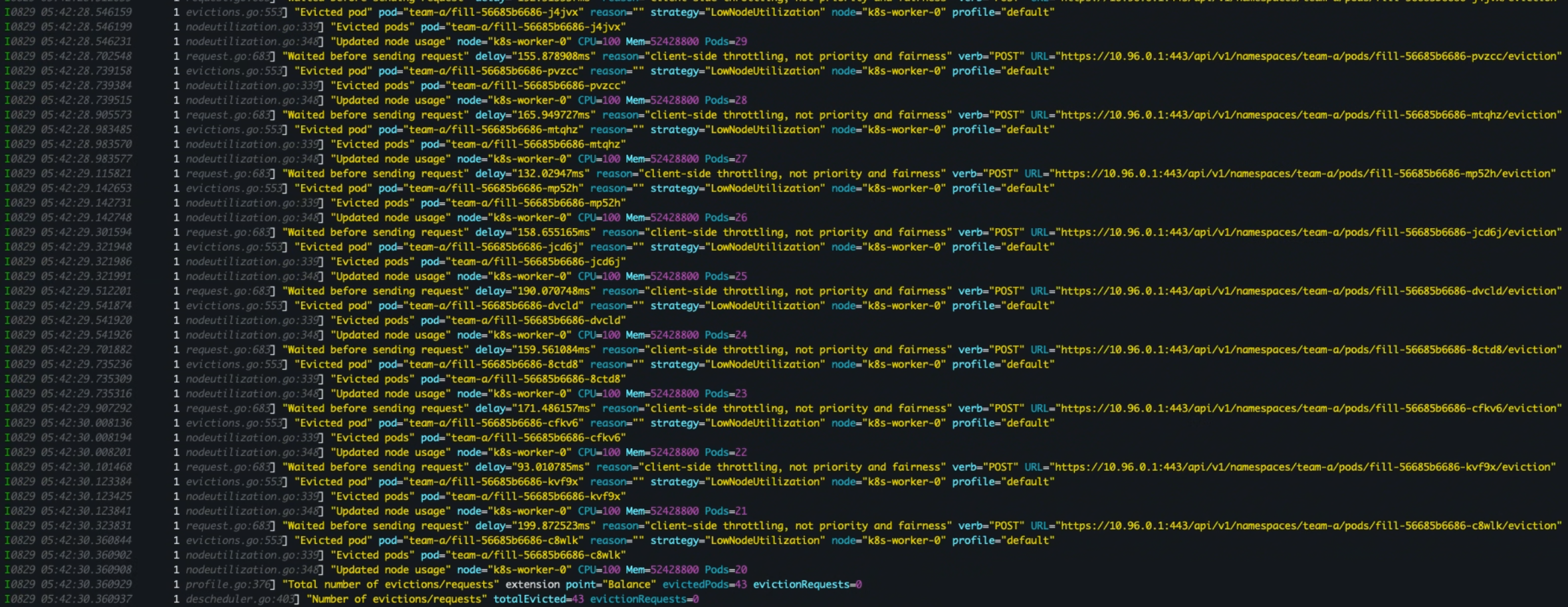
- 배포된 파드 어느 노드에 배포 되었는지 재확인
kubectl -n team-a get pods -l app=fill -o custom-columns=NODE:.spec.nodeName --no-headers \
| sort | uniq -c
- 실습 완료후 리소스 삭제
kubectl delete deployments.apps fill -n team-a
kubectl delete configmap descheduler -n kube-system
실습 실패 1) 클러스터 기본 분산 규칙 켜기(Default Pod Topology Spread)
[실습 목적]
- 워크로드가 개별 스펙에
topologySpreadConstraints를 넣지 않아도,스케줄러의 기본 분산 규칙이 적용되어 존/노드에 고르게 퍼지는지 확인합니다
[실습]
- 네임스페이스 생성
kubectl create ns tps-demo
- deployment 생성 (기본 분산이 적용 되는)
# tps-deploy.yaml
apiVersion: apps/v1
kind: Deployment
metadata:
  name: web
  namespace: tps-demo
spec:
  replicas: 30
  selector:
    matchLabels: { app: web }
  template:
    metadata:
      labels: { app: web }
    spec:
      # 의도적으로 topologySpreadConstraints 미설정 (기본 분산이 적용되어야 함)
      containers:
        - name: pause
          image: registry.k8s.io/pause:3.9
- 배포 적용
kubectl apply -f tps-deploy.yaml
- 분산 결과 확인
# 각 Pod가 어느 노드/존에 갔는지 보기
kubectl -n tps-demo get pod -o wide -L topology.kubernetes.io/zone

# 상세 정보
kubectl -n tps-demo get pod -o json \
| jq -r '.items[] | [.metadata.name, .spec.nodeName] | @tsv' \
| while IFS=$'\t' read -r pod node; do
  zone=$(kubectl get node "$node" -o jsonpath='{.metadata.labels.topology\.kubernetes\.io/zone}')
  printf "%-28s %-14s %s\n" "$pod" "$node" "$zone"
done

# 존별 파드 갯수
kubectl -n tps-demo get pod -o json \
| jq -r '.items[].spec.nodeName' \
| xargs -I{} kubectl get node {} -o jsonpath='{.metadata.labels.topology\.kubernetes\.io/zone}{"\n"}' \
| sort | uniq -c
- 결과
➜  5 kubectl -n tps-demo get pod -o wide -L topology.kubernetes.io/zone
NAME                  READY   STATUS    RESTARTS   AGE   IP            NODE           NOMINATED NODE   READINESS GATES   ZONE
web-cdb4bbd86-2x649   1/1     Running   0          3s    10.244.9.10   k8s-worker-5   <none>           <none>
web-cdb4bbd86-58ghm   1/1     Running   0          3s    10.244.9.11   k8s-worker-5   <none>           <none>
web-cdb4bbd86-6h255   1/1     Running   0          3s    10.244.5.12   k8s-worker-2   <none>           <none>
web-cdb4bbd86-8t5hf   1/1     Running   0          3s    10.244.8.9    k8s-worker-4   <none>           <none>
web-cdb4bbd86-9fc55   1/1     Running   0          3s    10.244.4.13   k8s-worker-1   <none>           <none>
web-cdb4bbd86-9hxw2   1/1     Running   0          3s    10.244.7.9    k8s-worker-3   <none>           <none>
web-cdb4bbd86-blqlf   1/1     Running   0          3s    10.244.5.9    k8s-worker-2   <none>           <none>
web-cdb4bbd86-bn6zh   1/1     Running   0          3s    10.244.8.12   k8s-worker-4   <none>           <none>
web-cdb4bbd86-ccff2   1/1     Running   0          3s    10.244.4.10   k8s-worker-1   <none>           <none>
web-cdb4bbd86-clk7f   1/1     Running   0          3s    10.244.7.10   k8s-worker-3   <none>           <none>
web-cdb4bbd86-d78gm   1/1     Running   0          3s    10.244.5.11   k8s-worker-2   <none>           <none>
web-cdb4bbd86-dndn4   1/1     Running   0          3s    10.244.4.12   k8s-worker-1   <none>           <none>
web-cdb4bbd86-g8wcn   1/1     Running   0          3s    10.244.8.10   k8s-worker-4   <none>           <none>
web-cdb4bbd86-gtjzz   1/1     Running   0          3s    10.244.7.8    k8s-worker-3   <none>           <none>
web-cdb4bbd86-nn7kv   1/1     Running   0          3s    10.244.9.8    k8s-worker-5   <none>           <none>
web-cdb4bbd86-p2czr   1/1     Running   0          3s    10.244.3.12   k8s-worker-0   <none>           <none>
web-cdb4bbd86-p72m2   1/1     Running   0          3s    10.244.9.9    k8s-worker-5   <none>           <none>
web-cdb4bbd86-pgqhl   1/1     Running   0          3s    10.244.3.9    k8s-worker-0   <none>           <none>
web-cdb4bbd86-psn2q   1/1     Running   0          3s    10.244.3.11   k8s-worker-0   <none>           <none>
web-cdb4bbd86-rgmmf   1/1     Running   0          3s    10.244.3.10   k8s-worker-0   <none>           <none>
web-cdb4bbd86-rqrtk   1/1     Running   0          3s    10.244.8.11   k8s-worker-4   <none>           <none>
web-cdb4bbd86-sb8wn   1/1     Running   0          3s    10.244.3.13   k8s-worker-0   <none>           <none>
web-cdb4bbd86-sr6z4   1/1     Running   0          3s    10.244.9.7    k8s-worker-5   <none>           <none>
web-cdb4bbd86-srdm2   1/1     Running   0          3s    10.244.7.11   k8s-worker-3   <none>           <none>
web-cdb4bbd86-swl7c   1/1     Running   0          3s    10.244.5.8    k8s-worker-2   <none>           <none>
web-cdb4bbd86-t87vj   1/1     Running   0          3s    10.244.5.10   k8s-worker-2   <none>           <none>
web-cdb4bbd86-v4kl5   1/1     Running   0          3s    10.244.7.12   k8s-worker-3   <none>           <none>
web-cdb4bbd86-w59gh   1/1     Running   0          3s    10.244.8.13   k8s-worker-4   <none>           <none>
web-cdb4bbd86-wgn77   1/1     Running   0          3s    10.244.4.11   k8s-worker-1   <none>           <none>
web-cdb4bbd86-wtxhh   1/1     Running   0          3s    10.244.4.9    k8s-worker-1   <none>           <none>
➜  5åå
➜ 5 kubectl -n tps-demo get pod -o json \ | jq -r '.items[] | [.metadata.name, .spec.nodeName] | @tsv' \ | while IFS=$'\t' read -r pod node; do zone=$(kubectl get node "$node" -o jsonpath='{.metadata.labels.topology\.kubernetes\.io/zone}') printf "%-28s %-14s %s\n" "$pod" "$node" "$zone" done web-cdb4bbd86-2x649 k8s-worker-5 zone-a web-cdb4bbd86-58ghm k8s-worker-5 zone-a web-cdb4bbd86-6h255 k8s-worker-2 zone-b web-cdb4bbd86-8t5hf k8s-worker-4 zone-b web-cdb4bbd86-9fc55 k8s-worker-1 zone-a web-cdb4bbd86-9hxw2 k8s-worker-3 zone-a web-cdb4bbd86-blqlf k8s-worker-2 zone-b web-cdb4bbd86-bn6zh k8s-worker-4 zone-b web-cdb4bbd86-ccff2 k8s-worker-1 zone-a web-cdb4bbd86-clk7f k8s-worker-3 zone-a web-cdb4bbd86-d78gm k8s-worker-2 zone-b web-cdb4bbd86-dndn4 k8s-worker-1 zone-a web-cdb4bbd86-g8wcn k8s-worker-4 zone-b web-cdb4bbd86-gtjzz k8s-worker-3 zone-a web-cdb4bbd86-nn7kv k8s-worker-5 zone-a web-cdb4bbd86-p2czr k8s-worker-0 zone-b web-cdb4bbd86-p72m2 k8s-worker-5 zone-a web-cdb4bbd86-pgqhl k8s-worker-0 zone-b web-cdb4bbd86-psn2q k8s-worker-0 zone-b web-cdb4bbd86-rgmmf k8s-worker-0 zone-b web-cdb4bbd86-rqrtk k8s-worker-4 zone-b web-cdb4bbd86-sb8wn k8s-worker-0 zone-b web-cdb4bbd86-sr6z4 k8s-worker-5 zone-a web-cdb4bbd86-srdm2 k8s-worker-3 zone-a web-cdb4bbd86-swl7c k8s-worker-2 zone-b web-cdb4bbd86-t87vj k8s-worker-2 zone-b web-cdb4bbd86-v4kl5 k8s-worker-3 zone-a web-cdb4bbd86-w59gh k8s-worker-4 zone-b web-cdb4bbd86-wgn77 k8s-worker-1 zone-a web-cdb4bbd86-wtxhh k8s-worker-1 zone-akubectl -n tps-demo get pod -o json \ | jq -r '.items[].spec.nodeName' \ | xargs -I{} kubectl get node {} -o jsonpath='{.metadata.labels.topology\.kubernetes\.io/zone}{"\n"}' \ | sort | uniq -c 15 zone-a 15 zone-b
- 대조 실험
- 대조 실험 A: “기본 분산이 안 걸리는” 케이스
기본 분산은 컨트롤러에 속하지 않은 “맨땅 Pod”에는 적용되지 않습니다. 동일 레이블의 단일 Pod 여러 개를 만들어 보세요. - 기존 코드 삭제
k delete deploy web -n tps-demo - naked pod 생성
# 30개 naked pod 생성
for i in $(seq 1 30); do
  cat <<'YAML' | sed "s/NAME/p${i}/" | kubectl apply -f -
apiVersion: v1
kind: Pod
metadata:
  name: NAME
  namespace: tps-demo
  labels: { app: naked }
spec:
  containers: [{ name: c, image: registry.k8s.io/pause:3.9 }]
YAML
done
- 대조 실험 A: “기본 분산이 안 걸리는” 케이스
- 결과 확인
# 각 Pod가 어느 노드/존에 갔는지 보기
kubectl -n tps-demo get pod -o wide -L topology.kubernetes.io/zone

# 상세 정보
kubectl -n tps-demo get pod -o json \
| jq -r '.items[] | [.metadata.name, .spec.nodeName] | @tsv' \
| while IFS=$'\t' read -r pod node; do
  zone=$(kubectl get node "$node" -o jsonpath='{.metadata.labels.topology\.kubernetes\.io/zone}')
  printf "%-28s %-14s %s\n" "$pod" "$node" "$zone"
done

# 존별 파드 갯수
kubectl -n tps-demo get pod -o json \
| jq -r '.items[].spec.nodeName' \
| xargs -I{} kubectl get node {} -o jsonpath='{.metadata.labels.topology\.kubernetes\.io/zone}{"\n"}' \
| sort | uniq -c
- 확인 결과 ⇒ 균등하게 분배 되서 실패
p1                           k8s-worker-2   zone-b
p10                          k8s-worker-3   zone-a
p11                          k8s-worker-5   zone-a
p12                          k8s-worker-2   zone-b
p13                          k8s-worker-1   zone-a
p14                          k8s-worker-5   zone-a
p15                          k8s-worker-2   zone-b
p16                          k8s-worker-3   zone-a
p17                          k8s-worker-0   zone-b
p18                          k8s-worker-4   zone-b
p19                          k8s-worker-2   zone-b
p2                           k8s-worker-0   zone-b
p20                          k8s-worker-3   zone-a
p21                          k8s-worker-4   zone-b
p22                          k8s-worker-5   zone-a
p23                          k8s-worker-1   zone-a
p24                          k8s-worker-0   zone-b
p25                          k8s-worker-0   zone-b
p26                          k8s-worker-1   zone-a
p27                          k8s-worker-3   zone-a
p28                          k8s-worker-2   zone-b
p29                          k8s-worker-4   zone-b
p3                           k8s-worker-3   zone-a
p30                          k8s-worker-5   zone-a
p4                           k8s-worker-4   zone-b
p5                           k8s-worker-5   zone-a
p6                           k8s-worker-1   zone-a
p7                           k8s-worker-4   zone-b
p8                           k8s-worker-0   zone-b
p9                           k8s-worker-1   zone-a
➜  5 kubectl -n tps-demo get pod -o json \
| jq -r '.items[].spec.nodeName' \
| xargs -I{} kubectl get node {} -o jsonpath='{.metadata.labels.topology\.kubernetes\.io/zone}{"\n"}' \
| sort | uniq -c
  15 zone-a
  15 zone-b
- 실습 후 리소스 삭제
kubectl delete namespace tps-demo
실습 실패 2) DRA로 GPU 요청: DeviceClass + ResourceClaimTemplate
[실습 목적]
- 파드가 ResourceClaim을 통해 장치(GPU 등)를 요구하고, 스케줄러가 충족 가능한 노드에만 스케줄하는 흐름을 확인합니다
[사전 지식]
- kubernetes v1.34 버전부터 stable → 참조
- v1.26–1.31: “클래식 DRA” 알파(
v1alpha2). 기본 비활성이라 feature gate와-runtime-config로 켜야 보입니다. - v1.32: DRA가 베타(
v1beta1로 바뀌고DeviceClass/devices:문법 등장(기본은 꺼져 있고 명시 활성 필요). - v1.34+: DRA가 Stable(=
v1)로 승격. - v1.34버전으로 실행
- v1.26–1.31: “클래식 DRA” 알파(
[사전 작업]
- 리소스/API 노출 여부 확인
kubectl api-versions | grep resource.k8s.io kubectl api-resources | egrep 'Resource(Class|ClaimTemplate|Claim|ClassParameters|Slice)'- 결과 ⇒ 만약 해당 값이 비어 있다면 비활성화 된것이므로 아래 설정 진행
➜  5 kubectl api-versions | grep resource.k8s.io
resource.k8s.io/v1
➜  5 kubectl api-resources | egrep 'Resource(Class|ClaimTemplate|Claim|ClassParameters|Slice)'
resourceclaims                                   resource.k8s.io/v1                true         ResourceClaim
resourceclaimtemplates                           resource.k8s.io/v1                true         ResourceClaimTemplate
resourceslices                                   resource.k8s.io/v1                false        ResourceSlice
- 결과 ⇒ 만약 해당 값이 비어 있다면 비활성화 된것이므로 아래 설정 진행
- kube-apiserver (컨트롤플레인 노드 전부)
/etc/kubernetes/manifests/kube-apiserver.yaml에commandargs에 추가 적용- --feature-gates=DynamicResourceAllocation=true - --runtime-config=resource.k8s.io/v1alpha2=true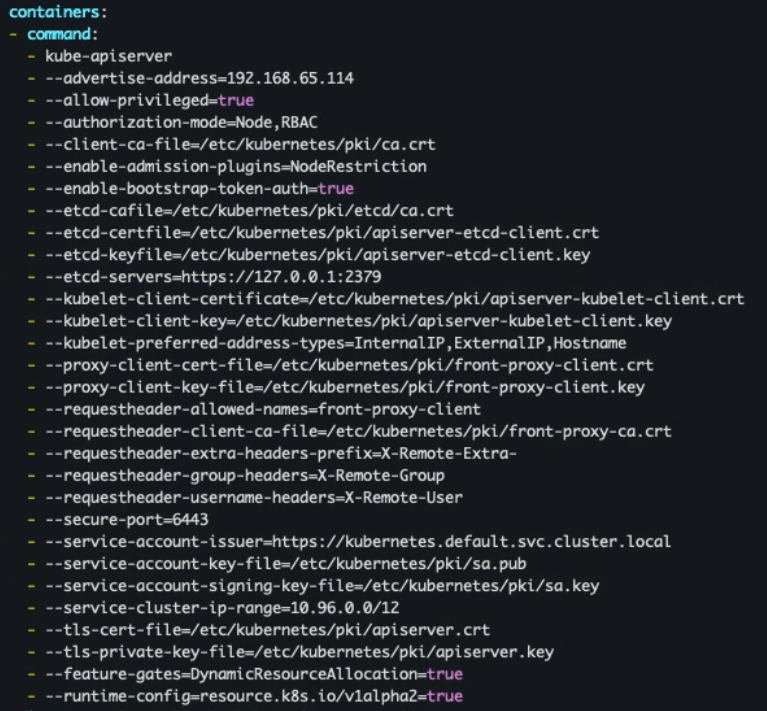
- kube-scheduler / kube-controller-manager
/etc/kubernetes/manifests/kube-scheduler.yaml/etc/kubernetes/manifests/kube-controller-manager.yaml- --feature-gates=DynamicResourceAllocation=true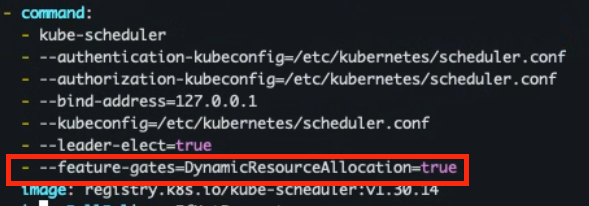
- kubelet (모든 노드)
/var/lib/kubelet/config.yamlfeatureGates: DynamicResourceAllocation: true # 적용후 재시작 sudo systemctl daemon-reload sudo systemctl restart kubelet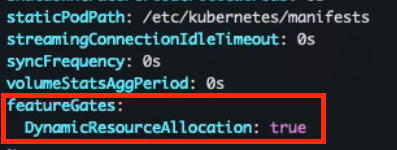
- 리소스 / API 재노출 확인
kubectl api-versions | grep resource.k8s.io
kubectl api-resources | egrep 'Resource(Class|ClaimTemplate|Claim|ClassParameters|Slice)'
- 드라이버 설치
- GPU Operator + DRA 지원 드라이버(오퍼레이터가 제공하거나, 공급사 DRA 드라이버)를 설치를 진행해야 하나.. DRA 동작 흐름을 알고 싶으므로 샘플 DRA 드라이버 설치 진행
# 네임스페이스 생성
kubectl create namespace dra-tutorial

# (v1.34) DeviceClass 생성
cat <<'YAML' | kubectl apply -f -
apiVersion: resource.k8s.io/v1
kind: DeviceClass
metadata:
  name: gpu.example.com
spec:
  selectors:
    - cel:
        # 드라이버가 광고한 디바이스만 매칭(예: 예제 드라이버)
        expression: "device.driver == 'gpu.example.com'"
YAML

# 서비스어카운트 / 클러스터롤 / 바인딩 / 우선순위클래스
kubectl apply --server-side -f https://k8s.io/examples/dra/driver-install/serviceaccount.yaml
kubectl apply --server-side -f https://k8s.io/examples/dra/driver-install/clusterrole.yaml
kubectl apply --server-side -f https://k8s.io/examples/dra/driver-install/clusterrolebinding.yaml
kubectl apply --server-side -f https://k8s.io/examples/dra/driver-install/priorityclass.yaml

# 예제 DRA 드라이버(모의 GPU) DaemonSet 배포
kubectl apply --server-side -f https://k8s.io/examples/dra/driver-install/daemonset.yaml

# 확인
kubectl -n dra-tutorial get pod -l app.kubernetes.io/name=dra-example-driver
여기서 막힘
- GPU Operator + DRA 지원 드라이버(오퍼레이터가 제공하거나, 공급사 DRA 드라이버)를 설치를 진행해야 하나.. DRA 동작 흐름을 알고 싶으므로 샘플 DRA 드라이버 설치 진행
[실습]
- resourceclass.yaml : v1.34 버전 부터 DeviceClass 대신 -> resourceClass로 변경
apiVersion: resource.k8s.io/v1alpha2
kind: ResourceClass
metadata:
  name: nvidia-gpu
driverName: gpu.example.com
- claim-template.yaml
# claim-template.yaml (v1.34) apiVersion: resource.k8s.io/v1 kind: ResourceClaimTemplate metadata: name: gpu-claim-tpl namespace: team-a spec: spec: devices: requests: - name: gpu-claim exactly: deviceClassName: gpu.example.com # 선택: 드라이버가 노출한 속성으로 필터링 selectors: - cel: # 예제: 10Gi 이상 메모리를 가진 모의 GPU expression: "device.capacity['gpu.example.com'].memory.compareTo(quantity('10Gi')) >= 0" - deploy-uses-dra.yaml
# deploy-uses-dra.yaml (v1.34)
apiVersion: apps/v1
kind: Deployment
metadata:
  name: gpu-app
  namespace: team-a
spec:
  replicas: 1
  selector:
    matchLabels: { app: gpu-app }
  template:
    metadata:
      labels: { app: gpu-app }
    spec:
      # 1) Pod 레벨에서 Claim(템플릿/기존 Claim) 제공
      resourceClaims:
        - name: my-gpu
          resourceClaimTemplateName: gpu-claim-tpl
      containers:
        - name: app
          image: nvidia/cuda:12.4.1-base-ubuntu22.04
          command: ["bash","-lc"]
          args: ["nvidia-smi || (echo 'no driver'; sleep 3600)"]
          resources:
            requests:
              cpu: "1"
              memory: "1Gi"
            # 2) 컨테이너 레벨에서 해당 Claim을 명시적으로 참조
            claims:
              - name: my-gpu
- 리소스 배포
# 리소스 적용
kubectl apply -f claim-template.yaml
kubectl apply -f deploy-uses-dra.yaml
- DeviceClass/ResourceSlice 가용 여부
# 1) DeviceClass/ResourceSlice 가용 여부
kubectl get deviceclasses
kubectl get resourceslices
- Pod ➜ ResourceClaim 생성/바인딩 확인
kubectl -n team-a get pods -l app=gpu-app
kubectl -n team-a get resourceclaim
kubectl -n team-a describe resourceclaim $(kubectl -n team-a get rc -o name)
- 이벤트 / 원인 추적
kubectl -n team-a describe pod -l app=gpu-app | grep -E "ResourceClaim|Allocated|Warning|Failed|device" -n
- 실습 후 리소스 삭제
kubectl delete deploy gpu-app -n team-a
kubectl delete resourceclaimtemplates.resource.k8s.io gpu-claim-tpl -n team-a
kubectl delete deviceclass gpu.example.com
# 예제 드라이버 정리
kubectl delete -n dra-tutorial daemonset dra-example-driver-kubeletplugin
kubectl delete namespace dra-tutorial
kubectl delete clusterrole dra-example-driver-role
kubectl delete clusterrolebinding dra-example-driver-role-binding
kubectl delete priorityclass dra-driver-high-priority
참고 링크
- Scheduling Framework: https://kubernetes.io/docs/concepts/scheduling-eviction/scheduling-framework/
- MaxNodeScore(0~100): https://pkg.go.dev/k8s.io/kubernetes/pkg/scheduler/framework
- Scheduler 성능 튜닝(
percentageOfNodesToScore): https://kubernetes.io/docs/concepts/scheduling-eviction/scheduler-perf-tuning/ - Pod Topology Spread(기본 제약): https://kubernetes.io/docs/concepts/scheduling-eviction/topology-spread-constraints/
- 스케줄러 프로파일/설정: https://kubernetes.io/docs/reference/scheduling/config/
- Pod Affinity
namespaceSelectorKEP: https://github.com/kubernetes/enhancements/blob/master/keps/sig-scheduling/2249-pod-affinity-namespace-selector/README.md matchLabelKeys/mismatchLabelKeys소개: https://kubernetes.io/blog/2024/08/16/matchlabelkeys-podaffinity/- Pod Scheduling Readiness: https://kubernetes.io/docs/concepts/scheduling-eviction/pod-scheduling-readiness/
- DRA(동적 리소스 할당, v1.34 Stable): https://kubernetes.io/docs/concepts/scheduling-eviction/dynamic-resource-allocation/
- Descheduler 리포지토리: https://github.com/kubernetes-sigs/descheduler
- Descheduler 정책 v1alpha2 API: https://pkg.go.dev/sigs.k8s.io/descheduler/pkg/api/v1alpha2
- Resource Bin Packing(요청 대비 용량 비율): https://kubernetes.io/docs/concepts/scheduling-eviction/resource-bin-packing/
- Reserve Compute Resources(Node Allocatable): https://kubernetes.io/docs/tasks/administer-cluster/reserve-compute-resources/
- Node-pressure Eviction: https://kubernetes.io/docs/concepts/scheduling-eviction/node-pressure-eviction/
- PID Limits & Reservations: https://kubernetes.io/docs/concepts/policy/pid-limiting/
- Pod Overhead: https://kubernetes.io/docs/concepts/scheduling-eviction/pod-overhead/
- Taint-eviction 컨트롤러 분리(1.29): https://kubernetes.io/blog/2023/12/19/kubernetes-1-29-taint-eviction-controller/ k8s-automated-placement-labs-guide.md

5개의 댓글

안녕하세요~ 오늘 작성해주신 블로그 실습글 너무 좋았습니다.
Q1. 실습에서 Pod Anti-Affinity와 Node Affinity를 동시에 사용했는데, 이 두 설정이 충돌하는 경우도 있을것 같은데, 적용 원칙같은게 있을까요?
Q2. 실습에서 schedulingGates를 사용해 파드 스케줄링을 지연시켰는데, 실제 운영 환경에서 어떤 상황에 유용한가요?
추가적으로 문의 주신 내용에 대해서 답변을 드리겠습니다.
우선 제가 직접 운영해본적이 없어.. 주변 동료분들과 GPT를 이용하여 정리하였습니다.
Q1. 대규모 업데이트과 관련하여.. 수백개의 파드가 배포됨에 따라서 descheduler가 위험하지 않을까?
분명 Descheduler를 잘못 사용하게 되면 문제가 발생합니다. 위험 요소는 다음과 같습니다.
위험요소
- 동시 축출·스케줄 경합: 리밸런싱 플러그인/과도한 주기로 Eviction이 몰리면 롤링업데이트와 충돌.
- PDB 이슈: PDB 여유 부족·미설정으로 가용성 하락 또는 Eviction 재시도 쓰레싱.
- 용량·배치 제약: 여유 리소스 부족, taint/toleration·affinity·topology 충돌, 리소스 단편화.
- 상태/스토리지: StatefulSet·PVC 재부착 지연, 로컬 스토리지 축출 시 데이터 손실·재동기화 비용
- 컨트롤플레인/인프라 부하: API 서버·스케줄러 큐, CNI/CSI, 레지스트리까지 부하 폭증.
- 정책/설정 실수: NodeFit off, 속도 제한 미설정, 고우선 파드/시스템 파드까지 축출, 제외 라벨 누락.
그럼에도 불구하고 다음과 같은 경우에는 사용하는것이 권장 됩니다.
사용이 권장되는 경우
- 정책 ‘위반 교정’: taint/affinity/topology-spread를 변경했는데 기존 파드가 기준을 어길 때 → RemovePodsViolating{Taints,NodeAffinity,TopologySpreadConstraint}.
- 중복/치우침 정리(저강도): 동일 RS 파드가 한 노드에 몰림 → RemoveDuplicates.
- 천천히 리밸런스: 시간이 지나 쏠린 자원을 야간에 완만히 재분배(과격 설정 금지).
사용 장점
- 정책 위반 교정: (Anti)Affinity·Taints·TopologySpread 위반 파드를 찾아 교정.
- 분산 정돈/중복 해소: 같은 RS/Job 파드가 특정 노드에 몰린 상태를 정리(
RemoveDuplicates). - 리밸런싱: 노드과/저활용 상태를 기준으로 균형 회복(
Low/HighNodeUtilization).
다음, DeScheduler를 Cronjob을 이용하여 정기적으로 실행하는 경우와, 일시적으로 실행하는 경우는 다음과 같이 분류를 할수 있습니다.
Cron으로 정기 실행이 어울리는 것
- 리밸런싱 계열: 시간이 지나며 서서히 생기는 불균형을 야간/저빈도로 완만히 정리.
- 중복/토폴로지 정돈: 저강도로 지속 유지 관리.
- 비상태 파드 청소:
PodLifeTime등(상태성/로컬스토리지는 제외).
일시 실행이 어울리는 것
- 정책을 방금 바꿨을 때: taints/(anti)affinity/topology 변경 → 위반 교정 1회 실행.
- 노드풀/가용영역 변경 직후: 일시적 불균형 해소를 위해 1회 실행.
- 대규모 배포 직후: 배포 종료 후 필요한 범위만 정렬.
안전하게 사용하는 방법 (가드레일 + 메트릭)
[정책/옵션 가드레일]
- NodeFit 활성화:
DefaultEvictor.nodeFit: true→ 수용 가능한 노드가 있을 때만 축출. - 속도·범위 제한:
maxNoOfPodsToEvictPerNode / PerNamespace / Total은 보수적으로 시작. - 민감 파드 보호:
evictDaemonSetPods=false,evictLocalStoragePods=false,evictSystemCriticalPods=false유지. - PDB 준수 전제: 핵심 서비스엔 PDB 설정 후 진행(
maxUnavailable/minAvailable점검). - 운영 도메인 한정:
namespaces.include/exclude,labelSelector,nodeSelector로 대상 축소(카나리 적용). - 로그 레벨: 원인 추적이 필요하면
-v=4이상으로 사유 로깅.
[메트릭/관측 (Prometheus 권장 지표)]
- Descheduler 자체 메트릭 (기본
:10258/metrics):pods_evicted_total: 축출 수(증가율 알람 권장).loop_duration_seconds: 사이클 소요 시간(p95 이상 증가 시 알람).strategy_duration_seconds: 전략별 소요.
- 스케줄러 보조 지표:
scheduler_pending_pods: 스케줄 대기 누적.scheduler_schedule_attempts_total: 스케줄 시도 추이.scheduler_preemption_attempts_total/_victims: 프리엠션 신호.
- 알람 예시:
rate(pods_evicted_total[5m])급증 &scheduler_pending_pods동반 상승 → 배포/리밸런스 충돌 가능.loop_duration_seconds{quantile="0.95"}상승 → 정책 과도·대상 과대 가능.
요약 (실무 흐름 체크리스트)
- 사전: 핵심 워크로드 PDB 배치 → Eviction 가드 확보.
- 배포 중: 리밸런싱 계열 중지/느슨화, 위반 교정만 최소한 유지.
nodeFit:true+ 축출 한도 보수. - 배포 후: 필요시 원샷 정렬 또는 야간 Cron으로 완만한 리밸런싱.
- 상시 관측:
pods_evicted_total/loop_duration_seconds+ 스케줄러 지표로 충돌 신호 감시. - 운영 가드: 대상 라벨/네임스페이스 한정, 카나리 적용, 문제가 생기면 즉시 scale 0 또는 정책 전환.
참고 자료 (References)
- Kubernetes SIGs Descheduler – 개요, 실행 형태 Job/CronJob/Deployment, Policy/플러그인, NodeFit, 메트릭 엔드포인트
- Kubernetes Docs — Disruptions / Eviction API
- Kubernetes Docs — Node-pressure Eviction (kubelet 축출은 PDB를 무시)
- Kubernetes Docs — CronJob (정기 작업 스케줄링)
- Kubernetes Docs — Kubernetes Metrics Reference (컨트롤플레인/스케줄러 메트릭 개요)
- Kubernetes Docs — Pod Topology Spread Constraints (스케줄 단계에서의 균등 분산)
- OKD Docs — Evicting pods using the descheduler (Descheduler 프로필/설치/간격 설정 가이드)
- Karpenter Docs — Disruption (Eviction API 사용으로 PDB 존중 흐름)
- AWS EKS Docs — Control Plane metric format (EKS 제어 플레인 원시 메트릭 형식과 엔드포인트 확인 방법)
Q2. GPU 노드를 어떻게 관리하는게 좋을까?
운영 체크리스트
- 전용 노드풀 격리
- GPU 노드에
taint적용 → GPU 파드만tolerations로 통과 - 파드에 반드시
resources.limits.nvidia.com/gpu](<N>선언
- GPU 노드에
- 표준 스택 선택
- 권장](NVIDIA GPU Operator(드라이버, 런타임, Device Plugin, DCGM, GFD 일원화)
- 대안](NVIDIA Device Plugin(+ GPU Feature Discovery) 단독 운용
- 정확한 배치
- Node Feature Discovery(NFD)로 모델/세대 라벨링 →
nodeSelector/affinity로 타겟팅(A100/H100 등) - (필요 시)
topologySpreadConstraints로 분산 보조
- Node Feature Discovery(NFD)로 모델/세대 라벨링 →
- GPU 공유 전략
- MIG](강한 격리·SLA(고정 파티션) / Time-slicing](버스티 워크로드 유연 공유
- NUMA/토폴로지 최적화
- Topology Manager(예](
single-numa-node) + Memory Manager로 메모리/장치 지역성 맞추기
- Topology Manager(예](
- 배치 잡 대기열
- 분산 학습·멀티 파드 잡은 Kueue(또는 Volcano)로 “모두 준비되면 시작”(gang) → 단편화/대기 감소
- 오토스케일 분리
- GPU 전용 노드그룹을 따로 두고 Cluster Autoscaler/Karpenter 파라미터를 독립 튜닝(웜업·이미지 풀 고려, 보수적 scale-down)
- 모니터링
- DCGM Exporter → Prometheus](사용률/메모리/온도/에러 지표 수집, 대시보드·알람 필수
참고 링크
- Kubernetes — Scheduling GPUs
- Kubernetes — Taints and Tolerations
- Kubernetes — Node Affinity
- Kubernetes — Topology Manager
- Kubernetes — Memory Manager
- NVIDIA — GPU Operator
- NVIDIA — k8s-device-plugin
- NVIDIA — DCGM Exporter
- Kubernetes SIGs — Node Feature Discovery
- NVIDIA — GPU Sharing (Time-Slicing) in K8s
- NVIDIA — MIG in K8s
- Kueue — Batch Queuing for K8s
- Volcano — Batch Scheduler
- Cluster Autoscaler — Repo
- Karpenter — Docs
안녕하세요. 작성해주신 글 잘 읽었습니다. 중간에 스케줄러 프로파일 & 성능 튜닝 설명해주신 부분에서 프로파일 다중화에 대해 언급해주신 부분을 보았습니다. 혹시 해당 부분은 ConfigMap을 통해서 Scheduler의 설정을 변경해주는 것을 의미하는 것인지, 아니면 다른 방식이 더 있는 것인지요?