

프로젝트 진행 중, 코드를 리팩토링하면서 아래와 같이 map으로 정의하여 tailwind 식의 css를 부여하려했다. 하지만 이 과정에서 오류가 발생했고, TypeScript는 기본적으로 객체의 프로퍼티를 읽을 때, string 타입의 key 사용을 허용하지 않는다것을 알 수 있었다!
따라서, 이 오류를 해결하기 위해 객체의 <key, value> 형식에서 key와 value의 타입을 정확하게 명시하여 사용하는 인덱스 시그니처라는 것을 설명해보겠다!
const headingTextSizeMap = {
    sm: 'text-sm',
    md: 'text-base'
    ...
}

const HeadingText = ({ size = 'sm', children, className, ...rest }: Props) => {
  const fontSize = headingTextSizeMap[size]; // complie error!
  return (
    <div className={['font-black', fontSize, className].join(' ')} {...rest}>
      {children}
    </div>
  );
};
위 코드를 컴파일할 때 에러가 발생한 이유는 string literal 타입만 허용되는 곳에 string 타입을 사용했기 때문이다.
string key로 객체에 접근하지 못하는 것은 여러모로 불편하다. 아래와 같이 Object.keys() 에서 리턴되는 값은 string[] 이기 때문에 JavaScript에서 사용하던 코드를 그대로 사용하면 컴파일 에러가 발생한다.
for (const key of Object.keys(obj)) {
  console.log(obj[key]) // compile error! key가 string타입이다.
}
따라서, 반드시 string literal 타입의 key로 접근하거나 객체의 타입 정의 시, 인덱스 시그니처를 선언해주어야한다.
그럼 string과 string literal 이 둘의 차이점은 무엇일까?
String Literal
const a = "Hello World"
let b = "Hello World"
const c: string = "Hello World"
위와 같은 TypeScript 코드가 있다. b와 c은 string 타입이 맞지만, a는"Hello World" 타입이라는 것을 알 수 있다.

- 컴파일러는 a 변수를 string이 아닌 조금 더 좁은 타입(
Literal Narrowing)으로 선언한 것으로 추론한다. - a의 타입은 string 타입보다 훨씬 구체적인 "Hello World" 타입이다.
- 따라서 a의 타입은 string이 아니라 string타입을 좁혀 만든
string literal type이다. 여기서 "타입을 좁힌다"는 말의 의미는 무한대의 경우의 수를 가질 수 있는 string 타입보다 훨씬 구체적인 string의 부분집합, "Hello World"만을 허용하는 타입을 선언했다는 뜻이다.
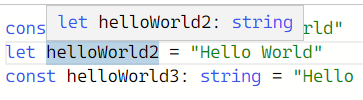
- b 변수는 let으로 선언되어 재할당될 수 있을 경우, 어떤 문자열이든 넣을 수 있으며 그 경우의 수가 무한대이기 때문에 컴파일러는 이 변수를 string타입으로 추론한다.
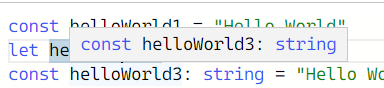
- c 변수는 명시적으로 string 으로 선언했으므로 string 타입이다.
따라서, 아래와 같이 명시적으로 literal type을 선언하면 let으로 선언된 변수도 "Hellow World" 타입만을 허용하도록 만들 수도 있다.
type HelloWorldType = "Hello World" // literal type

let a: HelloWorldType = "Hello World" // ok
a = "hahaha" // compile error: "hahaha"는 "Hello World"가 아니기 때문이다.
인덱스 시그니처를 왜 사용할까?
let obj {
	월급 : 200,
    보너스 : 200,
    인센티브 : 100,
    복지포인트 100
}
위와 같이 급여와 관련된 객체가 있고, 객체 내부에 존재하는 속성의 값을 모두 합산해야하는 경우라면 인덱스 시그니처를 사용해야한다.
function totalPay (payment : 무슨타입?){
	let total = 0;

  	for (const key in payment){
    	total += payment[key];
    }

  return total;
}
totalPay() 함수의 인자 payment는 key가
string이고 value가number타입인 객체만 허용해야 한다. key가 string 타입이 아닌 경우 객체의 속성을 접근하는데 문제가 발생하며, value가 number 타입이 아닌 경우 총 금액을 계산하는데 문제가 발생하기 때문이다.
따라서, 아래와 같이 인덱스 시그니처를 사용하여 객체의 타입을 정의해준다.
function totalPay (payment : {[key : string] : number}){
	let total = 0;

  	for (const key in payment){
    	total += payment[key];
    }

  return total;
}
인덱스 시그니처를 사용하여 객체를 정의하는 방법
▶ Key와 Value의 타입이 string
type userType = {
  [key: string]: string;
}

let user: userType = {
  '홍길동': '사람',
  '둘리': '공룡'
}
▶ Key의 타입은 string이며 Value의 타입은 string, number, boolean
type userType = {
  [key: string]: string | number | boolean;
}

let user: userType = {
  'name': '홍길동',
  'age': 20,
  'man': true
}
위에서 배운 내용을 토대로 오류가 발생한 코드를 인덱스 시그니처를 사용하여 해결할 수 있었다.
type ObjType = {
  [index: string]: string; // 인덱스 시그니처, index는 정해진 키워드가 아니라 개발자가 마음대로 지정할 수 있다.
};

const headingTextSizeMap: ObjType = {
  xs: 'text-xs',
  sm: 'text-sm',
  md: 'text-base',
  lg: 'text-lg',
  xl: 'text-xl',
};

const HeadingText = ({ size = 'lg', children, className, ...rest }: Props) => {
  const fontSize = headingTextSizeMap[size]; // ok!
  return (
    <div className={['font-black', fontSize, className].join(' ')} {...rest}>
      {children}
    </div>
  );
};