직접 HTTP 요청/응답 구현
-
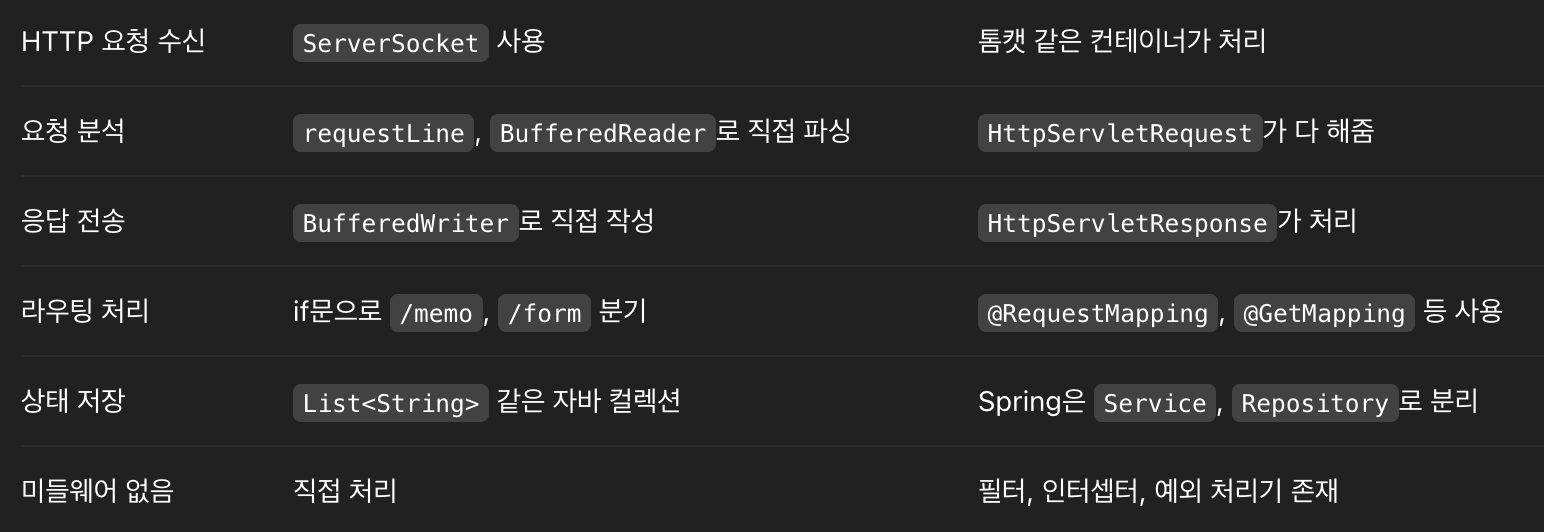
서블릿을 쓰면 웹 서버(톰캣 등)가 HttpServletRequest, HttpServletResponse 객체를 자동으로 만들어준다.
→ 하지만 직접 만들 땐 BufferedReader, BufferedWriter로 요청/응답을 수동으로 처리해야 한다. -
서블릿 컨테이너는 URL에 따라 어떤 서블릿이 실행될지 자동으로 매핑해준다.
→ 반면 우리는 요청 라인을 직접 파싱해서 if문으로 /memo, /form 등을 수동 분기해야 한다. -
서블릿은 doGet()이나 doPost() 같은 메서드를 오버라이드해서 로직을 구현한다.
→ 직접 구현한 서버에서는 메서드가 뭔지 직접 문자열로 비교하고, 그에 따라 로직을 실행해야 한다. -
서블릿 컨테이너는 멀티스레드로 동시 요청을 처리해주고 예외, 세션, 인코딩 등을 자동 관리한다.
→ 우리는 단일 스레드로 요청을 하나씩 받고, 예외 처리나 보안, 상태 관리도 직접 구현해야 한다. -
SimpleHttpServer vs. 서블릿(Servlet)
@Slf4j
public class SimpleHttpServer {

    // http://localhost:8080/form

    private static final List<String> memoList = new ArrayList<>(); // 메모를 저장할 리스트
    private static final String HTML_BASE_PATH = "src/main/resources/static/"; // HTML 파일 경로

    // 실행
    // 서버 소켓 생성 및 포트 바인딩 후, 요청 대기 및 처리
    public static void main(String[] args) throws IOException {
        // 서버 소켓 생성 및 포트 바인딩
        final int PORT = 8080;
        ServerSocket serverSocket = new ServerSocket(PORT); // 포트 8080에서 서버 소켓 생성
        log.info("서버가 포트 " + PORT + "에서 대기 중입니다.");

        // 클라이언트 요청 대기
        while (true) {
            Socket clientSocket = serverSocket.accept(); // 클라이언트 연결 수락
            handleClientRequest(clientSocket); // 클라이언트 요청 처리
        }
    }

    // 클라이언트 요청 처리 메소드
    private static void handleClientRequest(Socket clientSocket) {
        try (
                BufferedReader in = new BufferedReader(new InputStreamReader(clientSocket.getInputStream()));
                BufferedWriter out = new BufferedWriter(new OutputStreamWriter(clientSocket.getOutputStream()));
        ) {
            // 1. 요청 라인 읽기 (예: GET /form HTTP/1.1)
            String requestLine = in.readLine();
            if (requestLine == null || requestLine.isEmpty()) return;
            log.info("요청: " + requestLine);

            // 2. 요청 메소드와 경로 파싱
            StringTokenizer tokenizer = new StringTokenizer(requestLine);
            String method = tokenizer.nextToken();
            String path = tokenizer.nextToken();

            // 3. 요청 처리
            // GET /memo → 메모 목록 HTML로 응답
            if ("GET".equalsIgnoreCase(method) && path.equals("/memo")) {
                StringBuilder html = new StringBuilder("<html><body><h2>메모 목록</h2><ul>");
                for (String memo : memoList) {
                    html.append("<li>").append(memo).append("</li>");
                }
                html.append("</ul><a href=\"/form\">메모 작성하기</a></body></html>");
                sendHttpResponse(out, html.toString());
                return;
            }

            // POST /memo → 새 메모 저장 후 /memo로 리다이렉트
            if ("POST".equalsIgnoreCase(method) && path.equals("/memo")) {
                // POST 데이터 읽기
                int contentLength = 0;
                String line;
                // 헤더 읽기
                while (!(line = in.readLine()).isEmpty()) {
                    if (line.startsWith("Content-Length:")) {
                        contentLength = Integer.parseInt(line.split(":")[1].trim());
                    }
                }
                // 요청 본문(body) 읽기
                char[] bodyData = new char[contentLength];
                in.read(bodyData);
                String requestBody = new String(bodyData);
                log.info("POST 데이터: " + requestBody);

                // memo=내용 파싱 후 저장
                String[] params = requestBody.split("&");
                for (String param : params) {
                    if (param.startsWith("memo=")) {
                        String memo = URLDecoder.decode(param.split("=")[1], StandardCharsets.UTF_8);
                        memoList.add(memo);
                    }
                }

                // 302 리다이렉트 (브라우저가 /memo로 이동함)
                // 302: 리소스가 다른 위치에 있음을 나타냄 -> 브라우저가 자동으로 리다이렉트
                out.write("HTTP/1.1 302 Found\r\n");
                out.write("Location: /memo\r\n");
                out.write("\r\n");
                out.flush();
                return;
            }

            // GET /form → HTML 폼 파일 제공
            if ("GET".equalsIgnoreCase(method) && path.equals("/form")) {
                serveHtmlFile("memo-form.html", out);
                return;
            }

            // 이외의 요청은 처리하지 않음
            // 처리할 수 없는 요청 → 404 응답
            sendHttpResponse(out, "<h2>404 - 페이지 없음</h2>");

        } catch (IOException e) {
            e.printStackTrace();
        } finally {
            // 클라이언트 소켓 닫기
            try {
                clientSocket.close();
            } catch (IOException e) {
                e.printStackTrace();
            }
        }
    }

    // 클라이언트에 HTML 파일 제공
    private static void serveHtmlFile(String filename, BufferedWriter out) throws IOException {
        Path filePath = Paths.get(HTML_BASE_PATH, filename);
        if (!Files.exists(filePath)) {
            sendHttpResponse(out, "<h2>파일을 찾을 수 없습니다.</h2>");
            return;
        }

        String html = Files.readString(filePath, StandardCharsets.UTF_8);
        sendHttpResponse(out, html);
    }

    // HTTP 응답 전송 (200 OK + HTML 본문)
    private static void sendHttpResponse(BufferedWriter out, String body) throws IOException {
        out.write("HTTP/1.1 200 OK\r\n");
        out.write("Content-Type: text/html; charset=UTF-8\r\n");
        out.write("Content-Length: " + body.getBytes(StandardCharsets.UTF_8).length + "\r\n");
        out.write("\r\n");
        out.write(body);
        out.flush();
    }
}