
from requests import get
from bs4 import BeautifulSoup

base_url = "https://weworkremotely.com/remote-jobs/search?term="
search_term = "java"
response = get(f"{base_url}{search_term}")
if response.status_code != 200:
  print("Can't request website")
else:
  soup = BeautifulSoup(response.text, "html.parser")
  jobs =soup.find_all('section',class_="jobs")
  for job in jobs:
    job_posts = job.find_all('li')
    job_posts.pop(-1)
    for post in job_posts:
        anchors = post.find_all('a')
        anchor = anchors[1]
        link = anchor['href']
        company, kind, region = anchor.find_all('span', class_="company")
        title = anchor.find('span', class_='title')
        print(company, kind, region, title)
        print("/////////////////////")
        print("/////////////////////")
더 발전시킨 코드로 돌아왔다. 한줄씩 차근차근 살펴보자
먼저, 그 전 코드를 지우고 16번째 줄 인, anchors = post.find_all('a') 부터 추가했다.
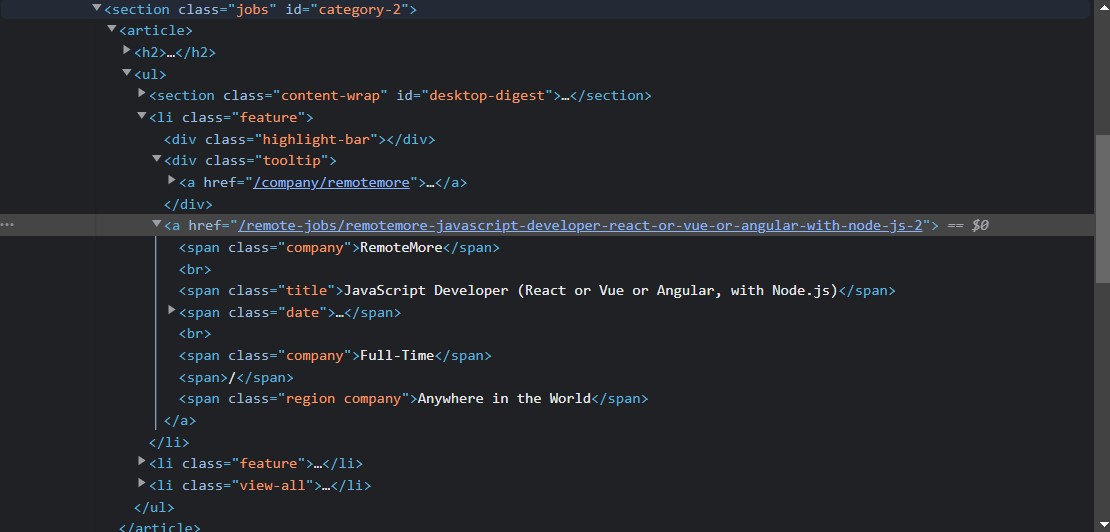
⦁ 여기를 보면 사이트 코드가 나와 있는데, 여기있는 'a'태그들 중 공고에 대한 내용으로 access 할 수 있는 highlight된 두번째 'a'태그가 필요하다. data structure를 이용한 방법이 효율적일 것 같은데, 이럴때 사용 가능한 방법이 있다.
BeautifuSoup는 html태그들을 dictionary로 바꿔준다.
그래서 'href'는 key가 되고 'value'는 주소로 바뀐다.
그렇기에 data structure로 취급할 수 있다.
for post in job_posts:
        anchors = post.find_all('a')
        anchor = anchors[1]
        link = anchor['href']
먼저, for - in 문을 활용해 'a'태그들을 찾아주고 이를 anchors라는 이름으로 넣어준다.(여기서 job_posts는 공고를 올린 회사 이므로, 회사마다 loop가 한번씩 돌아간다고 보면 된다.)
그 다음, data structure로 취급할 수 있으니, 우리는 두번째 'a'태그가 필요하니까 anchors[1]을 anchor라는 이름으로 저장해줬다.
마지막으로, dictionary의 특성을 이용하여, anchor['href']로 key를 이용해 호출해주면, 이건 href 다음에 주소였으므로 link라는 이름으로 저장해줬다.
⦁ 다음으로 넘어가기 전에 중요한 개념 하나를 설명하고자 한다.
리스트 요소마다 정의를 내리고 싶으면,
Identification = ["James", 27, "Korea"]
name = Identification[0]
age = Identification[1]
location = Identification[2]
이렇게 하면 된다.
하지만, 너무 비효율 적이다. 지금이라면 별 차이가 나지 않지만
요소가 많아지면 코드 길이도 길어지고, 시간도 오래 걸리기 때문이다.
이 같은 문제점을 해결 할 수 있는 방법이 있다.
Identification = ["James", 27, "Korea"]
name, age, location = Identification
이렇게 만들면 더 간단하게 정의를 할 수 있다.
print를 해 보면
print(name, age, location)

#코드 결과
James 27 Korea
윗 코드와 아래 코드 모두 동일하게 나온다.
우리는 이 개념을 이용해 프로젝트를 했다.
for post in job_posts:
        anchors = post.find_all('a')
        anchor = anchors[1]
        link = anchor['href']
        company, kind, region = anchor.find_all('span', class_="company")
        title = anchor.find('span', class_='title')
        print(company, kind, region, title)
        print("/////////////////////")
        print("/////////////////////")
⦁ anchor에서 'span'에 있는 class가 company인 요소들을 찾은 후 첫번째 요소를 company, 두번째를 kind, 세번째를 region이라고 저장한 뒤 title을 찾아서 title이라고 저장해줬다.
그래서 각각 회사명, 업무형태, 지역을 확인 할 수 있다.
그리고 이를 print 해보고, 각 loop과 구분을 지어주기 위해 구분자 2줄을 넣어주었다.
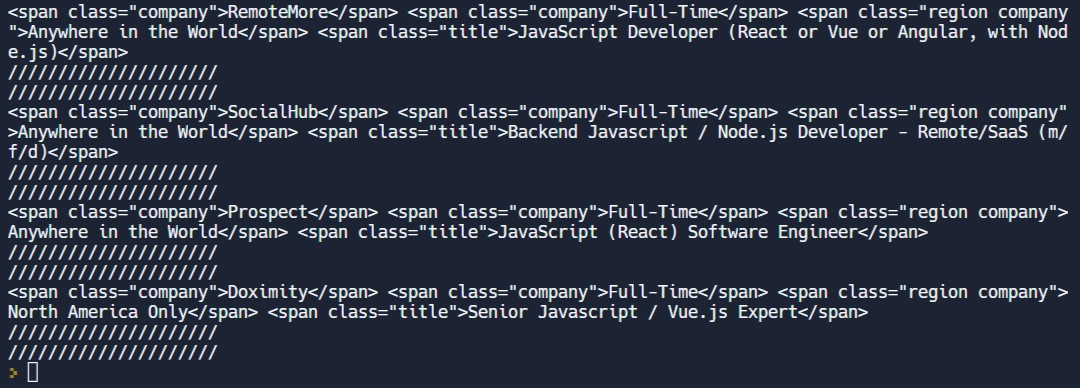
출력 결과는 다음과 같다.
첫번째 공고만 보자면,
회사명 : RemoteMore
업무형태 : Full-Time
지역 : Anywhere in the world
이라는 것을 확인 할 수 있다.