
canvas
HTML의 <canvas>는 웹페이지에서 그래픽적인 것을 그릴 때 사용된다.
getContext 함수로 자바스크립트에서 canvas의 context를 가져와서 그 context에 그림을 그리게 되는 것이다.
chart
let myChartOne = document.getElementById('myCharOne').getContext('2d');

            let barChart = new Chart(myChartOne, {
                type : 'bar', //pie, line, doughnut, polarArea
                data : {
                    labels : [''],
                    datasets : [{
                        label : '',
                        data : []
                    }]
                }
            })
chartjs.html
<!DOCTYPE html>
<html>
    <head>
        <meta charset="UTF-8">
        <title>chartJS</title>
        <script src="https://cdnjs.cloudflare.com/ajax/libs/Chart.js/3.7.0/chart.min.js"></script>
        <link href="https://cdn.jsdelivr.net/npm/bootstrap@5.1.3/dist/css/bootstrap.min.css" rel="stylesheet">
    </head>
    <body>
        <div class="container">
            <div class="row">
                <div class="col-md-6">
                    <canvas id="myChartOne"></canvas>
                </div>
                <div class="col-md-6">
                    <canvas id="myChartTwo"></canvas>
                </div>
                <div class="col-md-6">
                    <canvas id="myChartThree"></canvas>
                </div>
                <div class="col-md-6">
                    <canvas id="myChartFour"></canvas>
                </div>
            </div>
        </div>

        <script>
            let myChartOne = document.getElementById('myChartOne').getContext('2d');
            let myChartTwo = document.getElementById('myChartTwo').getContext('2d');
            let myChartThree = document.getElementById('myChartThree').getContext('2d');
            let myChartFour = document.getElementById('myChartFour').getContext('2d');

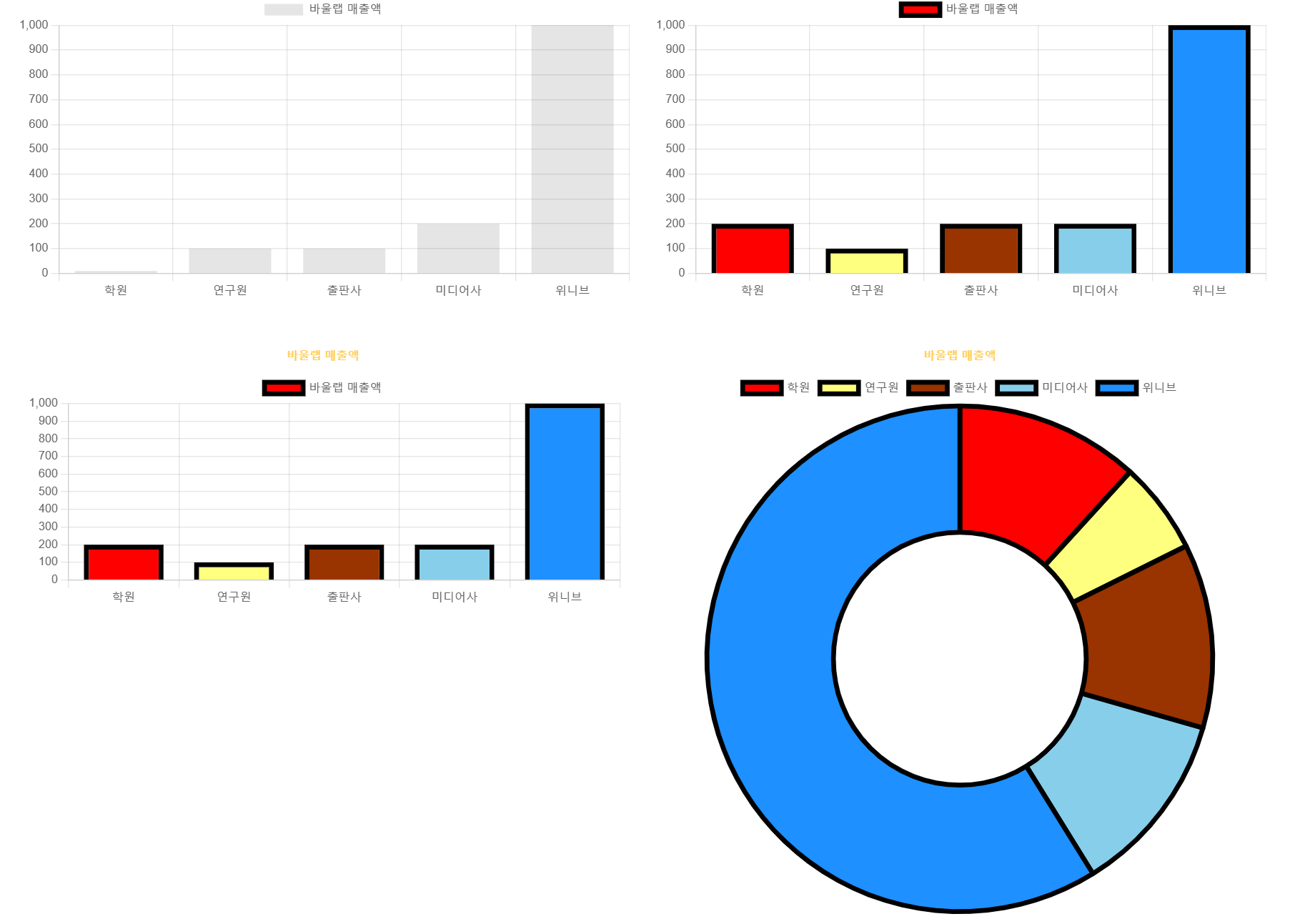
            let barChart = new Chart(myChartOne, {
                type : 'bar', //pie, line, doughnut, polarArea
                data : {
                    labels : ['학원', '연구원', '출판사', '미디어사', '위니브'],
                    datasets : [{
                        label : '바울랩 매출액',
                        data : [
                            10,
                            100,
                            100,
                            200,
                            1000
                        ]
                    }]
                }
            });

            let barChartTwo = new Chart(myChartTwo, {
                type : 'bar', //pie, line, doughnut, polarArea
                data : {
                    labels : ['학원', '연구원', '출판사', '미디어사', '위니브'],
                    datasets : [{
                        label : '바울랩 매출액',
                        data : [
                            200,
                            100,
                            200,
                            200,
                            1000
                        ],
                        backgroundColor:[
                            'red',
                            'rgba(255, 255, 0, 0.5)',
                            '#993300',
                            'skyblue',
                            'dodgerblue'
                        ],
                        borderWidth : 5,
                        borderColor : '#000',
                        hoverBorderWidth : 8,
                    }]
                }
            });

            let barChartThree = new Chart(myChartThree, {
                type : 'bar', //pie, line, doughnut, polarArea
                data : {
                    labels : ['학원', '연구원', '출판사', '미디어사', '위니브'],
                    datasets : [{
                        label : '바울랩 매출액',
                        data : [
                            200,
                            100,
                            200,
                            200,
                            1000
                        ],
                        backgroundColor:[
                            'red',
                            'rgba(255, 255, 0, 0.5)',
                            '#993300',
                            'skyblue',
                            'dodgerblue'
                        ],
                        borderWidth : 5,
                        borderColor : '#000',
                        hoverBorderWidth : 8,
                    }]
                },
                options: {
                    plugins: {
                        title: {
                            display: true,
                            text: '바울랩 매출액',
                            color : '#ffce56'
                        },
                        legend : {
                            display : true,
                            position : 'top' // top, bottom, right, left
                        },
                        tooltip : {
                            enabled: false,
                        }
                    },
                    layout : {
                            padding : {
                                left : 10,
                                right : 10,
                                top : 40,
                                bottom : 0
                            }
                        }
                }
            });

            let barChartFour = new Chart(myChartFour, {
                type : 'doughnut', //pie, line, doughnut, polarArea
                data : {
                    labels : ['학원', '연구원', '출판사', '미디어사', '위니브'],
                    datasets : [{
                        label : '바울랩 매출액',
                        data : [
                            200,
                            100,
                            200,
                            200,
                            1000
                        ],
                        backgroundColor:[
                            'red',
                            'rgba(255, 255, 0, 0.5)',
                            '#993300',
                            'skyblue',
                            'dodgerblue'
                        ],
                        borderWidth : 5,
                        borderColor : '#000',
                        hoverBorderWidth : 8,
                    }]
                },
                options: {
                    plugins: {
                        title: {
                            display: true,
                            text: '바울랩 매출액',
                            color : '#ffce56'
                        },
                        legend : {
                            display : true,
                            position : 'top' // top, bottom, right, left
                        },
                        tooltip : {
                            enabled: true,
                        }
                    },
                    layout : {
                            padding : {
                                left : 10,
                                right : 10,
                                top : 40,
                                bottom : 0
                            }
                        }
                }
            });
        </script>
    </body>
</html>
화면

Front-end Engineer, Web Developer & UX/UI Design