1. IO패키지
자바에서는 데이터를 input/ output하기 위해서 IO패키지를 제공합니다. 이 패키지를 이용해 데이터를 입출력할 수 있습니다.
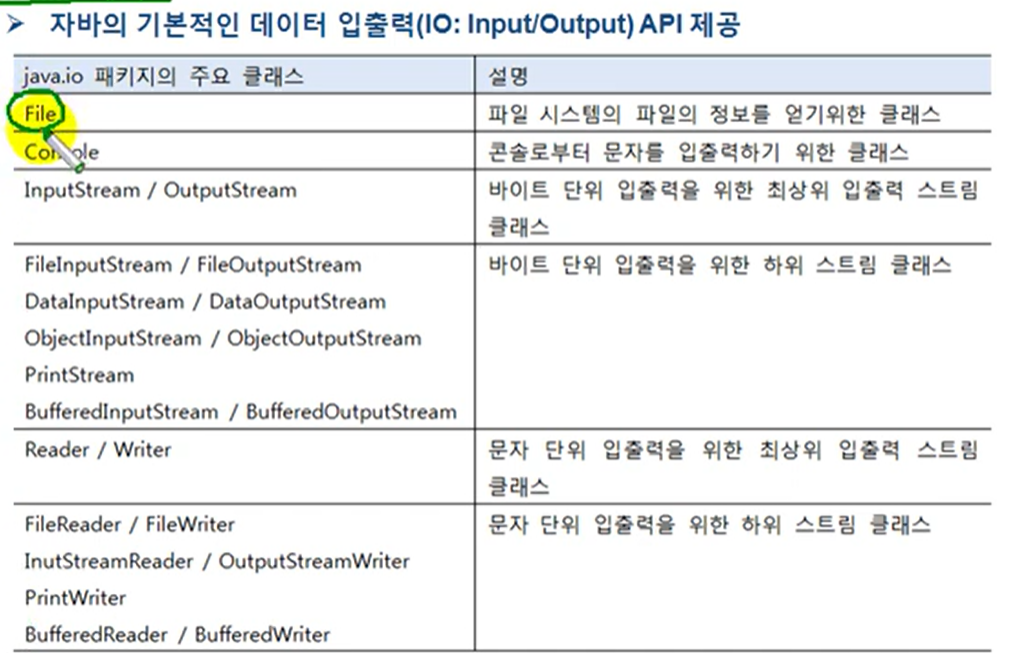
- FIle : 파일의 정보를 얻기 위한 클래스(파일의 이름, 경로, 크기, 속성(실행 가능?읽기가능?등)
- InputStream / OutputStream : 바이트 단위 입출력. 바이트를 읽고 쓰기 위해 사용하는 클래스
- Reder / Witer : 바이트 단위 입출력X 문자 단위 입출력
1-1. 입력 스트림과 출력 스트림 개념
데이터가 입력되는 흐름이 입력 스트림
데이터가 나가는 흐름이 출력 스트림
1-2. 바이트 기반 스트림과 문자 기반 스트림
- 바이트 기반 스트림 : 그림, 멀티미디어, 문자 등 모든 종류의 데이터를 받고 보낼 수 있따.
- 문자 기반 스트림 : 오직 문자만 받고 보낼 수 있도록 특화되어 있다.

읽을 때 사용 : FileInputStream / FileReader
내보낼 때 사용 : FileOutputStream / FileWriter
2.InputStream
- 바이트 기반 입력 스트림의 최상위 클래스로
추상 클래스다.
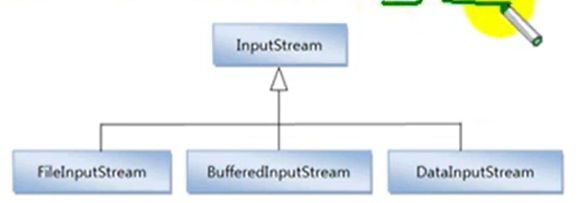
- FileInputStream BufferedInpuStream DataInputStream 의 상위 클래스
- InputStream의 주요 메소드
상당히 중요하니까 잘 알아두셔야합니다
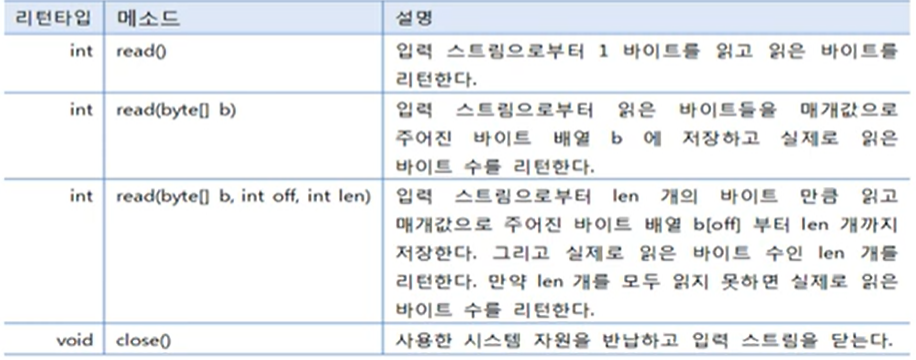
- read() : 1바이트를 읽는데 읽은 것이 4바이트(int) 끝에 저장된다. 4바이트를 읽는게 아닙니다.
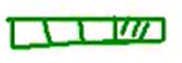
- read(byte[] b) : read()와 상당히 다릅니다. 주어진 바이트 배열의 길이만큼 데이터를 읽어서 그 데이터를 byte[]에 저장하고 읽은 바이트 '수'를 리턴합니다.
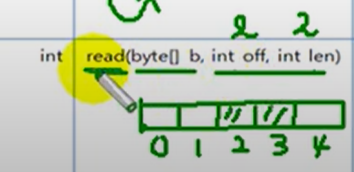
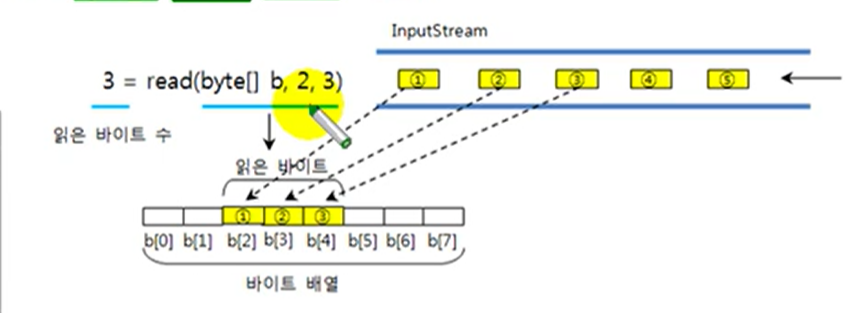
- read(byte[] b, int off, int len) : 읽은 데이터를 바이트 배열에 저장하는 건 맞는데, 어떤 위치에서 시작해서 몇개 저장할지는 int off, int len으로 결정합니다. 리턴값은 바이트 '수'.
예를 들어 전체 길이가 5라고 가정한다면, 2바이트를 읽겠다고 하면
- close() : 닫을 때 사용하는 메소드
2-1. read()
한 바이트를 읽고 읽은 바이트를 리턴합니다.
예를들어 다섯개의 바이트가 들어온다면, read() 메소드는 다섯 번 실행해야합니다.
InputStream is = new FilePutStream("C:/test.jpg");
int readByte;
while((readbyte=is.read()) != -1) {...}
C:/test.jpg가 5byte라고 가정한다면.
읽은 데이터는 -1값을 가질 수 없기 떄문에 while문에 저렇게 쓴 것.
더이상 읽을 게없으면 -1을 리턴합니다. 상당히 중요합니다!!!
import java.io.FileInputStream;
import java.io.InputStream;

public class ReadExample1 {
	//예외가 발생할 수 있는 생성자이므로 예외처리 해야함✅
	public static void main(String[] args) throws Exception {

		//Temp 폴더에 test라는 파일을 만듦
		InputStream is = new FileInputStream("C:/Temp/test.txt");

		//test 파일에는 abcde라는 글자가 적혀있음
		//알파벳 하나 당 1byte == 파일은 총 5byte
		int readByte; //읽은 byte를 저장할 변수 선언

		while((readByte = is.read()) != -1) {
			System.out.println(readByte);
		}
	}
}
이렇게 해도 됨
while(true) {
		readByte = is.read();
		if(readByte == -1) break;
		}
결과 :
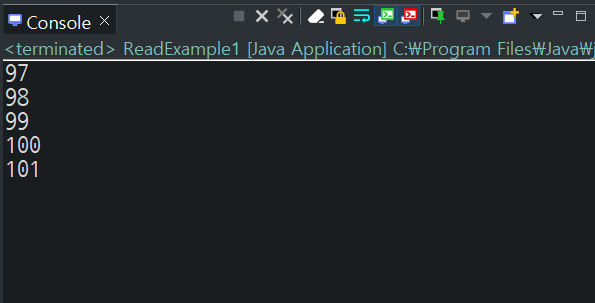
아...read()는 1byte 읽어서, 그 1byte의 내용(? 여기서는 아스키코드)를 리턴하는구나.
아스키코드가 아니라 a,b,c,d,e 등 문자로 출력하고 싶다면
SYstem.out.println((char)readByte);2-2. read(byte[] b)
byte[]가 길이 3짜리 배열이라면, read메소드는 이 InputStream에서 3byte를 읽고 배열[]에 저장합니다.
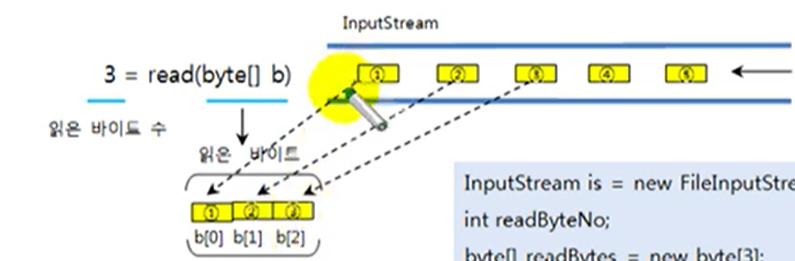
그리고 리턴은 : byte 세 개를 읽었기 때문에 3을 return합니다.
그리고 2byte가 남았죠.
그러면 두 번째 읽을 경우
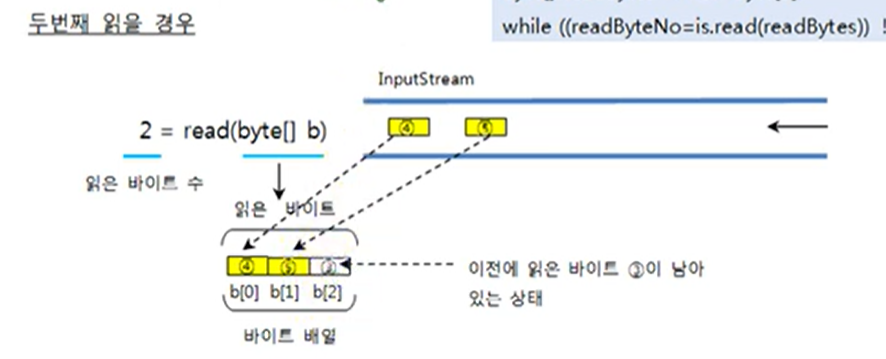
그럼 b[2]에는 전에 읽은 것이 저장되어 남아있습니다.
import java.io.FileInputStream;
import java.io.InputStream;

public class ReadExample2 {

	public static void main(String[] args) throws Exception {
		InputStream is = new FileInputStream("C:/Temp/test.txt");
		int readByteNo;    //읽은 바이트 수 저장할 곳
		byte[] readBytes = new byte[3];

		while((readByteNo = is.read(readBytes)) != -1 ) {
       		//몇 바이트 읽었는지 봅시다.
			System.out.println(readByteNo);
		}
	}
}
이렇게 해도 됨
while(true) {
			readByteNo = is.read(readBytes);
			if(readByteNo == -1) break;
			System.out.println(readByteNo);
		}
읽은 데이터를 문자열로 복원
String data="";
while(true) {
			readByteNo = is.read(readBytes);
			if(readByteNo == -1) break;
			data += new String(readBytes, 0,readByteNo);
            data += data;	>>❌이거 아니야...ㅠㅠ!
		}
나의 의문...char로 바꿀 땐 걍 (char)로 타입변환 했으면서, 왜 문자열로 변환할 땐 new String()을 사용할까...
2-3. read(byte[] b, int off, int len)
import java.io.FileInputStream;
import java.io.InputStream;

public class ReadExample3 {

	public static void main(String[] args) throws Exception {
		InputStream is = new FileInputStream("C:/Temp/test.txt");
		int readByteNo;
		byte[] readBytes = new byte[8];

		readByteNo = is.read(readBytes,2,3);

		System.out.println(readByteNo);			>> 결과 : 3. len을 리턴하니까❗

		for(int i=0; i<readBytes.length; i++) {
			System.out.println(readBytes[i]);
		}
	}
}
두 코드는 같은 코드예요.
2-4. close()
- InputStream을 더이상 사용하지 않을 경우 호출해준다.
- InputStream에서 사용했던 시스템 자원을 풀어준다.
- 다 쓰고나면 반드시 close()를 해야합니다.
3.OutputStream
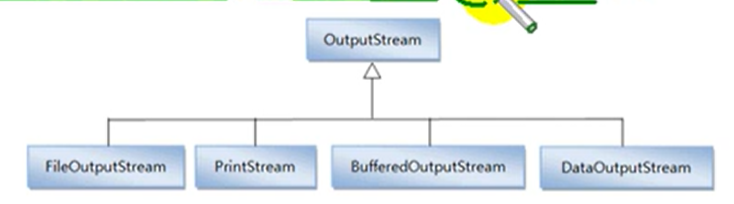
- 바이트 기반 출력 스트림의 최상위 클래스로 추상 클래스이다.
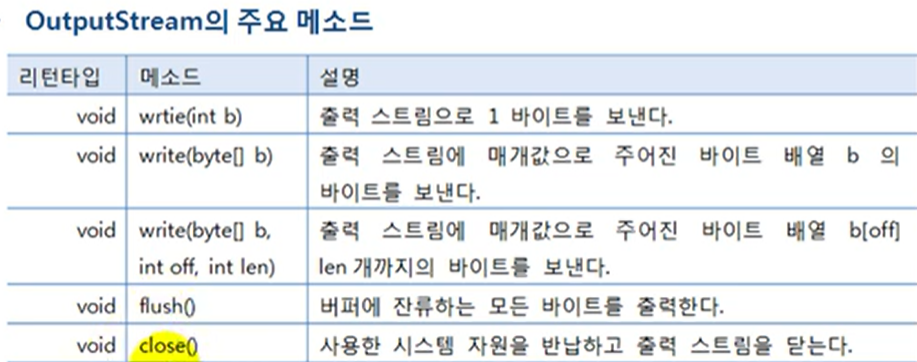
- flush() : 메모리 버퍼가 꽉 차면 비로소 출력한다.
- write()들을 호출하고 나면
반드시flush()를 해야합니다.
3-1. write(int a)
- int에서 끝 한 바이트만 출력하는 기능을 갖고 있습니다.
OutputStream os = new FileOutStream("C:/test.txt");
data[] data = "ABC".getbyte();
for(int i=0; i<data.length; i++) {
	os.write(data[i]);		//"A","B","C" 하나씩 출력
}
import java.io.FileOutputStream;
import java.io.OutputStream;
public class writeExample1 {
public static void main(String[] args) throws Exception {
OutputStream os = new FileOutputStream("C:/Temp/test.txt");
//내보낼 문자열 "ABC"설정
byte[] data = "ABC".getBytes();
for(int i=0; i<data.length;i++) {
os.write(data[i]);
}
os.flush(); //출력스트림에서 write하게 되면 data[i]가 잠시 버퍼에 쌓였다가
//출력하게 되거든요. 그런데 버퍼가 꽉 차지 않을 경우에는 실제로
//출력이 되지 않습니다. 강제적으로 남은것까지 출력해줌.
os.close();
}
}3-2. write(byte[] a)
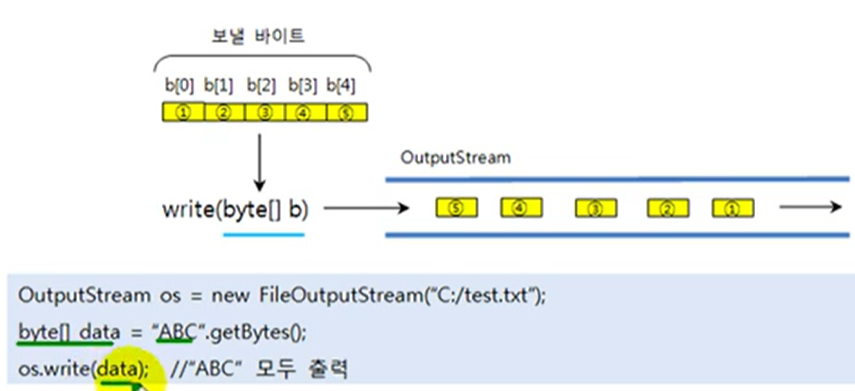
한 번의 write 실행으로 한꺼번에 ABC를 모두 출력하게 함.
한 바이트씩 읽는게 아니기 때문에, for문을 안 써도 됨.
public class WriteExample2 {

	public static void main(String[] args) throws Exception {
		OutputStream os = new FileOutputStream("C:/Temp/test.txt");

		byte[] data = "ABC".getBytes();

		os.write(data);
		os.flush();
		os.close();
	}
3-3. write(bytea, int off, int len)
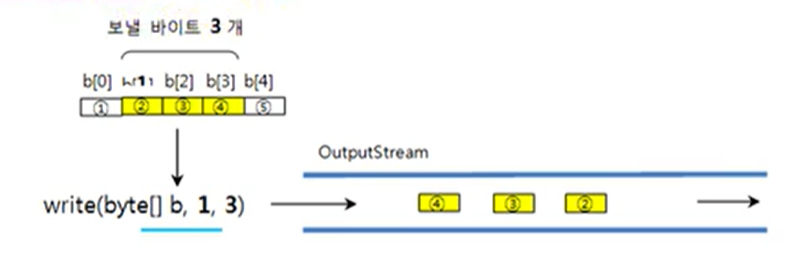

import java.io.FileOutputStream;
import java.io.OutputStream;

public class WriteExample2 {

	public static void main(String[] args) throws Exception {
		OutputStream os = new FileOutputStream("C:/Temp/test.txt");

		byte[] data = "ABC".getBytes();

		os.write(data,1,2);
		os.flush();
		os.close();
	}
}
4. Reader
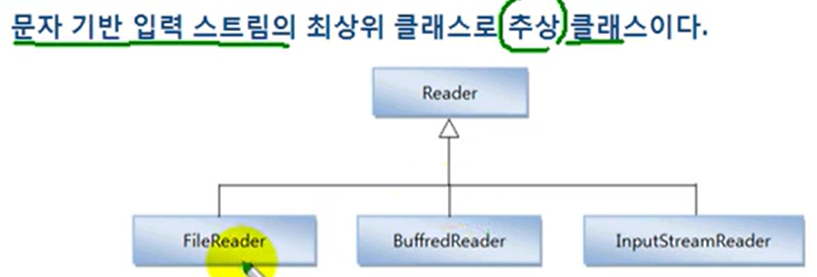
......문자 특화여도 리턴은 int구만...........
4-1. read()
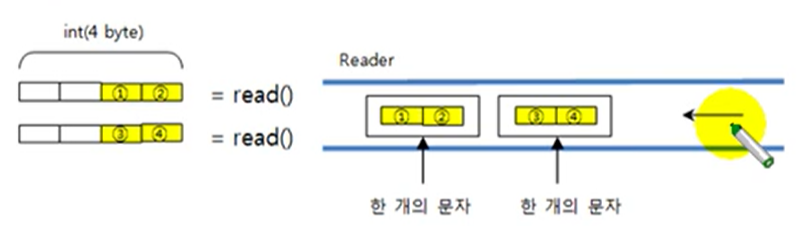
Reader reader = new FileReader("C:/test.txt");
int readData;
while((readData=reader.read()) != -1 {
	char charData = (char) readData;
}
public class ReadExample1 {
public static void main(String[] args) throws Exception {
Reader reader = new FileReader("C:/Temp/test.txt");
int readData;
while((readData = reader.read())!= -1) {
System.out.print((char)readData);
}
reader.close();
}
}이렇게 해도 됨
		while(true) {
			readData = reader.read();
			if(readData == -1) break;
			System.out.println((char)readData);
		}
4-2. read(char[] cbuf)
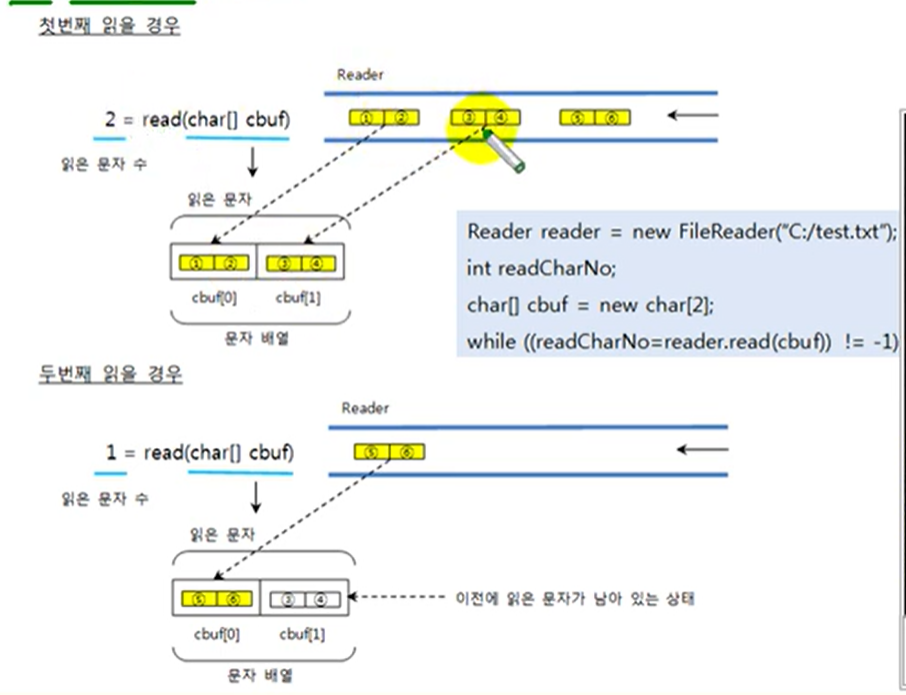
세 개의 문자가 들어올 때. char 배열이 길이 2짜리 배열이라면, 두 개의 문자를 읽어서 각각 0인덱스와 1인덱스에 저장합니다.
그리고 read는 두개의 문자를 읽었기 때문에 2를 리턴합니다.
두 번째 읽고 나서는 이전에 읽은 문자가 남아있는 상태.
public class ReadExample2 {

	public static void main(String[] args) throws Exception {

		Reader reader = new FileReader("C:/Temp/test.txt");
		int readCharNo;
		char[] cbuf = new char[2];
		String data = "";
		while(  (readCharNo = reader.read(cbuf)) != -1  ) {
			data += new String(cbuf, 0, readCharNo);
		}

		System.out.println(data);
		reader.close();

	}
}
이렇게 해도 됨
		while(true) {
			readCharNo = reader.read(cbuf);
			if(readCharNo == -1) break;
			data+=new String(cbuf, 0, readCharNo);
		}
4-3. read(char[] cbuf, int off, int len)
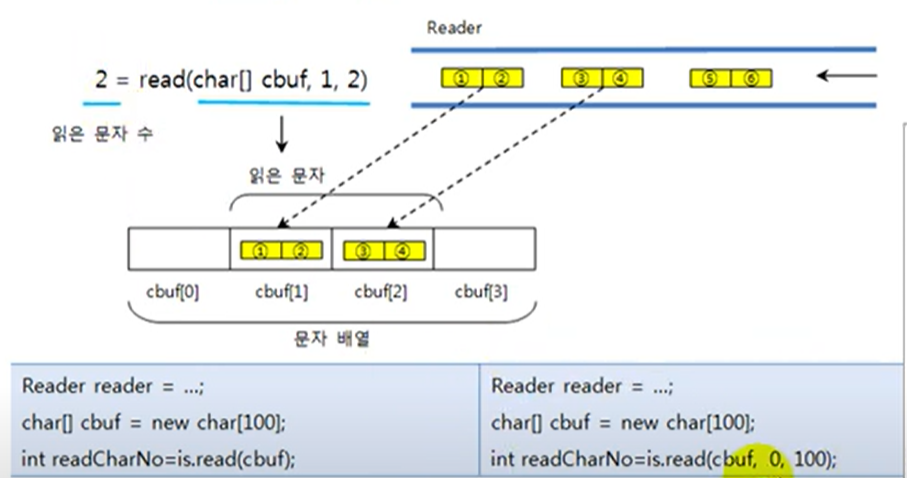
public class ReadExample2 {

	public static void main(String[] args) throws Exception {

		Reader reader = new FileReader("C:/Temp/test.txt");
		int readCharNo;


		char[] cbuf = new char[4];
		readCharNo = reader.read(cbuf, 1, 2);

		for(int i=0; i<cbuf.length; i++) {
			System.out.println(chuf[i]);
		}
	}
}
5. writer
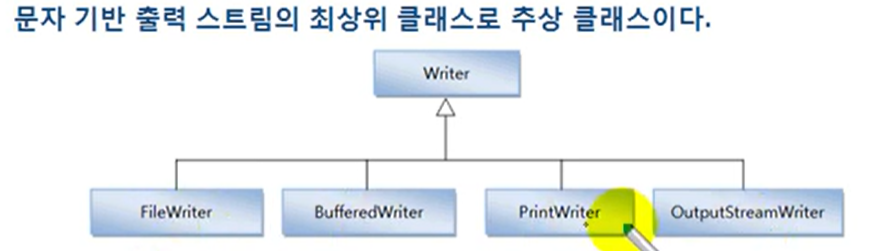
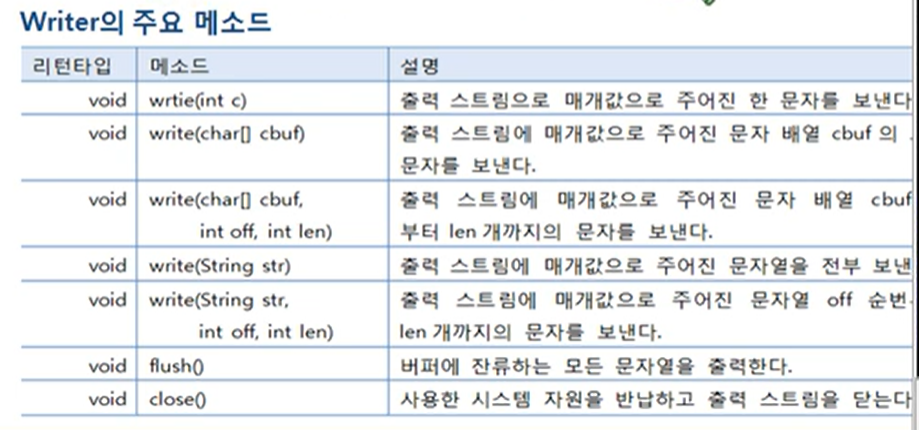
5-1. write(int a)
public class WirterExample1 {

	public static void main(String[] args) throws Exception {

		Writer writer = new FileWriter("C:/Temp/test.txt");

		char[] data = "홍길동".toCharArray();

		for(int i=0; i<data.length; i++) {
			writer.write(data[i]);

		}
		writer.flush();
		writer.close();
	}
}
5-2. write(char[] cbuf)
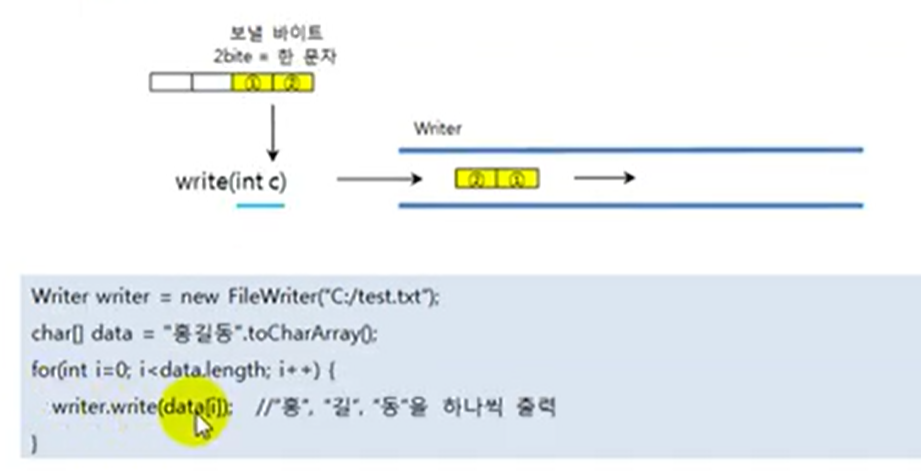
write(int a)는 하나씩 출력해서 for문이 필요했지만, write(char[] cbuf)는 한꺼번에 가져오기 때문에 for문이 필요 없습니다.
public class WirterExample1 {

	public static void main(String[] args) throws Exception {

		Writer writer = new FileWriter("C:/Temp/test.txt");

		char[] data = "홍길동".toCharArray();

		writer.write(data);

		writer.flush();
		writer.close();
	}
}
5-3. write(char[] cbuf, int off, int len)
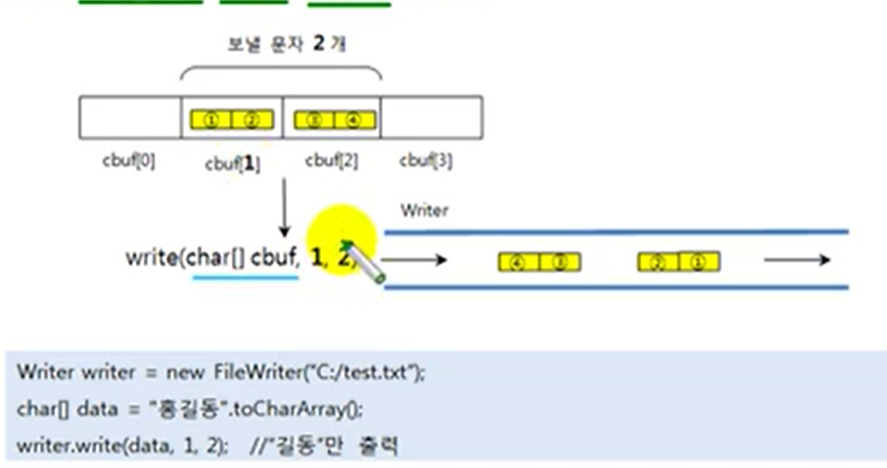
public class WriterExample3 {

	public static void main(String[] args) throws Exception {


		Writer writer = new FileWriter("C:/Temp/test.txt");
		char[] data = "홍길동".toCharArray();
		writer.write(data,1,2);

		writer.flush();
		writer.close();
	}
}
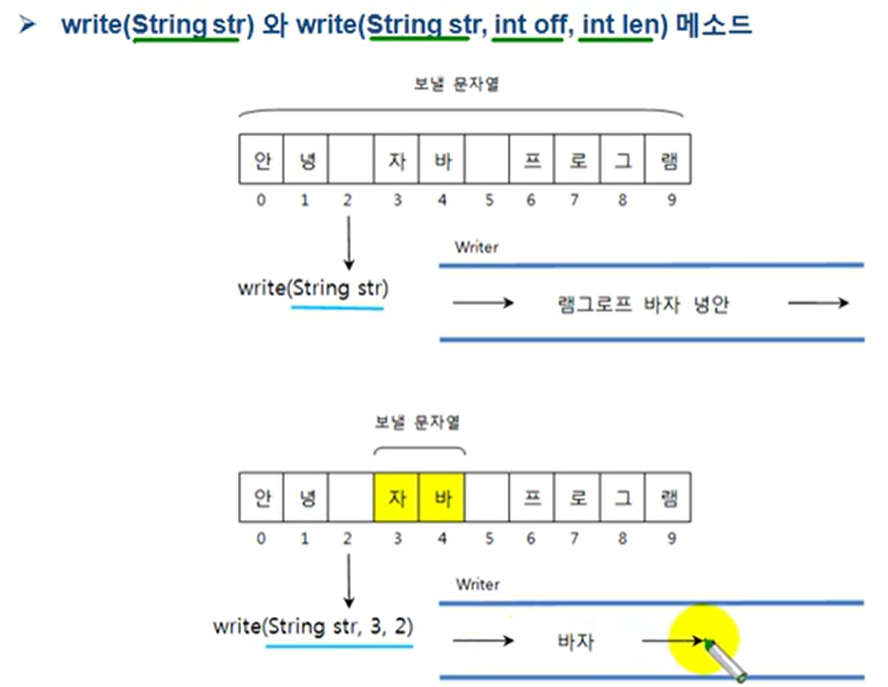
5-4. Writer(String str)와 write(String str, int off, int len)