
1. File 클래스
- 파일 시스템의 파일을 표현하는 클래스
파일,디렉토리관리- 파일 크기, 파일 속성, 파일 이름 등의 정보 제공
- 파일 생성 및 삭제 기능 제공
- 파일 객체 생성 (파일이 실제로 존재하지 않아도
객체는 만들어짐)
그래서 존재 유무 확인 메서드가 있는 것.
File file = new File("C:\\Temp||file.txt");
File file = new File("C:/Temp/File.txt");- 파일 또는 디렉토리
존재 유무확인 메소드
boolean isExist = file.sxitst();- 파일 및 디렉토리 생성 및 삭제 메소드
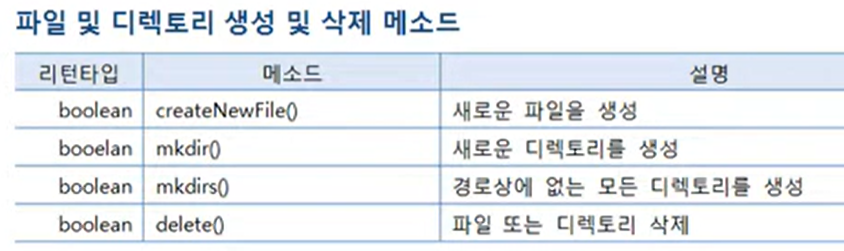
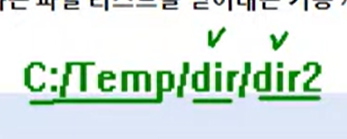
(뭔 소린지 모르겠음) 경로상에 dir이 있는지 확실하지 않을 때는mkdirs()를 사용하는 것이 좋습니다.
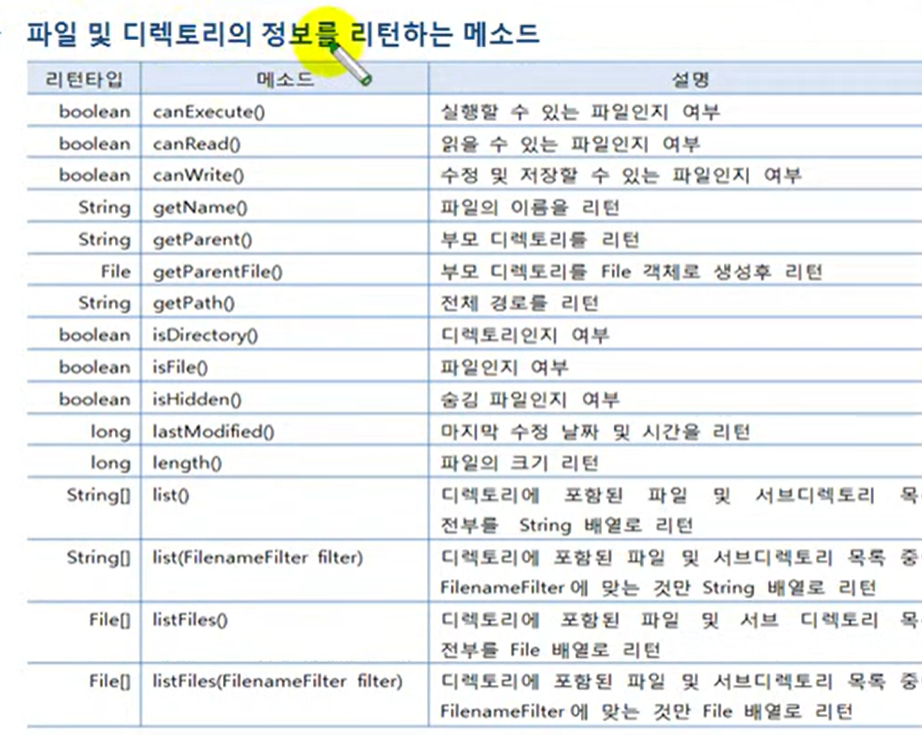
C:/Temp/test.txt
getName() : test.txt를 리턴
getParet() : C:/Temp리턴
getParentFile() : 부모의 경로로 만들어진 파일을 리턴
isFile() : 디렉토리로부터 파일이 만들어졌으면 false, 파일이 만들어졌으면 true;
length(): 파일의 크기, 단위는byte
public class FileExample {

	public static void main(String[] args) throws Exception {
		//C : Temp에 dir이라는 파일 객체를 만들어보겠습니다
		File dir = new File("C:/Temp/Dir");
		File file1 = new File("C:/Temp/file1.txt");
		File file2 = new File("C:/Temp/file2.txt");
		//이번에는 파일 경로를, 파일 생성자를 보면, 매개값으로 String말고 URI를 받을 수도 있죠
		//스키마인 file이 오고 그 다음에 host 이름이 오는데 , 여기는 local이라 호스트 네임이 필요없음
		//그래서 /넣어주고 경로 넣어주기
		//URI 생성자는 예외처리가 필요함
		//URI는 file이라는 스키마가 필요함. 안 넣으면 에러 남.
		//File file4 = new File(new URI("file://여기에 host네임 적어야함 /C:/Temp/file3.txt"));
		File file3 = new File(new URI("file:///C:/Temp/file3.txt"));

		//dir이라는 디렉토리가 존재하느냐?
		//Temp라는 디렉토리가 있는지 확실하지 않으면 mkdirs()
		if(dir.exists()); {dir.mkdirs();};
		if(file1.exists() == false) {file1.createNewFile();};
		if(file2.exists() == false) {file2.createNewFile();};
		if(file3.exists() == false) {file3.createNewFile();};

		File temp = new File("C:/temp");
		File[] contents = temp.listFiles();
		System.out.println("날짜  시간  형태  크기  이름");
		System.out.println("-----------------------------");
		//Date 출력할 포멧 생성
		SimpleDateFormat sdf = new SimpleDateFormat("yyyy-MM--dd a HH:mm");
		for(File file : contents) {
			System.out.print(sdf.format(new Date(file.lastModified())));
			if(file.isDirectory()) {			//형태 출력. 디렉토리냐 파일이냐
				System.out.println("\t<DIR>\t\t\t" + file.getName());
			} else {
				System.out.println("t\t\t" + file.length() + "\t" + file.getName());
			}
			System.out.println();
		}
	}
}
2. FileInputStream
- 파일로부터 바이트 단위로 읽어들일 때 사용
(그림, 오디오, 비디오, 텍스트 파일 등 모든 종류의 파일을 읽을 수 있다) - 객체 생성 방법
//첫 번째 방법
FileInputStream fis = new FileInputStream("C:/Temp?image.gif");
//두 번째 방법
File file = new File("C:/Temp/image.gif");
FileInputStream fis = new FileInputStream(fis);
FileInputStream 객체가 생성될 때 파일과 직접 연결.
만약 파일이 존재하지 않으면 FileNotFoundException을 발생
그러므로try-catch문으로 예외처리를 해야한다.
- InputStream의 하위 클래스이므로 사용방법은 그것과 동일.
public class FileInputStreamExample {

	public static void main(String[] args) {
		//FileInputStream fis = new FileInputStream(C:\Users\heeju\eclipse-workspace\aaa\src\sec04\exam01\FileInputStreamExample.java);

		//역슬래쉬는 excape로 치환되기 때문에 /로 바꾸기
		try{
		FileInputStream fis = new FileInputStream("C:/Users/heeju/eclipse-workspace/aaa/src/sec04/exam01/FileInputStreamExample.java");

		int data;

		while((data = fis.read())!= -1) {
			System.out.write(data);
			//System.out.println(data);
		}
		System.out.flush();		//책에는 없는데 넣어주는게 좋겠죠?
		fis.close();
        } catch(Exception e) { e.printStackTrace();  }
	}
}
3. FileOutStream
- 파일에 바이트 단위로 데이터를 저장할 때 사용
(그림, 오디오, 비디오, 텍스트 등 모든 종류의 데이터를 파일로 저장할 수 있다) - 객체 생성 방법
//방법1
FileOutStream fis = new FileOutStream("C:/Temp/image.gif");
//방법2
File file = new File(C:/Temp/image.gif");
FileOutStream fis - new FileOutStream(file);
파일이 이미 종재할 경우, 데이터를 출력하게 되면 파일을 덮어쓰게 됨.
기존 파일 내용 끝에 데이터를 추가할 경우 true를 붙이면 됨
FileOutStream fis = new FileOutStream("C:/Temp/image.gif");
FileOutStream fis = new FileOutStream(file,true);
OutputStream 하위 클래스이므로 사용 방법이 OutputStream과 동일
public class FileOutputstreamExample {

	public static void main(String[] args) throws Exception {

		String origanalFileName = "C://Users//heeju//eclipse-workspace//aaa//src//sec04/image.png";

		String targetFileName = "C:/Temp/image.png";

		FileInputStream fis = new  FileInputStream(origanalFileName);
		FileOutputStream fos = new FileOutputStream(targetFileName);

		int readbyteNo;
		byte[] readBytes = new byte[100];
		while((readbyteNo = fis.read(readBytes))!=-1  ) {
			fos.write(readBytes,0, readbyteNo);
		}

		fos.flush();		//fos.write()를 했으니까 flush도.
		fis.close();
		fos.close();

		System.out.println("복사가 잘 되었습니다.");
	}
}
4. FileReader
- 텍스트파일로부터 데이터를 읽어들일 때 사용
(문자 단위로 읽기 대문에 텍스트 파일만! 읽을 수 있음) - 객체 생성 방법
방법1
FileReader fr = new FileRead("C:/Temp/file.txt");

//방법2
File file = new File("C:/Temp/file.txt);
FileReader fr = new FileReader(file);
FileReader 객체가 생성될 때 파일과 직접 연결
만약 파일이 존재하지 않으면 FileNotFoundException을 발생
try-catch문으로 예외처리를 해야한다.
Reader 하위 클래스이므로 사용방법이 Reader와 동일
public class FileReaderExample {

	public static void main(String[] args) throws Exception {

		FileReader fr = new FileReader("C://Users//heeju//eclipse-workspace//aaa//src//sec04//exam01//FileReaderExample.java/FileReaderExample");

		int readCharNo;
		char[] cbuf = new char[100];

		while( (readCharNo = fr.read(cbuf) )!= -1    ) {
			String data = new String(cbuf,0,readCharNo);
			System.out.println(data);
		}
		fr.close();
	}
}
5. FileWriter
- 텍스트 파일에 문자 데이터를 저장할 때 사용
(텍스트 파일만! 가능) - 객체 생성 방법
//방법1
FileWriter fw = new FileWriter("C:/Temp/file.txt");
//방법2
File file = new File("C:/Temp/file.txt");
FileWriter fw = new FileWriter(file);- 파일이 이미 존재할 경우, 데이터를 출력하게 되면 파일을 덮어쓰게 됨
- 기존 파일 내용 끝에 데이터를 추가할 경우
FileWriter fw = new FileWriter("C:/Temp/file.txt",true);
FileWriter fw = new FileWriter(file,true);- Writer 하위 클래스이므로 사용 방법이 Writer와 동일
public class FileWriterExample {

	public static void main(String[] args) throws Exception {

		File file = new File("C:/Temp/file.txt");
		FileWriter fw = new FileWriter(file);

		fw.write("FileWrite는 한글로 된 "+ "\r\n");
		fw.write("문자열을 바로 출력할 수 있다" + "\r\n");
		fw.flush();

		System.out.println("파일에 저장되었습니다.");
	}
}
🍋🍋write할 때 ()안에 바로 텍스트 넣을 수 있네....왜 write 클래스 배울 땐 char[]나 int로 하나하나 한거지ㅡㅡ...
출력포맷