user 패키지 생성
///sbb/src/main/java/com/mysite/sbb/user/SiteUser.java
package com.mysite.sbb.user;

import jakarta.persistence.*;
import lombok.Getter;
import lombok.Setter;

@Getter
@Setter
@Entity
public class SiteUser {
// 이미 스프링 시큐리티에 User라는 클래스가 있으므로 SiteUser라고 하였다.

    @Id
    @GeneratedValue(strategy = GenerationType.IDENTITY)
    private Long id;

    @Column(unique = true)
    private String username;

    private String password;

    @Column(unique = true)
    private String email;
}
unique = true는 유일한 값만 저장할 수 있다.(중복되게 저장 불가), username과 email이 해당.
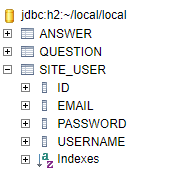
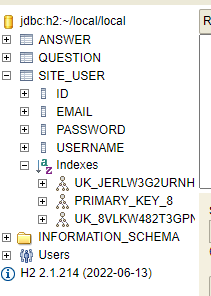
h2로 확인해보니 잘 들어와있는 걸 확인!
UserRepository.java
package com.mysite.sbb.user;

import org.springframework.data.jpa.repository.JpaRepository;

public interface UserRepository extends JpaRepository<SiteUser, Long> {
                                                // PK 타입은 Long이다.
}
UserService.java
package com.mysite.sbb.user;

import lombok.RequiredArgsConstructor;
import org.springframework.security.crypto.bcrypt.BCryptPasswordEncoder;

@RequiredArgsConstructor

public class UserService {
    private final UserRepository userRepository;

    public SiteUser create(String username, String email, String password){
        SiteUser user = new SiteUser();
        user.setUsername(username);
        user.setEmail(email);
        // BCryptPasswordEncoder는 BCrypt 해싱 함수를 사용해 비밀번호를 암호화한다.
        BCryptPasswordEncoder passwordEncoder = new BCryptPasswordEncoder();
        user.setPassword(passwordEncoder.encode(password));
        this.userRepository.save(user);
        return user;
    }
}
BCryptPasswordEncoder 객체를 직접 new로 생성하는 방식보다는,
PasswordEncoder 빈(bean)으로 등록해서 사용하는 것이 좋다.
왜냐하면, 암호화 방식을 변경하면 BCryptPasswordEncoder를 사용한 모든 프로그램을 일일이 찾아서 수정해야 하기 때문이다.
PasswordEncoder는 BCryptPasswordEncoder의 인터페이스이다.
SecurityConfig.java
PasswordEncoder 빈(Bean)을 만드는 가장 쉬운 방법은,
@Configuration이 적용된 SecurityConfig에 @Bean 메서드를 생성하는 것이다.
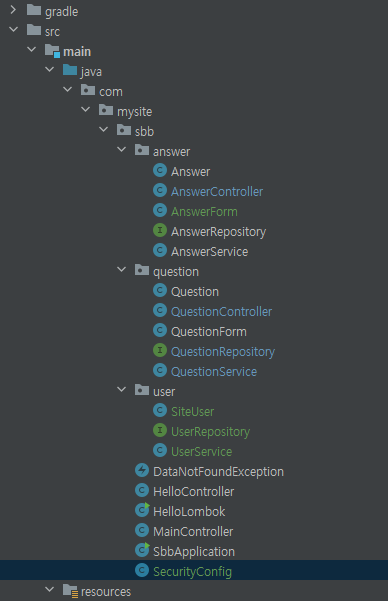
package com.mysite.sbb;

import org.springframework.context.annotation.Bean;
import org.springframework.context.annotation.Configuration;
import org.springframework.security.config.annotation.web.builders.HttpSecurity;
import org.springframework.security.config.annotation.web.configuration.EnableWebSecurity;
import org.springframework.security.crypto.bcrypt.BCryptPasswordEncoder;
import org.springframework.security.crypto.password.PasswordEncoder;
import org.springframework.security.web.header.writers.frameoptions.XFrameOptionsHeaderWriter;
import org.springframework.security.web.util.matcher.AntPathRequestMatcher;
import org.springframework.security.web.SecurityFilterChain;

@Configuration
@EnableWebSecurity
public class SecurityConfig {
    @Bean
    public SecurityFilterChain filterChain(HttpSecurity http) throws Exception {
        http.authorizeHttpRequests().requestMatchers(
                        new AntPathRequestMatcher("/**")).permitAll()
                .and()
                .csrf().ignoringRequestMatchers(
                        new AntPathRequestMatcher("/h2-console/**"))
                .and()
                .headers()
                .addHeaderWriter(new XFrameOptionsHeaderWriter(
                        XFrameOptionsHeaderWriter.XFrameOptionsMode.SAMEORIGIN))
        ;
        return http.build();
    }

    👉@Bean
    PasswordEncoder passwordEncoder(){
        return new BCryptPasswordEncoder();
    }
}
UserService.java
package com.mysite.sbb.user;

import lombok.RequiredArgsConstructor;
import org.springframework.security.crypto.bcrypt.BCryptPasswordEncoder;
import org.springframework.security.crypto.password.PasswordEncoder;

@RequiredArgsConstructor
@Service
public class UserService {
    private final UserRepository userRepository;
    👉private final PasswordEncoder passwordEncoder;

    public SiteUser create(String username, String email, String password){
        SiteUser user = new SiteUser();
        user.setUsername(username);
        user.setEmail(email);
        // BCryptPasswordEncoder는 BCrypt 해싱 함수를 사용해 비밀번호를 암호화한다.
        //BCryptPasswordEncoder passwordEncoder = new BCryptPasswordEncoder();
        user.setPassword(passwordEncoder.encode(password));
        this.userRepository.save(user);
        return user;
    }
}
회원가입 폼 클래스 작성
package com.mysite.sbb.user;

import jakarta.validation.constraints.Email;
import jakarta.validation.constraints.NotEmpty;
import jakarta.validation.constraints.Size;
import lombok.Getter;
import lombok.Setter;

@Getter
@Setter
public class UserCreateForm {
    @Size(min=3, max=25)
    @NotEmpty(message = "사용자ID는 필수항목입니다.")
    private String username;

    @NotEmpty(message = "비밀번호는 필수항목입니다.")
    private String password;

    @NotEmpty(message = "비밀번호 확인은 필수항목입니다.")
    private String password2;

    @NotEmpty(message = "이메일은 필수항목입니다.")
    @Email--ⓐ
    private String email;
}
ⓐ - 해당 속성의 값이 이메일 형식과 일치하는지를 검증한다.
UserController.java
package com.mysite.sbb.user;

import jakarta.validation.Valid;
import lombok.RequiredArgsConstructor;
import org.springframework.stereotype.Controller;
import org.springframework.validation.BindingResult;
import org.springframework.web.bind.annotation.GetMapping;
import org.springframework.web.bind.annotation.PostMapping;
import org.springframework.web.bind.annotation.RequestMapping;

@RequiredArgsConstructor
@Controller
@RequestMapping("user")
public class UserController {
    private final UserService userService;

    @GetMapping("/signup")
    public String signup(UserCreateForm userCreateForm){
        return "signup_form";
    }

    @PostMapping("/signup")
    public String signup(@Valid UserCreateForm userCreateForm, BindingResult bindingResult){
        if(bindingResult.hasErrors()){
            return "signup_form";
        }

        if(!userCreateForm.getPassword1().equals(userCreateForm.getPassword2())){
            bindingResult.rejectValue("password2", "passwordInCorrect", "2개의 패스워드가 일치하지 않습니다.");
            return "signup_form";
        }

        userService.create(userCreateForm.getUsername(), userCreateForm.getEmail(), userCreateForm.getPassword1());
        return "redirect:/";
    }
}
post 로 요청되면 회원가입을 진행하도록 했다.
회원가입시 비밀번호1과 비밀번호2가 동일한지 검증하는 로직,
두 개의 값이 일치하지 않을 경우에 오류 발생하도록 했다.
오류코드는 일단 passwordInCorrect로 했다.
bindingResult.rejectValue(필드명, 오류코드, 에러메시지)이다.
회원가입 폼 템플릿
// signup_form.html
<html layout:decorate="~{layout}">
<div layout:fragment="content" class="container my-3">
    <div class="my-3 border-bottom">
        <div>
            <h4>회원가입</h4>
        </div>
    </div>
    <form th:action="@{/user/signup}" th:object="${userCreateForm}" method="post">
        <div th:replace="~{form_errors :: formErrorsFragment}"></div>
        <div class="mb-3">
            <label for="username" class="form-label">사용자ID</label>
            <input type="text" th:field="*{username}" class="form-control">
        </div>
        <div class="mb-3">
            <label for="password1" class="form-label">비밀번호</label>
            <input type="password" th:field="*{password1}" class="form-control">
        </div>
        <div class="mb-3">
            <label for="password2" class="form-label">비밀번호 확인</label>
            <input type="password" th:field="*{password2}" class="form-control">
        </div>
        <div class="mb-3">
            <label for="email" class="form-label">이메일</label>
            <input type="email" th:field="*{email}" class="form-control">
        </div>
        <button type="submit" class="btn btn-primary">회원가입</button>
    </form>
</div>
</html>
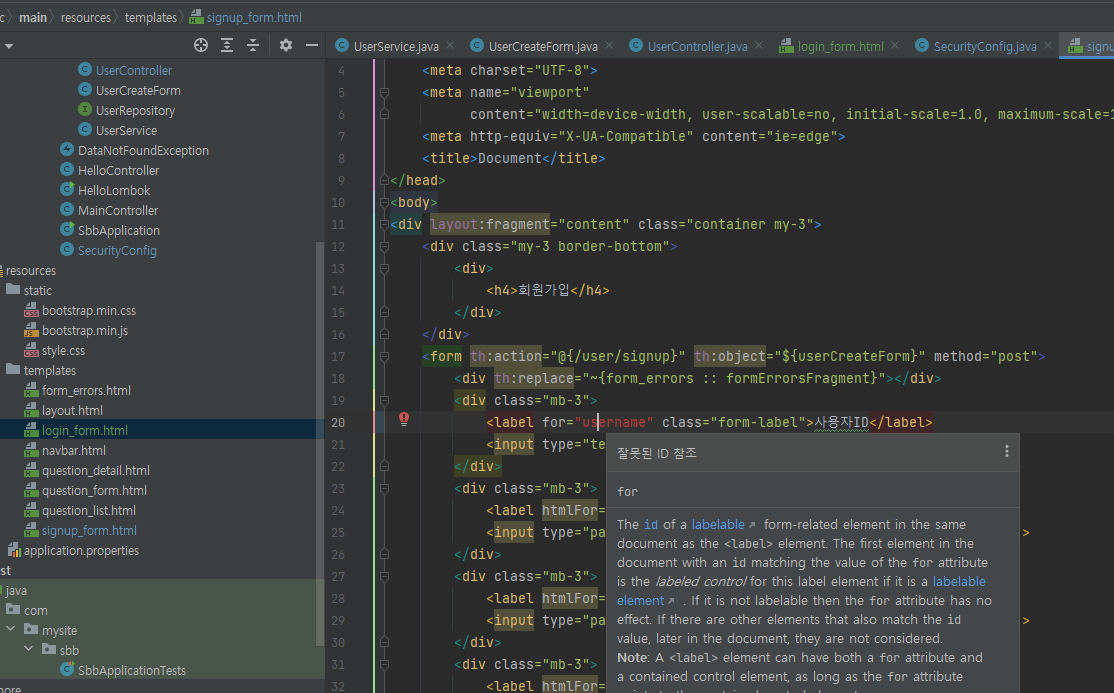
만약 label 태그의 for에서 오류가 발생한다면,
htmlFor로 고쳐보니 해결이 됐다.
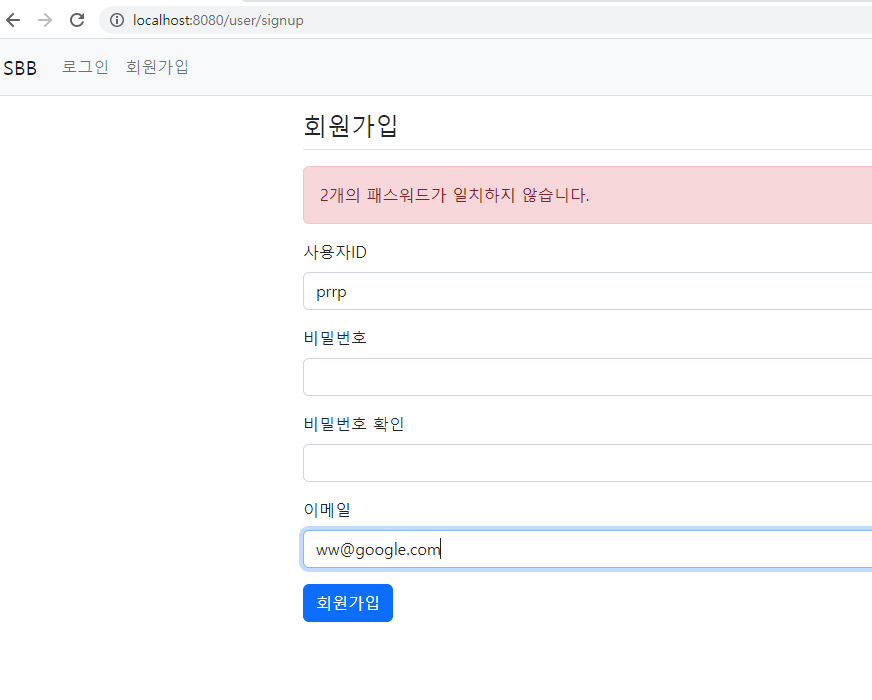
ID는 2글자 이상이 되어야 하고, 일부러 비밀번호를 다르게 입력했다. (이메일은 가짜)
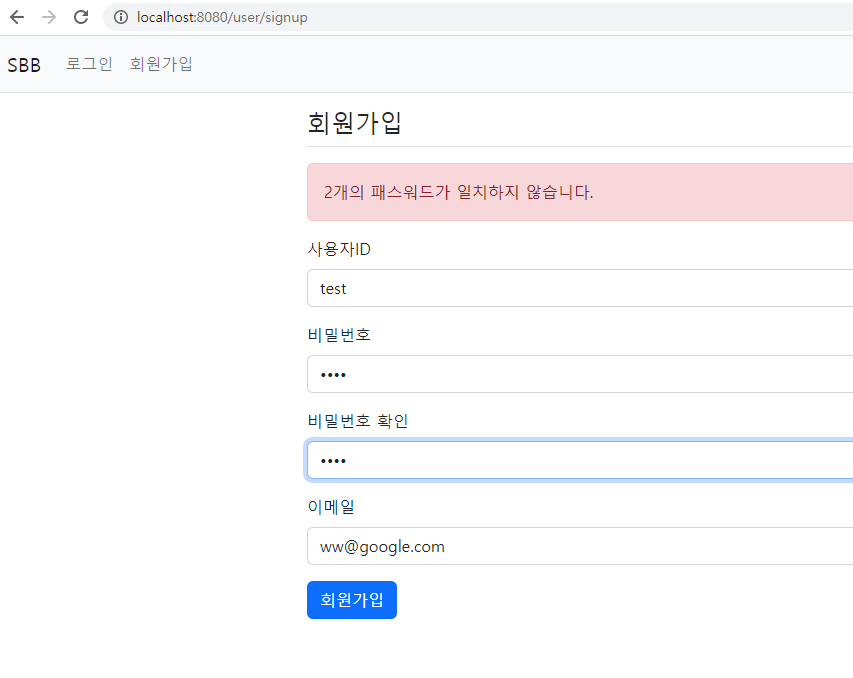
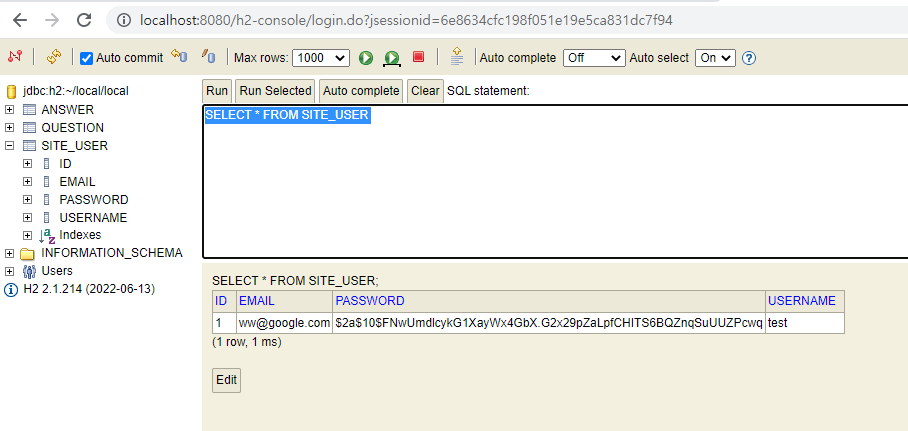
test / 1234로 회원가입을 했다.
h2-console로 확인해볼까?
중복 회원가입
동일한 사용자 ID 또는 동일한 이메일 주소로 사용자 데이터를 저장하는 것은
unique=true 설정으로 인해 허용되지 않기 때문에 오류가 발생하는 것은 당연하다.
하지만 이렇게 500 오류 메시지를 그대로 보여주는 것은 좋지 않다.
따라서, 회원가입 시 발생하는 오류를 다음과 같이 처리하도록 한다.
// UserController.java
package com.mysite.sbb.user;

import jakarta.validation.Valid;
import lombok.RequiredArgsConstructor;
import org.springframework.dao.DataIntegrityViolationException;
import org.springframework.stereotype.Controller;
import org.springframework.validation.BindingResult;
import org.springframework.web.bind.annotation.GetMapping;
import org.springframework.web.bind.annotation.PostMapping;
import org.springframework.web.bind.annotation.RequestMapping;

@RequiredArgsConstructor
@Controller
@RequestMapping("user")
public class UserController {
    private final UserService userService;

    @GetMapping("/signup")
    public String signup(UserCreateForm userCreateForm) {
        return "signup_form";
    }

    @PostMapping("/signup")
    public String signup(@Valid UserCreateForm userCreateForm, BindingResult bindingResult) {
        if (bindingResult.hasErrors()) {
            return "signup_form";
        }

        if (!userCreateForm.getPassword1().equals(userCreateForm.getPassword2())) {
            bindingResult.rejectValue("password2", "passwordInCorrect",
                    "2개의 패스워드가 일치하지 않습니다.");
            return "signup_form";
        }

        ✅try{
            userService.create(userCreateForm.getUsername(), userCreateForm.getEmail(), userCreateForm.getPassword1());
        }catch(DataIntegrityViolationException e){
            e.printStackTrace();
            bindingResult.reject("signupFailed", "이미 등록된 사용자입니다.");
            return "signup_form";
        }catch(Exception e){
            e.printStackTrace();
            bindingResult.reject("signupFailed", e.getMessage());
            return "signup_form";
        }

        userService.create(userCreateForm.getUsername(),
                userCreateForm.getEmail(), userCreateForm.getPassword1());

        return "redirect:/";
    }
}
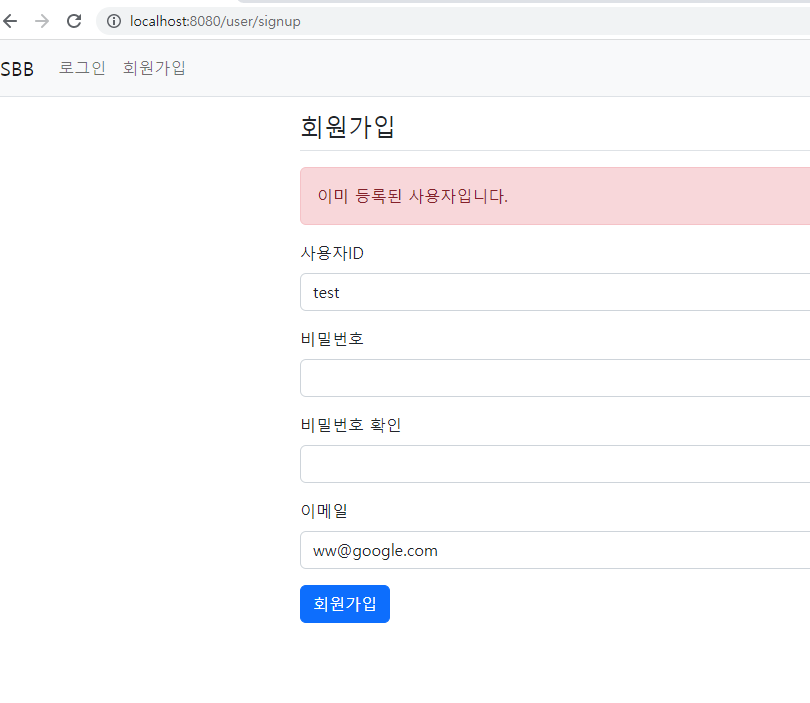
사용자 ID 또는 이메일 주소가 동일할 경우에는 DataIntegrityViolationException이 발생하므로, 이 예외가 발생할 경우 "이미 등록된 사용자입니다."
그 외는 해당 오류의 메시지를 발생하도록 했다.
bindingResult.reject(오류코드, 오류 메시지)는 특정 필드의 오류가 아닌 일반적인 오류를 등록할 때 사용한다.
이렇게 수정하고, 다시 동일한 사용자로 로그인을 하면 다음과 같이 정상적인 오류를 표시하는 화면을 볼 수 있다.