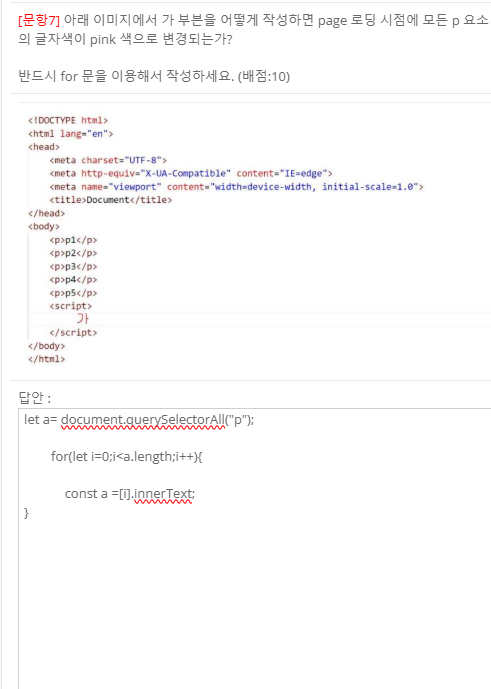
복습
-
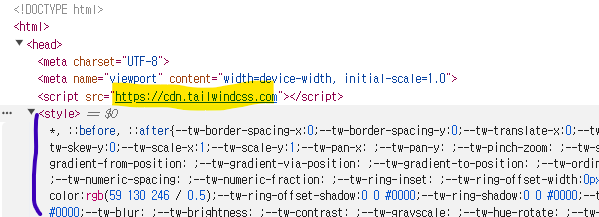
tailwindcss는 javascript로 < style>< /style>를 만들어서 부여함
-
javascript로 css요소를 만들어서 끼워넣기
-
cdn: 콘텐츠가 배달되는 위치(content delivery network)
-
css로 작성하지 말고 class로 작성하기
stylesheet(css 기초)
float
-
블록요소를 인라인 요소처럼 한 줄로 배치할 수 있음
-
이미지가 텍스트 옆에 존재하도록 배치
Step09_Float.html -
block요소를 inline 요소처럼 한줄로 배치
Step09_Float2.html -
위로 딱 붙음
-
물위에 찻잎 띄우듯이,,,
-
clear는 가루 치워~
display
Step10_Display~4.html
-
display : "none"->"block" :블럭요소를 보이게 함
-
: 공백을 뜻함
box-sizingd
Step15_boxSizing.html
border-box
content-box (default) | border-box
content-box : width 와 height 에 아무것도 포함하지 않음
border-box : width 와 height 에 padding 과 border 포함
css3
flex
Step05_flex.html
flex
- display:flex;
- 유연한 레이아웃
- 부모 요소부터 적용된다!
flex container의 주요 속성
-
flex-direction: row-reverse;
: 메인축이 어느 방향이냐에 따라서 달라짐 -
flex-wrap: nowrap;
: 담을 여유 공간이 없을 때 아이템의 줄바꿈 설정 -
justify-content: flex-start;
: 메인축의 방향
flex 아이템의 주요 속성
- 비율에 관한 개념
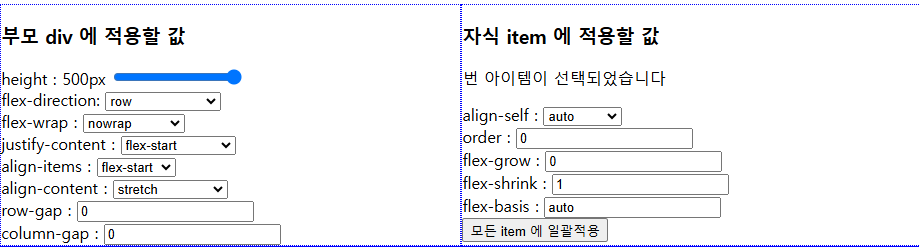
flex 아이템 연습
Step05_flexUtil.html
- bootstrap의 grid에 해당함
- bootstrap도 모두 flex를 사용함
- 부모의 속성부터 학습하기
<질문>
1.인라인 블럭 특징 언제 사용하는지?
- width, height, margin, padding 모두 가능
- 왼쪽과 오른쪽에 다른 요소가 올수 있다.
- < span>span 요소< /span>에서 띄어쓰기 해도 왜 안나오는가? 규칙임
3. 축의 방향
<작성순서>
b: tailwind.html
S
Step09_Float~3.html
Step09_Example.html
Step10_Display~4.html
Step15_boxSizing.html
C
Step05_flex.html
Step05_flexUtil.html