spring thymeleaf
spring의 서버
/spring04/ = static폴더를 말함
- spring boot는 배포는 jar파일로 하며 따로 서버를 잡지않아도 된다.
- html 응답은 jsp 혹은 view engine 을 사용해야 한다.
MODEL VIEW CONTROLLER(MVC)
- Model 은 spring framework 가 자동으로 만들어주니 필요한 데이터를 model에 담아라
- model에 담은 내용을 자동으로 request 에 담아준다.
- 모델 = 데이터 , view = template(jsp, thymelef...), controller
- 규모가 커졌을 때 유지보수가 쉬움 = MVC로 틀이 만들어져 있다.
thymeleaf 의 요소 및 기능
-
th가 붙은 곳은 thymeleaf가 해석한다.

-
@{} : context 경로를 알아서 출려해준다.


-
[[${ }]] : 참조된 내용을 보여준다.


-
참조된 내용을 속성 안에서 사용할 수 있다.

-
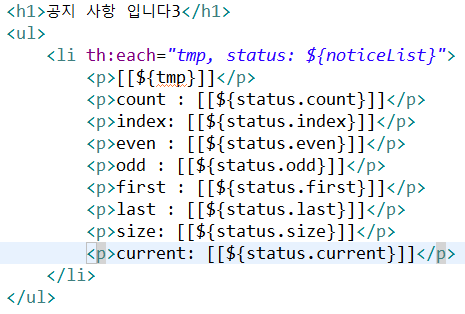
th:each : 배열에 담은 데이터를 보여준다. (반복문, 각 요소 접근했음)

-
status
-
status 활용 동적 css

today
조건부 렌더링
- th:if
- th:unless

- th:switch + th:case
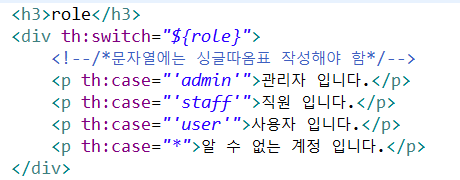
로그인 여부, 성인인증, 관리자 계정...등...
javascript

- dto는 참조값이 들어가는데...?
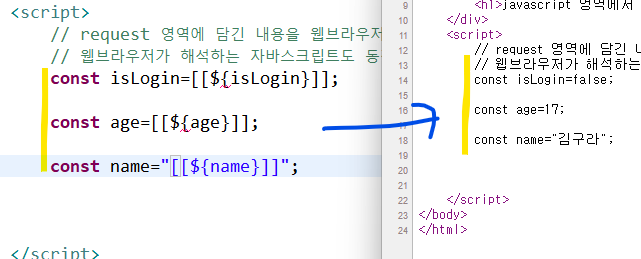
- th:inline : 자바스크립트에 바로 사용 가능하게 변환을 해줌

자동으로 오브젝트, 리스트 만들어 준다. + 이클립스 오류도 안뜸
include
-
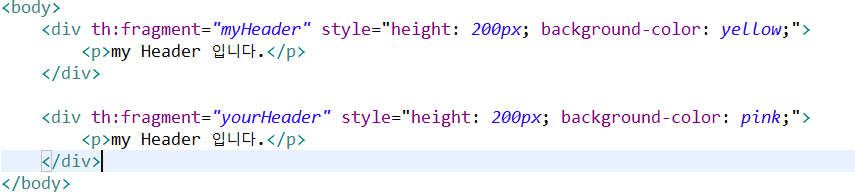
th:fragment
-
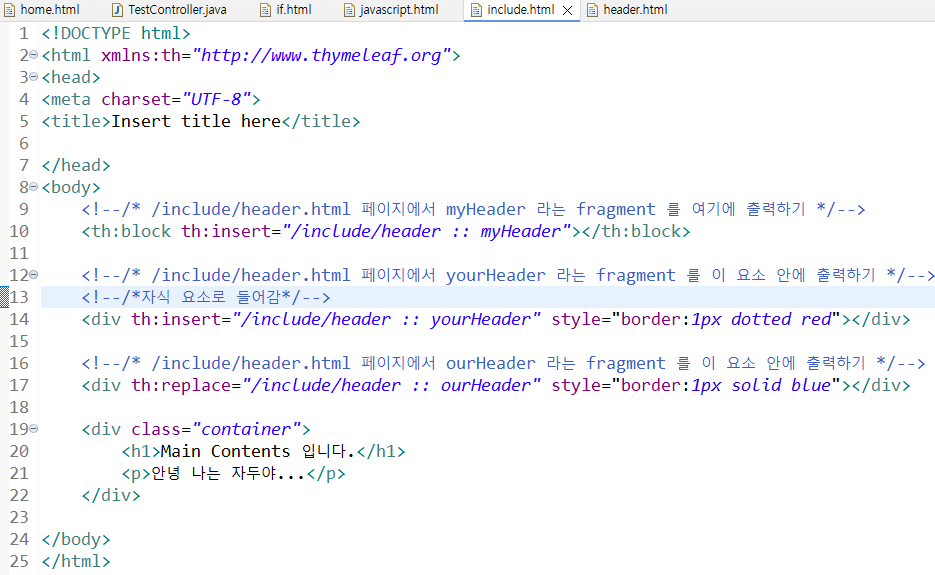
:: 은 조각 선택자
-
th:block , th:insert , th:replace
-
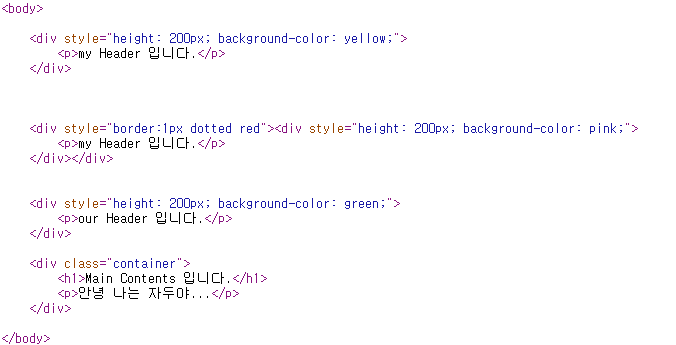
각 결과들...
-
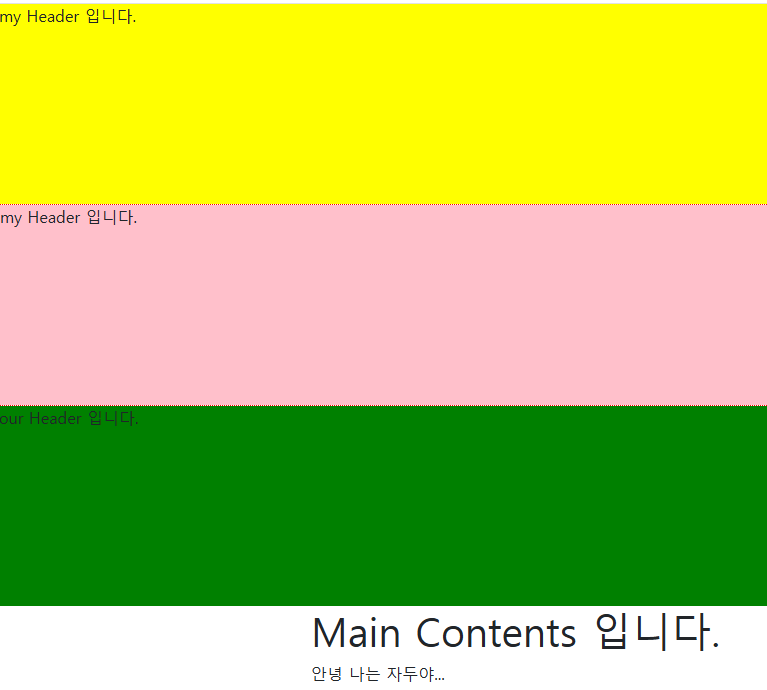
조회되는 화면
header, foother, resource 는 templates 안의 include 폴더 생성하고 작성하기
- title, content는 매개변수 역할


- unescape
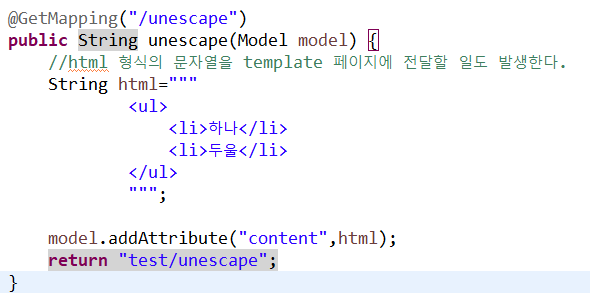
- 원래 동작은 html 로부터 탈출되어서 동작된다.
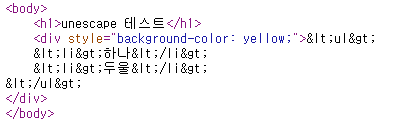
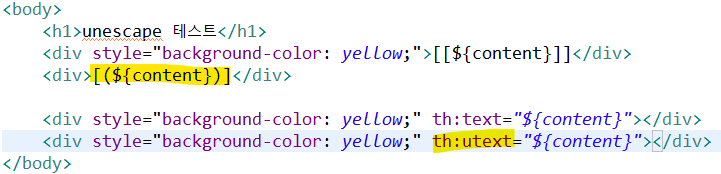
- 하지만 html의 문자열을 html 요소로 나타내고 싶을 때
[(${ })] 혹은 th:utext
DB 연동
-
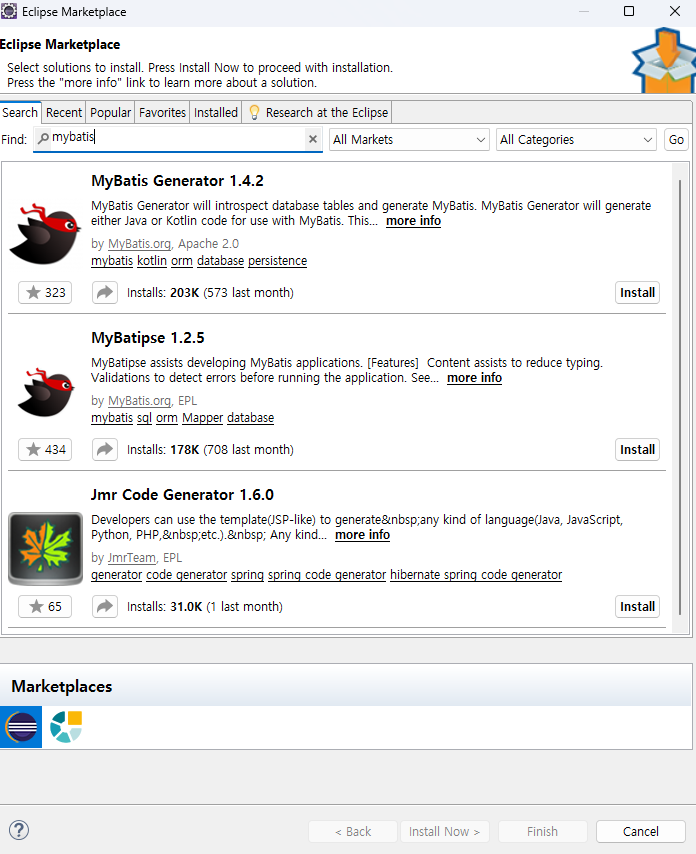
mybatis -> 1.4.2 랑 1.2.5 모두 설치하기
-
프로젝트 설정 : Oracle Driver, MyBatis Framework 체크하기
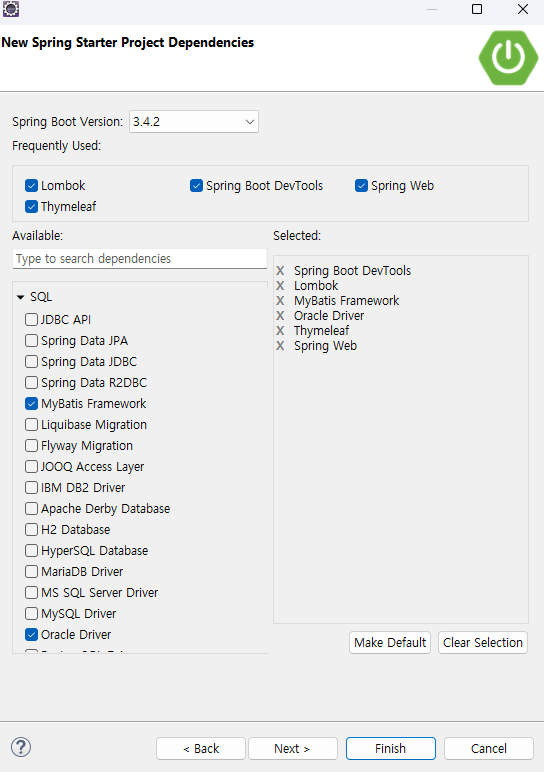
-
jsp 프로젝트의 context.xml 의 설정을 여기서 한다.
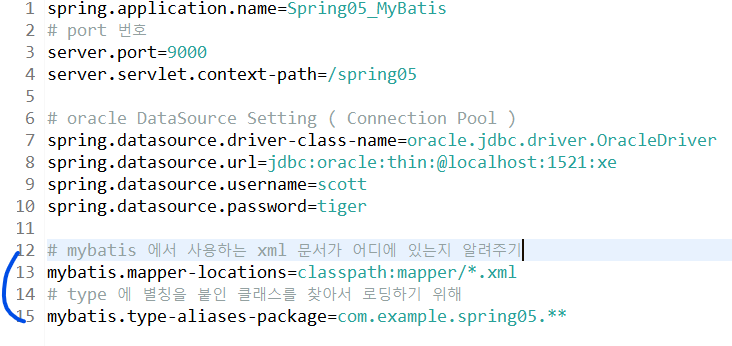
👉 MyBatis에서 SQL 쿼리가 적힌 XML 파일들이 어디 있는지 알려주는 설정!
예를 들어, UserMapper.xml, ProductMapper.xml 같은 파일들을 MyBatis가 알아서 사용하게 해줌.
👉 Java 객체 이름을 짧게 쓸 수 있도록 해주는 설정!
예를 들어, com.example.spring05.dto.UserDTO를 XML에서 UserDTO로만 써도 자동으로 매칭됨.
Dao 인터페이스 생성
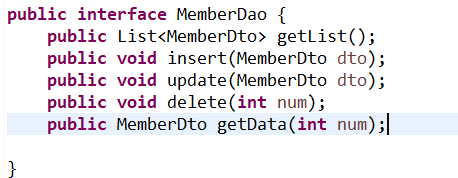
-
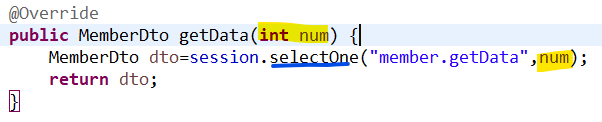
내가 선택한 열이 여러개 면 selectList , 내가 선택한 열이 하나면 selectOne
-
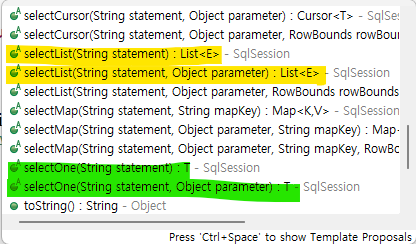
-
Mybatis는 sql문을 xml 문서로 실행할 sql문을 작성한다.
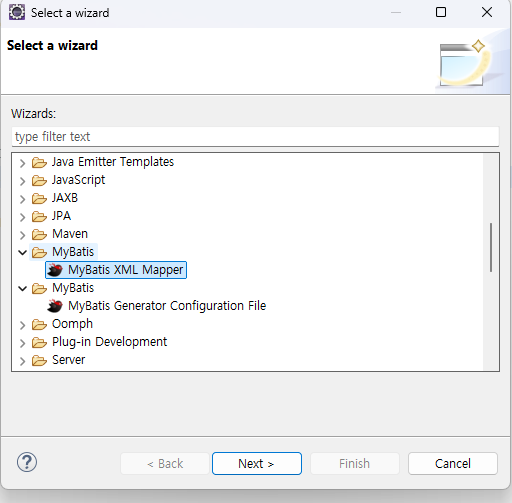
-
member 은 특정xml을 찾아가는 것이고 getList는 특정 sql문으로 찾아가는 것이다.
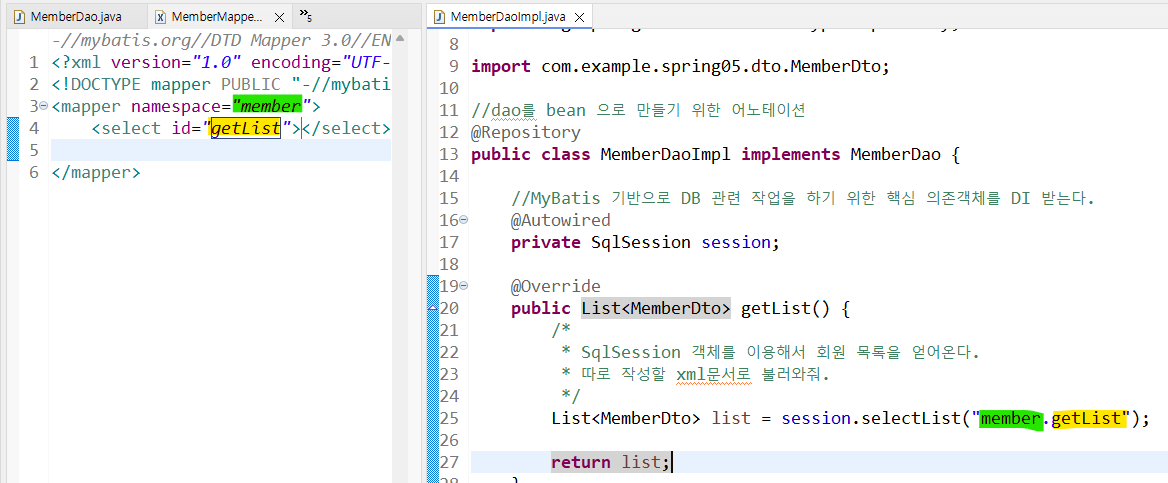
-
xml 문서
-
row 하나를 저기 MemberDto 에 담아라, select 된 row를 어떤 type 에 담을지 설정
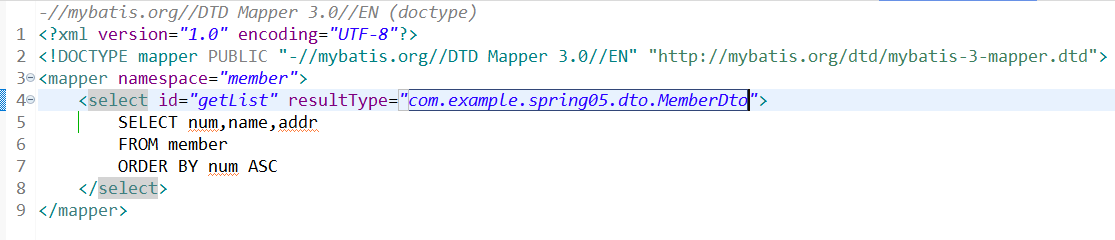
- getData
- 파라미터명을 넣어주고
Spring Bean Co
MemberController @Controller
MemberDalImpl @Repository
SplSession 객체 자체설정
@Autowired : 주입을 받아서 연관관계를 만든다. / container 안에서 서로 주입이 가능하다.
보안
- tbody
<table>
        <thead>
            <tr>
                <th>이름</th>
                <th>나이</th>
                <th>직업</th>
            </tr>
        </thead>
        <tbody>
            <tr> // 행
                <td>홍길동</td> // 셀
                <td>25</td>
                <td>개발자</td>
            </tr>
        </tbody>
</table>-
동적 파라미터 구성해보기

-
lombok 설치
java-templates에 chrome 추가하기
// 서버가 준비 되었을 때 실행할 메소드 설정
	@EventListener(ApplicationReadyEvent.class)
	public void openChrome() {
		String url="http://localhost:9000/spring03/";
		// 운영체제의 이름을 소문자로
		String os=System.getProperty("os.name").toLowerCase();
		ProcessBuilder builder=null;
		try {
			if(os.contains("win")) {
				builder=new ProcessBuilder("cmd.exe","/c","start chrome "+url);
			}else if(os.contains("mac")) {
				builder=new ProcessBuilder("/usr/bin/open","-a","Google chrome"+url);
			}else {
				System.out.println("지원 하지 않는 운영체제 입니다.");
				return;
			}
			builder.start();
		}catch (IOException e) {
			e.printStackTrace();
		}
	}
window > Preferences 로 가서 New Thymeleaf Page 생성하기
<!DOCTYPE html>
<html xmlns:th="http://www.thymeleaf.org">
<head>
<meta charset="UTF-8">
<title>Insert title here</title>
</head>
<body>

</body>
</html>