CRUD 구현 방법을 배우면서 구현했던 파일에 다시 가서 수정해보자.
저번엔 일회성 DB를 작성했으니 이번엔 JPA를 배운 만큼 연결해서 해보자.
UserRepository.java
@Service
public class UserRepository extends SimpleDataRepository<UserEntity, Long> {
    public List<UserEntity> findAllScoreGreaterThen(int score){
        return this.findAll()
                .stream()
                .filter(
                        it -> {
                            return it.getScore() >= score; //조건
                        }
                ).collect(Collectors.toList()); //전체 불러옴
    }
}
여기서 이제 수정해보자
@Service를 지우고 interface UserRepository, interface기 때문에 extends를 쓰고 JpaRepository를 상속받도록 하자.
public interface UserRepository extends JpaRepository<UserEntity, Long> {
}
UserEntity.java
@EqualsAndHashCode(callSuper = true)
@Data
@NoArgsConstructor
@AllArgsConstructor
@Builder
public class UserEntity extends Entity {

    private String name;
    private int score;

}
UserEntity에서는 extends Entity 와 @EqualsAndHashCode(callSuper = true)를 지우고,
참고할 테이블을 @Entity annotation을 사용해서 @Entity(name ="user")를 추가한다.
반드시 Primary Key에 해당되는 id를 가지고 있어야한다. 고로 @Id annotation과 @GeneratedValue에 이게 어떻게 생성되는지 속성을 지정한다.
@Data
@NoArgsConstructor
@AllArgsConstructor
@Builder
@Entity(name ="user")
public class UserEntity {
    @Id
    @GeneratedValue(strategy = GenerationType.IDENTITY)
    private Long id;
    private String name;
    private int score;

}
UserService에 가면 여기 id에 오류가 생기는데, Required type: UserEntity, Provided:Long 으로 돼 있다.
UserEntity
Provided:
Long
    public void delete (Long id){
        userRepository.delete(id);
    }
를
public void delete (UserEntity id){로 바꿔준다. 그러면 1 related problem이 뜨는데 Controller에
    @DeleteMapping("/id/{id}")
    public void delete(@PathVariable Long id) {
        userService.delete(id);
    }
와 오류가 난다. 일단 주석해주고
또 UserService에서 특정 점수 이상을 조회하기 위해 이걸 만들었었는데,
    public List<UserEntity> filterScore(int score){
        return userRepository.findAllScoreGreaterThen(score);
    }
findAllScoreGreaterThen에 오류가 난다.
JPA를 사용하게 되면 따로 Query문을 날리지 않고 Query method라는 것을 통해서, 즉 method를 통해서 Query를 날리는 방법을 사용하게 된다.
UserRepository에서 method를 만들자.
public interface UserRepository extends JpaRepository<UserEntity, Long> {
    public List<UserEntity> findAllByScoreGreaterThanEqual(int score);
}
다시 Service로 넘어와서
    public List<UserEntity> filterScore(int score){
        return userRepository.findAllByScoreGreaterThanEqual(score);
    }
로 수정한다.
CamelCase 기준으로 끊기 때문에 find all 모두 찾겠다, by 어디로 부터? (where절) ScoreGreaterThanEqual이 되는 것이다.
이와 관련한 공식 문서가 있다.
https://docs.spring.io/spring-data/jpa/docs/current-SNAPSHOT/reference/html/#jpa.query-methods
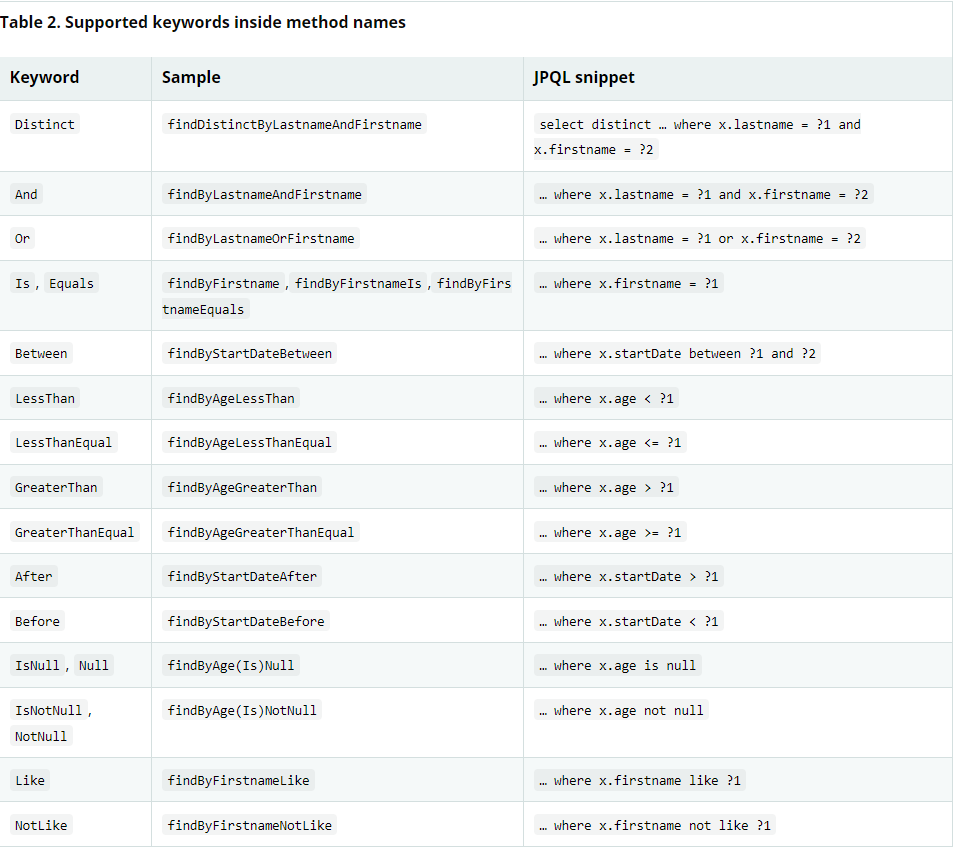
이런식으로 어떤식으로 구성해야하는지 나온다.
다시 Repository로 돌아와서
select * from user where score >= ?? AND score <= ??에 해당하는 것을 작성해보자. 최대 점수와 최소 점수도 넣자.
List<UserEntity> findAllByScoreGreaterThanEqualAndScoreLessThanEqual(int min, int max);Controller로 가서 입력했던 아래 코드 방식을 바탕으로
    @GetMapping("/")
    public List<UserEntity> filterScore(
        @RequestParam int score
    ){
        return userService.filterScore(score);
    }
아래처럼 수정해주고
    @GetMapping("/min_max")
    public List<UserEntity> filterScore(
            @RequestParam int min,
            @RequestParam int max
    ){
        return userService.filterScore(min, max);
Service에
    public List<UserEntity> filterScore(int score){
        return userRepository.findAllByScoreGreaterThanEqual(score);
    }
와 같은 방식으로
    public List<UserEntity> filterScore(int min, int max){
        return userRepository.findAllByScoreGreaterThanEqualAndScoreLessThanEqual(min, max);
    }
로 작성해준다.
api tester에
http://localhost:8080/api/user/min_max?min=90&max=100 를 send하면
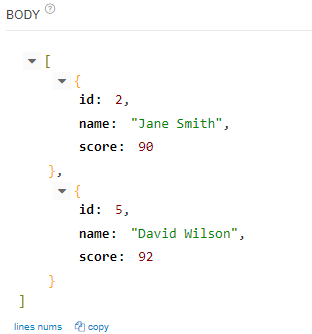
제대로 나온다.
종종 복잡한 Query를 사용해야할 때도 있고 join을 통해서 할 때도 있는데, 어떻게 해야하는지 알아보자.
우선 List<UserEntity> score(int min, int max);를 쓰고 위에 @Query라는 annotation을 사용해야한다.
@Query("select u from user u where u.score >= ?1 AND u.score <= ?2") 를 위에 작성하고 testapi에서 send하면 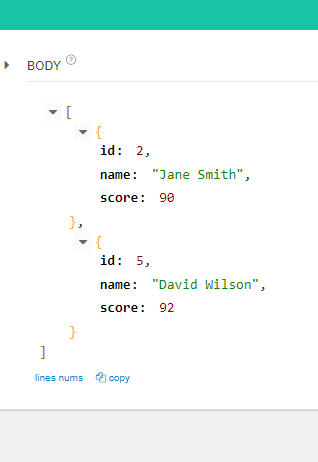
똑같은 결과가 나온다.
이번엔 다른 방법으로 이렇게 할 수도 있다.
    @Query(value = "select * from user as u where u.score >= ?1 AND u.score <= ?2",
    nativeQuery = true
    )
1 2가 아니라 3 4 ... 더 늘어날 경우 바인딩 할 수 있다.
앞에 @Param annotation을 붙이고 value를 준다.
    List<UserEntity> score(
            @Param(value ="min") int min,
            @Param(value ="max") int max);
이렇게 바꿨으니 @Query도 바꿔준다.
    @Query(value = "select * from user as u where u.score >= :min AND u.score <= :max",
    nativeQuery = true
    )
방식은 Query method 활용 방식, native query 사용 방식, JPQL을 쓸 수 있다.
Parameter를 바인딩하는 방식은 @Param을 쓰거나 ?1, ?2 처럼 순서대로 하는 방식을 사용할 수 있다.
