8월 20일 금
학습한 내용
왼쪽 사이드 고정 영역 완성
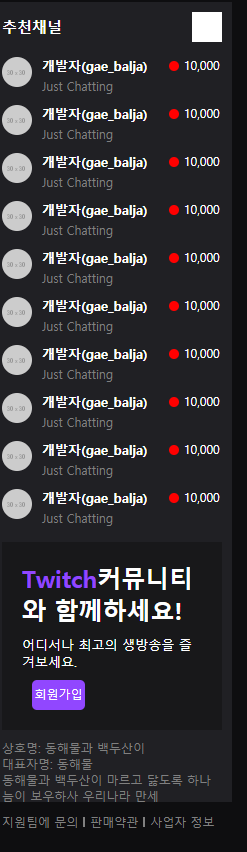
<nav id="top-nav">

	<div class="nav-wrap">

		<div class="nav-left">
			<h1 class="logo">
				<a href="#">
					<img src="https://via.placeholder.com/24x28">
				</a>
			</h1>
			<ul>
				<li><a href="#">탐색</a></li>
				<li><a href="#">e스포츠</a></li>
				<li><a href="#">음악</a></li>
			</ul>
			<div class="more">
				<a href="#">더보기</a>
			</div>
		</div>

		<div class="nav-center">
			<div class="search-wrap">
				<input type="text" placeholder="검색">
				<button class="btn-search"></button>
			</div>
		</div>

		<div class="nav-right">
			<div class="mark-wrap">
				<i class="icon-mark"></i>
				<span class="alarm">44</span>
			</div>

			<a href="#" class="btn-login">로그인</a>
			<a href="#" class="btn-purple">회원가입</a>
			<button class="btn-profile"></button>
		</div>

	</div>

</nav>


<div class="main-container">

	<div class="left-area">
		<div class="channel-wrap">
			<div class="channel-header">
				<h3>추천채널</h3>
				<i class="icon-arrow"></i>
			</div>

			<div class="channel-body">
				<ul>
					<li>
						<a href="#">
							<img src="https://via.placeholder.com/30">
							<div class="txt-wrap">
								<h4>개발자(gae_balja)</h4>
								<span class="source">Just
								Chatting</span>
							</div>
							<span class="count">10,000</span>
						</a>
					</li>
					<li>
						<a href="#">
							<img src="https://via.placeholder.com/30">
							<div class="txt-wrap">
								<h4>개발자(gae_balja)</h4>
								<span class="source">Just
								Chatting</span>
							</div>
							<span class="count">10,000</span>
						</a>
					</li>
					<li>
						<a href="#">
							<img src="https://via.placeholder.com/30">
							<div class="txt-wrap">
								<h4>개발자(gae_balja)</h4>
								<span class="source">Just
								Chatting</span>
							</div>
							<span class="count">10,000</span>
						</a>
					</li>
					<li>
						<a href="#">
							<img src="https://via.placeholder.com/30">
							<div class="txt-wrap">
								<h4>개발자(gae_balja)</h4>
								<span class="source">Just
								Chatting</span>
							</div>
							<span class="count">10,000</span>
						</a>
					</li>
					<li>
						<a href="#">
							<img src="https://via.placeholder.com/30">
							<div class="txt-wrap">
								<h4>개발자(gae_balja)</h4>
								<span class="source">Just
								Chatting</span>
							</div>
							<span class="count">10,000</span>
						</a>
					</li>
					<li>
						<a href="#">
							<img src="https://via.placeholder.com/30">
							<div class="txt-wrap">
								<h4>개발자(gae_balja)</h4>
								<span class="source">Just
								Chatting</span>
							</div>
							<span class="count">10,000</span>
						</a>
					</li>
					<li>
						<a href="#">
							<img src="https://via.placeholder.com/30">
							<div class="txt-wrap">
								<h4>개발자(gae_balja)</h4>
								<span class="source">Just
								Chatting</span>
							</div>
							<span class="count">10,000</span>
						</a>
					</li>
					<li>
						<a href="#">
							<img src="https://via.placeholder.com/30">
							<div class="txt-wrap">
								<h4>개발자(gae_balja)</h4>
								<span class="source">Just
								Chatting</span>
							</div>
							<span class="count">10,000</span>
						</a>
					</li>
					<li>
						<a href="#">
							<img src="https://via.placeholder.com/30">
							<div class="txt-wrap">
								<h4>개발자(gae_balja)</h4>
								<span class="source">Just
								Chatting</span>
							</div>
							<span class="count">10,000</span>
						</a>
					</li>
					<li>
						<a href="#">
							<img src="https://via.placeholder.com/30">
							<div class="txt-wrap">
								<h4>개발자(gae_balja)</h4>
								<span class="source">Just
								Chatting</span>
							</div>
							<span class="count">10,000</span>
						</a>
					</li>
				</ul>
			</div>

		</div>

		<div class="join-wrap">

			<div class="txt-wrap">
				<h2><span class="font-purple">Twitch</span>커뮤니티와 함께하세요!</h2>
				<p>어디서나 최고의 생방송을 즐겨보세요.</p>
				<button type="button" class="btn-purple">회원가입
				</button>
			</div>

		</div>

		<div class="info-wrap">

			<p>상호명: 동해물과 백두산이</p>
			<p>대표자명: 동해물</p>
			<p>동해물과 백두산이 마르고 닳도록 하나늠이 보우하사 우리나라 만세</p>

			<ul>
				<li><a href="#">지원팀에 문의</a></li>
				<li><a href="#">판매약관</a></li>
				<li><a href="#">사업자 정보</a></li>
			</ul>

		</div>

	</div>

	<div class="content">

	</div>

</div>html, body {
width: 100%;
height: 100%;
}
body {
background-color: #0e0e10;
}
ol, ul {
list-style: none;
}
a {
text-decoration: none;
}
img {
vertical-align: top;
}
input {
outline: none;
border: none;
}
button {
outline: none;
border: none;
background: transparent;
}
h1, h2, h3, h4, h5, h6, p, span, input, button, a {
color: #ffffff;
}
.btn-purple {
background-color: #9147ff;
color: #ffffff;
}
.font-purple {
color: #9147ff;
}
/상단 네비 영역/
#top-nav {
position: fixed;
width: 100%;
height: 50px;
background-color: #0e0e10;
padding: 0 15px;
min-width: 1340px;}
#top-nav .nav-wrap {
display: flex;
flex-wrap: wrap;
justify-content: space-between;
align-items: center;
}
#top-nav .nav-wrap .nav-left {
display: flex;
flex-wrap: wrap;
justify-content: flex-start;
align-items: center;
}
#top-nav .nav-wrap .nav-left .logo {
}
#top-nav .nav-wrap .nav-left .logo a {
}
#top-nav .nav-wrap .nav-left .logo a img {
width: 24px;
height: 28px;
}
#top-nav .nav-wrap .nav-left ul {
display: flex;
flex-wrap: wrap;
justify-content: flex-start;
align-items: center;
}
#top-nav .nav-wrap .nav-left ul li {
height: 50px;
font-size: 20px;
padding: 0 20px;
}
#top-nav .nav-wrap .nav-left ul li a {
display: block;
width: 100%;
height: 100%;
line-height: 50px;
}
#top-nav .nav-wrap .nav-left ul li:first-child {
padding-right: 0;
}
#top-nav .nav-wrap .nav-left ul li:first-child a:after {
position: relative;
display: inline-block;
content: '';
width: 1px;
height: 30px;
background-color: grey;
margin-left: 20px;

top: 8px;
}
#top-nav .nav-wrap .nav-left .more a {
display: block;
font-size: 20px;
height: 50px;
line-height: 50px;
padding-left: 20px;
}
#top-nav .nav-center {
position: absolute;
left: 50%;
transform: translateX(-50%);
}
#top-nav .nav-center .search-wrap {
display: flex;
flex-wrap: wrap;
justify-content: space-between;
align-items: center;
width: 380px;
height: 36px;
background-color: yellow;
overflow: hidden;
border-radius: 5px;
}
#top-nav .nav-center .search-wrap input {
width: calc(100% - 34px);
height: 100%;
background-color: grey;
}
#top-nav .nav-center .search-wrap .btn-search {
width: 34px;
height: 100%;
background-color: darkgrey;
}
#top-nav .nav-right {
display: flex;
flex-wrap: wrap;
justify-content: flex-end;
align-items: center;
}
#top-nav .nav-right .mark-wrap {
position: relative;
}
#top-nav .nav-right .mark-wrap .icon-mark {
display: block;
width: 20px;
height: 20px;
background-color: yellow;
cursor: pointer;}
#top-nav .nav-right .mark-wrap .alarm {
position: absolute;
border-radius: 15px;
background-color: red;
color: #ffffff;
font-size: 14px;
top: -12px;
right: -20px;
padding: 4px 8px 2px;
}
#top-nav .nav-right .btn-login {
width: 53px;
height: 30px;
border-radius: 5px;
background-color: grey;
text-align: center;
line-height: 30px;

margin-left: 20px;

font-size: 12px;
}
#top-nav .nav-right .btn-purple {
width: 53px;
height: 30px;
border-radius: 5px;
text-align: center;
line-height: 30px;

margin-left: 10px;
font-size: 12px;
}
#top-nav .nav-right .btn-profile {
width: 20px;
height: 20px;
background-color: #ffffff;
margin-left: 10px;}
.main-container {
width: 100%;
min-width: 1340px;
/*padding-top: 50px;*/}
.left-area {
position: fixed;
width: 240px;
background-color: #202024;
top: 50px;
bottom: 0;
left: 0;
overflow-y: auto;
}
.left-area .channel-wrap {
}
.left-area .channel-wrap .channel-header {
display: flex;
flex-wrap: wrap;
justify-content: space-between;
align-items: center;
padding: 10px;}
.left-area .channel-wrap .channel-header h3 {
font-size: 15px;
}
.left-area .channel-wrap .channel-header .icon-arrow {
display: inline-block;
width: 30px;
height: 30px;
background-color: #ffffff;
}
.left-area .channel-wrap .channel-body {
}
.left-area .channel-wrap .channel-body ul {
}
.left-area .channel-wrap .channel-body li {
}
.left-area .channel-wrap .channel-body a {
display: flex;
flex-wrap: wrap;
align-items: flex-start;
padding: 5px 10px;}
.left-area .channel-wrap .channel-body img {
width: 30px;
height: 30px;
border-radius: 50%;
}
.left-area .channel-wrap .channel-body .txt-wrap {
width: 110px;
margin-left: 10px;
}
.left-area .channel-wrap .channel-body .txt-wrap h4 {
font-size: 13px;
}
.left-area .channel-wrap .channel-body .txt-wrap .source {
font-size: 12px;
color: grey;
}
.left-area .channel-wrap .channel-body .count {
display: block;
width: 53px;
font-size: 12px;
}
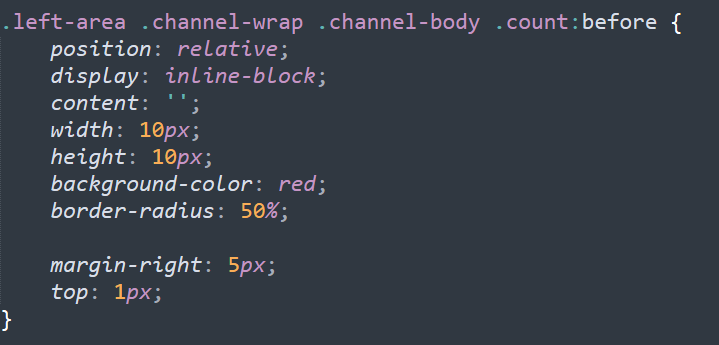
.left-area .channel-wrap .channel-body .count:before {
position: relative;
display: inline-block;
content: '';
width: 10px;
height: 10px;
background-color: red;
border-radius: 50%;
margin-right: 5px;
top: 1px;
}
.left-area .join-wrap {
margin: 10px;
}
.left-area .join-wrap .txt-wrap{
background-color: #18181a;
padding: 20px;
}
.left-area .join-wrap .txt-wrap h2 {
font-size: 24px;
}
.left-area .join-wrap .txt-wrap h2 span {
}
.left-area .join-wrap .txt-wrap p {
margin-top: 10px;
font-size: 13px;
}
.left-area .join-wrap .txt-wrap .btn-purple {
width: 53px;
height: 30px;
border-radius: 5px;
margin-left: 10px;
text-align: center;
line-height: 30px;
font-size: 12px;
margin-top: 10px;}
.left-area .info-wrap {
font-size: 12px;
margin: 0 10px 10px 10px;}
.left-area .info-wrap p {
color: grey;
}
.left-area .info-wrap ul {
display: flex;
flex-wrap: wrap;
align-items: center;
margin-top: 10px;}
.left-area .info-wrap li {
}
.left-area .info-wrap li a {
color: grey;
}
.left-area .info-wrap li a:after {
position: relative;
display: inline-block;
content: '';
width: 2px;
height: 10px;
background-color: grey;
margin: 0 5px;}
.left-area .info-wrap li:last-child a:after {
content: none;
}
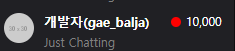
빨간점 만들기
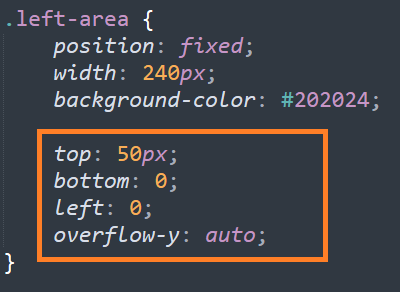
오늘 만든 영역 브라우저 크기에 따라 변하도록 고정시키기
학습한 내용 중 어려웠던 점 또는 해결못한 것들
없었음 오늘은
해결방법 작성
학습 소감

이런 화면을
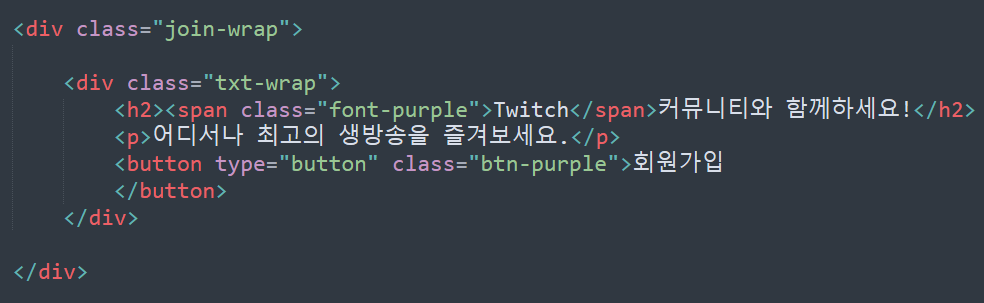
이렇게 뼈대와
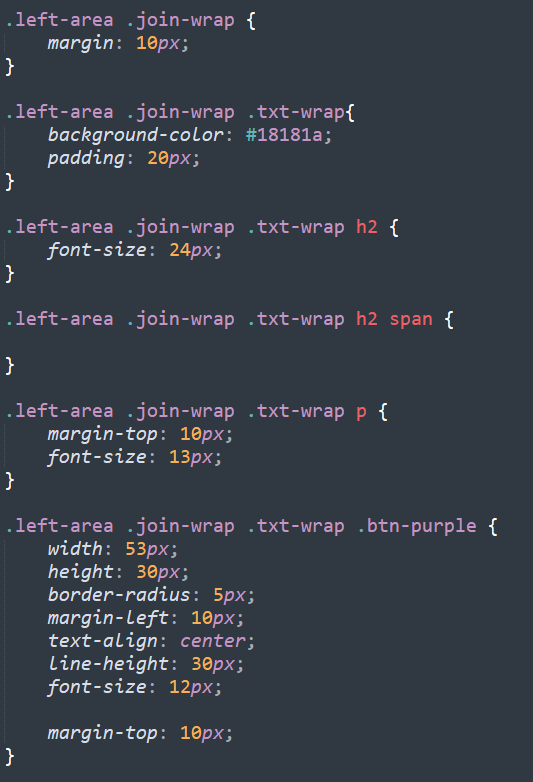
또 이렇게 색을 입혀 표현이 가능하다는게 신기했다.