이번시간에는 View에 대해 알아보는 시간이다.
Welcome Page
static폴더안에 index.html파일 생성
스프링 부트가 제공하는 Welcome Page 기능
static/index.htmlWelcome page 기능을 제공
서버를 실행시키면 home의 기능을하는 페이지가 출력된다
깨알 정보
스프링의 생태계는 어마어마하게 커졌고, 스프링부트는 그런 스프링의 전반을 감싼형태로 수많은 각종 편의기능을 제공한다 그러므로 그 많은 것들을 다 알수는 없으므로 필요한 것을 찾는 능력이 필요!
- 메뉴얼 검색
spring.io 접속 -> Project탭 Spring Boot -> 아래 두번째 탭 Learn 원하는 버전의 Reference Doc. 선택 -> 보고싶은 챕터선택
진입점 (Controller) 만들기
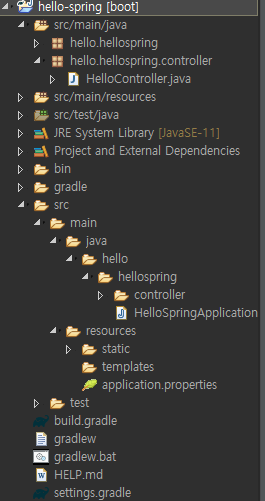
src폴더 안에 controller패키지 생성, HelloController클래스 생성
package hello.hellospring.controller;

import org.springframework.stereotype.Controller;
import org.springframework.ui.Model;
import org.springframework.web.bind.annotation.GetMapping;

@Controller
public class HelloController {
	@GetMapping("hello")
	public String hello(Model model) {
		model.addAttribute("data", "hello!!");
		return "hello";
	}
}
우선은 따라서 타이핑하라고 하셔서 정신없이 치고있다 ㅋㅋㅋ
이 클래스가 @Controller라는것을 annotation을 통해 알려주고
@GetMapping("hello") Mapping의 value를 hello로 준다
import org.springframework.ui.Model;의 Model은 MVC패턴의 그 Model이라고 한다
웹어플리케이션에서 /hello 주소가 들어오면 @GetMapping("hello")아래의 메소드를 호출해준다 -> 스프링의 자체기능!
thymeleaf를 사용한 hello.html 파일 생성
그리고 이번에는 아까 예시로 만들었던 static폴더 대신 thymeleaf가 들어가는 templates폴더에
hello.html생성
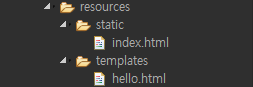
hello.html
<!DOCTYPE HTML>
<html xmlns:th="http://www.thymeleaf.org">
<head>
 <title>Hello</title>
 <meta http-equiv="Content-Type" content="text/html; charset=UTF-8" />
</head>
<body>
<p th:text="'안녕하세요. ' + ${data}" >안녕하세요. 손님</p>
</body>
</html>
<html xmlns:th="http://www.thymeleaf.org"> thymeleaf를 사용하겠다고 선언
th로 사용
스프링 서버 재시작/실행
http://localhost:8080/hello

간단한 동작원리 + 템플릿엔진의 동작
- /hello주소가 들어오고
@GetMapping("hello")가 주소를 받아서public String hello(Model model)메소드를 실행- 메소드 내부
model.addAttribute("data", "hello!!");에서 스프링이 Model객체를 만들어서attributeName : "data", attributevalue : "hello!!"를 처리해준다hello.html의${data}부분이 attributeName이므로 그 이름의 값에 해당하는 attributevalue의 hello!!를 대입시켜준다return "hello"는 resources/templates/파일명.html이 기본경로로 지정되어있으므로(thymeleaf 템플릿엔진 기본경로) 다시 /hello창을 띄운다(viewResolver)가 하는일
