학습 주제
- DataFrame 더 심도 있게 활용
01 DataFrame활용-데이터셋개요와행조회(loc,duplicated)
- 데이터셋 준비
- 타이타닉 Dataset
titanic_df =pd.read_excel('titanic3.xls')
titanic_df- About Dataset
타이타닉 데이터셋은 타이타닉호의 침몰 사건과 관련된 정보를 담고 있습니다.
타이타닉호는 역사상 가장 유명한 난파선 사건 중 하나입니다.
1912년 4월 15일, 타이타닉호는 첫 항해 중에 있던 도중에 빙산과 충돌하여 침몰했습니다.
이 배는 "침몰하지 않을 것"이라고 여겨져 왔지만,
탑승자들을 위한 구명보트가 충분하지 않아 2224명의 승객과 선원 중 1502명이 목숨을 잃었습니다.
생존에는 일부 운이 개입되었지만,
특정 그룹의 사람들은 다른 사람들보다 생존할 가능성이 더 높은 것으로 보입니다.
이 과제에서는 승객들의 데이터(예: 이름, 나이, 성별, 사회경제적 지위 등) 를 사용하여
"어떤 종류의 사람들이 생존할 가능성이 더 높았는가?" 라는 예측 모델을 구축하도록 요청합니다.
- 예상해볼 수 있는 분석
생존율 분석
승객들의 특성(성별, 나이, 객실 등급 등)에 따른 생존율을 분석할 수 있습니다.
어떤 그룹의 사람들이 생존할 가능성이 높았는지, 그들의 특징은 무엇인지 알 수 있습니다.
특성 엔지니어링
데이터셋에는 승객의 이름, 성별, 나이, 객실 등급, 승선 항구 등 다양한 특성이 포함되어 있습니다.
이러한 특성들을 활용하여 새로운 특성을 만들어내거나 범주형 특성을 수치형으로 변환할 수 있습니다.
데이터 시각화
데이터셋을 시각화하여 생존 여부와 관련된 패턴이나 상관관계를 탐색할 수 있습니다.
막대 그래프, 히스토그램, 상자 그림, 히트맵 등 다양한 시각화 기법을 사용하여 데이터를 탐색하고 이해할 수 있습니다.
예측 모델링
타이타닉 데이터셋을 사용하여 생존 여부를 예측하는 머신 러닝 모델을 개발할 수 있습니다.
다양한 알고리즘을 사용하여 모델을 학습하고 테스트하여 최적의 모델을 찾을 수 있습니다.
특성 중요도 분석
학습된 모델을 통해 각 특성의 중요도를 분석할 수 있습니다.
어떤 특성이 생존 예측에 가장 중요한 역할을 하는지 파악할 수 있습니다.
- 항목 설명
| 항목 | 설명 |
|---|---|
| pclass | Passenger Class (1 = 1st; 2 = 2nd; 3 = 3rd), 승객의 등급 (1 = 1등급, 2 = 2등급, 3 = 3등급) |
| survived | Survival (0 = No; 1 = Yes), 생존 여부 (0 = 생존하지 않음, 1 = 생존) |
| name | Name, 이름 |
| sex | Sex, 성별 |
| age | Age, 나이 |
| sibsp | Number of Siblings/Spouses Aboard, 함께 탑승한 형제자매/배우자의 수 |
| parch | Number of Parents/Children Aboard, 함께 탑승한 부모/자녀의 수 |
| ticket | Ticket Number, 티켓 번호 |
| fare | Passenger Fare (British pound), 승객 요금 (영국 파운드) |
| cabin | Cabin, 객실 번호 |
| embarked | Port of Embarkation (C = Cherbourg; Q = Queenstown; S = Southampton), 탑승 항구 (C = 쉐르부르, Q = 퀸스타운, S = 사우샘프턴) |
| boat | Lifeboat, 구명보트 번호 |
| body | Body Identification Number, 시신 식별 번호 |
| home.dest | Home/Destination, 거주지/목적지 |
- 특이사항
Pclass는 사회경제적 지위(SES)를 나타내는 대리 변수입니다.
1등급은 상류층, 2등급은 중산층, 3등급은 하류층을 대표합니다.
Age는 연령으로 표시되며, 만약 1보다 적은 경우 소수점으로 표현됩니다.
만약 연령이 추정된 경우 xx.5와 같은 형식으로 표시됩니다.
Fare는 1970년 이전의 영국 파운드로 표시됩니다.
- 환산 계수: 1 파운드 = 12 실링 = 240 페니, 1 실링 = 20 페니
가족 관계 변수인 sibsp와 parch에 대해서는 일부 관계가 무시되었습니다.
- 다음은 sibsp와 parch에 사용된 정의입니다.
- Sibling: 타이타닉호에 함께 탑승한 형제, 자매, 이복형제, 이복자매
- Spouse: 타이타닉호에 함께 탑승한 남편 또는 아내 (연인과 약혼자는 제외)
- Parent: 타이타닉호에 함께 탑승한 어머니 또는 아버지
- Child: 타이타닉호에 함께 탑승한 아들, 딸, 이복아들, 이복딸
이 연구에서 제외된 다른 가족 관계에는 사촌, 조카, 이모, 고모, 시부모 등이 포함됩니다.
- 일부 아이들은 유모와 함께만 여행했으므로, 그들에 대해서는 parch=0으로 표시되었습니다.
- 또한, 일부 사람들은 아주 가까운 친구나 이웃과 함께 여행했지만, 이러한 관계는 정의에서 지원되지 않습니다.
-
dtype 등 info 파악
-
데이터 행은 총 1309개
-
pclass, survived, name, sex, sibsp, parch, ticket 은 결측치 없음
-
age, fare, cabin, embarked, boat, body, home.dest는 결측치 있음.
-
int64 : pclass, survived, sibsp, parch
-
float64 : age, fare, body
-
object : name, sex, ticket, cabin, embarked, boat, home.dest
- 데이터프레임 준비
- 실습을 위해 name을 인덱스로 사용
- 이름순으로 정렬
# index_col = 'name'으로 지정
titanic_df =pd.read_excel('titanic3.xls', index_col='name')
titanic_df = titanic_df.sort_index()
titanic_df = titanic_df.sort_index(key = lambda x: x.str.lower())
titanic_df.head()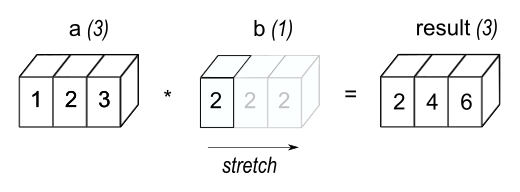
- .loc
- 인덱스 레이블로 행 조회
- 메소드가 아닌 속성
.loc[]은 주로 레이블(label)을 기반으로 행과 열에 접근하는 데 사용되지만,
boolean 배열과 함께 사용할 수도 있음
- 하나의 레이블
5또는'a'(5는 인덱스의 레이블로 해석되며 정수 위치로 해석되지는 않음).
- 레이블의 리스트 또는 배열
['a', 'b', 'c']
- 레이블 범위로 된 슬라이스 객체
'a':'f'
- 축과 길이가 같은 boolean 배열
-[True, False, True]
# 1. Abbing, Mr. Anthony 를 조회
# 5 또는 'a'
titanic_df.loc['Abbing, Mr. Anthony']
pclass 3
survived 0
sex male
age 42.0
sibsp 0
parch 0
ticket C.A. 5547
fare 7.55
cabin NaN
embarked S
boat NaN
body NaN
home.dest NaN
Name: Abbing, Mr. Anthony, dtype: object# 1-1 시리즈 말고 데이터프레임으로 받고 싶으면
titanic_df.loc[['Abbing, Mr. Anthony']]- 데이터 프레임 형식으로 출력된다. [ ] 안에 [ ]
# 2. Abbing, Mr. Anthony와 Zimmerman, Mr. Leo 를 조회
# ['a', 'b', 'c']
titanic_df.loc[['Abbing, Mr. Anthony','Zimmerman, Mr. Leo']]- 데이터가 없는 경우 대체 방법
-
if..else..
# if문으로 제어 if 'Spencer' in titanic_df.index: result = titanic_df.loc['Spencer'] else: result = None -
try..except..
# try문으로 제어
try :
    result = titanic_df.loc['Spencer']
except:
    result = None
-
- .duplicated() - 동명이인 발생하는 경우
# 1. 데이터프레임.인덱스.중복확인()
titanic_df.index.duplicated()

# 2. 1에 조건에 맞는 행 출력
titanic_df.loc[titanic_df.index.duplicated()]- keep을 사용
- 중복된 값 중 어떤 값을 유지할지를 지정
- first
- 첫 번째 등장하는 값을 제외하고 중복된 값을 True로 표시
- 중복된 값 중 첫 번째 값은 유지되고, 이후 등장하는 중복된 값들은 True로 표시.
- last
- 마지막 등장하는 값을 제외하고 중복된 값을 True로 표시
- 중복된 값 중 마지막 값은 유지되고, 이전에 등장하는 중복된 값들은 True로 표시.
- False
- 모든 중복된 값을 True로 표시합니다
- 중복된 값들 모두를 유지하지 않고 True로 표시.
# 3. 2에서 중복값을 포함하도록 한다.
titanic_df.loc[titanic_df.index.duplicated(keep=False)] #모든 중복된 값을 True로 표시합니다
02 DataFrame활용-행의열조회(loc)
- loc - 특정 행의 특정 열 조회
- 생존자 'Blank, Mr. Henry'를 조사해보자
**예제 1 : Blank, Mr. Henry의 승객 등급과 요금은?**
# 2. Blank, Mr. Henry는 승객 등급과 요금은?
titanic_df.loc['Blank, Mr. Henry', ['pclass', 'fare']]
pclass 1
fare 31.0
Name: Blank, Mr. Henry, dtype: object**예제 2 : Herman, Miss. Alice 와 Herman, Miss. Kate는?**
- 2명의 정보가 모두 같다! 쌍둥이지 않았을까?
# 탑승자
passenger = ['Herman, Miss. Alice', 'Herman, Miss. Kate']

# 2. 승객 등급과 요금은?
titanic_df.loc[passenger, ['pclass', 'ticket', 'boat']]| name | pclass | ticket | boat |
|---|---|---|---|
| Herman, Miss. Alice | 2 | 220845 | 9 |
| Herman, Miss. Kate | 2 | 220845 | 9 |
03 DataFrame활용-인덱스 위치 기반 행과 열 조회(iloc)
# loc을 이용한 999 조회
titanic.loc[999] # 레이블을 참조
pclass 3
name McCarthy, Miss. Catherine "Katie"
sex female
age NaN
fare 7.75
Name: 999, dtype: object# iloc을 이용한 999 조회
titanic.iloc[999] #인덱스의 위치를 참조pclass 3
name McCarthy, Miss. Catherine "Katie"
sex female
age NaN
fare 7.75
Name: 999, dtype: object# 0 행 삭제
titanic.drop(labels=0, inplace =True)-
삭제 후 loc[0]을 탐색하면 오류가 나지만, iloc[0]을 탐색하면 오류가 나지 않는다.
-
loc vs iloc
- loc은 레이블 기반 인덱싱 (해당 레이블이 존재 하지 않음)
- iloc은 정수 위치 기반 인덱싱 이기 떄문이다. (iloc[0]은 첫번째행 의미함)
-
iloc을 통한 행과 열 지정하여 조회
iloc[index_position]> Seriesiloc[[index_position]]> DataFrameiloc[[index_position1, 2, 3]]> DataFrameiloc[index_position, column_position]iloc[[index_position], column_position]iloc[[index_position], [column_position]]iloc[index_position, [column_position]]
# 3번째 위치한 사람 행 데이터
titanic.iloc[3]
pclass 1
sex male
age 30.0
fare 151.55
Name: Allison, Mr. Hudson Joshua Creighton, dtype: object# iloc[index_position, column_position] -> 스칼라
titanic.iloc[3, 2]30.0
# iloc[[index_position], column_position] -> Series
titanic.iloc[[3, 5, 7], 2]
name
Allison, Mr. Hudson Joshua Creighton 30.0
Anderson, Mr. Harry 48.0
Andrews, Mr. Thomas Jr 39.0
Name: age, dtype: float64DataFrame을 축소하면 Series
Series 또는 1행 1열의 DataFrame을 축소하면 스칼라가 된다.
# iloc[[index_position], [column_position]] -> DataFrame 1
titanic.iloc[[3, 5, 7], [2]]| name | age |
|---|---|
| Allison, Mr. Hudson Joshua Creighton | 30.0 |
| Anderson, Mr. Harry | 48.0 |
| Andrews, Mr. Thomas Jr | 39.0 |
# iloc[[index_position], [column_position]] -> DataFrame 2
titanic.iloc[[3, 5, 7], [2,3]]| name | age | fare |
|---|---|---|
| Allison, Mr. Hudson Joshua Creighton | 30.0 | 151.55 |
| Anderson, Mr. Harry | 48.0 | 26.55 |
| Andrews, Mr. Thomas Jr | 39.0 | 0.00 |
# iloc[index_position, [column_position]] -> Series
titanic.iloc[3,[2,3]]
age 30.0
fare 151.55
Name: Allison, Mr. Hudson Joshua Creighton, dtype: object
- 편하게 사용할 수 있는 건
iloc같으나- 유의미하고 명확하게 사용하게 되는 건
loc- '특정 누구를 찾는다'라고 할 땐 loc이 유리
- 정렬을 하다보면 index position은 바뀌기 마련.
- 때문에 '특정 행에서 특정처리를 한다'는 상황은 가능한
loc을 지향
04 DataFrame활용-서로 다른 차원 배열 연산(Matching, Broadcasting)
Broadcasting이란?
- 여러분의 공간 지각 능력이 필요합니다.
- 교과 과정에서 행렬을 배웠을 수도 안 배웠을 수도 있습니다.
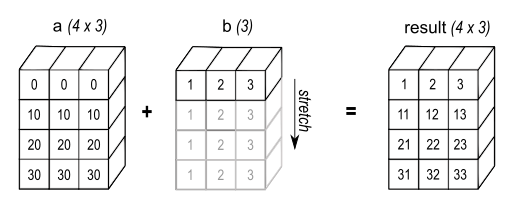
- numpy에선 Array, Pandas에서는 DataFrame또는 Series의 모양이 다른 경우에 연산이 가능하도록 모양을 처리하는 방법을 말합니다.
- BroadCasting 비교 - Numpy vs Pandas
# numpy Array로 할 때
a = np.array([1.0, 2.0, 3.0])
b = np.array([2.0])
# * 연산
a * barray([2., 4., 6.])
numpy로 하면 계산이 된다.
💡 numpy는 Strech(스케일 변환) 방식pandas는 각각 처리하고 반영이 어려운 곳은 결측치로 처리
- pandas의 행렬 크기가 다를 때
# Case1. 크기가 다른 Series를 DataFrame시킬 때
s1 = pd.Series(data = [1, 2, 3], index=['a', 'b', 'c'])
s2 = pd.Series(data = [4, 5, 6, 7], index=['a', 'b', 'c', 'd'])
s3 = pd.Series(data = [8, 9, 10], index=['a', 'b', 'd'])

df1 = pd.DataFrame(
    data = {
        '1열': s1, '2열': s2, '3열': s3
    }
)
df2 = pd.DataFrame(
    data = {
        '2열': s2
    }
)
# 매칭이 안되는 곳은 결측치로 처리한다.
df1
df2| 1열 | 2열 | 3열 | |
|---|---|---|---|
| a | 1.0 | 4 | 8.0 |
| b | 2.0 | 5 | 9.0 |
| c | 3.0 | 6 | NaN |
| d | NaN | 7 | 10.0 |
| 2열 | |
|---|---|
| a | 4 |
| b | 5 |
| c | 6 |
| d | 7 |
- df1의 크기와 df2의 크기가 다르다. 이때 계산을 하면 어떻게 될까?
# Case2. 모두 DataFrame이고 행렬 크기가 다르나 동일한 열이름이 있는 경우 사칙 연산은?
df1 - df2| 1열 | 2열 | 3열 | |
|---|---|---|---|
| a | NaN | 0 | NaN |
| b | NaN | 0 | NaN |
| c | NaN | 0 | NaN |
| d | NaN | 0 | NaN |
동일한 label만 가진 열만 계산되고 나머지는 모두 결측치가 되었다.
# Case3. DataFrame과 Series의 연산이라면?
s4 = df2.squeeze()
s4
a 4
b 5
c 6
d 7
Name: 2열, dtype: int64squeeze함수는 차원이 1인 차원을 제거
# sub 함수로 축을 변경해주면, Stretch가 일어났다!
df1.sub(s4, axis='index')| 1열 | 2열 | 3열 | |
|---|---|---|---|
| a | -3.0 | 0 | 4.0 |
| b | -3.0 | 0 | 4.0 |
| c | -3.0 | 0 | NaN |
| d | NaN | 0 | 3.0 |

numpy의 Strech와 같은 상황
- 실습에서 활용해보기
# 출항이 늦어져서 30% Discount 해주기로 했다면?
titanic['fare'] *0.7
0 147.93625
1 106.08500
2 106.08500
3 106.08500
4 106.08500
...
1304 10.11794
1305 10.11794
1306 5.05750
1307 5.05750
1308 5.51250
Name: fare, Length: 1309, dtype: float64# 할인가를 DataFrame에 열 추가
titanic['delayed_discount_fare'] = titanic['fare'] *0.7
titanic05 DataFrame활용-조건문(Conditional Statement)
-
파이썬이라면 True/False를 기반으로 실행제어
-
Pandas에서는 True/False로 만들어진 Series/DataFrame으로 조건에 맞는 데이터를 탐색
-
==를 이용한 조건문
# 살아남은 survived == 1인 사람 찾기
titanic['survived'] == 1# 매번 이렇게 작성하면 길다! 다음처럼 해볼까?
survived_mask = titanic['survived'] == 1
titanic[survived_mask]- 다양한 mask 생성
male_mask = titanic['sex'] == 'male'
female_mask = titanic['sex'] == 'female'
old_mask = titanic['age'] > 65
young_mask = titanic['age'] < 15-
비트 연산자를 통해 mask 이용
&는 and 연산을 한다.|는 or,~는 not
-
남성이고 65세 이상의 생존 확인
# 남성과 65세 이상과 생존을 확인할 수 있는 mask 생성 후 &사용
titanic[male_mask & old_mask & survived_mask]- 상류층 여성의 생존 명단 확인
female_mask = titanic['sex'] == 'female'
class_mask = titanic['pclass'] == 1
survived_mask = titanic['survived'] == 1

titanic[class_mask & female_mask & survived_mask]- 250이상을 지불한 15세 미만 어린이의 생존 명단 확인
young_mask = titanic['age'] < 15
fare_mask = titanic['fare'] >= 250
survived_mask = titanic['survived'] == 1

titanic[young_mask & fare_mask & survived_mask]- 15세 미만 또는 여성의 생존 명단 확인
titanic[(young_mask | female_mask) & survived_mask]06 DataFrame활용-범위 지정 필터링(between)
- Series의 메소드
- 주어진 범위 안에 있는 요소를 가진 불리언 시리즈(Boolean Series)를 반환하는 메소드
- 주어진 시리즈(Series)의 각 요소가 left와 right 사이에 있는 경우에 해당하는 위치에 True를 포함하는 불리언 벡터를 반환
- NA 값은 False로 처리
**Series.between(left, right, inclusive='both')**
-
left : 왼쪽 경계값
-
right: 오른쪽 경계값
-
inclusive: 경계값을 포함할지 여부를 지정하는 매개변수.
- 기본값은 'both'로, 왼쪽과 오른쪽 경계값을 모두 포함.
- 그 외로 'left', 'right', 'neither'를 선택 가능.
-
조건문으로 20대 찾기
upper_20_mask = titanic['age'] >= 20
lower_30_mask = titanic['age'] < 30

titanic[upper_20_mask & lower_30_mask]- between으로 20대 찾기
age_20s_mask = titanic['age'].between(20, 30, inclusive='left')
age_20s_mask- inclusive 값의 변화
# 20이상 30이하
age_20s_mask = titanic['age'].between(20, 30, inclusive='both').sum()
age_20s_mask
384
# 20초과 30이하
age_20s_mask = titanic['age'].between(20, 30, inclusive='right').sum()
age_20s_mask
361
# 20초과 30미만
age_20s_mask = titanic['age'].between(20, 30, inclusive='neither').sum()
age_20s_mask
321
07 DataFrame활용-결측치필터와처리(isin, isnull, isna, notnull)
-
조건문이 복잡해지기 전에 미리 데이터를 정리하는 연습을 해보자.
-
isin, isnull, notnull 메소드는 Series, DataFrame 모두 있다.
-
상류층 | 중산층 모두 찾을 조건문을 만들 때
pclass_1_mask = titanic['pclass'] == 1
pclass_2_mask = titanic['pclass'] == 2

pclass_1_mask | pclass_2_mask
name
Allen, Miss. Elisabeth Walton True
Allison, Master. Hudson Trevor True
Allison, Miss. Helen Loraine True
Allison, Mr. Hudson Joshua Creighton True
Allison, Mrs. Hudson J C (Bessie Waldo Daniels) True
...
Zabour, Miss. Hileni False
Zabour, Miss. Thamine False
Zakarian, Mr. Mapriededer False
Zakarian, Mr. Ortin False
Zimmerman, Mr. Leo False
Name: pclass, Length: 1309, dtype: bool- 이것을 **
.isin()**으로 동일코드를 구현해보면- **
Series.isin(values)** - 파이썬의 in과 비슷
- isin 메소드를 사용하여 각 요소가 특정 값들에 속하는지 여부를 확인 할 수 있음
- **
titanic['pclass'].isin([1,2])name
Allen, Miss. Elisabeth Walton True
Allison, Master. Hudson Trevor True
Allison, Miss. Helen Loraine True
Allison, Mr. Hudson Joshua Creighton True
Allison, Mrs. Hudson J C (Bessie Waldo Daniels) True
...
Zabour, Miss. Hileni False
Zabour, Miss. Thamine False
Zakarian, Mr. Mapriededer False
Zakarian, Mr. Ortin False
Zimmerman, Mr. Leo False
Name: pclass, Length: 1309, dtype: booltitanic['pclass'].isin([1,2]).sum()600
- **
.isnull()**- null 요소가 있는지 확인하는 메서드
- NA를 발견하면 True로 반환
# age열 isnull()
titanic['age'].isnull()
# 개수 확인
titanic['age'].isnull().sum()263
- **
.notnull()**- innull과 반대로 NA가 아닌 걸 발견하면 True로 반환
titanic['age'].notnull()# 개수 확인
titanic['age'].notnull().sum()1046
- 위의 것들을 이용하여 조건문 만들기
unknown_age_mask = titanic['age'].isnull()
known_age_mask = titanic['age'].notnull()

# 나이가 식별되지 않은 사람 확인
titanic[unknown_age_mask]
08 DataFrame활용-행렬인덱스네이밍변경(rename)
# 열 목록(columns index) 조회
titanic.columns

# 특정 열 이름 접근
titanic.columns[0]
# 방법 1 : rename을 이용하기
titanic.rename(columns={'plcass': 'class'}, inplace=True)# 방법 2 : 같은 길이의 리스트를 준비해서 교체하기
titanic.columns
# 길이가 5이니 5개 요소의 리스트 준비하기, 비용(fare->cost)로 변경
titanic.columns = ['class', 'survived', 'sex', 'age', 'fare']- rename() 더 알아보기 - 행과 열의 인덱스 이름 변경