🚗Problem
https://school.programmers.co.kr/learn/courses/30/lessons/92341?language=java
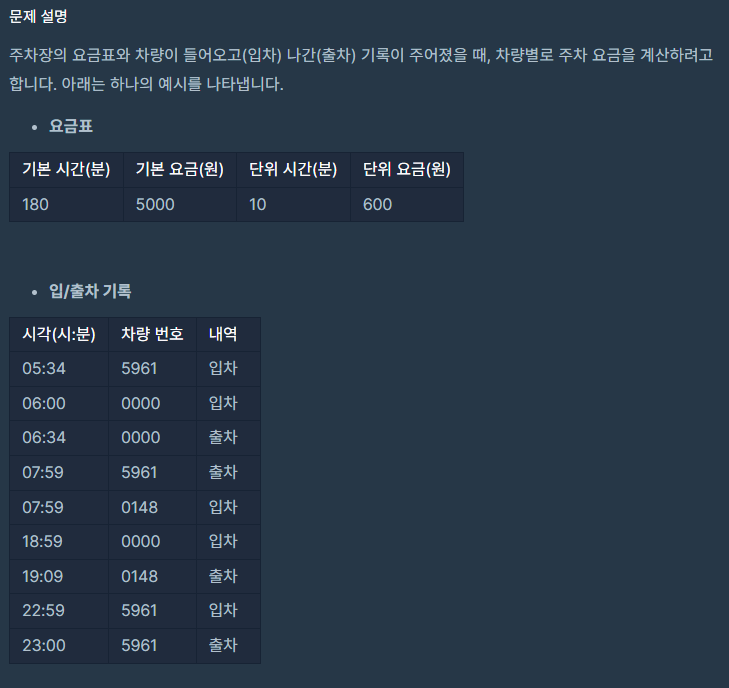
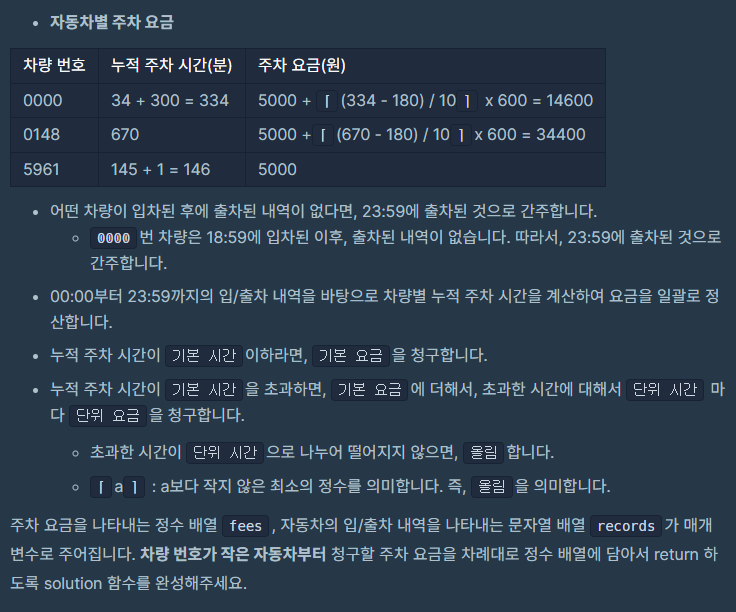
문제에 주어진 사항은 다음과 같다. 요구사항을 분석해보자면 하루에 각 차량의 주차 요금을 계산하는 프로그램을 만드는 것이다. 각 차량은 여러번 입차, 출차가 가능하며 입차 후 출차를 하지 않을 수도 있다. 출차 기록이 없는 경우에는 23:59에 출차한 것으로 간주해 요금을 계산한다.
신경써야 하는 점
- 각 차량은 여러번 입차, 출차가 가능하다. 각 주차의 시간을 기준으로 요금을 계산하는 것이 아니라 하루에 총 주차한 시간을 기준으로 요금을 계산해야 한다.
- 요금은 차량번호를 오름차순으로 정렬한 기준으로 나열해야한다.
Solution
1. 차량의 입출차 기록을 보면서 각 차량의 주차 시간 구하기
먼저 records를 탐색하면서 각 차량의 주차 시간을 구했다. record를 탐색하다 입차시간 기록이 나오면 timeRecord 해시맵에 기록을 저장한다. 계속 탐색하다가 출차시간 기록이 나오면 timeRecord에 저장해뒀던 입차기록을 꺼내온 뒤 주차시간을 구한다. 주차 시간을 구하는 부분은 함수로 분리했다. 입차시간과 출차시간을 매개변수로 받아서 주차시간을 반환하는 getParkingTime 함수를 작성했다.
	private int getParkingTime(String in, String out) {
        String[] inTime = in.split(":");
        String[] outTime = out.split(":");
        int total = 0;
        int inMin = Integer.parseInt(inTime[1]);
        int outMin = Integer.parseInt(outTime[1]);
        if (outMin > inMin) {
            total = (Integer.parseInt(outTime[0]) - Integer.parseInt(inTime[0])) * 60;
            total += outMin - inMin;
        } else {
            total = (Integer.parseInt(outTime[0]) - Integer.parseInt(inTime[0]) - 1) * 60;
            total += 60 - inMin + outMin;
        }
        return total;
    }
시와 분을 비교해서 적절하게 계산하여 주차된 시간을 분으로 구한다. 구한 주차 시간은 totalParkingTime이라는 해시맵에 차량번호가 key일 때 value값에 더하여 저장한다. 하루에 여러번 주차가 가능하므로 하루에 주차한 총 시간을 구하기 위해서다.
records를 모두 탐색하면, timeRocord에 차량의 출차기록이 없는 경우가 남는다. 똑같이 getParkingTime 함수를 이용해서 출차기록을 23:59으로 설정하여 주차시간을 구한다.
2. 주차 시간에 대한 요금 계산하기
각 차량의 총 주차시간을 구했으니 이제 요금을 계산할 차례이다. 요금은 기본 요금과 시간 당 추가 요금으로 나뉜다. 요금을 계산하는 부분도 calculateFee라는 함수로 분리해 작성했다.
	private int calculateParkingFee(int[] fees, int parkingTime) {
        int totalFee = fees[1];
        parkingTime -= fees[0];
        if (parkingTime > 0) {
            totalFee += (parkingTime / fees[2]) * fees[3];
            if (parkingTime % fees[2] > 0) {
                totalFee += fees[3];
            }
        }
        return totalFee;
    }
먼저 기본요금을 설정하고 기본 시간을 주차 시간에서 뺀다. 뺀 나머지가 0보다 크다면 추가 요금이 발생하기 때문에 추가 요금을 계산해준다. 추가 요금의 시간 단위보다 적게 주차한 경우에는 올림으로 요금을 계산한다. 시간 단위가 10분인 경우 6분을 주차했더라도 10분의 요금을 부과한다.
3. 차량번호를 기준으로 정렬해서 요금 구하기
차량번호가 작은 순부터 요금을 출력해야 하므로 차량번호를 정렬하고, 정렬된 순으로 주차시간에 대한 요금을 계산한다.
	ArrayList<String> keys = new ArrayList<>(totalParkingTime.keySet());
        Collections.sort(keys);
        int[] answer = new int[totalParkingTime.size()];
        int i = 0;
        for (String key : keys) {
            answer[i++] = calculateParkingFee(fees, totalParkingTime.get(key));
        }
        return answer;
Java Code
import java.util.Map;
import java.util.HashMap;
import java.util.StringTokenizer;
import java.util.ArrayList;
import java.util.Collections;

class Solution {

    private int getParkingTime(String in, String out) {
        String[] inTime = in.split(":");
        String[] outTime = out.split(":");
        int total = 0;
        int inMin = Integer.parseInt(inTime[1]);
        int outMin = Integer.parseInt(outTime[1]);
        if (outMin > inMin) {
            total = (Integer.parseInt(outTime[0]) - Integer.parseInt(inTime[0])) * 60;
            total += outMin - inMin;
        } else {
            total = (Integer.parseInt(outTime[0]) - Integer.parseInt(inTime[0]) - 1) * 60;
            total += 60 - inMin + outMin;
        }
        return total;
    }

    private int calculateParkingFee(int[] fees, int parkingTime) {
        int totalFee = fees[1];
        parkingTime -= fees[0];
        if (parkingTime > 0) {
            totalFee += (parkingTime / fees[2]) * fees[3];
            if (parkingTime % fees[2] > 0) {
                totalFee += fees[3];
            }
        }
        return totalFee;
    }

    public int[] solution(int[] fees, String[] records) {
        Map<String, String> timeRecord = new HashMap<>();
        Map<String, Integer> totalParkingTime = new HashMap<>();

        for (String record : records) {
            StringTokenizer st = new StringTokenizer(record);
            String time = st.nextToken();
            String num = st.nextToken();
            String cmd = st.nextToken();
            if (cmd.equals("IN")) {
                timeRecord.put(num, time);
            } else {
                String inTime = timeRecord.get(num);
                timeRecord.remove(num);
                int parkingTime = getParkingTime(inTime, time);
                totalParkingTime.put(num, totalParkingTime.getOrDefault(num, 0) + parkingTime);
            }
        }
        for (Map.Entry<String, String> entry : timeRecord.entrySet()) {
            String num = entry.getKey();
            int parkingTime = getParkingTime(entry.getValue(), "23:59");
            totalParkingTime.put(num, totalParkingTime.getOrDefault(num, 0) + parkingTime);
        }
        ArrayList<String> keys = new ArrayList<>(totalParkingTime.keySet());
        Collections.sort(keys);
        int[] answer = new int[totalParkingTime.size()];
        int i = 0;
        for (String key : keys) {
            answer[i++] = calculateParkingFee(fees, totalParkingTime.get(key));
        }
        return answer;
    }
}
전체 코드는 다음과 같다.
사실 이 문제를 이전에 파이썬으로 풀이한 적이 있다. 파이썬에서는 딕셔너리를 이용해 각 차의 주차 시간 기록과 주차 시간 정보를 저장했었다. Java에서는 HashMap을 이용하여 정보를 저장하도록 구현했다. HashMap을 사용하면 차량의 번호를 key값으로 사용해 정보를 저장할 수 있다. 따라서, 각 차량의 정보를 저장하고 찾는데 용이하다.
Bonus. StringTokenizer vs Split
이 코드로 스터디를 진행하면서 내가 StringTokenizer와 Split을 섞어서 썼다는 사실을 알게 되었다. 생각의 흐름대로 공백문자가 들어있네? StringTokenizer 써야겠다. :이 들어있으니까 split을 써야겠다. 이렇게 작성을 한 것이다. 그렇다보니 확실하게 둘의 차이가 어떤 것이 있는지 궁금해졌다.
StringTokenizer
- StringTokenizer는 긴 문자열을 지정된 구분자를 기준으로 토큰이라는 여러 개의 문자열을 잘라 내는데 사용된다.
- StringTokenizer의 구분자로 단 하나의 문자 밖에 사용하지 못하기 때문에, 보다 복잡한 형태의 구분자로 문자열을 나누어야 할 때는 정규식이 사용 가능한 메서드를 사용해야 한다.
- 구분자를 지정하지 않으면 디폴트로
\t\n\r등의 기본 구분자가 적용된다. - 결과값이 문자열 형태이다.
Split
- String 클래스에 속해있는 메서드이다.
- 정규식을 구분자로 사용할 수 있으므로 두 문자 이상의 구분자도 사용이 가능하다.
- 결과값은 문자열 배열 String[] 형태이다.
성능 차이
- StringTokenizer가 split보다 빠르다고 알고 있었다. 정확한 성능 차이를 알기 위해 다른 글들을 찾아 보던 중 StringTokenizer가 레거시라는 글을 보게 되었다.
StringTokenizer is a legacy class that is retained for compatibility reasons although its use is discouraged in new code. It is recommended that anyone seeking this functionality use the split method of String or the java.util.regex package instead.
StringTokenizer는 레거시 클래스로 새로운 코드에 사용하는 것은 추천되지 않으며 split 함수를 사용한다는 것을 추천한다는 내용이다.
더 찾아보니 StringTokenize는 내부적으로 구분자와 문자열을 전체를 비교해야 하므로 구분자의 형태와 문자열의 형태에 따라 성능이 나빠질 수 있다는 것을 알게 되었다. 특히 구분자가 유니코드인 경우, hasMoreToken이 자주 호출될수록 성능이 안좋아진다. 따라서, StringTokenizer는 다음과 같은 상황에서 더 나은 성능을 보인다.
1. 구분자가 1개이다.
2. 구분자에 유니코드가 포함되어 있지 않다.
3. 필요한 token이 정해져 있으므로 hasMoreToken을 사용하지 않고 nextToken만 사용한다.
참고
https://blog.naver.com/PostView.nhn?blogId=makga87&logNo=221949199317&parentCategoryNo=&categoryNo=17&viewDate=&isShowPopularPosts=true&from=search
https://blog.naver.com/PostView.nhn?blogId=chogahui05&logNo=221474002967&categoryNo=12&parentCategoryNo=0&viewDate=¤tPage=1&postListTopCurrentPage=1&from=postView