CoreDNS
CoreDNS는 K8s 클러스터에서 DNS resolve 역할을 수행할 수 있는 DNS 서버입니다.
Pod, Service의 도메인을 관리하고, 외부 도메인에 대한 서버 연결이 필요한 경우 통로로 사용됩니다.
- Deployment로 관리, Service 타입 중 ClusterIP
- Service 명: kube-dns이나, kubeadm v1.33 버전에서는 DNS 애플리케이션으로 CoreDNS만 지원됨
kubectl get pod,svc,ep -n kube-system -l k8s-app=kube-dns -o wide

파드가 생성 시, Default로 DNS 질의를 사용하면, kube-dns 서비스를 기본으로 찾습니다.
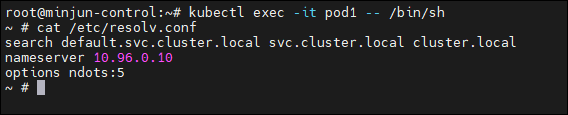
실제 파드 생성 후, /etc/resolv.conf 파일 확인 시, kube-dns의 ClusterIP가 nameserver로 설정되어 있습니다.
Pod, Service의 DNS
Pod 및 Service는 CoreDNS를 통해서 도메인 접근이 가능하다고 했었습니다.
이 말을 바꿔 말하면, pod 및 Service에 할당된 IP는 가변하기에, DNS를 통해서 endpoint를 설정한다면, 불편함을 해결할 수 있습니다.
Pod 및 Service의 DNS는 아래와 같은 규칙으로 생성됩니다.
- Pod Domain:
<Pod IP>.<namespace>.pod.cluster.local - Service Domain:
<Service Name>.<namespace>.svc.cluster.local
DNS 통신 확인
실습 파드 생성
apiVersion: v1
kind: Pod
metadata:
  creationTimestamp: null
  labels:
    run: nginx
  name: nginx
spec:
  nodeName: minjun-worker1
  containers:
  - image: nginx
    name: nginx
    resources: {}
  dnsPolicy: ClusterFirst
  restartPolicy: Always
---
apiVersion: v1
kind: Service
metadata:
  creationTimestamp: null
  labels:
    app: nginx
  name: nginx
spec:
  ports:
  - name: http
    port: 80
    protocol: TCP
    targetPort: 80
  selector:
    run: nginx
  type: ClusterIP
---
apiVersion: v1
kind: Pod
metadata:
  creationTimestamp: null
  labels:
    run: netshoot
  name: netshoot
spec:
  nodeName: minjun-worker2
  containers:
  - image: nicolaka/netshoot
    name: netshoot
    args: ["sleep", "infinty"]
    resources: {}
  dnsPolicy: ClusterFirst
restartPolicy: Always- Service Domain을 활용하여, Netshoot2 -> nginx로 ping 테스트
kubectl exec -it netshoot -- zsh
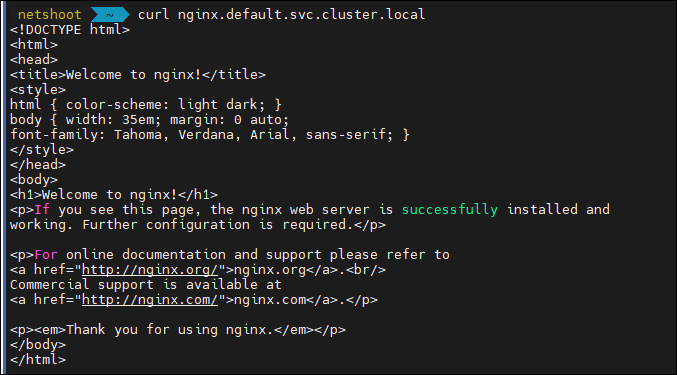
curl nginx.default.svc.cluster.local
curl nginx.default
curl nginx
ClusterIP를 모르는 상태에서, DNS만으로도 통신이 됨을 확인 가능합니다.
DNS만으로 어떻게 통신이 가능한가?
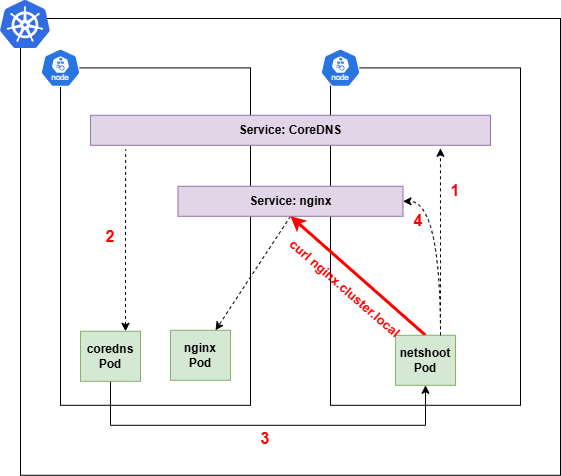
-> CoreDNS가nginx라는 Service 이름을 DNS로 resolve하기 때문입니다.<통신 과정>
- netshoot pod에서 curl
- CoreDNS가 Service name: nginx의 도메인에 대해서 ClusterIP로 변환(resolve)
- netshoot pod의 /etc/resolv.conf에 등록된 도메인에 대해서 자동으로 suffix를 붙혀 DNS 조회를 시도합니다.
- 예를 들어,
curl http://nginx인 경우 아래와 같은 순서로 조회하며, 조회된 DNS 명이 ClusterIP로 resolve됩니다.
- 1. nginx.default.svc.cluster.local
- 2. nginx.svc.cluster.local
- 3. nginx.cluster.local
- Service name: nginx라는 이름으로 클러스터 내부에서 Pod IP로 트래픽을 전달
즉, 같은 네임스페이스(default)에 있는 Service라면 이름만(nginx)으로도 접근이 가능한 구조입니다.
참고: netshoot에 설정된 resolve의 nameserver IP는 CoreDNS의 Service IP입니다.
즉, Pod 내부에서의 모든 DNS 요청은 해당 ClusterIP로 전달되고, 이 IP는 실제로 CoreDNS가 백엔드단에서 처리합니다.


만약, DNS가 아닌 IP 접근이라면?
위와 같이 nginx에 대한 접근이 DNS가 아니라, IP:Port를 통한 접근이라면 CoreDNS는 필요하지 않습니다.
DNS의 핵심은 "Name Resolve"입니다.
CoreDNS는 오직 nginx라는 Service name을 ClusterIP로 변환하는 역할을 합니다.
- 쉽게 말해, 도메인을 IP로 해석(식별)하는 역할
이미 ClusterIP를 알거나, Node의 IP:Nodeport 혹은 LB IP로 직접 요청하면 DNS 해석이 필요하지 않는 것입니다.
내용 정리
- netshoot에서 nginx로 curl을 도메인으로 접근 (빨간선)
- netshoot > coredns로 도메인을 IP로 해석하기 위해 DNS 쿼리 요청
- CoreDNS Pod가 도메인을 해석하여 IP로 변경
- 해당 내용을 netshoot pod로 전달
- ClusterIP를 아는 netshoot는 nginx Service의 ClusterIP로 요청을 보냄
- 요청을 받은 nginx pod는 curl에 대해 응답
외부 DNS 통신
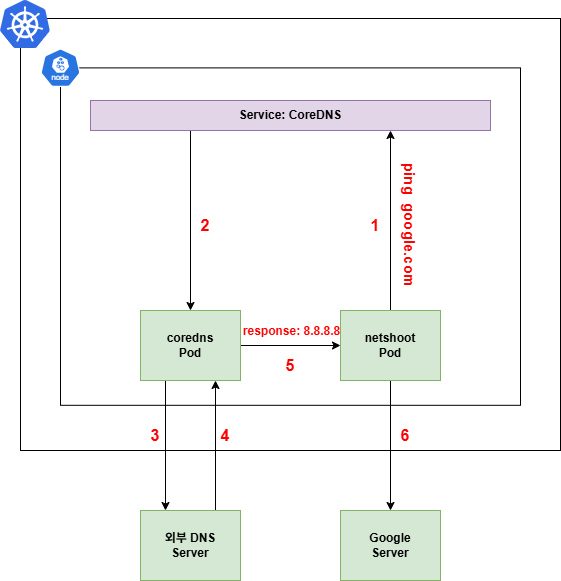
CoreDNS는 외부 DNS 통신 시에도 활용된다고 언급했었습니다.
default 값으로 Pod는 CoreDNS를 바라보며, 모든 DNS 쿼리 요청은 CoreDNS로 전달됩니다.
- netshoot > CoreDNS 요청
- DNS 해석이 필요하기에, /etc/resolv.conf에 등록된 CoreDNS로 쿼리를 보냄
- 쿼리엔 google.com ip 주소 요청 내용이 담김
- CoreDNS Service > CoreDNS Pod
- CoreDNS Service는 내부 ClusterIP를 통해 CoreDNS Pod로 요청 전달
- CoreDNS > 외부 DNS서버로 포워딩
- CoreDNS 자체적으로는 google.com을 모르기에 외부로 포워딩
- 일반적으로 CoreDNS의 설정 파일
Corefile에forward . 8.8.8.8설정이 담겨있음
- 일반적으로 CoreDNS의 설정 파일
- 외부 DNS > CoreDNS 응답
- google.com IP를 찾아 응답
- CoreDNS > netshoot 응답
ping google.com명령이ping x.x.x.x처럼 동작하게 됨
- netshoot > 실제 google 서버와 통신
-
netshoot Pod는 얻은 IP를 통해 실제 google 서버에 패킷을 전송/수신 가능
-
별도 설정없이 ping 가능

위 구조가 가능한 이유?
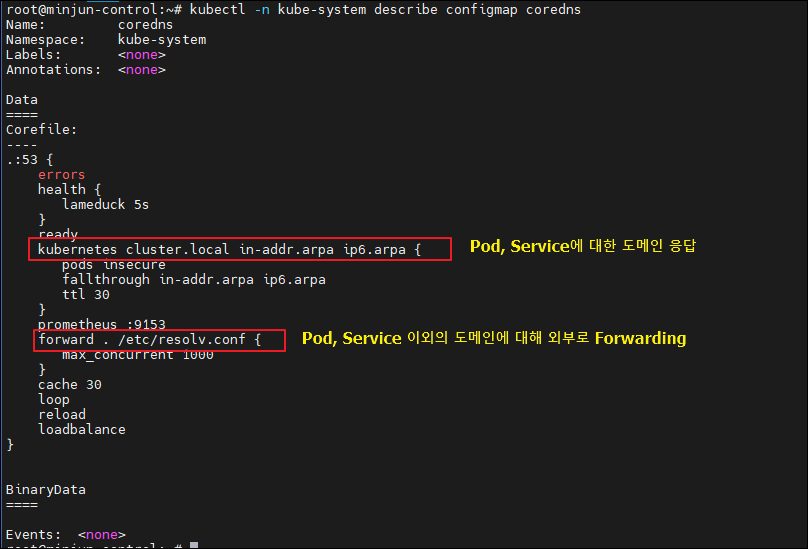
CoreDNS는 내부 DNS 요청만 처리하는 것이 아닌, 외부 DNS 요청도 forward 플러그인을 통해 처리할 수 있도록 설정되어 있음
CoreDNS 설정 파일
kubectl -n kube-system describe configmap coredns