Project. DayLight
오늘은 인벤토리, 아이템 구현을 위한 R&D를 진행했다. S.O로 어디까지 관리를 할지, 클래스를 어느 범위까지 적용시키고 어떻게 세분화시킬 것인지, 인벤토리 슬롯을 별개의 클래스로 관리하는지에 대해 공부했는데, 아직까지 감은 제대로 안 잡히는 것 같다.
작업 완료 기능
- 플레이어 루팅 기능 구현
- 인벤토리 - 아이템 선택, 이동 기능 구현
- 아이템 분류, Scriptable Object 스크립트 작성
- CSV 파일을 바탕으로 아이템 S.O 자동 생성 툴 구현
작업 중 기능
- 플레이어 공격(근접 무기) - IK(Inverse Kinematic) R&D
- 플레이어 모션 - 애니메이터 작업 + 상태 패턴
- 퀵슬롯 기능 구현
- 몬스터 AI - Patrol, 플레이어 추적
코드 공유
작업한 내역 중 CSV 파일로 S.O를 생성하는 기능에 대해 공유해보려한다.
ItemBase
먼저 아이템이 공통으로 가지는 속성을 보유한 BaseItem 부모 클래스이다.
public class ItemBase : ScriptableObject
{
    public int ItemID;
    public string Name;
    public string Description;
    public ItemType Type;
    public Sprite Sprite;
}

public enum ItemType
{
    Melee, Gun, Shield, Special, Consumable, ETC, Stuff
}
ShieldItem
ItemType에서 Shield에 해당하는 아이템이 가지는 속성을 보유한 ShieldItem 자식 클래스이다.
public class ShieldItem : ItemBase
{
    public int MaxDurability;
    public int DefenseAmount;
}
CreateSO
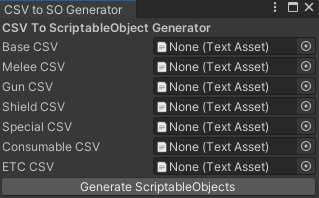
CSV파일을 드래그하여 등록하면 저장된 데이터를 불러와 S.O를 생성하는 툴을 만드는 스크립트이다. ItemType 중 Shield와 관련된 메서드만 작성된 형태로 크게 3개의 작업으로 나눌 수 있다.
1. Editor Window 창을 띄우기 위한 작업 (상속, GetWindow 메서드)
2. Editor Window 창에 표시되는 UI (CSV 파일 등록, Generate 버튼)
3. Generate 버튼과 연결된 내부 S.O 생성 메서드
// 커스텀 에디터 윈도우를 만들기 위한 상속
// Unity Editor 안에 새 창을 추가하는 툴을 만들 수 있다.
public class CreateSO : EditorWindow
{
    private TextAsset _baseCsvFile;
    private TextAsset _shieldCsvFile;

    // Unity 메뉴 - Tools 바에 아래의 툴을 추가한다.
    // "CSV to ScriptableObjects" 라는 항목이 추가
	[MenuItem("Tools/CSV to ScriptableObjects")]
    public static void ShowWindow()
    {
    	// CreatsSO라는 새로운 에디터 윈도우(창)를 연다.
        GetWindow<CreateSO>("CSV to SO Generator");
    }

	// Editor Window 창에 표시되는 UI(매 프레임마다 호출)
    private void OnGUI()
    {
    	// "CSV To ScriptableObject Generator" 라는 텍스트 Bold체로 출력
        GUILayout.Label("CSV To ScriptableObject Generator", EditorStyles.boldLabel);

        // 드래그로 CSV 파일을 넣을 수 있는 필드를 생성
        // 첫 번째 인자("Base CSV") : 왼쪽에 라벨로 보이는 문자열
        // 두 번째 인자(_baseCsvFile) : 현재 값. 파일을 드래그해서 넣을 경우 여기에 할당
        // 세 번째 인자(typeof(TextAsset)) : 필드에 어떤 타입의 에셋을 받을지 결정(텍스트 에셋)
        // 네 번째 인자(false) : allowSceneObjects 옵션.
        // false의 경우 Project 창에 있는 에셋만 드래그 가능
        // true의 경우 씬 안의 오브젝트도 드래그 가능
        _baseCsvFile = (TextAsset)EditorGUILayout.ObjectField
        ("Base CSV", _baseCsvFile, typeof(TextAsset), false);

        _shieldCsvFile = (TextAsset)EditorGUILayout.ObjectField
        ("Shield CSV", _shieldCsvFile, typeof(TextAsset), false);

        // "Generate ScriptableObjects" 이름의 버튼 UI 생성
        // 클릭 시 조건에 따라 CreateSOFromCSV 메서드 호출
        if (GUILayout.Button("Generate ScriptableObjects"))
        {
            if (_baseCsvFile != null)
            {
                CreateSOFromCSV();
            }
            else
            {
                Debug.LogWarning("CSV 파일이 지정되지 않았습니다.");
            }
        }
    }

    // CSV 파일 데이터를 바탕으로 한 S.O 생성 메서드
    private void CreateSOFromCSV()
    {
		// 개행 별로 문자열 저장
        string[] lines = _baseCsvFile.text.Split('\n');

		// 저장 경로 설정 Assets - ScriptableObjects - Items
        // 단 Assets - ScriptableObjects는 반드시 존재해야한다.
        string folderPath = "Assets/ScriptableObjects/Items";

        // 저장 경로가 없는 경우 (Items 폴더가 없는 경우)
        if (!AssetDatabase.IsValidFolder(folderPath))
        {
        	// Items 폴더 신규 생성
            AssetDatabase.CreateFolder("Assets/ScriptableObjects","Items");
        }

        for (int i = 1; i < lines.Length; i++)
        {
            // 문장의 앞,뒤 공백 제거
            string line = lines[i].Trim();

            // 공백을 제거했을 때 아무 것도 없는 경우 스킵
            if (string.IsNullOrEmpty(line)) continue;

            // 문장을 ,(쉼표)로 구분
            string[] parts = line.Split(',');

            // 데이터를 구분하여 string 변수에 캐싱
            string itemId = parts[0];
            string name = parts[1];
            string description = parts[2];
            string itemType = parts[3];
            string icon = parts[4];

			// item을 Type에 따라 다르게 정의하기 위한 변수 선언
            ItemBase item = null;

            // Parse를 중복 호출을 하지 않기 위한 변수 선언
            int ID = int.Parse(itemId);

            // ItemType에 따른 분기 설정
            switch ((ItemType)Enum.Parse(typeof(ItemType),itemType))
            {
            	// ItemType이 Shield인 경우
                case ItemType.Shield:
                	// shield 관련 CSV파일이 등록된 경우에만
                    if (_shieldCsvFile != null)
                    {
                    	// item을 Shield로 생성하여 할당
                        item = CreateShieldItem(ID);
                    }
                    else
                    {
                        Debug.LogWarning("Shield CSV파일이 등록되지 않았습니다.");
                    }
                    break;
            }

            item이 할당되지 않았을 경우 : Stuff(재료)로 간주. 공통 옵션만 존재
            if (item == null)
            {
            	// 공통 속성만 가지고 있는 ItemBase로 생성하여 할당
                item = ScriptableObject.CreateInstance<ItemBase>();
            }

			// 공통 속성 할당
            item.ItemID = int.Parse(itemId);
            item.Name = name;
            item.Description = description;
            item.Type = (ItemType)Enum.Parse(typeof(ItemType),itemType);
            //weaponItem.Icon = BringIcon(icon)

            // S.O 파일 저장 경로 및 파일 이름 설정
            string assetPath = $"{folderPath}/Item_{itemId}_{name}.Asset";

            // 파일 생성
            AssetDatabase.CreateAsset(item, assetPath);
        }
        // 현재 메모리에 존재하는 에셋의 변경 사항을 디스크에 저장
        // 메모리에만 존재하는 데이터를 .asset 파일로 저장하기 위한 메서드 호출(ctrl+s)
        AssetDatabase.SaveAssets();

        // 새로 생성되거나 수정된 에셋 파일을 Unity가 인식하도록 하는 메서드
        // Unity창에 바로 나타나지 않을 수 있어서 업데이트 하는 것
        AssetDatabase.Refresh();
    }

    // ItemType에 맞는 item을 생성하는 메서드
    private ShieldItem CreateShieldItem(int id)
    {
    	// ItemType 중 Shield에 해당하는 Data 읽어오기
        Dictionary<int, string[]> shieldData = LoadData(_shieldCsvFile);

        // Shield 아이템 생성
        ShieldItem shieldItem = ScriptableObject.CreateInstance<ShieldItem>();

        // Data에 id가 있는 경우
        if (shieldData.ContainsKey(id))
        {
        	// Shield에만 존재하는 속성 Data를 기반으로 할당
            string[] shieldDataParts = shieldData[int.Parse(itemId)];
            shieldItem.MaxDurability = int.Parse(shieldDataParts[1]);
            shieldItem.DefenseAmount = int.Parse(shieldDataParts[2]);
        }

        return shieldItem;
    }

    // 추가 CSV 파일을 읽어와 Dictionary로 반환하는 메서드
    private Dictionary<int, string[]> LoadData(TextAsset csvFile)
    {
        if (csvFile != null)
        {
        	// CSV 파일에 저장된 데이터를 Dictionary로 관리
            Dictionary<int, string[]> data = new Dictionary<int, string[]>();

            // 개행으로 구분하여 문자열 저장
            string[] Lines = csvFile.text.Split('\n');

            // 문자열마다 쉼표(,)로 구분하여 데이터 저장
            for (int i = 1; i < Lines.Length; i++)
            {
            	// 공백 제거, 공란 스킵, 쉼표 구분
                string line = Lines[i].Trim();
                if (string.IsNullOrEmpty(line)) continue;
                string[] parts = line.Split(',');

                // 첫 번째 데이터를 Key로 하여 문자열 데이터를 Dictionary에 저장
                int id = int.Parse(parts[0]);
                data[id] = parts;
            }
            return data;
        }

        return null;
    }
}
뚠뚠뚠뚠